

Introduction
A wedding photograph captures more than clothing, decorations and poses. It preserves the emotions, people and moments that make a marriage celebration memorable. With ChatGPT, you can create wedding concepts, improve existing marriage photographs, design invitation visuals, change backgrounds and develop romantic images for anniversaries or social media.
This guide includes a reusable marriage prompt template, a complete example, 45 original ChatGPT prompts and practical advice for creating more natural and accurate wedding images.
What Is a Marriage Prompt?
A marriage prompt is a written instruction for generating or editing an image connected with a wedding or married couple. It can help you create:
- Wedding portraits.
- Couple photographs.
- Marriage invitation designs.
- Engagement images.
- Traditional wedding scenes.
- Reception photographs.
- Anniversary visuals.
- Family and bridal-party images.
- Romantic social media posts.
- Wedding photo restorations.
The phrase “marriage prompt” can refer to several different image requirements. Some users may want a realistic photograph of a bride and groom, while others may need an Indian wedding portrait, a Christian church ceremony, a Muslim nikah scene, a civil wedding photograph or a creative anniversary image.
For this reason, describe the cultural setting, clothing, location, ceremony, mood and purpose instead of using only the word “marriage.”
Simple prompt
“Create a romantic wedding photograph of a bride and groom standing together.”
More detailed prompt
“Create a realistic wedding portrait of a newly married couple standing beneath a floral arch at an outdoor evening ceremony. The bride is wearing an elegant ivory saree with delicate gold details, and the groom is wearing a cream sherwani. Use warm decorative lights, soft natural expressions and a refined editorial photography style.”
The second prompt gives ChatGPT more information about the people, clothing, setting, lighting and style.
Reusable Marriage Prompt Template
Use this template to create a personalised marriage or wedding image prompt:
“Create or edit a [type of wedding image] featuring [the couple or people in the image]. The [bride/partner] is wearing [clothing, colour and accessories], and the [groom/partner] is wearing [clothing, colour and accessories]. Show them [pose, action or interaction] at [venue or setting]. Include [flowers, decorations, cultural details or important objects]. Use [lighting, colour palette and mood] with a [photography or artistic style]. Compose the image as [close-up, waist-up, full-body, portrait, landscape or vertical]. Preserve [facial identity, age, expressions, clothing, jewellery, body proportions and pose]. Avoid [extra people, distorted hands, random text, incorrect cultural details or unrealistic objects]. Make the final image suitable for [wedding invitation, album, social media, print or another purpose].”
Short version
“Create a realistic wedding image of [describe the couple] [describe the pose] in [describe the venue]. Use [lighting and mood], preserve their natural appearance and make the image elegant, emotional and authentic.”
Editing version
“Edit this wedding photograph by [describe one specific change]. Preserve the couple’s exact faces, expressions, hairstyles, wedding clothes, jewellery, pose and body proportions. Change only [specific area] and keep the final result realistic.”
Example Marriage Prompt
“Create a realistic vertical wedding portrait of a newly married Indian couple standing beneath a floral mandap during an evening ceremony. The bride is wearing a deep red silk saree with traditional gold jewellery, and the groom is wearing an ivory sherwani with subtle embroidery. They are standing close together and smiling naturally at one another. Use warm decorative lights, soft floral details and a refined editorial photography style. Keep their facial features, skin tones, expressions and body proportions natural. Leave a small amount of clean space above them for invitation text, but do not add any text automatically. Do not include extra people, distorted hands, random logos or unrealistic decorations.”
This prompt works because it includes:
- The type of image.
- The people and relationship.
- Cultural and clothing details.
- The venue and ceremony setting.
- The pose and interaction.
- The lighting and artistic direction.
- The composition and intended use.
- The details that must be preserved.
- The errors to avoid.
For image edits, OpenAI recommends separating the requested change from the details that must stay the same. It also suggests describing framing, subject placement, people, actions and exact text when those details are important.
Explore Entri’s free AI tools course now!
45 Marriage Prompts for ChatGPT
The following prompts are original examples that you can copy and adapt. Replace the details in brackets with your preferred names, clothing, location, cultural setting and visual style.
Wedding Couple Prompts
1. Classic wedding portrait
“Create a realistic portrait of a newly married couple standing together after their wedding ceremony. Use elegant formal clothing, soft lighting and a clean, romantic background. Show relaxed smiles and a natural connection rather than an overly posed appearance.”
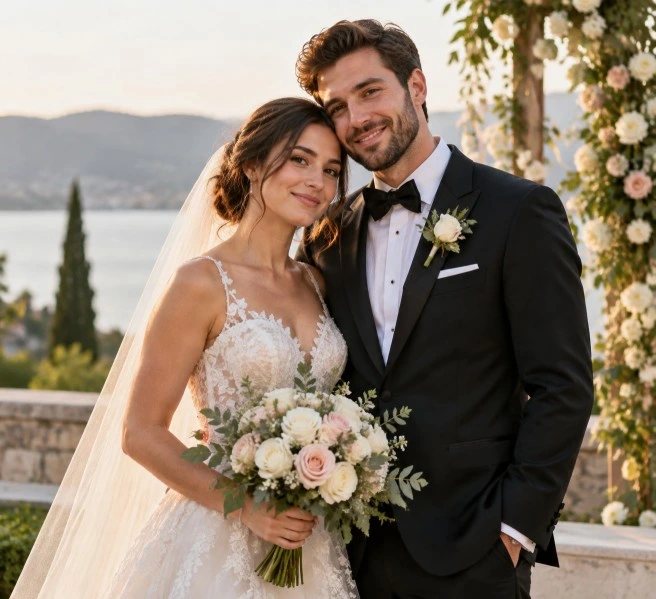
Created with ChatGPT
2. Bride and groom looking at each other
“Create a romantic wedding photograph of a bride and groom looking into each other’s eyes. Place them beneath a floral arch with warm evening lights in the background. Use realistic skin texture, natural expressions and soft cinematic lighting.”
3. Couple holding hands
“Create a full-length wedding photograph of a bride and groom holding hands in an elegant venue. Show their wedding outfits and footwear clearly, with balanced lighting and a softly blurred background.”
4. Close-up wedding portrait
“Create a close-up portrait of a newly married couple standing cheek to cheek. Preserve natural facial features and expressions, use gentle studio lighting and include subtle details of their wedding clothing and jewellery.”
5. Walking together
“Create a candid wedding photograph of a bride and groom walking together through a decorated reception venue. Show natural movement, relaxed expressions and realistic fabric details.”
6. Couple under a floral arch
“Create an elegant wedding portrait of a couple standing beneath an arch decorated with white flowers and greenery. Use soft daylight, natural poses and a refined luxury-wedding photography style.”
7. Sunset couple photograph
“Create a cinematic wedding photograph of a newly married couple standing outdoors during sunset. Use warm backlighting, gentle shadows and a natural emotional connection. Keep their faces clearly recognisable.”
8. Black-and-white wedding portrait
“Create a timeless black-and-white portrait of a bride and groom standing close together. Use rich contrast, detailed clothing textures and natural expressions without changing their facial identity.”
9. Traditional marriage portrait
“Create a realistic traditional marriage portrait of a couple wearing [describe traditional clothing]. Include culturally appropriate details, natural expressions and a respectful ceremonial setting. Avoid adding incorrect accessories or unrelated decorations.”
10. Modern wedding portrait
“Create a contemporary wedding portrait of a stylish couple in a minimalist venue. Use neutral colours, clean architecture, soft directional lighting and a sophisticated editorial photography style.”
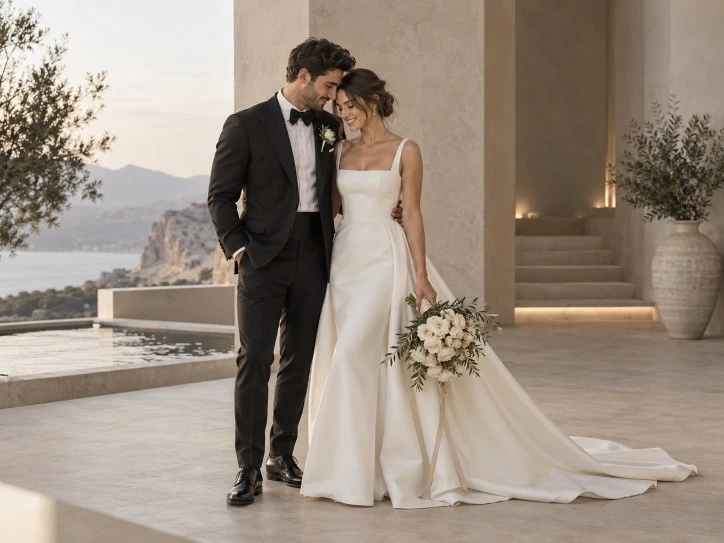
Created with ChatGPT
Cultural and Ceremony Prompts
11. Indian wedding ceremony
“Create a realistic Indian wedding ceremony scene showing the bride and groom seated beneath a decorated mandap. Include culturally appropriate flowers, ceremonial details and traditional clothing. Use warm lighting and respectful, natural expressions.”
12. South Indian marriage portrait
“Create an elegant South Indian wedding portrait of a couple wearing traditional wedding attire. Use temple-inspired architectural details, fresh flowers and warm natural lighting. Keep the clothing, jewellery and cultural elements authentic and realistic.”
13. Kerala wedding image
“Create a realistic Kerala wedding portrait of a couple wearing traditional Kerala wedding clothing. Place them in a beautifully decorated venue with white flowers, greenery and warm natural light. Keep the mood graceful, joyful and authentic.”
14. Hindu wedding entrance
“Create a cinematic photograph of a bride and groom entering their Hindu wedding venue together. Include tasteful floral decorations, warm lights and guests softly blurred in the background. Preserve their clothing, facial features and natural proportions.”
15. Nikah ceremony
“Create a respectful and realistic nikah ceremony image showing a couple seated in an elegant, softly decorated venue. Use modest formal clothing, warm lighting and a peaceful atmosphere. Avoid stereotypes and preserve natural facial features.”
16. Church wedding
“Create a realistic church wedding photograph of a bride and groom standing near the altar after their ceremony. Include soft window light, elegant floral arrangements and a calm, joyful mood.”
17. Civil wedding
“Create a modern civil wedding photograph of a couple exchanging rings in a bright municipal ceremony room. Use simple formal clothing, natural expressions and documentary-style photography.”
18. Wedding ritual close-up
“Create a detailed close-up photograph of the couple’s hands during a wedding ritual. Show the rings, jewellery and ceremonial details clearly, with realistic skin texture, natural lighting and anatomically correct hands.”
19. Cultural clothing detail
“Create a detailed wedding fashion portrait focusing on the couple’s traditional clothing, embroidery, jewellery and accessories. Keep the couple recognisable and use soft studio lighting.”
20. Multicultural wedding
“Create a warm wedding portrait of a multicultural couple combining respectful elements from both of their cultural backgrounds. Use balanced styling, authentic details and a joyful but natural atmosphere.”
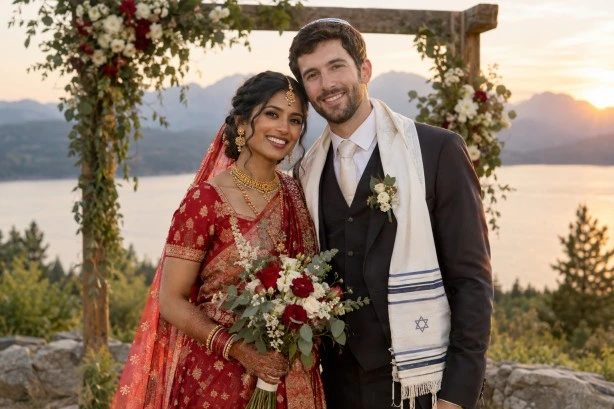
Created with ChatGPT
Wedding Invitation Prompts
21. Marriage invitation portrait
“Create an elegant vertical portrait of a wedding couple standing beneath soft floral decorations. Leave clear negative space at the top and bottom for invitation wording. Do not add text automatically.”
22. Minimalist invitation image
“Create a minimalist marriage invitation image featuring a couple in formal wedding clothing against a soft cream background. Use delicate floral details, gentle shadows and clean empty space for text.”
23. Luxury wedding invitation
“Create a refined luxury-wedding invitation visual with a couple standing in a grand venue. Use ivory, gold and muted green tones, elegant lighting and an uncluttered composition. Leave space for typography.”
24. Floral invitation design
“Create a romantic wedding invitation background with a couple positioned toward the lower half of the image and delicate flowers around the edges. Leave the centre and upper area clear for readable text.”
25. Traditional invitation image
“Create a traditional marriage invitation image showing a couple in culturally appropriate wedding attire. Use rich but balanced colours, elegant ornamental details and a clear area for the invitation message.”
26. Save-the-date image
“Create a modern save-the-date photograph of an engaged couple walking through a flower garden. Use soft daylight, natural interaction and open space for the date and names.”
27. Wedding hashtag visual
“Create a square social media image featuring a joyful wedding couple and a clean decorative frame. Leave space at the bottom for a wedding hashtag, but do not generate any text.”
28. Digital wedding card
“Create a vertical digital wedding card with an elegant portrait of the couple, subtle floral borders and balanced empty space for names, date and venue details. Keep the couple’s appearance realistic.”
29. Ring ceremony invitation
“Create a romantic invitation image showing a couple holding hands while their wedding rings are visible. Use soft focus, warm light and a clean background with space for text.”
30. Typography-ready wedding image
“Create a wedding photograph with the couple positioned on the right side and a softly textured, uncluttered background on the left for headline text. Keep the empty area free of objects and decorations.”
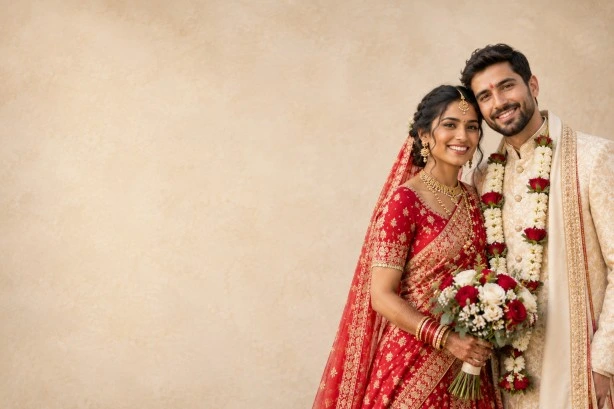
Created with ChatGPT
When an image includes important wording, place the exact text in quotation marks and specify its location and appearance. However, always proofread generated text before publishing because small words, names and dates may require correction.
Wedding Photography Prompts
31. Bridal portrait
“Create an elegant bridal portrait of a bride standing near a softly lit window. Show the details of her dress, veil and jewellery with natural skin texture and refined wedding photography.”
32. Groom portrait
“Create a formal portrait of a groom standing in a sophisticated wedding venue. Use soft directional lighting, realistic fabric details and a calm, confident expression.”
33. Bride with father
“Create an emotional but natural wedding photograph of a bride standing beside her father before the ceremony. Use soft indoor lighting and preserve their facial features, clothing and genuine expressions.”
34. Couple with parents
“Create a formal family wedding portrait showing the couple standing with their parents. Arrange everyone naturally, maintain realistic height differences and use balanced studio-style lighting.”
35. Wedding party photograph
“Create a joyful group photograph of the couple with their wedding party. Keep the couple as the visual focus, arrange everyone clearly and avoid duplicated faces, limbs or clothing.”
36. First dance
“Create a romantic wedding photograph of a couple sharing their first dance under warm decorative lights. Show natural movement, realistic fabric folds and a softly blurred group of guests in the background.”
37. Exchange of rings
“Create a close-up wedding photograph showing the couple exchanging rings. Focus on the hands and rings while keeping the background softly blurred. Ensure the fingers and jewellery look anatomically and physically realistic.”
38. Wedding reception
“Create a lively but elegant wedding reception photograph of the couple smiling together near their decorated table. Use warm lights, tasteful flowers and a candid photography style.”
39. Couple leaving the venue
“Create a joyful photograph of a newly married couple leaving their wedding venue together. Include soft confetti in the air, natural movement and warm evening light. Do not obscure their faces.”
40. Wedding album cover
“Create a sophisticated horizontal wedding album cover featuring the couple in an elegant venue. Place them slightly to the right and leave clean space on the left for the album title.”
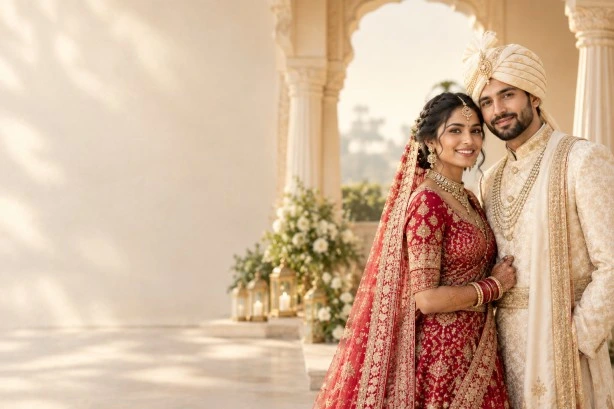
Created with ChatGPT
Romantic and Anniversary Prompts
41. Engagement portrait
“Create a romantic engagement portrait of a couple walking through a flower garden. Show the engagement ring subtly, use natural expressions and apply soft golden-hour lighting.”
42. Anniversary portrait
“Create a warm anniversary photograph of a married couple sitting together at home. Include a small bouquet and soft evening light while keeping the mood sincere and realistic.”
43. Recreate a wedding photograph
“Using the uploaded wedding photograph as a reference, create a present-day recreation with the couple in a similar pose. Preserve their current facial features and use matching composition and lighting.”
44. Wedding photo background edit
“Edit this wedding photograph by replacing the crowded background with an elegant softly blurred venue. Preserve the couple’s faces, expressions, clothing, jewellery, pose and body proportions. Change only the background.”
45. Marriage social media post
“Create a polished square social media image featuring a newly married couple smiling naturally. Use warm colour grading, subtle floral details and balanced composition. Leave a small uncluttered area for a short caption, but do not add text.”
Tips for Better Marriage Prompt Construction
Describe the intended use
Tell ChatGPT where the image will be used. The same couple photograph may need different compositions for a wedding album, invitation, social media post or website banner.
Useful phrases include:
- “Suitable for a printed wedding album.”
- “Designed for a vertical invitation.”
- “Prepared for an Instagram post.”
- “Created as a horizontal website banner.”
- “Suitable for a framed wall portrait.”
- “Leave empty space for invitation wording.”
Explaining the intended result helps guide the framing, subject placement and amount of empty space.
Identify the people clearly
Describe who appears in the image:
- Bride and groom.
- Engaged couple.
- Married couple.
- Bride and father.
- Couple with parents.
- Couple with the wedding party.
- Older married couple.
- Interfaith or multicultural couple.
If several people are present, identify their positions:
“Place the bride and groom in the centre, with their parents standing on either side.”
Include clothing details
Wedding clothing is often central to the image. Mention:
- Saree, lehenga, sherwani, suit or tuxedo.
- Colour and fabric.
- Embroidery.
- Veil or dupatta.
- Jewellery.
- Flowers or hair accessories.
- Shoes.
- Cultural or ceremonial clothing.
Avoid adding culturally specific details you do not want. If the clothing must remain unchanged, write:
“Preserve the original wedding attire, embroidery, jewellery and accessories.”
Describe the venue
A venue can immediately establish the mood and purpose of the photograph. Examples include:
- Decorated mandap.
- Church altar.
- Outdoor garden.
- Beach ceremony.
- Banquet hall.
- Historic building.
- Modern reception venue.
- Family home.
- Temple courtyard.
- Mountain resort.
Specify the ceremony or action
A wedding image feels more natural when the couple is doing something. You can ask them to:
- Exchange rings.
- Walk together.
- Hold hands.
- Share their first dance.
- Look at one another.
- Stand beneath a floral arch.
- Sign a marriage document.
- Cut the wedding cake.
- Greet their guests.
- Leave the ceremony venue.
Clarify the mood
Choose a mood that matches the purpose:
- Romantic.
- Joyful.
- Elegant.
- Traditional.
- Intimate.
- Emotional.
- Celebratory.
- Peaceful.
- Luxurious.
- Candid.
- Nostalgic.
Use a small number of compatible mood words. “Elegant, joyful and intimate” is more focused than a long list of contradictory emotions.
Mention cultural details respectfully
If the image represents a specific marriage tradition, identify the relevant cultural setting clearly. Ask for authenticity without relying on stereotypes:
“Use culturally appropriate clothing and ceremony details, with a respectful and realistic presentation.”
If you provide a reference photograph, explain which elements it contributes. For example:
“Use image one as the couple reference and image two for the venue style. Do not copy the faces or clothing from image two.”
OpenAI’s image prompting guidance recommends assigning a clear role to each reference image when multiple images are used.
Add composition instructions
Composition is particularly important for invitation and album images. You can specify:
- Vertical or horizontal orientation.
- Close-up or full-body framing.
- Couple in the centre.
- Couple positioned on the right.
- Open space on the left for text.
- Symmetrical arrangement.
- Wide view of the venue.
- Focus on the rings.
- Bride and groom at equal visual prominence.
Protect identity in photo edits
When editing a real wedding image, use a detailed preservation clause:
“Preserve the couple’s exact facial features, skin tones, expressions, hairstyles, wedding clothing, jewellery, body proportions and pose.”
If you need only one change, add:
“Change only the background and leave every other element untouched.”
OpenAI’s guidance specifically recommends stating what should change and what must remain the same when editing an image.
Check hands, rings and jewellery
Wedding images often include hands, rings, necklaces, earrings and other small details. Ask for:
“Accurate hands, correctly positioned fingers, realistic rings and natural jewellery reflections.”
Inspect the result carefully because small accessories and text may not always be rendered exactly as requested.
Use exact wording carefully
For names, dates and venues, put the required wording in quotation marks:
“Add the exact text ‘Ananya & Rahul’ at the top in an elegant serif font.”
Even with this instruction, check the spelling manually before using the image for a real invitation.
Refine one element at a time
If you need several adjustments, make them in stages:
- Correct the composition.
- Edit the background.
- Adjust lighting and colour.
- Refine clothing or decorations.
- Check text and small details.
OpenAI recommends deliberate iteration, with one change at a time while repeating the key details that must remain unchanged.
Common Problems and Fixes
The couple’s faces change
Use:
“Restore the original facial identity of both people. Preserve their eye shape, nose, mouth, jawline, skin tone and expressions.”
The clothing is inaccurate
Specify the garment and instruct ChatGPT not to redesign it:
“Keep the original wedding attire, embroidery, fabric, jewellery and accessories exactly as shown.”
The image contains incorrect cultural details
Describe the intended ceremony and clothing precisely. You can also provide a reference image and explain which visual elements it should guide.
The venue looks artificial
Ask ChatGPT to match:
“The perspective, lighting direction, scale, depth, shadows and colour temperature of the original photograph.”
The hands look unnatural
Use a simpler pose and add:
“Show anatomically correct hands with five natural fingers and realistic ring placement.”
The invitation text is wrong
Keep the text short, place exact wording in quotation marks and proofread the final image. For important invitations, add the text separately in a design application after generating the background.
The couple looks overly posed
Use terms such as:
- Candid.
- Relaxed.
- Natural interaction.
- Documentary-style.
- Genuine expressions.
- Unscripted moment.
The image includes extra people
Write:
“Show only the couple in the foreground. Do not add extra people unless specifically requested.”
Privacy and Responsible Use
Use wedding photographs that you own or have permission to edit. Wedding images often include relatives, children, guests and identifiable venues, so consider privacy before uploading or publishing them.
If you are creating an invitation or commercial wedding content, confirm that you have permission to use the couple’s photographs, names and likenesses. For professional photography, preserve the original image and treat AI-generated edits as part of a review process rather than assuming every detail is accurate.
Do not use an edited wedding photograph to misrepresent a real ceremony, legal document or official marriage record. AI-generated visuals can be useful for concepts and creative designs, but they should not replace accurate documentation where authenticity matters.
Conclusion
Marriage prompts for ChatGPT can help you create wedding portraits, invitation backgrounds, ceremony concepts, anniversary images and polished social media visuals. The most effective prompts go beyond the words “bride and groom” by explaining the couple’s clothing, interaction, cultural setting, venue, lighting, mood and intended use.
When editing a real wedding photograph, always separate the requested change from the details that need protection. Phrases such as “change only the background” and “preserve the couple’s exact facial features and wedding attire” can help reduce unwanted alterations.
Begin with the reusable template, adapt one of the 45 prompts and refine the image gradually. Review facial identity, hands, rings, jewellery, clothing, cultural details and written text before publishing or printing the result. With clear instructions and careful checking, ChatGPT can support a wide range of meaningful and visually appealing marriage-related image projects.
|
Join Big Tech companies with Entri’s Courses Now! |
|||||
|---|---|---|---|---|---|
| Full-Stack Web Developer | Data Science | Python Programming | |||
| Software Testing | DevOps | Data Analytics | |||
| Cyber Security | UI/UX Design | ||||
| SAP FICO Course | AI-Powered Practical Accounting Course | ||||


