

Introduction
Gemini can help you edit photos by changing backgrounds, improving lighting, removing objects, replacing outfits, restoring old photographs, enhancing product images, and transforming pictures into artistic styles. The most important rule is to state exactly what you want to change—and equally clearly, what should remain unchanged.
The 45 prompts below are ready to copy and paste. Upload your photo first, then use the prompt that matches the edit you want.
Explore the free AI tools course by Entri
How to Use Image Editing Prompts
- Open Gemini and upload the image you want to edit.
- Copy one of the prompts below.
- Replace the bracketed details with your preferred background, outfit, colour, object, or style.
- Submit the prompt.
- Review the result.
- If needed, make one small follow-up change at a time.
A reliable editing formula is:
Using the uploaded image, change only [specific element] to [new detail]. Keep the person’s face, identity, expression, hairstyle, clothing, pose, body proportions, lighting direction, and background exactly the same.
For example:
Using the uploaded image, change only the background to a sunny beach with gentle waves. Keep my face, identity, expression, hairstyle, clothing, pose, and body proportions exactly the same.
Use images only when you have the necessary rights or permission. Avoid editing images in ways that deceive, harass, defame, or misrepresent real people. Google also advises users not to violate copyright or privacy rights when editing web images.
Also read: Gemini Prompts for Image Generation
45 Gemini Prompts for Image Editing
Background Editing Prompts
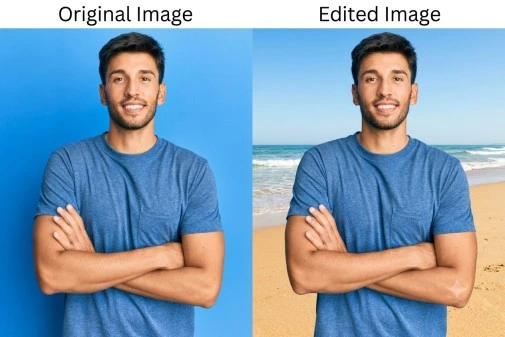
1. Beach background
Using the uploaded image, change only the background to a sunny beach with gentle waves, golden sand, and a clear blue sky. Keep my face, identity, expression, hairstyle, clothing, pose, body proportions, and lighting direction exactly the same.
Created with Gemini AI
2. Modern office background
Using the uploaded image, replace the background with a bright modern office featuring glass walls, indoor plants, and soft natural light. Preserve my face, identity, expression, hairstyle, clothing, pose, and body proportions exactly the same.
3. Flower garden background
Using the uploaded image, change only the background to a colourful flower garden with roses, tulips, and soft sunlight. Keep the person’s face, identity, expression, hairstyle, clothing, pose, and body proportions unchanged.
4. Mountain background
Using the uploaded image, replace the background with misty green mountains, pine trees, and a clear morning sky. Preserve the subject’s identity, facial features, clothing, pose, and natural proportions exactly the same.
5. Kerala backwater background
Using the uploaded image, change only the background to a peaceful Kerala backwater with coconut trees, calm water, a wooden boat, and soft morning mist. Keep the person’s face, identity, expression, clothing, pose, and body proportions unchanged.
6. City street background
Using the uploaded image, replace the background with a stylish city street at night, including glowing signs, blurred pedestrians, and wet pavement reflections. Preserve the subject’s identity, facial features, clothing, pose, and body proportions exactly the same.
7. Studio background
Using the uploaded image, change only the background to a clean professional studio backdrop in soft grey. Keep my face, identity, expression, hairstyle, clothing, pose, body proportions, and lighting direction exactly the same.
8. Bookshop background
Using the uploaded image, replace the background with a cosy bookshop featuring wooden shelves, warm lamps, plants, and soft window light. Preserve the person’s identity, facial features, clothing, pose, and body proportions exactly the same.
9. Temple background
Using the uploaded image, change only the background to a beautifully decorated Indian temple courtyard with carved pillars, flowers, and warm lamps. Keep the person’s face, identity, expression, clothing, pose, and body proportions unchanged.
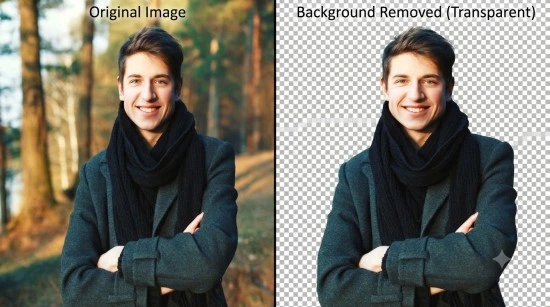
10. Remove background
Using the uploaded image, remove the background completely and create a clean transparent background around the subject. Preserve the subject’s edges, hair details, clothing, pose, colours, and proportions accurately.
Created with Gemini AI
Outfit and Style Editing Prompts
11. Change to formal suit
Using the uploaded image, change only my clothing to a navy-blue formal suit with a white shirt. Keep my face, identity, expression, hairstyle, pose, body proportions, background, and lighting direction exactly the same.
12. Change to traditional saree
Using the uploaded image, change only the woman’s outfit to an elegant red silk saree with a gold border. Preserve her face, identity, expression, hairstyle, pose, body proportions, background, and lighting direction exactly the same.
13. Change to casual outfit
Using the uploaded image, change only the clothing to a casual white T-shirt, blue jeans, and white sneakers. Keep the person’s face, identity, expression, hairstyle, pose, body proportions, background, and lighting direction unchanged.
14. Change to traditional kurta
Using the uploaded image, change only the man’s outfit to a cream kurta with a saffron waistcoat. Preserve his face, identity, expression, hairstyle, pose, body proportions, background, and lighting direction exactly the same.
15. Change to winter clothing
Using the uploaded image, change only the clothing to a warm wool coat, knitted scarf, and gloves. Keep the person’s face, identity, expression, hairstyle, pose, body proportions, background, and lighting direction unchanged.
16. Change outfit colour
Using the uploaded image, change only the colour of the outfit to emerald green. Preserve the original clothing design, fabric texture, person’s face, identity, expression, hairstyle, pose, background, and lighting direction exactly the same.
17. Add a blazer
Using the uploaded image, add a tailored beige blazer over the existing outfit. Keep my face, identity, expression, hairstyle, pose, body proportions, background, and lighting direction exactly the same.
18. Change to festive outfit
Using the uploaded image, change only the clothing to an elegant Diwali festive outfit. Add subtle traditional jewellery and warm festive colours. Preserve the person’s face, identity, expression, hairstyle, pose, body proportions, background, and lighting direction exactly the same.
19. Change to bridal outfit
Using the uploaded image, change only the woman’s outfit to an elegant bridal saree with traditional gold jewellery. Preserve her face, identity, expression, hairstyle, pose, body proportions, background, and lighting direction exactly the same.
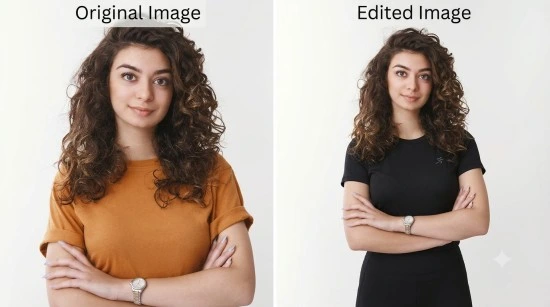
20. Change to gym outfit
Using the uploaded image, change only the clothing to a black sports T-shirt, leggings or training trousers, and sports shoes. Keep the person’s face, identity, expression, hairstyle, pose, body proportions, background, and lighting direction unchanged.
Created with Gemini AI
Face and Portrait Editing Prompts
21. Improve lighting
Using the uploaded image, improve only the lighting by balancing exposure, softening harsh shadows, and adding natural highlights. Preserve the person’s face, identity, expression, hairstyle, clothing, pose, background, and body proportions exactly the same.
22. Professional headshot retouch
Using the uploaded image, create a clean professional headshot. Improve sharpness, lighting, and colour balance while preserving my identity, facial features, expression, hairstyle, natural skin texture, clothing, and background.
23. Remove background distractions
Using the uploaded image, remove only distracting background objects and clutter. Preserve the main subject’s face, identity, expression, hairstyle, clothing, pose, body proportions, and important background elements exactly the same.
24. Improve skin texture naturally
Using the uploaded image, improve skin tone and reduce temporary blemishes naturally. Preserve realistic skin texture, pores, facial identity, expression, hairstyle, clothing, pose, and body proportions. Do not create plastic-looking skin.
25. Brighten a dark photo
Using the uploaded image, brighten only the dark areas and improve overall exposure. Preserve the original mood, colours, facial identity, expression, hairstyle, clothing, pose, and background composition exactly the same.
26. Fix blurry photo
Using the uploaded image, improve sharpness and clarity without changing the person’s identity or facial structure. Preserve natural skin texture, expression, hairstyle, clothing, pose, background, and body proportions.
27. Correct colour balance
Using the uploaded image, correct only the colour balance so that skin tones, clothing, and background colours appear natural. Preserve the person’s identity, facial features, expression, hairstyle, pose, and composition exactly the same.
28. Make a professional LinkedIn photo
Using the uploaded image, create a polished LinkedIn profile photo. Use a clean neutral background, balanced lighting, sharp facial details, and a confident expression. Preserve my identity, facial features, hairstyle, natural skin texture, and body proportions.
29. Change hairstyle
Using the uploaded image, change only the hairstyle to a neat short textured haircut. Preserve the person’s face, identity, expression, facial hair, clothing, pose, body proportions, background, and lighting direction exactly the same.
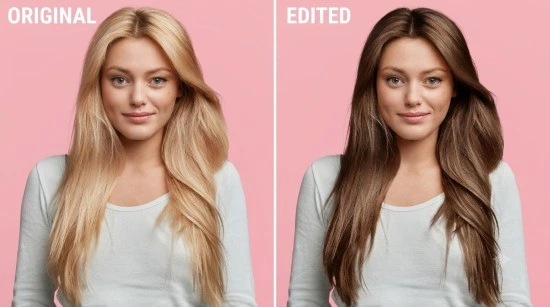
30. Change hair colour
Using the uploaded image, change only the hair colour to natural dark brown. Preserve the hairstyle shape, person’s face, identity, expression, clothing, pose, background, and lighting direction exactly the same.
Created with Gemini AI
Object Addition and Removal Prompts
31. Add birthday decorations
Using the uploaded image, add tasteful birthday decorations such as balloons, flowers, and a cake in the background. Preserve the person’s face, identity, expression, hairstyle, clothing, pose, body proportions, and original background structure exactly the same.
32. Add Diwali decorations
Using the uploaded image, add Diwali elements such as glowing diyas, marigold flowers, and a colourful rangoli in the background. Keep the person’s face, identity, expression, hairstyle, clothing, pose, and body proportions unchanged.
33. Add Christmas decorations
Using the uploaded image, add a decorated Christmas tree, fairy lights, and wrapped gifts in the background. Preserve the person’s face, identity, expression, hairstyle, clothing, pose, and body proportions exactly the same.
34. Add flowers
Using the uploaded image, add a small bouquet of pastel roses in the subject’s hand. Preserve the person’s face, identity, expression, hairstyle, clothing, pose, body proportions, background, and lighting direction exactly the same.
35. Remove an object
Using the uploaded image, remove only [object] from the background. Fill the removed area naturally using the surrounding background. Preserve the person’s face, identity, expression, hairstyle, clothing, pose, body proportions, and all other details exactly the same.
36. Remove unwanted person
Using the uploaded image, remove only the unrelated person in the background. Reconstruct the background naturally. Preserve the main subject’s face, identity, expression, hairstyle, clothing, pose, body proportions, and all other details exactly the same.
37. Add sunglasses
Using the uploaded image, add stylish sunglasses to the subject. Preserve the person’s face shape, identity, expression, hairstyle, clothing, pose, background, and lighting direction exactly the same.
38. Add a hat
Using the uploaded image, add a stylish wide-brimmed hat to the subject. Preserve the person’s face, identity, expression, hairstyle direction, clothing, pose, body proportions, background, and lighting direction exactly the same.
39. Add a pet
Using the uploaded image, add a friendly golden retriever sitting beside the subject. Preserve the person’s face, identity, expression, hairstyle, clothing, pose, body proportions, background, and lighting direction exactly the same.
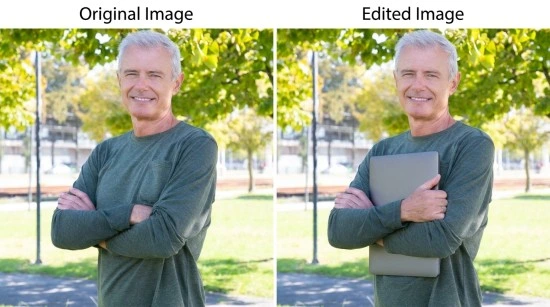
40. Add a product
Using the uploaded image, add [product] naturally into the subject’s hand. Preserve the person’s face, identity, expression, hairstyle, clothing, pose, body proportions, background, and lighting direction exactly the same. Keep the product design accurate.
Created with Gemini AI
Restoration and Artistic Editing Prompts
41. Restore old photograph
Using the uploaded image, restore this old photograph by improving sharpness, contrast, exposure, and visible details. Repair minor scratches, dust marks, fading, and uneven tones while preserving the original faces, expressions, clothing, objects, and historical appearance.
42. Restore faded colours
Using the uploaded image, restore the faded colours naturally. Improve clarity, contrast, and exposure while preserving the original people, clothing, background, and composition exactly the same.
43. Convert to oil painting
Using the uploaded image, transform the photograph into a classical oil painting. Preserve the person’s identity, facial features, expression, pose, clothing, and background composition. Use visible brushstrokes, realistic skin tones, rich shadows, and a traditional canvas texture.
44. Convert to watercolour painting
Using the uploaded image, transform the photograph into a soft watercolour illustration. Preserve the subject’s identity, facial features, expression, pose, clothing, and background composition. Use gentle pastel colours, delicate brush textures, and a peaceful artistic atmosphere.
45. Convert to anime style
Using the uploaded image, transform the photograph into an original anime-style portrait. Preserve the person’s recognisable facial features, hairstyle direction, expression, and overall pose. Use expressive anime eyes, clean line art, soft shading, vibrant colours, and a detailed background. Do not copy any specific anime character or series.
Useful Editing Instructions
Add these lines to almost any editing prompt:
Change only the selected element.
Keep everything else in the image exactly the same.
Preserve the person’s identity and facial features.
Maintain natural skin texture and realistic proportions.
Keep the lighting direction consistent.
Preserve the original composition and framing.
Do not add extra fingers, objects, text, logos, or watermarks.
Make the edited area blend naturally with the rest of the image.
Avoid plastic-looking skin or artificial facial features.
Keep the final result realistic and suitable for professional use.
How to Refine an Edit
If the first edit changes too much, ask Gemini to correct it with a focused instruction.
Try these follow-up prompts:
Keep the new background, but restore my original face, expression, and hairstyle exactly.
Preserve the outfit change, but restore the original background and lighting.
Make the edited object smaller and more naturally placed.
Correct the hands and fingers while keeping the rest of the image unchanged.
Reduce the brightness of the background and keep the subject clearly visible.
Make the edited clothing match the original lighting direction.
Keep the artistic style, but make the face more recognisable and natural.
Remove the added text and leave clean empty space instead.
Conclusion
Gemini prompts for image editing work best when they are specific, respectful, and focused on one change at a time. Clearly mention the element you want to change—such as the background, outfit, lighting, object, hairstyle, or artistic style—and state that the person’s identity, face, pose, clothing, and proportions should remain unchanged.
The 45 copy-and-paste prompts in this guide cover background replacement, outfit changes, portrait retouching, object addition and removal, photo restoration, and artistic transformations. Upload a clear image, choose the relevant prompt, and refine the result gradually. Always use images you have the right to edit, and avoid creating misleading or harmful representations of real people.
|
Join Big Tech companies with Entri’s Courses Now! |
|||||
|---|---|---|---|---|---|
| Full-Stack Web Developer | Data Science | Python Programming | |||
| Software Testing | DevOps | Data Analytics | |||
| Cyber Security | UI/UX Design | ||||
| SAP FICO Course | AI-Powered Practical Accounting Course | ||||


