

Introduction
A good image prompt does more than ask Gemini to make a picture “HD” or “4K.” It should explain what needs to be improved, how the image should look, which details must remain unchanged, and where the final image will be used.
You can use Gemini quality-enhancement prompts to sharpen portraits, improve lighting, restore old photographs, clean up backgrounds, enhance product images, correct colours, upscale visuals, and prepare images for websites or social media.
Gemini’s image tools may support different output sizes and aspect ratios depending on the model, product, account, and interface. In supported API workflows, image size can be specified separately from the creative prompt.
The prompts in this guide are designed for both image generation and image editing. You can copy and paste them into Gemini, then upload a photo when you want to enhance an existing image.
How to Make Images High Quality in Gemini
Use a high-quality source image
When editing an existing photograph, begin with the clearest original file available. A blurry, heavily compressed, or very small image may limit the quality of the final result.
Describe the exact improvement
Instead of writing only:
Make this image high quality.
Try:
Improve the sharpness, lighting, colour balance, and fine details while preserving the subject’s identity, facial features, clothing, pose, and background.
Mention the intended format
Add the required aspect ratio or use case:
- 1:1 for profile pictures and square posts.
- 4:5 for portrait social media posts.
- 9:16 for stories, reels, and mobile screens.
- 16:9 for YouTube thumbnails, presentations, and website banners.
- 3:2 for landscape photography.
- 2:3 for vertical photography.
Available aspect ratios and resolution controls may vary across Gemini products.
Protect important details
Use instructions such as:
Preserve the original face, identity, body shape, clothing, pose, product design, text, and overall composition.
You can also ask Gemini to make one change at a time. This makes it easier to identify which instruction improved or damaged the result.
45 Gemini Prompts to Make Images High Quality
General Image Enhancement Prompts
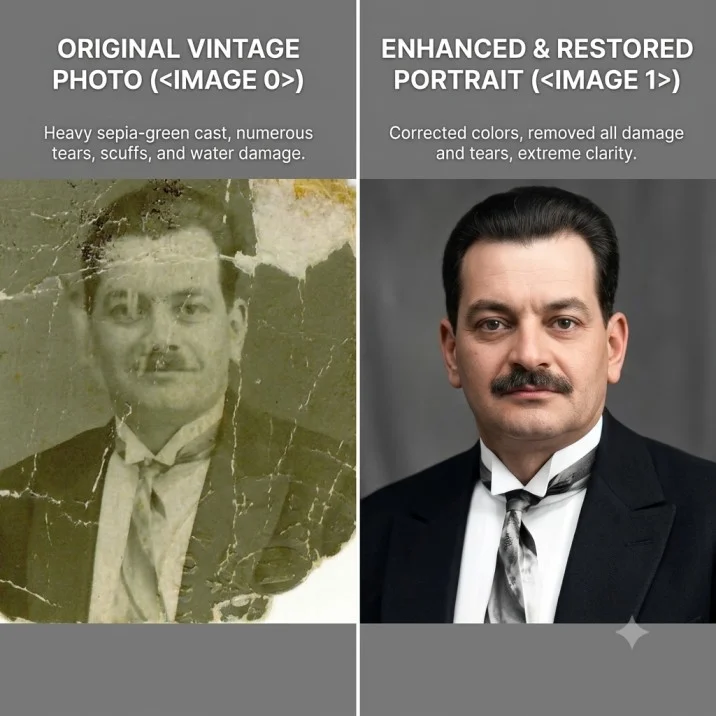
1. General quality enhancement
Enhance this image to make it look sharper, cleaner, brighter, and more professional. Improve overall clarity, lighting, colour balance, contrast, and fine details while preserving the original subject, identity, composition, clothing, pose, and background. Do not add or remove important objects.
Created with Gemini AI
2. Ultra-detailed enhancement
Improve the uploaded image with realistic high-resolution detail, natural sharpness, balanced contrast, accurate colours, and clean textures. Preserve the original composition and make the result look polished without creating artificial edges, plastic-looking skin, or excessive sharpening.
3. Professional photography finish
Transform this image into a professionally edited photograph. Improve exposure, white balance, sharpness, colour depth, lighting, and background clarity while keeping the subject and original scene unchanged. Use a natural premium photography finish.
4. Natural HD enhancement
Enhance this image with a natural high-definition appearance. Increase clarity and detail without over-smoothing the subject or changing facial features, body proportions, clothing, objects, or background. Keep the final result realistic and suitable for digital publishing.
5. Clean and polished image
Make this image look clean, crisp, and professionally finished. Correct dull colours, uneven brightness, mild blur, and distracting visual noise. Preserve the original details and avoid making the image look over-edited or artificial.
6. High-quality social media image
Optimise this image for a high-quality social media post. Improve sharpness, lighting, colour balance, and subject clarity while preserving the original composition. Crop the image to a vertical 4:5 format and keep all important elements visible.
7. High-quality mobile image
Enhance this image for mobile viewing. Improve subject visibility, edge clarity, colour contrast, and brightness while keeping the image natural. Use a vertical 9:16 composition and ensure that important details remain clear on a small screen.
8. Website-ready image
Prepare this image for use on a professional website. Improve resolution, sharpness, colour accuracy, lighting, and visual balance. Preserve the subject and composition, remove minor distractions, and create a clean polished result suitable for a web page.
9. Print-style enhancement
Enhance this photograph for high-quality printing. Improve clarity, fine details, colour accuracy, exposure, and contrast while preserving the original appearance. Avoid excessive sharpening, artificial textures, or changes to the subject’s identity.
Portrait and Selfie Enhancement Prompts
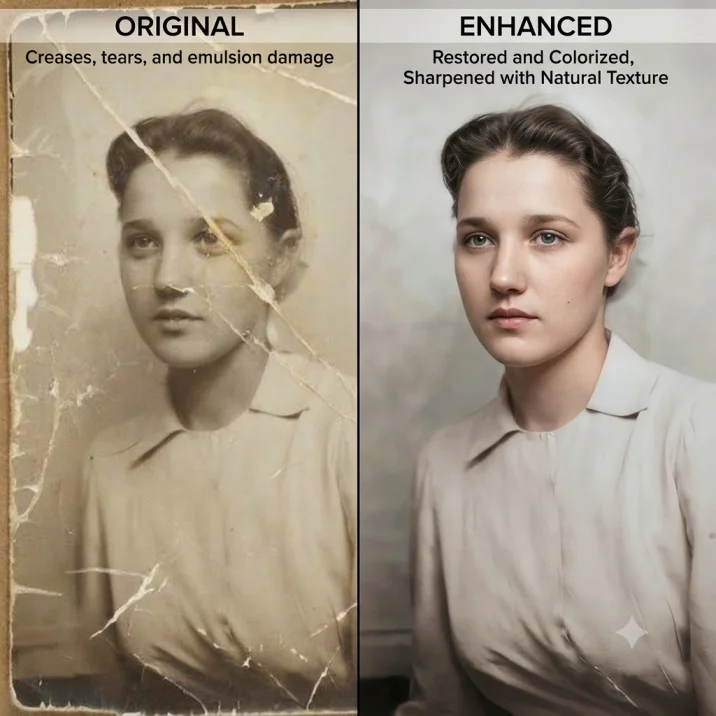
10. Portrait quality improvement
Enhance this portrait with realistic sharpness, balanced skin tones, clear eyes, detailed hair, natural lighting, and a softly refined background. Preserve the person’s identity, facial structure, expression, clothing, pose, and natural skin texture.
Created with Gemini AI
11. Selfie enhancement
Improve this selfie by correcting exposure, reducing digital noise, sharpening facial details, and balancing the colours. Keep the person’s face, identity, expression, hairstyle, clothing, and background unchanged. Make the result look natural rather than heavily retouched.
12. Professional headshot enhancement
Turn this portrait into a polished professional headshot. Improve lighting, facial clarity, colour balance, background softness, and overall sharpness. Preserve the person’s natural facial features, expression, hairstyle, clothing, and identity.
13. LinkedIn profile image
Enhance this photograph for a professional LinkedIn profile. Improve sharpness, lighting, colour accuracy, and facial clarity. Use a clean subtle background and a balanced head-and-shoulders crop while preserving the person’s natural appearance and identity.
14. Face-detail enhancement
Improve the clarity of the face, eyes, hair, and facial details without changing the person’s identity or natural appearance. Reduce blur and noise, correct uneven lighting, and keep skin texture realistic. Do not reshape the face or alter the expression.
15. Low-light portrait enhancement
Improve this dark portrait by increasing visibility, correcting exposure, reducing noise, and restoring natural skin tones. Preserve the original lighting mood, facial features, clothing, pose, and background. Avoid creating harsh highlights or unnatural skin texture.
16. Blurry portrait improvement
Make this slightly blurry portrait clearer and more detailed. Improve focus on the eyes, hair, facial features, and clothing while maintaining a natural appearance. Do not invent major facial details, change the person’s identity, or alter the background unnecessarily.
17. Outdoor portrait enhancement
Enhance this outdoor portrait with sharper subject details, balanced sunlight, accurate skin tones, natural colours, and improved background clarity. Preserve the original pose, clothing, facial features, landscape, and overall atmosphere.
18. Group photo enhancement
Improve the quality of this group photograph by sharpening each person naturally, correcting exposure, reducing noise, and balancing skin tones. Preserve every person’s identity, facial features, position, clothing, and expression. Do not merge faces or remove anyone.
Lighting and Colour Correction Prompts
19. Brightness correction
Correct the brightness and exposure of this image so that the subject and background are clearly visible. Recover detail in dark areas, soften overly bright highlights, preserve natural colours, and keep the original composition unchanged.
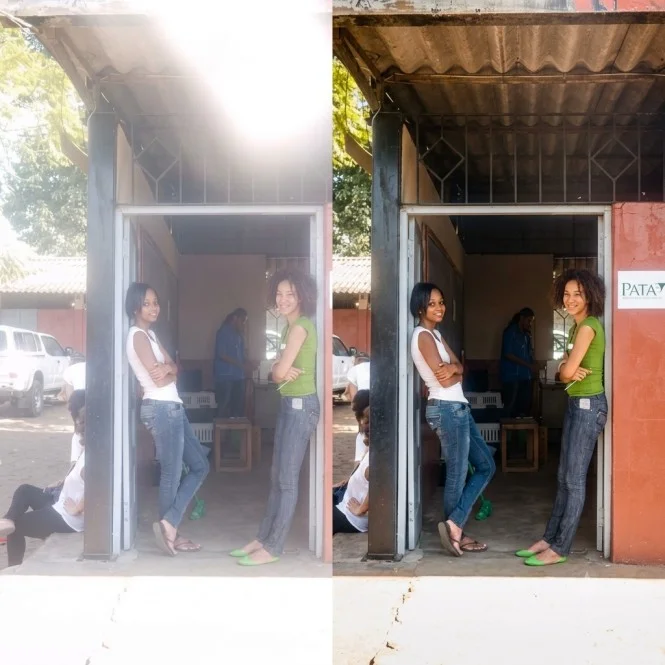
20. Colour correction
Correct the colour balance of this image so that skin tones, clothing, objects, and background colours appear natural and accurate. Remove unwanted colour casts, improve contrast gently, and preserve the original visual mood.
Created with Gemini AI
21. Warm golden-hour finish
Enhance this image with a soft, natural golden-hour colour grade. Improve warmth, contrast, highlights, and subject clarity while preserving realistic skin tones, original facial features, clothing, pose, and background details.
22. Cool cinematic finish
Give this image a refined cool cinematic colour grade with balanced blue and neutral tones. Improve clarity, contrast, and lighting while preserving natural skin tones, facial details, objects, and the original composition.
23. Soft studio lighting
Improve this portrait by adding soft, evenly distributed studio-style lighting. Reduce harsh shadows, brighten the face naturally, improve skin-tone accuracy, and preserve the original features, hairstyle, clothing, pose, and background.
24. Dramatic lighting enhancement
Enhance the lighting in this image with controlled dramatic contrast and subtle directional highlights. Keep the subject’s facial features, clothing, body shape, background, and identity unchanged. Make the lighting realistic and suitable for professional photography.
25. Colourful image enhancement
Make the colours in this image richer and more balanced without making them oversaturated. Improve detail, contrast, and clarity while preserving realistic skin tones, fabric colours, background elements, and the original mood.
26. Black-and-white conversion
Convert this image into a high-quality black-and-white photograph. Preserve the subject’s identity, facial details, textures, and composition. Use balanced contrast, detailed shadows, clear highlights, and subtle film grain without losing important features.
27. Vintage image enhancement
Enhance this photograph with a refined vintage film appearance. Improve clarity and composition while adding subtle warm tones, gentle grain, balanced contrast, and natural fading. Preserve the original subject, face, clothing, objects, and background.
Background and Composition Prompts
28. Background cleanup
Improve the image by removing minor background distractions such as clutter, stray objects, and visual noise. Keep the main subject, face, clothing, pose, lighting, and important background features unchanged. Make the result look natural and seamless.
29. Subject separation
Improve the separation between the subject and background using natural lighting, subtle contrast, and a soft background blur. Keep the person’s edges clean and realistic, especially around the hair, shoulders, clothing, and hands.
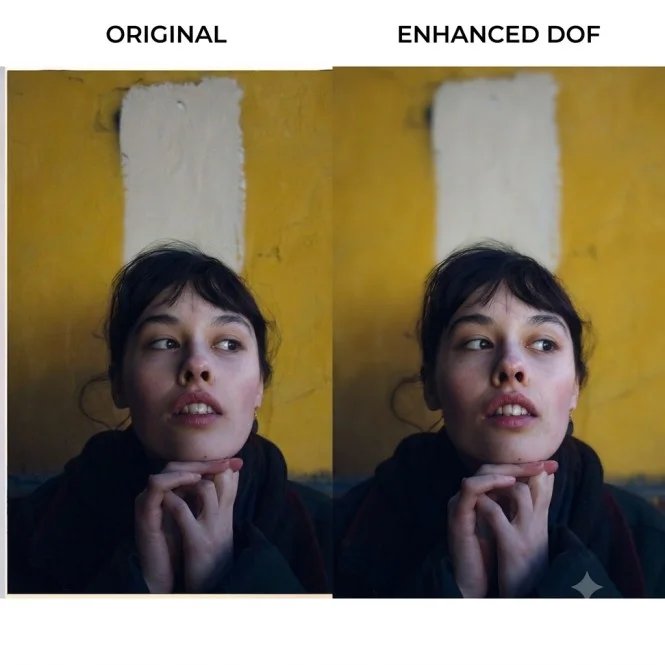
30. Background blur
Enhance this portrait by creating a natural shallow depth-of-field effect. Keep the subject sharply focused while softly blurring the background. Preserve the person’s facial features, hair, clothing, body proportions, and original lighting.
Created with Gemini AI
31. Improve composition
Improve the composition of this image by balancing the subject, background, spacing, and visual focus. Preserve all important objects and the person’s identity. Create a professional, uncluttered layout without adding unnecessary elements.
32. Add natural empty space
Reframe this image into a wider composition and add realistic empty space on the left side for headline text. Preserve the subject’s appearance, clothing, pose, lighting, and background style. Do not stretch or distort the person.
33. Crop for Instagram
Crop and enhance this image for an Instagram portrait post in a 4:5 aspect ratio. Keep the subject’s face and important details visible, improve sharpness and colour balance, and preserve the natural composition.
34. Crop for YouTube thumbnail
Prepare this image as a high-quality 16:9 YouTube thumbnail. Keep the main subject large and clear, improve lighting and contrast, create enough visual separation from the background, and leave balanced space for optional headline text. Do not add text or logos.
35. Vertical story format
Convert this image into a high-quality vertical 9:16 composition for a mobile story. Extend the background naturally where necessary, keep the subject undistorted, improve clarity and colour balance, and preserve the original visual style.
Old, Blurry, and Damaged Photo Prompts
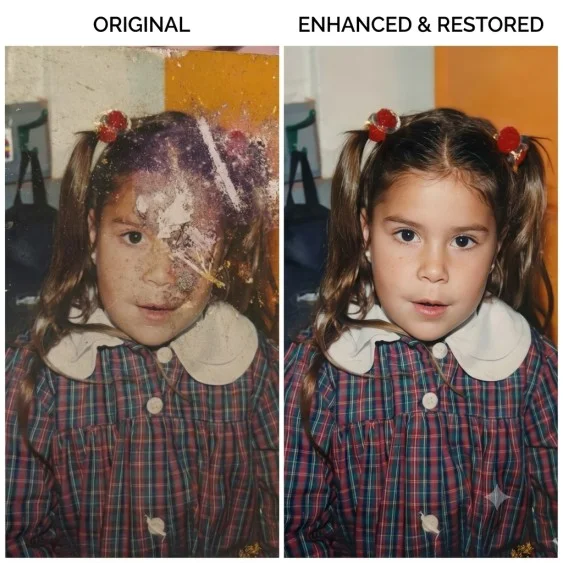
36. Restore old photograph
Restore this old photograph by improving sharpness, contrast, exposure, and visible details. Repair minor scratches, dust marks, fading, and uneven tones while preserving the original faces, expressions, clothing, objects, and historical appearance.
37. Restore faded colour photo
Restore the faded colours in this photograph while keeping the result historically natural. Improve clarity, contrast, and exposure, reduce visible damage, and preserve the original people, clothing, background, and composition.
38. Repair damaged photograph
Carefully repair this damaged photograph by reconstructing only small missing or torn areas using surrounding visual information. Improve clarity and contrast while preserving the original faces, expressions, clothing, background, and authentic photographic character.
39. Upscale family photograph
Enhance and upscale this family photograph with natural detail and improved clarity. Preserve every person’s identity, face, clothing, expression, position, and body proportions. Reduce blur and noise without inventing unrealistic details.
40. Improve scanned image
Clean and enhance this scanned photograph by reducing scan noise, correcting uneven lighting, removing dust marks, improving sharpness, and restoring natural contrast. Preserve the original content, faces, colours, and composition.
Created with Gemini AI
Product and Commercial Image Prompts
41. Product photo enhancement
Enhance this product photograph for professional commercial use. Improve sharpness, lighting, colour accuracy, edges, surface texture, and background cleanliness. Preserve the exact product shape, design, colour, logo, label, packaging, and proportions.
42. E-commerce product image
Prepare this product image for an e-commerce listing. Make the product sharp, evenly lit, colour-accurate, and clearly separated from a clean background. Preserve every product detail, label, pattern, logo, and dimension. Do not redesign or modify the product.
43. Clothing product image
Enhance this clothing photograph for a fashion catalogue. Improve fabric texture, colour accuracy, lighting, edges, and garment visibility. Preserve the exact design, print, stitching, border, buttons, shape, and colour of the clothing.
44. Jewellery product image
Improve this jewellery photograph for a premium catalogue. Sharpen the jewellery, enhance realistic reflections, correct colour balance, clean the background, and preserve the exact design, stones, metal finish, size, and proportions. Do not add or remove any jewellery details.
45. Food image enhancement
Enhance this food photograph for a restaurant menu or social media post. Improve natural colour, texture, lighting, sharpness, and presentation while keeping the food realistic. Preserve the original ingredients, portion, plate, arrangement, and background style.
Extra Quality-Enhancement Instructions
You can add these lines to almost any image prompt:
Preserve the original identity and composition.
Keep all facial features natural and unchanged.
Use realistic textures and physically consistent lighting.
Improve detail without over-sharpening.
Avoid plastic-looking skin and artificial facial features.
Do not add extra fingers, objects, jewellery, logos, or text.
Keep the product design and colours accurate.
Make the edges around hair, hands, clothing, and objects clean and natural.
Use a high-detail professional photography finish.
Maintain realistic proportions and perspective.
Conclusion
The best Gemini prompts to make an image high quality describe the exact improvement required instead of relying only on words such as “HD,” “4K,” or “ultra-realistic.” Ask Gemini to improve specific elements such as sharpness, lighting, colours, exposure, background, noise, composition, or texture, while clearly stating which parts must remain unchanged. Use these prompts in this guide for portraits, selfies, old photographs, product images, social media posts, websites, and commercial visuals. Choose the correct aspect ratio for your intended platform, begin with the highest-quality source image available, and refine one element at a time. If your Gemini version offers separate output-size controls, use those settings in addition to your prompt for the appropriate delivery resolution.
| Categories for Gemini Image Generation Prompts | |||||
| Man | Woman | Couples | |||
| Saree | Father & Daughter | Male Hairstyle | |||
| Mother & Son | Marriage | Anant Chaturdashi | |||
| Gandhi Jayanti | Aesthetic | Oil Painting | |||
| Ghibli Art | Friends | Birthday | |||
| Dussehra | Family Photo | Wedding Anniversary | |||
| Anime | Underwater | Engagement | |||
| Selfie | Professional Photoshoot | ||||
|
Join Big Tech companies with Entri’s Courses Now! |
|||||
|---|---|---|---|---|---|
| Full-Stack Web Developer | Data Science | Python Programming | |||
| Software Testing | DevOps | Data Analytics | |||
| Cyber Security | UI/UX Design | ||||
| SAP FICO Course | AI-Powered Practical Accounting Course | ||||


