

What Is Django? The Python Web Framework Explained
Django is a free, open-source, high-level web framework written in Python that helps developers build secure, database-driven websites and web applications quickly. It follows the Model-View-Template (MVT) pattern and ships “batteries included”: an ORM, an admin panel, authentication, forms and security protections come built in, so you write far less boilerplate code.
Python programming with Django is a top choice for developers aiming to build scalable, secure and high-performance web applications. Developers favour Django for its simplicity, versatility and robust framework powered by Python, which enables rapid development and clean design.
Django was created in 2003–2005 by web developers at the Lawrence Journal-World newspaper, released as open source in 2005, and is now maintained by the non-profit Django Software Foundation (DSF).
What Is Django Used For?
Django is used to build the server side (backend) of web applications: the part that stores data, applies business rules, checks who is logged in, and sends HTML pages or JSON to a browser or mobile app. Typical uses include:
- Content-heavy websites and CMSs: news sites, blogs and documentation portals (Django began at a newspaper).
- E-commerce stores: catalogues, carts and orders, often with frameworks such as Django Oscar.
- SaaS products, dashboards and internal tools: the built-in admin gives non-developers a data-entry interface on day one.
- REST APIsfor React, Flutter or Android/iOS apps, built with Django REST Framework (DRF).
- AI-powered web apps: wrapping a machine-learning model or an LLM API call behind a Django view so users can access it through a web page.
Well-known sites built with Django include Instagram, Disqus and Mozilla’s add-ons site.
How Does Django Work? The MVT Architecture
Django’s architecture is MVT (Model-View-Template). The Model defines your data, the View holds the logic for a request, and the Template produces the HTML. A URL dispatcher connects incoming URLs to views. Here is what happens when someone opens a page on a Django site:
- The browser sends an HTTP request. A WSGI or ASGI server (for example Gunicorn or Uvicorn) hands it to Django.
- The request passes through each middleware in the MIDDLEWARE setting (security, sessions, CSRF, authentication).
- The URL dispatchercompares the path against urlpatterns in py and picks the matching view.
- The view It typically reads or writes data through models using the ORM.
- The view renders a template with a context dictionary, or returns JSON, a redirect or an error.
- The HttpResponse travels back through middleware to the browser.
| MVT part | Lives in | What it does |
| Model | models.py | Python classes that map to database tables (fields, relationships, rules). |
| View | views.py | Function or class that receives a request and returns a response. |
| Template | templates/*.html | HTML with Django Template Language tags that displays data. |
| URL dispatcher | urls.py | Maps URL patterns to views (Django’s “controller” role). |
Django Project vs Django App: What Is the Difference?
A Django project is the whole website: one settings file, one root URL configuration and one database configuration, created with django-admin startproject. A Django app is a self-contained feature inside it, such as blog, accounts or payments, created with python manage.py startapp. One project usually contains several apps, and a well-built app can be reused in other projects.
| Django project | Django app | |
| Created with | django-admin startproject mysite | python manage.py startapp blog |
| Scope | The entire site and its configuration | One feature or domain area |
| Key files | settings.py, urls.py, wsgi.py, asgi.py, manage.py | models.py, views.py, admin.py, apps.py, migrations/ |
| How many | One per website | Many per project, registered in INSTALLED_APPS |
Django vs Flask vs Django REST Framework at a Glance
Learners often meet these three names together. Flask is a separate, minimal framework; DRF is an add-on that sits on top of Django.
| Django | Flask | Django REST Framework | |
| What it is | Full-stack Python web framework | Lightweight Python micro-framework | Toolkit added to a Django project |
| Built-in ORM | Yes (Django ORM) | No (usually add SQLAlchemy) | Uses the Django ORM |
| Admin panel | Yes, auto-generated | No (add Flask-Admin) | Uses the Django admin |
| Authentication | Built in | Add extensions (e.g. Flask-Login) | Adds token, session and permission classes for APIs |
| Typical output | HTML pages (and JSON) | Anything you code | JSON APIs with a browsable web view |
| Best for | Database-driven sites that need structure and security out of the box | Small services, prototypes, full control over components | Backends for mobile apps and JavaScript front-ends |
| Learning curve | Moderate: more concepts, strong conventions | Gentle start, more decisions later | Moderate: needs Django first |
What Should You Learn Before Django?
Django is normally learned after core Python: you should be comfortable with functions, classes, dictionaries and modules first, because every Django model, view and form is plain Python.
How to Install Django and Create Your First Django Project
In this tutorial you will set up a virtual environment, install Django, create a project and an app, show your first page in the browser and log in to the Django admin. It takes 9 steps and about 20–30 minutes on Windows, macOS or Linux.
Prerequisites
- Python 3.12 or newer installed (check with python –version). Django 6.x needs 3.12+.
- A code editor such as VS Code, and a terminal or Command Prompt.
- Basic Python: functions, imports and running a .py file.
Steps
Step 1: Create a project folder and a virtual environment
Keep every Django project in its own isolated environment.
mkdir django_starter
cd django_starter
python -m venv venv
Step 2: Activate the virtual environment
Your prompt will show (venv) once it is active.
# Windows
venv\Scripts\activate
# macOS / Linux
source venv/bin/activate
Step 3: Install Django
Install Django with pip, then confirm the installed version.
pip install django
python -m django –version
Step 4: Create the project
The trailing dot creates the project in the current folder instead of an extra nested folder.
django-admin startproject mysite .
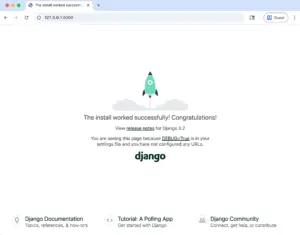
Step 5: Run the development server
Open http://127.0.0.1:8000/ in your browser. You should see Django’s welcome page with a rocket.
python manage.py runserver
Step 6: Create an app and register it
Stop the server with Ctrl+C, create an app, then add “blog” to the INSTALLED_APPS list in mysite/settings.py.
python manage.py startapp blog
Step 7: Write your first view
Open blog/views.py and add a function that returns a response.
from django.http import HttpResponse
def home(request):
return HttpResponse(“Hello, Django!”)
Step 8: Map a URL to the view
Edit mysite/urls.py so the site’s home page calls your view. Run the server again and reload the page to see “Hello, Django!”.
from django.contrib import admin
from django.urls import path
from blog import views
urlpatterns = [
path(“admin/”, admin.site.urls),
path(“”, views.home, name=”home”),
]
Step 9: Set up the database and admin login
Create Django’s built-in tables, then create an admin user and log in at http://127.0.0.1:8000/admin/.
python manage.py migrate
python manage.py createsuperuser
