

What Are Views in Django? Function-Based, Class-Based and Generic Views
Views in Django are Python functions or classes that receive a web request and return a web response: an HTML page, a redirect, a 404 error, JSON or a file. A view sits between your URLs and your data. It reads the request, fetches or saves data through models, and passes the result to a template or serializer.
Every view follows one contract: it takes an HttpRequest as its first argument and must return an HttpResponse (or raise an exception such as Http404). Everything else, such as which template to use or what to query, is up to you.
Function-Based Views vs Class-Based Views
Django supports two styles. Function-based views (FBVs) are plain Python functions, so the logic is explicit and easy to follow. Class-based views (CBVs) are classes that handle each HTTP method in its own method (get(), post()), and they can be extended through inheritance and mixins.
| Function-based view | Class-based view | |
| Looks like | def post_list(request): … | class PostList(ListView): … |
| Wired in urls.py as | views.post_list | views.PostList.as_view() |
| Handling GET vs POST | if request.method == “POST”: | Separate get() and post() methods |
| Reuse | Decorators such as @login_required | Inheritance and mixins such as LoginRequiredMixin |
| Best for | One-off or unusual logic, learning | Standard list/detail/create/update/delete pages |
What Are Generic Views in Django?
Generic views are ready-made class-based views in django.views.generic that implement common page patterns. You configure them with attributes like model, template_name, fields and success_url instead of writing the query and rendering code yourself.
| Generic view | What it does | Default template |
| TemplateView | Renders a template, optionally with extra context | Set with template_name |
| ListView | Lists objects of a model, with optional pagination | <app>/<model>_list.html |
| DetailView | Shows one object found by pk or slug | <app>/<model>_detail.html |
| CreateView | Displays and processes a form that creates an object | <app>/<model>_form.html |
| UpdateView | Displays and processes a form that edits an object | <app>/<model>_form.html |
| DeleteView | Confirms and deletes an object | <app>/<model>_confirm_delete.html |
| FormView / RedirectView | Processes a non-model form / redirects to another URL | Set with template_name / none |
How to Get Data from the Database in a Django View
Inside a view you query a model through its manager, Model.objects, then pass the results to a template in the context dictionary. Use get_object_or_404() when fetching a single row, so a missing record returns a proper 404 page instead of a server error.
from django.shortcuts import render, get_object_or_404
from .models import Post
def post_list(request):
posts = Post.objects.filter(published=True).order_by(“-created_at”)
return render(request, “blog/post_list.html”, {“posts”: posts})
def post_detail(request, slug):
post = get_object_or_404(Post, slug=slug, published=True)
return render(request, “blog/post_detail.html”, {“post”: post})
For related data, add select_related(“author”) (ForeignKey) or prefetch_related(“tags”) (many-to-many) to the query so the template doesn’t trigger one extra query per row.
How to Import Views in Django (urls.py)
Views are connected to URLs in a URLconf. Inside an app, import the app’s views module with a relative import and reference each view in path(). Then include the app’s URLs from the project’s root urls.py.
# blog/urls.py
from django.urls import path
from . import views
app_name = “blog”
urlpatterns = [
path(“”, views.post_list, name=”post_list”),
path(“<slug:slug>/”, views.post_detail, name=”post_detail”),
]
# mysite/urls.py
from django.urls import include, path
urlpatterns = [
path(“blog/”, include(“blog.urls”)),
]
Prefer from . import views over from .views import *. It keeps names unambiguous and makes it obvious where each view comes from.
How to Create a View in Django That Fetches Data from the Database
You will build a blog list page and a detail page: first as function-based views, then by converting the list page to a generic ListView. It takes 7 steps and about 25 minutes, and assumes you already have a project with a blog app.
Prerequisites
- A Django project with an app named blogadded to INSTALLED_APPS (see the Django topic’s tutorial).
- Migrations applied (python manage.py migrate) and a superuser created.
- Basic Python classes and functions.
Steps
Step 1: Define a model
Add a Post model to blog/models.py, then run makemigrations and migrate.
from django.db import models
class Post(models.Model):
title = models.CharField(max_length=200)
slug = models.SlugField(unique=True)
body = models.TextField()
published = models.BooleanField(default=True)
created_at = models.DateTimeField(auto_now_add=True)
def __str__(self):
return self.title
Step 2: Add sample data through the admin
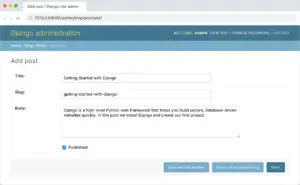
Register the model in blog/admin.py with admin.site.register(Post), open /admin/ and create two or three posts.
 .
.
Step 3: Write a function-based list view
In blog/views.py, query published posts and render them.
from django.shortcuts import render, get_object_or_404
from .models import Post
def post_list(request):
posts = Post.objects.filter(published=True).order_by(“-created_at”)
return render(request, “blog/post_list.html”, {“posts”: posts})
Step 4: Write a detail view
Fetch one post by its slug; a wrong slug returns a 404.
def post_detail(request, slug):
post = get_object_or_404(Post, slug=slug, published=True)
return render(request, “blog/post_detail.html”, {“post”: post})
Step 5: Import the views and map URLs
Create blog/urls.py with from . import views and two path() entries (shown above in “How to Import Views”), then add path(“blog/”, include(“blog.urls”)) to the project URLconf.
Step 6: Create minimal templates
Create blog/templates/blog/post_list.html that loops over posts and links to each post, and post_detail.html that shows {{ post.title }} and {{ post.body|linebreaks }}.
{% for post in posts %}
<a href=”{% url ‘blog:post_detail’ post.slug %}”>{{ post.title }}</a>
{% empty %}
<p>No posts yet.</p>
{% endfor %}
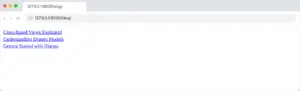
Figure: The unstyled post list rendered by the post_list view at /blog/.
Step 7: Convert the list page to a generic ListView
Replace post_list with a class-based view and update the URL to views.PostList.as_view(). The template keeps working because context_object_name is set to posts.
from django.views.generic import ListView
class PostList(ListView):
queryset = Post.objects.filter(published=True).order_by(“-created_at”)
template_name = “blog/post_list.html”
context_object_name = “posts”
paginate_by = 10
