Table of Contents
Key Takeaways:
- Pomelli Photoshoot turns smartphone snaps into pro images free, saving $500+ per shoot.
- Business DNA ensures brand-consistent AI product photography for websites and ads.
- 60-second generations beat traditional timelines by days, ideal for small business marketing.
- Templates and edits handle studio/lifestyle shots; prompts unlock custom “e-commerce product visuals.”
- Free access at labs.google.com—no subscriptions, perfect for Shopify and Instagram sellers.
Introduction
Imagine running a small online store from your kitchen table in Kochi, staring at a smartphone snap of your handmade soaps that looks more like a blurry afterthought than a sales magnet. Professional photoshoots? They’re a distant dream, costing hundreds and eating weeks. Now picture this: that same fuzzy image turns into glossy lifestyle shots on cafe counters or beach sunrises—in seconds, for free. Google Labs’ Pomelli Photoshoot makes it real, handing small businesses the keys to pro-level AI product photography without the hassle.
This isn’t hype from a tech bubble. Launched in February 2026, the tool has already sparked buzz among Shopify sellers and solopreneurs, promising to slash marketing costs by up to 90% while boosting ad clicks. E-commerce thrives on visuals that sell trust, and Pomelli delivers exactly that—relatable, brand-aligned images that turn browsers into buyers.
Core Features of Pomelli Photoshoot
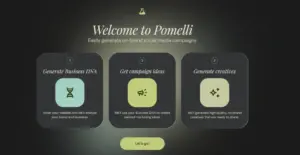
Pomelli Photoshoot generates professional product images using AI diffusion models like Nano Banana, combined with your brand’s “Business DNA” for consistent visuals.
Upload one photo, add a prompt, and it creates studio shots, lifestyle scenes, or custom edits.
Updated 2026 models handle complex prompts with 95% accuracy, including background swaps (e.g., plain wall to forest path) and style referencing from other images. Campaign integration pulls product details from URLs, auto-generating on-brand ads. Access remains free at labs.google.com, with no credit card needed—unlike Canva Pro’s $120/year fee.
Editing tools let users tweak lighting, shadows, and textures post-generation, preserving intricate details on jewelry or electronics.
How to Use Pomelli Step-by-Step: Generate AI Product Photos in 60 Seconds
Start with labs.google.com and search for Pomelli—it’s live as of March 2026, though Labs pages evolve quickly.
Detailed process:
- Sign in with Google; set up Business DNA (one-time: logo, colors, style prefs) for auto-branding.
- Upload a clear product image (smartphone quality works; neutral background ideal).
- Select templates (studio, lifestyle) or type prompts like “handcrafted mug on wooden table with morning light, Kerala tea estate vibe.”
- Generate: AI segments the product, denoises backgrounds in 30-40 seconds via Euler scheduler.
- Edit/refine: Swap backgrounds, reference styles, or iterate.
- Download high-res files or save to DNA for campaigns.vidau+1
For bulk needs, process one-by-one.
Cost and Time Savings for Small Businesses
Pomelli eliminates $50–$500 per-image shoots, delivering results in under a minute versus days. Small businesses report 5x faster ad production and 30% higher engagement on social platforms.
| Aspect | Traditional Shoots | Pomelli AI Photoshoot |
|---|---|---|
| Cost per Image | $50–$500 | Free |
| Time per Image | 1–7 days | 60 seconds |
| Scalability | Budget-limited | Unlimited generations |
| Skills Required | Pro photographer | Basic prompts |
| Brand Consistency | Manual enforcement | Auto via Business DNA |
Indian SMBs (Small and Medium-Sized Businesses), facing tight margins, gain an edge in Google Shopping and Instagram ads with “AI product photography for small business” optimized visuals.
Real User Results and Keyword Optimization Tips
Shopify users praise lifestyle shots for e-commerce pages, with one seller noting 30% sales lift from AI-generated beach scenes for soaps. A cafe owner created seasonal menu visuals, skipping photographers entirely.
Edge cases like motion-heavy products falter, needing manual nudges, as of now.
Limitations and Best Practices
No bulk uploads for 100+ products—handle individually. Geo-access works globally, but Labs experiments may shift; check labs.google.com weekly. Outputs occasionally need Canva tweaks for pixel-perfect control. Additionally, it is only available in the US, Canada, and Australia, as of now. Future stable variants may be rolled out to other countries as well.
Best practices:
- Use detailed prompts: “vibrant running shoes on mountain trail, golden hour lighting, dynamic angle.”
- Stage complex items: Generate background first, composite product second.
Conclusion
Pomelli Photoshoot redefines accessible marketing, empowering small businesses to craft compelling AI product images without breaking the bank. As Google Labs iterates, expect deeper e-commerce ties and smarter edits ahead. Dive in today at labs.google.com—your next viral ad awaits just one upload away.
|
Coding Courses Offered |
|||||
| Full-Stack Web Developer | Data Science | Python Programming | |||
| Software Testing | AWS Solution Architect Associate | Data Analytics | |||
| Cyber Security | UI/UX Design | ||||
Frequently Asked Questions
Is Pomelli Photoshoot still available in 2026?
Yes, it’s active via Google Labs as of March 2026, with ongoing updates like better prompt accuracy.
Does it integrate with Shopify or WooCommerce?
Not natively yet—download images manually. Bulk tools lag behind apps like Prodofoto.
What file formats does it output?
High-res PNG/JPG, ready for ads, websites, or social media.
Can it handle Indian products like spices or jewelry?
Absolutely; prompts for cultural scenes (e.g., “turmeric jar in Diwali setup”) yield accurate results.
How accurate are the AI generations?
95% prompt adherence with 2026 updates; minor edits fix shadows or textures.