Table of Contents
Understanding the difference between BIM and CAD is essential for anyone working in architecture, engineering, or construction today. While both tools are used to create drawings and designs, they serve very different purposes in modern project workflows. CAD focuses mainly on drafting, whereas BIM introduces a smarter, data-driven way of designing and managing buildings. In this blog, we will cover the key differences between BIM and CAD, how each approach impacts project delivery, and why BIM is becoming the preferred choice across the industry.
Get Career Oriented BIM Certification Course with Expert Mentors! Get Free Demo Here!
Introduction
In the architecture, engineering, and construction industry, few topics create as much confusion as the difference between BIM and CAD. Many students, fresh graduates, and even working professionals often assume that BIM and CAD are simply different software tools used to produce drawings. Because both are used to design buildings and create construction documents, the terms are frequently used interchangeably. This misunderstanding usually leads learners to focus only on software commands rather than understanding how projects actually flow from design to construction. As a result, many people spend months learning tools without knowing whether they are building the right skills for their career goals.
The reality is that BIM and CAD represent two very different approaches to working in the built environment. CAD is primarily about drafting—creating digital drawings that visually communicate design intent. BIM, on the other hand, is about building a digital representation of a real structure that contains geometry, data, and relationships between elements. This difference impacts not only how drawings are created, but also how teams collaborate, how errors are identified, how costs are estimated, and how projects are managed over time. Without clarity, learners often feel overwhelmed and unsure about where to start.
In this blog, we will break down the difference between BIM and CAD in a clear, practical, and easy-to-understand way. By the end, you will know exactly what BIM and CAD are, how they are used in real projects, when one is more suitable than the other, and which skill you should learn first based on your career path. Whether you are a student, a working professional, or someone planning a career shift, this guide will help you make confident and informed decisions.
Quick Definition
What is CAD?
CAD, or Computer-Aided Design, is a digital way of creating drawings. It is mainly used to draw plans, sections, elevations, and details on a computer instead of on paper. CAD works with lines and shapes, and each drawing is created separately. In simple terms, CAD helps you draw what a building looks like, but it does not understand what the building elements actually are.
-
Used for drafting and drawing
-
Works with lines, arcs, and text
-
Each drawing is created and edited separately
-
Changes must be updated manually
-
Best for basic documentation and small projects
What is BIM?
BIM, or Building Information Modeling, is a digital way of creating a building before it is built. Instead of just drawings, BIM creates a 3D model that contains information about materials, dimensions, quantities, and relationships between elements. In simple terms, BIM helps you build a digital version of the real building, where every change updates automatically across drawings and data.
-
Used for modeling, coordination, and data management
-
Works with intelligent building elements
-
All drawings come from one central model
-
Changes update automatically everywhere
-
Supports design, construction, and building management
Master BIM and Elevate Your Career – Enroll Today!
Stay ahead in the construction and design industry with our comprehensive BIM Course! Learn Building Information Modeling (BIM) from experts, gain hands-on experience with top software, and boost your career prospects. Join now and become a certified BIM professional!
Know MoreCore difference: BIM vs CAD
The main difference between CAD and BIM is not just the software, but the way projects are created and managed. CAD focuses on drawing, while BIM focuses on building a complete digital representation of a project with information. The table below highlights these differences in a clear and easy-to-understand way.
| Comparison Point | CAD | BIM |
|---|---|---|
| Basic idea | Digital drafting | Digital building model |
| What you create | Lines, shapes, and text | Intelligent building elements |
| Understanding of elements | Drawings do not “know” what they represent | Elements behave like real building components |
| Working method | Each drawing is separate | All drawings come from one central model |
| Handling changes | Changes must be updated manually | Changes update automatically across views |
| Coordination | Mostly manual and error-prone | Built-in coordination between disciplines |
| Use of data | Very limited information | Rich data linked to each element |
| Project stages | Mostly design and documentation | Supports design, construction, and facility management |
BIM vs CAD in Real Project Workflow
Understanding the difference between CAD and BIM becomes much clearer when we look at how each is used in real projects. The workflow in a CAD-based project is very different from a BIM-based project, and these differences have a major impact on efficiency, accuracy, and collaboration.
Typical CAD Workflow
In a CAD workflow, each discipline works mostly independently. For example, an architect creates floor plans, elevations, and sections as separate 2D drawings. Structural engineers produce their own drawings, and MEP teams create theirs. Coordination is usually manual, often happening through meetings or by comparing printed drawings.
If changes are made, such as modifying a wall or door location, each affected drawing must be updated manually. This is time-consuming and prone to errors, especially in larger projects with multiple revisions. On-site clashes or design conflicts are often discovered only during construction, which can lead to rework, delays, and increased costs.
CAD workflows are suitable for smaller projects or basic drafting needs because they are straightforward. However, for medium to large projects, managing multiple drawings and revisions manually becomes very challenging.
Typical BIM Workflow
BIM introduces a centralized, intelligent model that all disciplines work on. In a typical BIM workflow, the architect creates the architectural model in software like Revit or Archicad. Structural and MEP teams then link their models to the same project or work on shared coordinated models.
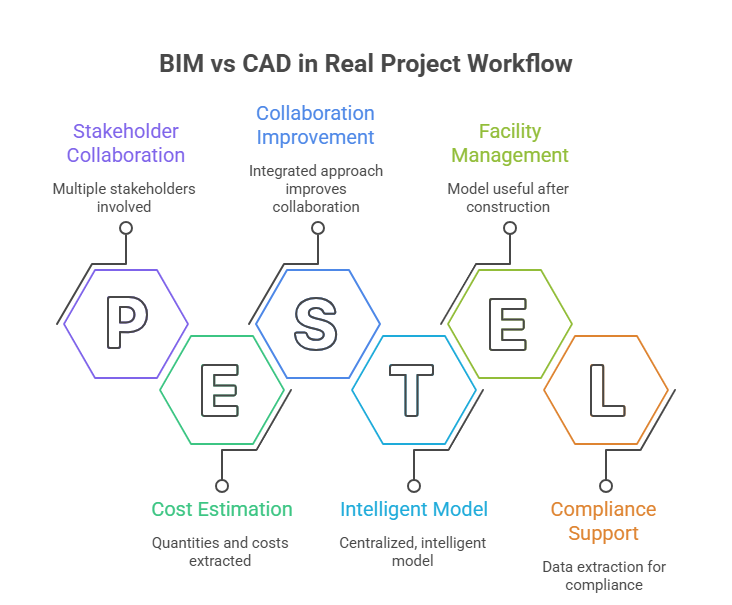
Any changes in the architectural model automatically update related drawings, schedules, and data. BIM allows clash detection before construction, ensuring conflicts are resolved digitally. Quantities, costs, and timelines can also be extracted directly from the model, supporting 4D scheduling, 5D cost estimation, and more.
This integrated approach improves collaboration, reduces errors, and saves time. BIM workflows are particularly valuable for complex projects, infrastructure developments, or projects with multiple stakeholders. The model continues to be useful even after construction, supporting facility management and building operations.
BIM “Dimensions” vs CAD
One of the biggest differences between BIM and CAD is how they handle dimensions—not just in terms of geometry, but in terms of data, time, cost, sustainability, and lifecycle management. While CAD mainly focuses on 2D or 3D drafting, BIM extends the concept of dimensions to include multiple layers of information that make a project smarter and more manageable.
1. 3D – Geometry
Both CAD and BIM can create 3D representations of buildings. However, in BIM, the 3D elements are intelligent objects. For example, a wall in BIM knows its height, thickness, material, and relationship with other elements, while in CAD it is just a 3D shape without data.
2. 4D – Time / Scheduling
4D BIM connects the model to construction timelines. You can visualize how the building will be constructed over time, identify sequencing issues, and plan resources efficiently. CAD cannot integrate schedules directly into its drawings.
3. 5D – Cost / Budgeting
5D BIM links model elements with cost data. As quantities change, the cost updates automatically, allowing accurate budgeting and forecasting. CAD cannot provide automated cost estimation because it lacks intelligent, connected data.
4. 6D – Sustainability / Energy Analysis
6D BIM includes energy performance, environmental impact, and sustainability simulations. Architects and engineers can analyze building efficiency, water use, or carbon footprint directly from the model. CAD cannot support this type of analysis since it’s only geometry-based.
5. 7D – Facility / Lifecycle Management
7D BIM extends into operations and maintenance. Facility managers can track asset data, schedule maintenance, and manage the building throughout its lifecycle. CAD drawings are static and do not contain this type of operational information.
Why CAD Can’t Fully Support This
CAD is limited to lines, shapes, and visual representation. It does not “understand” building elements, cannot link data to schedules or costs, and cannot support lifecycle management or performance simulations. BIM, on the other hand, integrates geometry, data, and processes in a single, connected environment, making it far more powerful for modern construction and management workflows.
Master BIM and Elevate Your Career – Enroll Today!
Stay ahead in the construction and design industry with our comprehensive BIM Course! Learn Building Information Modeling (BIM) from experts, gain hands-on experience with top software, and boost your career prospects. Join now and become a certified BIM professional!
Know MoreTools People Confuse
One of the biggest reasons learners struggle to understand BIM is because of confusion around software tools. Many people assume that learning one program automatically means they “know BIM,” while others believe BIM is simply a new version of CAD. In reality, BIM is a process and methodology, and different tools support different stages of that process. Understanding the role of each tool is essential for using BIM correctly and building the right skills.
AutoCAD – A CAD Tool
AutoCAD is a traditional CAD tool used mainly for 2D drafting and basic 3D work. It is excellent for creating plans, sections, elevations, and detailed drawings using lines and shapes. However, AutoCAD does not understand building elements like walls or doors as intelligent objects. It does not store information about materials, quantities, or relationships between elements. Because of this, AutoCAD is considered a drafting tool, not a BIM tool, even though it is still widely used in the industry.
Revit, Tekla, and Archicad – BIM Authoring Tools
Revit, Tekla, and Archicad are called BIM authoring tools because they are used to create intelligent, data-rich building models. In these tools, a wall knows its height, thickness, material, and connection to other elements. Revit is commonly used for architectural, structural, and MEP modeling. Tekla is especially strong in structural and steel detailing, while Archicad is popular for architectural design workflows. These tools allow automatic drawing generation, scheduling, and coordination.
Navisworks – Coordination and Clash Detection
Navisworks is not used for modeling. Instead, it is used to combine models from different disciplines and identify clashes between them. It helps teams detect problems before construction starts, saving time and cost.
BIM Is Not a Single Software
The most important thing to remember is that BIM is not one program. It is a collaborative process supported by multiple tools working together across the project lifecycle. Understanding this helps learners choose the right tools and avoid common misunderstandings.
Who Should Learn What (Personal-Based)
Choosing between CAD and BIM—or deciding what to learn first—depends largely on your background and career goals. Different roles in the construction industry require different skill sets, and understanding this early can save time and effort. Below is a persona-based guide to help you decide what to learn and where to start.
Civil and Architecture Students
Students often begin with CAD because it is commonly taught in colleges. While CAD helps in understanding drafting basics, the industry now expects graduates to be familiar with BIM workflows. Learning BIM early gives students a strong advantage in internships and entry-level roles.
If your goal is to work on real projects and grow quickly in your career, start with BIM fundamentals and a tool like Revit, while learning basic CAD alongside.
Structural Engineers
Structural engineers need tools that handle complex structural systems, reinforcement detailing, and coordination with other disciplines. While CAD is still used for detailing in some firms, BIM offers better accuracy and collaboration.
If your goal is to work on coordinated structural projects and advanced detailing, start with structural BIM tools like Tekla or Revit Structure.
MEP Designers
MEP design relies heavily on coordination because systems often intersect in tight spaces. CAD-based workflows make clash detection difficult and error-prone. BIM allows MEP systems to be modeled intelligently and coordinated early.
If your goal is to reduce site issues and improve coordination, start with Revit MEP and learn BIM coordination workflows.
Draftsmen and Site Engineers Transitioning to Office Roles
Many draftsmen and site engineers begin their careers using CAD for drawing production. However, office-based roles increasingly require BIM skills for coordination and project management.
If your goal is career growth and better opportunities, start by upgrading from CAD drafting to BIM modeling and coordination tools like Revit and Navisworks.
Is BIM replacing CAD?
This is one of the most common questions asked by students and professionals entering the construction industry. The short answer is no, BIM is not completely replacing CAD, but it is changing how and where CAD is used. Both tools still exist in today’s workflows, but their roles are very different.
CAD continues to be widely used for basic drafting and documentation. Many firms rely on CAD for small-scale projects, quick layout drawings, minor renovations, and detailing work where coordination complexity is low. CAD is also useful when working on legacy projects or when clients only require simple 2D deliverables. In these situations, using BIM may be unnecessary and time-consuming.
However, as projects grow in size and complexity, BIM becomes the preferred approach. BIM is increasingly adopted for large buildings, infrastructure projects, and multi-disciplinary coordination. It allows teams to collaborate using a shared model, detect clashes early, manage changes efficiently, and extract accurate quantities and schedules. These capabilities make BIM far more suitable for modern construction demands where time, cost, and coordination are critical.
Another reason BIM is gaining preference is its ability to support the entire project lifecycle—from design and construction to facility management. CAD drawings usually stop being useful once construction is complete, while BIM models continue to provide value during operations and maintenance.
In practice, many companies use a hybrid approach. CAD may be used for certain drawings or quick tasks, while BIM drives the main project workflow. Over time, BIM is becoming the industry standard for complex projects, while CAD remains a supporting tool.
Learning Roadmap (High-conversion section)
If you are planning to learn BIM or transition from CAD to BIM, having a clear learning roadmap is essential. Many learners make the mistake of jumping straight into software tutorials without understanding how BIM works in real projects. A structured roadmap helps you build the right skills in the right order and makes your learning more effective and career-focused.
Step 1: Understand the BIM Mindset
Before learning any tool, start with conceptual clarity. Understand how BIM differs from CAD, how models replace drawings, and how information flows across project stages. This mindset shift is critical because BIM is a process, not just software. Without this understanding, learners often treat BIM like drafting and struggle later.
Step 2: Choose One Core BIM Tool
Select one primary BIM authoring tool based on your discipline. Architecture and MEP learners usually start with Revit, while structural professionals may prefer Tekla. Focus on core modeling skills such as creating walls, floors, families, levels, and systems. Accuracy and structure matter more than speed at this stage.
Step 3: Learn Model-Based Documentation
Next, learn how drawings are generated directly from the BIM model. Practice creating plans, sections, elevations, sheets, and schedules. This step helps you understand how a single model controls all project outputs and why BIM reduces repetitive work.
Step 4: Understand Coordination and Collaboration
Once you are comfortable with modeling, move into coordination workflows. Learn how to link models from different disciplines, manage revisions, and identify clashes using tools like Navisworks. Coordination skills are highly valued and separate basic BIM users from job-ready professionals.
Step 5: Explore Data and Project Intelligence
At this stage, start learning how BIM connects with quantities, cost estimation, and construction sequencing. Understanding 4D and 5D concepts prepares you for advanced roles and improves your overall project awareness.
Step 6: Build a BIM-Focused Portfolio
Create a portfolio that highlights your BIM workflow, not just drawings. Include screenshots of models, coordination views, schedules, and brief explanations of your approach. This is what recruiters want to see.
Step 7: Specialize and Grow Continuously
Finally, choose a specialization such as automation, sustainability analysis, or BIM management. BIM evolves constantly, so continuous learning is part of long-term success.
Get Career Oriented BIM Certification Course with Expert Mentors! Get Free Demo Here!
Conclusion
Understanding the difference between BIM and CAD is essential for making informed decisions in today’s architecture, engineering, and construction industry. While CAD continues to play an important role in basic drafting and smaller projects, BIM represents a more advanced, collaborative, and data-driven approach that supports the entire project lifecycle. Knowing what each method offers—and when to use which—helps professionals avoid confusion and build skills that align with real industry needs.
Ultimately, BIM is not just a tool but a way of working that is shaping the future of the construction industry. By gaining clarity on BIM and CAD, learners can choose the right learning path, develop relevant skills, and stay competitive in a rapidly evolving field. Making the right choice today can lead to stronger career growth and long-term opportunities.
Master BIM and Elevate Your Career – Enroll Today!
Stay ahead in the construction and design industry with our comprehensive BIM Course! Learn Building Information Modeling (BIM) from experts, gain hands-on experience with top software, and boost your career prospects. Join now and become a certified BIM professional!
Know MoreFrequently Asked Questions
Is BIM the same as CAD?
No. CAD is mainly used for drafting drawings using lines and shapes, while BIM is a process that creates intelligent, data-rich building models. BIM goes beyond drawings and supports coordination, analysis, and lifecycle management.
Should I learn CAD before BIM?
Not necessarily. While basic CAD knowledge can be helpful, many learners start directly with BIM today. What matters more is understanding BIM concepts and workflows rather than mastering CAD first.
Is BIM only for architects?
No. BIM is used by architects, structural engineers, MEP designers, contractors, and facility managers. It supports collaboration across all disciplines involved in a project.
Do BIM jobs have better career opportunities?
In many regions, BIM roles offer better growth opportunities, higher demand, and competitive salaries compared to traditional drafting roles, especially for coordination and management positions.
Is coding required to work in BIM?
Coding is not mandatory for most BIM roles. However, learning basic automation tools like Dynamo or Grasshopper can improve efficiency and open advanced career paths.
Can CAD and BIM be used together in a project?
Yes. Many projects use a hybrid approach where BIM drives the main workflow, while CAD is used for specific drawings, details, or legacy documentation.
How long does it take to learn BIM?
Basic BIM skills can be learned in 2–3 months with focused practice. Gaining confidence in real project workflows usually takes 6–12 months of hands-on experience.
Is BIM a long-term skill or just a trend?
BIM is a long-term industry shift. Many governments and large organizations mandate BIM for major projects, making it a stable and future-proof skill.