Table of Contents
Problems with integration, manual mistakes, delayed releases, and handling frequent upgrades are common during software deployment. Conventional approaches to software delivery become inefficient and prone to errors as application complexity increases. Automation is absolutely vital in this context. Pipelines for Continuous Integration and Continuous Delivery/Deployment (CI/CD) automate code construction, testing, and deployment, leading to more frequent and stable software releases. Improved developer cooperation and less chance of errors reaching production are two benefits of CI/CD’s streamlined operations. Furthermore, it facilitates the effective and regular delivery of updates by teams. Learn the ins and outs of continuous integration and continuous delivery (CI/CD) pipelines and why they’re crucial to contemporary software development methods with this comprehensive article.
Build a Career in Android Development. Join Entri now
Key Takeaways:
- Software delivery is simplified by CI/CD pipelines from code development to production.
- The steps are build, test, artefact generation, staging, and release.
- CI regularly merges and tests code to detect bugs early.
- CD keeps software ready or automatically released.
- CI/CD pipeline automation minimises errors, boosts software quality, and speeds releases.
- After deployment, performance monitoring finds faults immediately and improves.
What is a CI/CD Pipeline?
Developers are able to provide code changes in a reliable and quick manner with the assistance of a CI/CD pipeline, which is an automated workflow.
It includes the following:
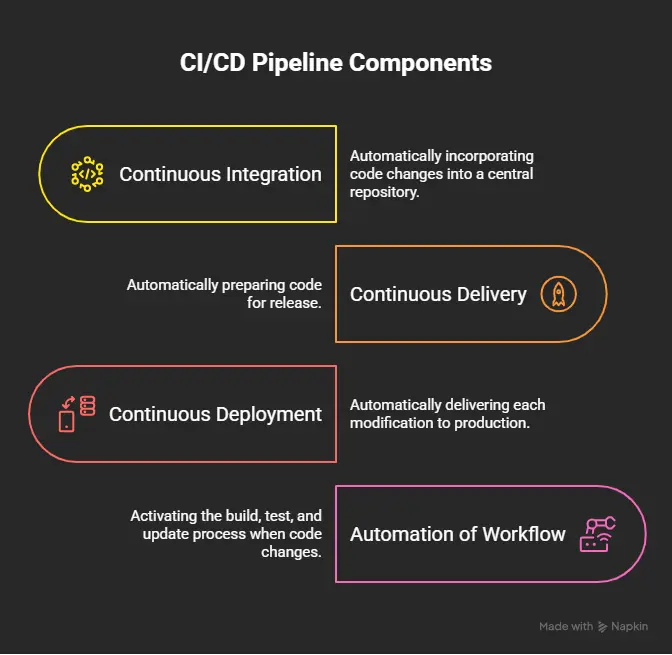
- Continuous Integration, sometimes known as CI, is the process of automatically incorporating changes to code into a central repository.
- Continuous Delivery (CD) refers to the process of automatically preparing code for release.
- Continuous deployment refers to the process of automatically delivering each modification to production.
- Automation of workflow is activated when a developer makes a change to the code. This is a great time to build, test, and update the software.
Why CI/CD Pipelines Matter?
There are several reasons why CI/CD pipelines are essential:
- Enable the release of software more quickly.
- Lessen the impact of human error on deployment
- Enhance the overall quality of the software.
- Improve teamwork and communication amongst groups
An example of a CI/CD pipeline is an assembly line for software, in which code is moved through a series of automated phases, including build, test, and deploy, before it is made available to consumers.
Understanding CI and CD Before Learning the Pipeline
What is Continuous Integration (CI)?
It is necessary for developers to regularly push changes to a central repository in order to implement continuous integration. As a component of the procedure, this is carried out.
Those ideas that are most important:
- Regular updates to the code are being implemented.
- Collecting data in an iterative manner
- Automated testing and control
Continuous Integration (CI) is a method that allows one to guarantee that newly developed code will not do any harm to functionality that has already been implemented.
What is Continuous Delivery (CD)?
The availability of software for release is guaranteed by continuous delivery, which does not care about the time of day or whether it is being provided.
Key ideas include:
- Preparation for product shipment as determined automatically
- You may always get the production-ready program.
What is Continuous Deployment?
By deploying every update to production automatically, Continuous Deployment takes things to the next level. This eliminates the need for any modifications to be manually approved before they can be implemented.
The following are the fundamental ideas:
- Public announcements that are produced solely by computerised system.
- The absence of any influence or action from human beings.
| Feature | Continuous Integration | Continuous Delivery | Continuous Deployment |
|---|---|---|---|
| Code Integration | Yes | Yes | Yes |
| Automated Testing | Yes | Yes | Yes |
| Release Ready | No | Yes | Yes |
| Auto Production Deployment | No | No | Yes |
| Manual Approval | Yes | Yes | No |
How a CI/CD Pipeline Works
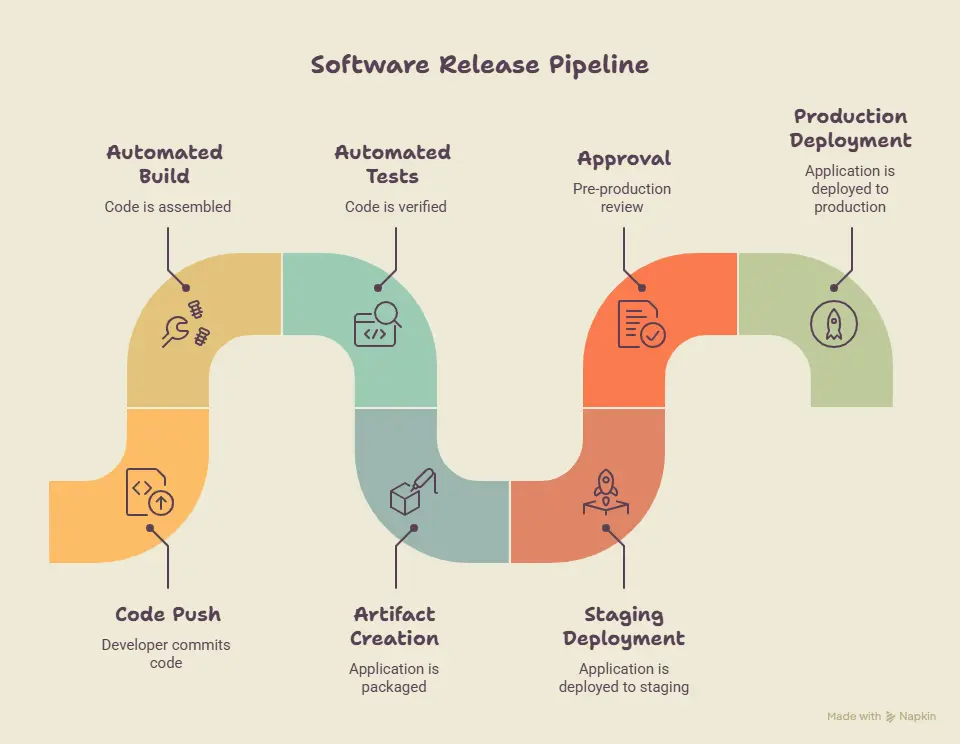
When it comes to software development, a continuous integration and continuous delivery pipeline is comparable to an automated production line. Whenever a developer makes a modification to the application, the pipeline is meant to automatically test, inspect, and prepare the application for release. When this is done, teams are able to release software rapidly and with fewer faults than they would otherwise be able to.
CI/CD Pipeline Flow
- Developer writes code – The process begins when a developer adds functionality or fixes an app.
- Code is pushed to repository—GitHub, GitLab, and Bitbucket update when new code is pushed.
- Automated build starts—Programs are assembled automatically.
- Automated tests execute—Automated tests verify code after a build.
- Artifact is created – The application is packaged as a deployable artefact if tests pass.
- Deployment to staging environment—The item is then relocated to a manufacturing model staging area.
- Approval process (if required) – Pre-production release reviews by humans or machines may be needed.
- Production deployment – The application is deployed to active production after approval.
- Monitoring and feedback—Monitoring tools track system performance after deployment.
Visual CI/CD Workflow
Developer
↓
Code Repository (GitHub/GitLab)
↓
Build Stage (Compile & Package)
↓
Test Stage (Automated Testing)
↓
Artifact Creation (Docker/JAR/WAR)
↓
Staging Environment
↓
Approval (Optional)
↓
Production Deployment
↓
Monitoring & Feedback
Stages of a CI/CD Pipeline
Stage 1: Source Code Management
- Store and manage code changes.
Popular Tools
- Git
- GitHub
- GitLab
- Bitbucket
Stage 2: Build Stage
- Convert source code into deployable applications.
Activities
- Dependency installation
- Compilation
- Packaging
Popular Tools
- Maven
- Gradle
- npm
Stage 3: Automated Testing Stage
Purpose
- Validate code quality.
Types of Testing
- Unit Testing
- Integration Testing
- Functional Testing
- Security Testing
- Performance Testing
Stage 4: Artifact Management
Purpose
- Store application packages.
Popular Repositories
- Nexus Repository
- JFrog Artifactory
- AWS ECR
Artifact versioning
There is a unique number that is assigned to each and every software package or application that is created through the utilisation of artefact versioning. The monitoring of releases, revisions, and reverts is all done for teams through the use of this program.
There are a few other builds that have different names; the versions 1.0.0, 1.1.0, and 2.0.0 are the ones that are taken into consideration. It is not difficult to recognise either the versions that have been deployed or the upgrades that have been provided.
Stage 5: Deployment Stage
- Staging Deployment
- Production Deployment
- Rollback Mechanisms
Popular tools:
- Jenkins
- Argo CD
- GitLab CI/CD
Stage 6: Monitoring and Feedback
Why Monitoring Matters?
- Metrics to Track
- Application performance
- Error rates Availability
- User experience
Popular tools:
- Prometheus
- Grafana
- ELK Stack
CI/CD Pipeline Architecture
 The following are included in a contemporary CI/CD pipeline:
- Control System for the Source
- Create a server.
- The Framework for Automated Testing
- A repository for artefacts
- An Engine for Deployment
- The Platform for Monitoring
- The manner in which they collaborate
Code flows from developers → source control → build server → testing tools → artifact storage → deployment engine → production monitoring.
CI/CD Pipeline Example
Example: Deploying an E-commerce Application
- Developer pushes code to GitHub
- GitHub triggers Jenkins
- Jenkins builds the application
- Automated tests run
- Docker image is created
- Image stored in registry
- Deployed to Kubernetes
- Monitoring tools track performance
This ensures fast, reliable, and automated delivery from code to production.
Popular CI/CD Pipeline Tools
Jenkins
- Open-source automation server.
- High customisation, large plugin ecosystem
- Best for enterprise automation workflows
Active GitHub
- Overview: GitHub-based CI/CD
- Features: No setup, easy integration
- Good for: GitHub projects
GitLab CI/CD
- An integrated DevOps suite
- Features: Full DevOps
- Most useful: Full-lifecycle automation
CircleCI
- Cloud CI/CD tool
- Fast, scalable builds
- Ideal for: Cloud-native apps
Azure DevOps
- Platform overview: MS DevOps
- Advantages: Enterprise integration
- Perfect for Microsoft ecosystem users
AWS CodePipeline
- Native CI/CD service.
- Advantages: Deep AWS integration
- Ideal for AWS cloud-first apps
Argo CD
- It is a Kubernetes GitOps deployment tool.
- Advantages: Declarative deployments
- Good for: Kubernetes
| Tool | Type | Best Use Case |
|---|---|---|
| Jenkins | CI/CD Server | Custom pipelines |
| GitHub Actions | CI/CD | GitHub projects |
| GitLab CI/CD | DevOps platform | Full lifecycle |
| CircleCI | Cloud CI | Fast builds |
| Azure DevOps | Enterprise | Microsoft stack |
| AWS CodePipeline | Cloud CI/CD | AWS applications |
| Argo CD | GitOps CD | Kubernetes deployments |
Benefits of CI/CD Pipelines
- The transmission of software more quickly
- Enhancement of the software’s quality
- Fewer instances of deployment failures
- Better teamwork among team members
- A rise in the use of automation
- Improved speed of bug discovery
- Costs of operations that are lower
Instead of manually deploying each update, continuous integration and continuous delivery (CI/CD) automatically tests and releases code within minutes, thereby decreasing downtime and the likelihood of human mistake.
Common Challenges in CI/CD Pipelines
- Construction times are slow.
Solution: Builds and caching should be optimised.
- Questionable evaluation
Solution: Maintain a stable testing environment
- Potential security flaws
Solution: Utilise security scanning that is automated.
- Advanced setups
Solution: Use templates for the pipeline.
- Distinctions in the environment
Solution: Docker containers should be used.
- Problems with deployment
Solution: Rollback strategies should be implemented.
CI/CD Pipeline Best Practices
- Automate testing as soon as possible.
- A frequent committing of code
- Maintain the speed of the pipelines.
- Build your infrastructure with code.
- Utilise scanning for security purposes.
- Monitor the condition of the pipeline.
- Make appropriate use of version control.
- Enable rollbacks that are automatic.
CI/CD Pipelines and DevOps
It is essential to the culture of DevOps to have CI/CD.
In what ways does CI/CD help DevOps?
- Creates a connection between the development and operations phases
- Promotes the use of automation
- Enhances the cooperative effort
The Advantages for Groups
- Instantaneous feedback for developers
- The operations: deployments that are stable
CI/CD Pipeline Learning Roadmap
Step 1: Learn Git
Step 2: Learn Linux
Step 3: Understand CI Concepts
Step 4: Learn Jenkins or GitHub Actions
Step 5: Learn Docker
Step 6: Learn Kubernetes
Step 7: Learn Cloud Platforms
Step 8: Build Real Projects
Real-World Companies Using CI/CD Pipelines
- Netflix
Uses CI/CD to deploy thousands of microservices daily with minimal downtime.
- Amazon
Automated pipelines are used to deploy code at regular intervals of a few seconds.
Utilises cutting-edge continuous integration tools to handle huge applications throughout the globe.
- Spotify
Maintains ongoing feature updates and experimentation through the use of CI/CD.
Maintains a regular deployment schedule for updates by utilising automated testing and deployment tools.
Web Development courses at your fingertips. Join Entri now
CONCLUSION
CI/CD pipelines are the essential building blocks of contemporary software development. They make it possible to have faster releases, higher quality, and workflows that are entirely automated. Developers can greatly improve their productivity and align themselves with industry-standard DevOps processes if they master continuous integration and continuous delivery.
| Related Articles | |
| What is DevOps? A Beginner’s Guide | DevOps Engineer Roles and Responsibilities |
| DevOps Lifecycle Explained | DevOps vs Agile: Key Differences |
Frequently Asked Questions
What is a CI/CD pipeline in software development?
A CI/CD pipeline is an automated workflow used in software development to build, test, and deploy applications efficiently and reliably.
How does a CI/CD pipeline work step by step?
A CI/CD pipeline works by taking code from a repository, automatically building it, running tests, creating artifacts, and deploying it to staging or production environments.
What are the main benefits of CI/CD pipelines?
CI/CD pipelines help improve software quality, speed up release cycles, reduce manual errors, and enable continuous software delivery.
What is the difference between CI, CD, and continuous deployment?
CI focuses on integrating and testing code frequently, CD prepares code for release, and continuous deployment automatically releases code to production.
Which tools are commonly used in CI/CD pipelines?
Popular CI/CD tools include Jenkins, GitHub Actions, GitLab CI/CD, Docker, Kubernetes, and AWS CodePipeline.
Why is CI/CD important in DevOps?
CI/CD is important in DevOps because it automates software delivery, improves collaboration between teams, and supports faster and more reliable deployments.
What is an artifact in a CI/CD pipeline?
An artifact is a packaged and versioned application file, such as a Docker image or JAR file, ready for deployment.
Can beginners learn CI/CD easily?
Yes, beginners can learn CI/CD by understanding Git, basic Linux, build tools, and simple automation tools like GitHub Actions or Jenkins.
What are the stages of a CI/CD pipeline?
The main stages include code commit, build, testing, artifact creation, staging deployment, production deployment, and monitoring.
How does CI/CD improve software quality and performance?
CI/CD improves quality by running automated tests on every change, detecting bugs early, and ensuring consistent deployments across environments.