Table of Contents
The creation of modern software requires a high level of speed, dependability, and regular upgrades. In order for organisations to accomplish these objectives, they significantly rely on DevOps approaches and automation. Both Continuous Integration (CI) and Continuous Delivery (CD) are considered to be two of the most essential ideas in the field of DevOps.
CI and CD are phrases that are frequently used together, although within the context of the software delivery lifecycle, they perform distinct functions. Continuous Integration and Continuous Delivery are sometimes confused by novices due to the fact that both include automation and collaborate closely with one another.
You will get the following knowledge from this article:
- What is meant by the term “continuous integration”
- What is meant by the term “continuous delivery”
- The distinctions between CD and CI are as follows:
- Examples taken from the real world
- CI/CD techniques that are widely used
- Best practices and the relevance of careers
Key Takeaways:
- In continuous integration, code is merged and tested automatically on a regular basis.
- Keeping code ready for publication at any time is what is meant by having a CD.
- CI is concerned with building and testing, while CD is concerned with releasing the product.
- Early detection of defects is achieved via CI, while deployment is sped up by CD.
- They work together to optimise the delivery of software, as well as speed and quality.
Build a Career in Android Development. Join Entri now
What is Continuous Integration (CI)?
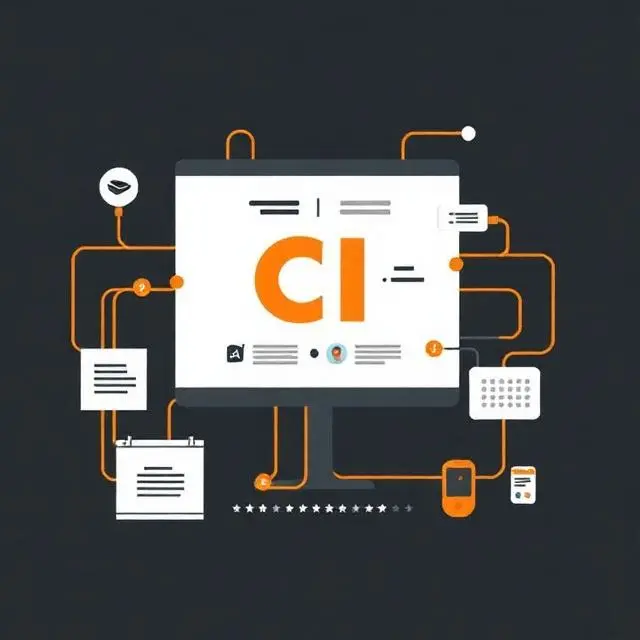
It is standard practice for software engineers to include their code modifications into a shared repository as part of a process known as Continuous Integration (CI), which is a technique of software development. In the event that new code is committed, automated procedures are activated. These operations include the construction of the application and the execution of tests. By doing so, teams are able to identify and resolve problems at an earlier stage in the development cycle, hence minimizing the likelihood that integration problems would arise at a later stage.
Continuous Integration is a method that assists teams in maintaining codebases that are stable and dependable by often testing and verifying any changes that are made to the code.
How Continuous Integration Works
Continuous Integration automates code validation before application deployment.
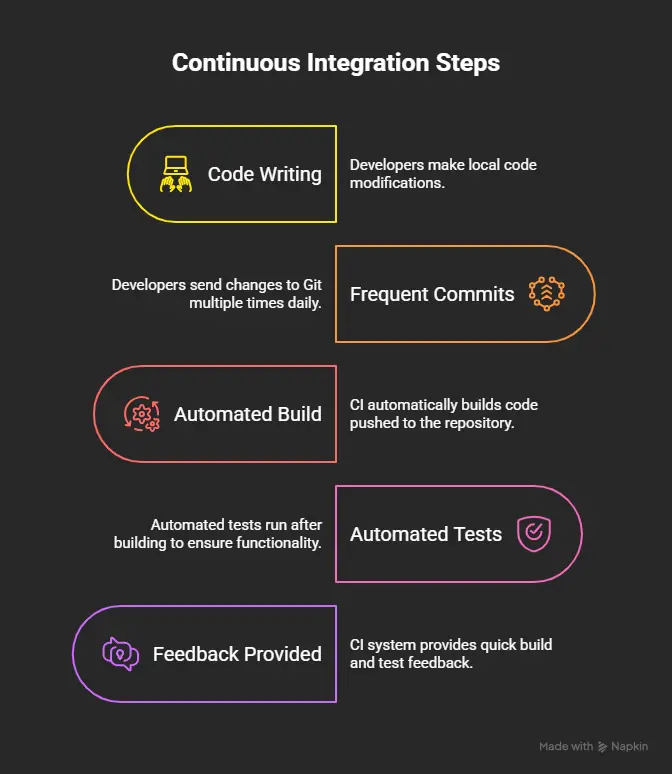
Step 1: Developer Writes Code
Developers add features, patch bugs, and improve the software. These modifications are made locally before being shared with the team.
Step 2: Code is committed frequently.
Developers send their changes to Git numerous times a day instead of waiting days or weeks. Frequent commits help find and fix issues rapidly.
Step 3: Automated Build Starts
CI automatically builds code pushed to the repository. Compiling and packaging the application code ensures its buildability. During this stage, the application code is compiled and packaged to ensure it can be successfully built.
Step 4: Automated Tests Run
After building, automated tests run. These tests may comprise unit, integration, and code quality checks. The goal is to ensure the new code does not break functionality.
Step 5: Feedback is Provided
The CI system provides quick build and test feedback. Developers are alerted of issues so they may address them before making more modifications.
Key Features of Continuous Integration
- Code Commits Often
Developers routinely incorporate changes, simplifying code merging and lowering disputes.
- Builds automatically
Every code commit starts a build process, keeping the program running.
- Automated Testing
Teams may maintain high-quality software through automated tests that check code for accuracy and stability.
- Faster Bug Detection
Code modifications quickly reveal bugs, making bug fixes cheaper.
- Coding Quality Improvement
Continuous validation helps developers to follow coding standards and write cleaner, more dependable code.
Benefits of Continuous Integration
- Reduced Integration Issues
- Faster Development Cycles
- Improved Collaboration
- Better Software Quality
What is Continuous Delivery (CD)?
Continuous Delivery (CD) is a strategy in software development based on Continuous Integration (CI) that makes sure you are able to release any change that you made right away. CD is sometimes called Continuous Integration. Once the code has successfully moved through the continuous integration pipeline, it will go on to the next set of operations, including packaging, testing, and deployment to staging environments. Once this is done, the code will break out of the pipeline.
Continuous Delivery is the practice of ensuring that an application is constantly available, not simply deployable to production. Whenever they need to, businesses can deploy new features, upgrades, and problem fixes quickly and reliably. This allows them to meet commercial needs.
How Continuous Delivery Works
An organized procedure automates release preparation in Continuous Delivery, ensuring software is always ready for deployment.
Continuous Delivery follows a structured workflow that automates the release preparation process and ensures software is always ready for deployment.
Step 1: CI Pipeline Completes
The procedure starts after the Continuous Integration pipeline finishes. The application code has been built and tested, ensuring quality.
Step 2: Application is Packaged
Validated applications are packaged as containers, binaries, or installations. This allows consistent deployment of these artifacts across environments.
Step 3: Deployment to Staging
The packed application is automatically deployed to a production-like staging environment. This lets teams test the app’s behavior after release.
Step 4: Validation and Testing
To ensure application functionality, automated and human tests are run. Performance, security, and user acceptance testing may be done now.
Step 5: Ready for Production Release
Upon successful validation, the application is production-ready. The firm can activate a release with a simple approval process.
Key Features of Continuous Delivery
- Automatic Release Preparation
Continuous Delivery automates software deployment preparation, eliminating manual labor and error.
- Production-Ready Software
The application is deployable throughout development, enabling rapid and dependable releases.
- Regular Deployments
Standardized deployment techniques guarantee software is deployed consistently throughout testing, staging, and production.
- Faster Releases
Automation greatly reduces the time it takes to move software from development to production.
Benefits of Continuous Delivery
- Lower deployment risk
More frequent and smaller releases make issues easier to discover and fix, lowering deployment failures.
- Delivering Features Faster
Companies may adapt faster to market demands by delivering new products and enhancements to users.
- Improved Client Experience
Customers gain regular updates, speedier issue fixes, and program stability.
- Regular Release
Automated workflows make deployments more efficient and less stressful for development teams.
Continuous Integration vs Continuous Delivery
Although CD and CI have different purposes, they are part of the software development lifecycle. Continuous integration focuses on regular code integration and provides code quality with automated builds and testing. Code quality is ensured. Continuous Delivery, an offshoot of Continuous Integration, makes verified software always available.
| Feature | Continuous Integration (CI) | Continuous Delivery (CD) |
|---|---|---|
| Purpose | Integrate code frequently | Prepare software for release |
| Focus | Code quality | Release readiness |
| Automation Level | Build and testing | Deployment preparation |
| Deployment to Production | No | Optional with approval |
| Main Goal | Detect issues early | Deliver software quickly |
| End Result | Validated code | Production-ready application |
Understanding the CI/CD Workflow
How CI and CD Work Together
Streamlining the distribution of software can be accomplished in two different ways. In a Continuous Flow (CI/CD), delivery and integration are performed. Continuous Integration, sometimes known as CI, is in charge of integrating new code and running tests. After the code has been audited, it is packaged, deployed, and prepared for production during the certification process.
By utilizing continuous integration and delivery, software can be delivered in a more timely manner, with improved quality, and with fewer concerns over deployment.
Learn Android Development from experts. Join Entri now
CI/CD Workflow Diagram
Developer
│
▼
Git Repository
│
▼
Continuous Integration
(Build + Test)
│
▼
Artifact Creation
│
▼
Continuous Delivery
(Staging + Validation)
│
▼
Production Release
Real-World Example of Continuous Integration
Developing an E-commerce website
Imagine a team building a huge e-commerce website with product search, shopping carts, payment processing, and order monitoring. Multiple developers work on different app elements simultaneously. Combining these modifications can be difficult without a suitable integration strategy.
Without Continuous Integration
In conventional development, engineers may work on their code for days or weeks before merging it into the main repository.
Delays in Integration
Developers may not find compatibility concerns until late in the development cycle since code is rarely merged.
Combine Conflicts
Multiple developers editing the same files or components makes integrating changes complex and time-consuming. Project delays might result from conflict resolution.
Late Bug Discovery
Bugs often remain undiscovered until integration or testing. Identifying the fundamental cause becomes more difficult and expensive after discovery.
Challenges Without CI:
- Integration efforts increased
- Many merge conflicts
- Tests last longer
- Higher production fault risk
- Slower feature delivery
With Continuous Integration
This e-commerce development team uses Continuous Integration.
Automated Testing
The CI pipeline develops and runs automated tests when a developer pushes code. This prevents new changes from breaking functionality.
Early Issue Detection
Bugs are found soon following code changes. Developers get immediate feedback and can correct issues before they affect teammates.
Develop faster
Because integration is continuous, developers spend less time addressing issues and more time implementing features. Smoother, more efficient development.
Benefits of CI:
- Frequent code integration
- Immediate feedback on code quality
- Reduced manual testing effort
- Faster bug resolution
- Improved team collaboration
Popular Tools Used in Continuous Integration
1. Jenkins
- An open-source continuous integration server.
- Build, test, and CI pipeline automation
- Advantages: Free, customisable, and supports thousands of plugins.
2. Github Actions
- Overview: Continuous integration and delivery are embedded into GitHub repositories.
- Workflow automation, software testing, and deployment
- Benefits: Simple installation and GitHub integration
3. GitLab CI/CD
- Overview: GitLab DevOps and Continuous Integration/Delivery integration.
- Use Cases: Automating construction, testing, and deployment.
- Benefits: A complete DevOps platform with built-in security.
4. CircleCI
- Overview: A cloud-based CI/CD platform.
- Applications: Software delivery and testing automation
- Excellent scalability and development speed.
5. Travis CI
- Overview: A popular tool for reviewing open-source projects using continuous integration.
- Applications: Automated builds and testing
- Advantages: Easy GitHub setup and use.
6. Azure DevOps
- Overview: Microsoft’s DevOps platform is detailed.
- CI/CD pipelines, project management
- Advantages: Enterprise-ready features and strong Azure integration
Popular Tools Used in Continuous Delivery
Jenkins
- Summary: CI/CD pipeline automation tool.
- Application build, testing, and deployment. Leads to production releases.
- Advantages: Huge plugin support, flexible, customisable.
GitLab CI/CD
- Description: GitLab’s built-in DevOps tool.
- The release lifecycle includes code commit, testing, staging, and production.
- Advantages: One-stop tool, easy automation.
Argo CD
- A Kubernetes-based GitOps tool.
- Release Lifecycle: Continuously syncs Git repository with deployed apps.
- Excellent Kubernetes support, automated sync, rollback.
AWS CodePipeline
- An overview of AWS release automation.
- Automates AWS cloud creation, test, and deployment.
- Fully managed, AWS-integrated, scalable.
Azure DevOps
- Overview: Microsoft DevOps.
- Controls CI builds and CD deployments to staging and production.
- Excellent Azure integration and enterprise readiness.
Spinnaker
- A multi-cloud continuous delivery platform.
- Release Lifecycle: Safe production deployment with rollbacks.
- Plus: Multi-cloud support, advanced release methods.
- Faster software releases
Release time is greatly reduced via automation.
- Better Software
Continuous testing finds bugs early.
- Fewer Deployment Failures
Standardised methods reduce deployment risk.
- Improved Teamwork
Shared workflows boost communication.
- Better Business Agility
Organisations can meet market demands fast.
- Better Client Satisfaction
New features and fixes arrive faster.
Common Challenges in CI and CD
Flaky Automated Tests
Problem: Productivity decreases with long execution durations.
Solution: Improve test design and stability.
Slow Pipelines
Problem: Productivity decreases with long execution durations.
Solution: Parallelize tests and optimize builds.
Infrastructure Complexity
Problem: Environment management becomes tough.
Solution: Take advantage of Infrastructure as Code.
Security Concerns
Problem: Production vulnerabilities may occur.
Solution: Pipeline security scanning is the solution.
Environment Inconsistencies
Problem: Different environments for development and production.
Solution: Use containers and conventional setups.
Best Practices for CI and CD
- Commit code frequently
- Automate everything possible
- Maintain high test coverage
- Monitor pipeline performance
- Implement security scanning
- Use Infrastructure as Code
- Keep deployments small and frequent
CI vs CD: Which Should You Learn First?
Software integration, building, and testing are the goals of Continuous Integration (CI). Sets the stage for software automation. When CI is complete, CD will automate deployment and application release. CI is second for deployment readiness and stability.
Why Continuous Integration Comes First
Building a solid foundation for continuous integration is essential to achieving continuous delivery. The automation of delivery becomes dangerous when it is not accompanied by dependable builds and testing.
Recommended Learning Path
Step 1: Git and version control
Pull requests, branching, and merging are all concepts that you need to become familiar with.
Step 2: Continuous Integration
The level of your knowledge regarding automated builds and testing ought to be adequate for the task that you do.
Step 3: Automated testing
To better understand the many forms of testing, such as end-to-end testing, integration testing, and unit testing, you should educate yourself.
Step 4: Continuous Delivery
It is recommended that you proceed with the construction of deployment pipes.
Step 5: Docker and Kubernetes
Through the development of your abilities, you can improve your knowledge of containerisation and orchestration.
Step 6: Cloud Platforms
There are three cloud computing platforms that are recommended for conducting research: Google Cloud, Microsoft Azure, and Amazon Web Services.
Beginner Learning Roadmap
Git
↓
CI
↓
Testing
↓
CD
↓
Docker
↓
Kubernetes
↓
Cloud Platforms
Career Importance of CI and CD
Organizations seek professionals who can automate software delivery, improve reliability, and accelerate releases.
Job Roles That Require CI/CD Knowledge
- DevOps Engineer
- Cloud Engineer
- Site Reliability Engineer (SRE)
- Platform Engineer
- Release Engineer
Essential Skills to Learn Alongside CI/CD
- Linux
- Git
- Docker
- Kubernetes
- AWS
- Terraform
Web Development courses at your fingertips. Join Entri now
Conclusion
Software development is accelerated through the use of continuous integration and delivery. These techniques enhance the quality of the code, the release processes, and the happiness of the customers. CI will release software, but CD will detect issues at an earlier stage. CI/CD is necessary for processes such as software engineering, cloud computing, and DevOps. Get familiar with Git and containerisation first.
| RELATED POSTS | |
| What is DevOps? A Beginner’s Guide | DevOps Engineer Roles and Responsibilities |
| DevOps Lifecycle Explained | DevOps vs Agile: Key Differences |
Frequently Asked Questions
What is the difference between Continuous Integration and Continuous Delivery?
Continuous Integration focuses on frequently merging and testing code changes, while Continuous Delivery ensures the application is always ready for release to production.
Why is Continuous Integration important in DevOps?
CI helps detect bugs early, reduces integration issues, and improves code quality by automating builds and tests whenever code is committed.
What are the main benefits of Continuous Delivery?
Continuous Delivery reduces deployment risks, speeds up feature releases, improves customer experience, and ensures consistent and reliable software releases.
What tools are commonly used for CI/CD?
Popular tools include Jenkins, GitHub Actions, GitLab CI/CD, CircleCI, Travis CI, and Azure DevOps.