Table of Contents
The construction and infrastructure industry has never been changing as fast – we’re seeing a seismic shift away from manual modelling, tedious drafting tasks, and laborious co-ordination workflows. The sheer size and complexity of some projects mean that these old methods just aren’t up to the job anymore. And at the heart of this change is a brand new role – the BIM Automation Specialist
If you’re a BIM student, a civil engineer, an architect, or an MEP professional, 2026 is a good moment to start thinking seriously about whether a BIM automation role might be for you. Because the truth is – for top firms, BIM automation is no longer an optional extra, its becoming a key skill that every major construction, design and engineering organisation needs to have.
This guide is here to help – what a BIM Automation Specialist is all about, what they do, how to become one, the skills you’ll need, and what to expect from salaries – and how learning tools like the Entri BIM Course can help you on your way. We’ve aimed to write this guide with a long-term view, so its relevance doesn’t fade over time – its a clear and practical resource that’ll stay useful.
Who Is a BIM Automation Specialist

A BIM Automation Specialist is a pro who uses a mix of programming, visual scripting, and logic to make BIM workflows run faster and more smoothly. They design systems that automate the drudge work, saving time, cutting out errors, and ensuring consistency across the board – instead of just repeating the same tasks over and over manually.
To put it simple: a BIM Automation Specialist:
- gets rid of repetitive modelling and documentation tasks by automating them
- writes clever scripts that turbo-charge BIM workflows
- links BIM up with other tools and platforms – so all the different bits of a project are talking to each other as they should
- drives up productivity across design and build teams
This role sits at the crossroads of BIM, data and code
Get Career-Oriented BIM Certification Course with Expert Mentors! Get a free demo here!
Step-by-Step Guide: How to Become a BIM Automation Specialist
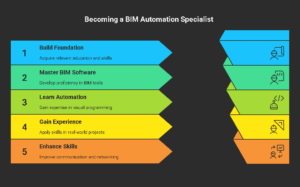
Step 1: Get What a BIM Automation Specialist Does
A BIM Automation Specialist is like a superhero for the construction project. You model in a virtual environment and automate the drudgery. Imagine catching a pipe that is about to crash into a wall prior to it being built, hours and hours and tons of dollars saved. Your work simplifies, reduces costs, and minimizes errors in projects. For example you could create a script to check a building model for problems in minutes rather than spending hours to do so. It is a combination of architecture, engineering and tech know-how. You will collaborate with others, work on difficult problems and use tools such as Revit and Dynamo. This role can help you focus in on the skills you will excel at.
Step 2: Build a Solid Starting Point
Kick things off with a degree in architecture, civil engineering, or construction management. These teach you the nuts and bolts of building design, construction processes, and managing projects. A bachelor’s degree usually does the trick, though some top jobs might ask for a master’s. Already in the industry? No need to start over. Sign up for Entri’s BIM Course to get hands-on training in Revit and Navisworks. It covers 3D modeling, digital design basics, and how projects come together. You’ll learn about building systems and industry rules. A strong foundation like this sets you up to tackle automation skills with confidence.
Step 3: Get Good at BIM Software
To be a top BIM Automation Specialist, you need to rock the right software. Entri’s BIM Course dives deep into Autodesk Revit, the go-to tool for building detailed 3D models. You’ll learn to create walls, floors, roofs, and fixtures like a pro. The course also covers Navisworks, which helps spot problems like clashing systems before construction starts. Then there’s Dynamo, a game-changer for automating tasks in Revit, like creating schedules or placing components. Spend three to six months getting comfy with Revit, then two months each on Navisworks and Dynamo through Entri’s guided lessons and real-world projects. Practice makes perfect, so build models and test your skills.
Step 4: Learn to Automate with Visual Programming
Automation is what makes a BIM Automation Specialist stand out. Entri’s BIM Course teaches you Dynamo, a visual programming tool for Revit. With Dynamo, you can create scripts to handle repetitive tasks, like updating model details or checking for errors. Imagine writing a script that places every door in a building model automatically—hours saved! If you’re into coding, Entri’s course also dips into Python for custom scripts to supercharge your automation. Spend two to three months practicing with Entri’s step-by-step assignments. Try automating something like a floor plan to get the hang of it. The more you practice, the more you’ll feel like a wizard.
Step 5: Get Real-World Experience
Nothing beats hands-on work to make you shine. If you’re just starting, look for internships or entry-level jobs at architecture or engineering firms. Entri’s BIM Course includes live projects that mimic real BIM workflows, so you can practice Revit and Navisworks in action. If you’re already in construction, start using BIM in your daily tasks, like building 3D models or running clash checks. Share your projects on online groups like Reddit’s r/BIM to get tips and feedback. Build a portfolio with three to five projects—like a hospital layout or a clash detection report—using Entri’s projects to show off your skills. A killer portfolio grabs employers’ attention.
Step 6: Sharpen Your People Skills
Tech skills are awesome, but you’ll need more to succeed. BIM Automation Specialists work with architects, engineers, and contractors, so you’ve got to communicate clearly. Explain tricky tech stuff in a way anyone can get. Problem-solving is huge, you’ll fix model issues or streamline workflows on tight deadlines. Good time management keeps you on top of multiple projects. Entri’s BIM Course offers mentorship and team assignments to practice these skills. Try presenting your work in online forums to build confidence. Great people skills make you a team favorite and open doors to roles like BIM Coordinator or Manager.
Step 7: Keep Up with What’s New
The BIM world moves fast. New tools, like AI-powered design checkers, pop up every year. To stay ahead, check out blogs like BIM Corner or follow industry pros on LinkedIn. Entri’s BIM Course keeps you in the loop on updates to Revit, Dynamo, and standards like ISO 19650. Hit up webinars or events like Autodesk University to catch the latest features. For example, a 2025 Revit update might speed up model processing by 30%. Join online communities to swap scripts and ideas. Spend an hour or two each week learning new tricks to keep your projects sharp and efficient.
Step 8: Connect with the Right People
Networking can open big doors. Go to industry events like BIM World or local AEC meetups. Link up with BIM experts on LinkedIn and share your Entri BIM Course projects. Join forums like BIM Cafe’s community to ask questions and learn from seasoned pros. A mentor might share a Dynamo script that saves you hours. Reach out to recruiters at companies like AECOM or Skanska. A solid network can lead to job offers or freelance gigs. Try connecting with five to ten pros each month to build a circle that boosts your career.
Step 9: Grab Certifications
Certifications show you mean business. They prove your skills and make your resume pop. Check out the next section for the best ones to go for. Start with something like Autodesk Certified Professional in Revit, which Entri’s BIM Course helps you prep for. Aim to earn one every six months to keep growing. Certifications also teach you global standards like ISO 19650, key for international projects. Study hard to nail the exams first try—Entri’s got your back with practice materials.
Step 10: Land Your Dream Job
With skills, experience, and certifications, you’re ready to apply for jobs. Target roles at architecture firms, engineering companies, or big players like Turner Construction. Customize your resume to highlight Revit, Dynamo, and your Entri BIM Course projects. Add a link to your portfolio to show off your work. Prep for interviews by practicing questions like how you’d automate a task in Revit. Show how you save time and cut errors. If you’re new, aim for junior roles with salaries around $55,000 to $70,000 a year in the U.S. With a few years under your belt, you could pull in $80,000 or more as a senior specialist.
Master BIM and Elevate Your Career – Enroll Today!
Stay ahead in the construction and design industry with our comprehensive BIM Course! Learn Building Information Modeling (BIM) from experts, gain hands-on experience with top software, and boost your career prospects. Join now and become a certified BIM professional!
Know MoreCertifications to Boost Your Profile
Certifications make you a standout candidate. They show employers you’re ready to tackle real projects. Here’s a rundown of the best ones for a BIM Automation Specialist in 2026, with Entri’s BIM Course as your prep partner:
Autodesk Certified Professional (ACP) in Revit
This badge proves you’re a Revit rockstar. It tests your skills in modeling, documentation, and project management with multiple-choice questions and hands-on tasks. Entri’s BIM Course gets you ready with Revit training and practice projects. The exam costs $150-$200 and takes about two months to prep for. Employers love this for jobs needing advanced Revit skills. Grab this one first to set a strong foundation.
Certified BIM Manager (AGC or RICS)
Offered by the Associated General Contractors (AGC) or Royal Institution of Chartered Surveyors (RICS), this shows you can lead BIM teams and manage workflows. It covers project coordination, standards, and processes. The exam needs some experience and costs $200-$300. Entri’s BIM Course aligns with AGC standards to help you study. It’s perfect for stepping into leadership roles. Aim for this after a couple of years in the field.
ISO 19650 Certification
This global standard proves you know BIM practices for international projects. It focuses on managing information and working with teams. Offered by groups like BSI, it costs $150-$250. Entri’s BIM Course covers ISO 19650 basics through practical lessons. It’s a must for jobs with global firms. Get this to boost your resume for international work.
Dynamo for Revit Certification
Some platforms offer certifications for Dynamo, testing your ability to automate Revit tasks. You’ll create scripts for things like placing components or checking clashes. Exams cost $100-$200. Entri’s BIM Course includes Dynamo training with hands-on projects to get you ready. This is key for automation-heavy roles. Go for it once you’re confident with Dynamo basics.
CanBIM Professional Certification
In Canada, CanBIM shows you’re a pro at BIM tools and workflows. It’s great for North American projects and covers Revit, Navisworks, and standards like ISO 19650. The exam costs $200-$300 and takes one to two months to prep for. Entri’s BIM Course offers training to help you pass. This certification boosts your cred in the U.S. and Canada.
Revizto Expert Certification
Revizto’s certification focuses on clash detection and issue tracking. Level 1 (Expert 1) costs $199 and covers BIM basics and Revizto tools. Entri’s BIM Course includes clash detection training with Navisworks, which pairs well with Revizto skills. It’s ideal for complex projects. Add this to your resume for niche expertise.
Start with one or two certifications, like Autodesk’s Revit ACP through Entri’s BIM Course, then add Dynamo or ISO 19650. Each takes one to three months to prepare. Use Entri’s resources to study and practice. These badges show employers you’re ready to hit the ground running.
Get Career-Oriented BIM Certification Course with Expert Mentors! Get a free demo here!
Core Responsibilities of a BIM Automation Specialist
A typical day for a BIM Automation Specialist would probably look a bit like this:
1. Putting Together Automation Scripts
- We’re talking using Dynamo to craft some pretty fancy parametric workflows in Revit, and in some cases, we’d actually be using Python to tackle tougher logic and data processing tasks.
- And the other thing that’s key here is building up some reusable automation libraries to make standardized tasks easier to roll out.
2. Getting Different Tools to Talk to Each Other
- Connecting Revit to some external data tools like Excel and Power BI, as well as BIM 360 and even cloud APIs, and weaving all that together in a way that makes sense.
- Automating data transfers between modeling tools and management platforms – getting the different bits of the puzzle to fall into place.
3. Keeping an Eye on Model Quality
- Setting up automated checks to make sure our BIM work is up to scratch and in line with industry standards.
- Keeping an eye on consistency – making sure parameters, naming conventions, and object classification all are spot on.
4. Working with BIM Teams
- Tricking out colleagues on the automation workflows.
- And if things go wrong, as they sometimes do, sorting out script errors and beefing up the performance.
5. Keeping Everyone in the Loop
- Churning out automated reports for project managers, with all the info they need to keep pushing the project forward.
- Keeping everyone up to speed with real-time model data, via dashboards that update as things change.
Conclusion
Becoming a BIM automation specialist is a job that’s really satisfying – it involves taking all that BIM know-how and pairing it with some coding magic and real-world problem-solving skills. By 2026 and onwards, the need for folk with this skillset is only going to grow, as the AEC industry gets more and more comfortable with digital ways of working and automation that’s actually intelligent.
If you are just starting out in this, then beginning with building a solid base of BIM knowledge is probably a good idea. Also start with a small set of automation tools and gradually build up through real-world projects – the more you can challenge yourself, the better. To be honest, structured learning (like the BIM course on Entri) really helps here, it will keep you on track, make you feel more confident and all in all give you a kick up the backside to get a successful career going.
Master BIM and Elevate Your Career – Enroll Today!
Stay ahead in the construction and design industry with our comprehensive BIM Course! Learn Building Information Modeling (BIM) from experts, gain hands-on experience with top software, and boost your career prospects. Join now and become a certified BIM professional!
Know MoreFrequently Asked Questions
What Does a BIM Automation Specialist Do Daily?
A BIM Automation Specialist spends their day making construction projects smoother using Building Information Modeling (BIM) and automation tools. Picture yourself at a desk, firing up Autodesk Revit to build or tweak 3D models of buildings, like a school or an office tower. You might create a model with walls, doors, and pipes, ensuring everything fits perfectly. Then, you switch to Dynamo, a tool taught in Entri’s BIM Course, to write scripts that automate tasks, like placing windows across a floor plan in minutes instead of hours. You’ll also use Navisworks to check for clashes, like a duct hitting a beam, before construction starts. Part of your day involves meeting with architects or engineers to understand project needs or explain your fixes.
Do I Need a Degree to Become a BIM Automation Specialist?
You don’t always need a degree to become a BIM Automation Specialist, but it helps. Most employers look for a bachelor’s in architecture, civil engineering, or construction management because these teach you how buildings work—think design, materials, and project flow. Without a degree, you can still break in by showing strong skills and experience. Entri’s BIM Course is a game-changer here, offering practical training in Revit, Navisworks, and Dynamo without requiring a formal degree. You’ll learn to create 3D models, spot issues, and automate tasks like a pro. If you’re already in construction, say as a drafter or technician, you can use Entri’s course to add BIM skills to your toolbox. The course’s live projects let you practice real-world tasks, like building a digital model of a hospital wing. Pair that with a portfolio of your work, and you’re competitive, degree or not. Certifications, like Autodesk’s Revit ACP, which Entri prepares you for, also boost your resume.
How Long Does It Take to Become a BIM Automation Specialist?
The time to become a BIM Automation Specialist depends on your starting point, but plan for 1-2 years to go from beginner to job-ready. If you have a background in architecture or engineering, you’re halfway there. Start with Entri’s BIM Course, which takes about 4-6 months to complete, teaching you Revit, Navisworks, and Dynamo. You’ll spend 3 months learning Revit to build 3D models, then 2 months each on Navisworks for clash detection and Dynamo for automation.
What Skills Are Most Important for a BIM Automation Specialist?
A BIM Automation Specialist needs a mix of tech and people skills to shine. Top of the list is mastering BIM software like Autodesk Revit for creating 3D models of buildings. You’ll build everything from walls to HVAC systems. Entri’s BIM Course teaches you Revit hands-on, so you’re modeling like a pro in months. Next, learn Navisworks to catch clashes, like pipes hitting beams, before they cause costly delays. Dynamo is the big one—it’s a visual programming tool for automating repetitive tasks, like updating model data or placing fixtures. Entri’s course covers Dynamo, showing you how to write scripts that save hours. If you know Python, you can level up with custom automation scripts. Beyond tech, communication is huge.
Can I Become a BIM Automation Specialist Without Coding Experience?
Yes, you can become a BIM Automation Specialist without coding experience! While coding helps, it’s not a must. The key is learning BIM software like Revit and Navisworks, which don’t require coding. Revit lets you build 3D models of buildings, and Navisworks spots issues like clashing systems. Entri’s BIM Course teaches both with step-by-step lessons, no coding needed. The automation part comes from Dynamo, a visual programming tool that’s beginner-friendly. Instead of writing code, you drag and drop “nodes” to create scripts, like automating door placement in a model.
How Much Can a BIM Automation Specialist Earn in 2026?
Salaries for BIM Automation Specialists in 2026 are solid, reflecting the high demand for these skills. Entry-level roles in the U.S. typically pay $55,000 to $70,000 a year, depending on the city and company. Think architecture firms or big construction companies like Turner Construction. With 2-3 years of experience, you can jump to $80,000 or more as a senior specialist. Top pros, like BIM Managers, can earn $100,000+ in high-demand areas like New York or San Francisco. Your pay depends on skills, certifications, and experience. Mastering Revit, Navisworks, and Dynamo—taught in Entri’s BIM Course—makes you a hot hire. Certifications like Autodesk’s Revit ACP or ISO 19650, which Entri preps you for, can push your salary higher by proving your expertise.
What’s the Best Way to Build a Portfolio as a BIM Automation Specialist?
A killer portfolio is your ticket to landing BIM Automation Specialist jobs. It shows employers you can handle real projects. Start by including 3-5 projects that highlight your skills in Revit, Navisworks, and Dynamo. Entri’s BIM Course is perfect for this—it offers live projects like creating a 3D model of a building or automating a task, like generating a material schedule. Pick projects that show different skills: one could be a detailed Revit model of a school, another a Navisworks clash detection report, and a third a Dynamo script that places fixtures automatically.
How Does Entri’s BIM Course Help Me Become a BIM Automation Specialist?
Entri’s BIM Course is your fast track to becoming a BIM Automation Specialist. It’s built for beginners and pros alike, teaching you the tools and skills employers want in 2026. The course covers Autodesk Revit for creating 3D building models, Navisworks for spotting issues like clashing systems, and Dynamo for automating tasks like updating designs or placing components. You’ll get hands-on practice through live projects, like modeling a hospital wing or writing a script to automate door placement. These projects mimic real-world work, so you’re ready for the job. Expert mentors guide you, offering tips and feedback to sharpen your skills.
What Are the Biggest Challenges for a BIM Automation Specialist?
Being a BIM Automation Specialist is rewarding but comes with challenges. One big hurdle is mastering complex software like Revit and Dynamo. These tools take months to learn, and mistakes in models can cause costly project delays. Entri’s BIM Course helps by breaking down Revit, Navisworks, and Dynamo into clear lessons with live projects, so you practice real tasks like modeling a building or automating a schedule.
Why Is 2026 a Great Year to Become a BIM Automation Specialist?
2026 is the perfect time to become a BIM Automation Specialist because construction is booming, and companies need pros who can make projects faster and cheaper. The push for sustainable buildings and smart cities is driving demand for BIM skills. Firms are using tools like Revit and Dynamo to cut errors and save millions on projects like skyscrapers or green homes. Entri’s BIM Course teaches you these tools—Revit for 3D modeling, Navisworks for clash detection, and Dynamo for automation—through hands-on projects that match real-world needs. You’ll learn to automate tasks like placing fixtures or checking designs, skills employers crave. Salaries are strong, starting at $55,000-$70,000 for newbies and climbing to $80,000+ for experienced specialists.