

Every month, an HR executive copies attendance data into a payroll sheet, checks it line by line, mails payslips one by one and answers the same twenty questions about leave balances. None of it needs deep judgement, and all of it can go wrong when someone is tired. This is where automation in HR helps.
HR automation means using software to complete repetitive, rule-based HR tasks with little or no manual effort. This lesson covers what to automate, what to keep human, the benefits and risks, how to start, and what automation means for HR jobs.
Automation, AI and why the difference matters
| Automation | AI | |
|---|---|---|
| How it works | Follows fixed rules you define | Learns patterns from data |
| Example | Sends an offer letter when a manager approves | Ranks candidates by predicted fit |
| Predictability | Same input, same output | Output can vary and needs checking |
| Main risk | Automating a bad process | Bias and unexplained decisions |
Most HR automation is rule-based workflow: forms, approvals, reminders, calculations and records. AI adds prediction and language ability on top. Our lesson on AI use cases in HR covers the AI side in detail.
HR tasks that suit automation
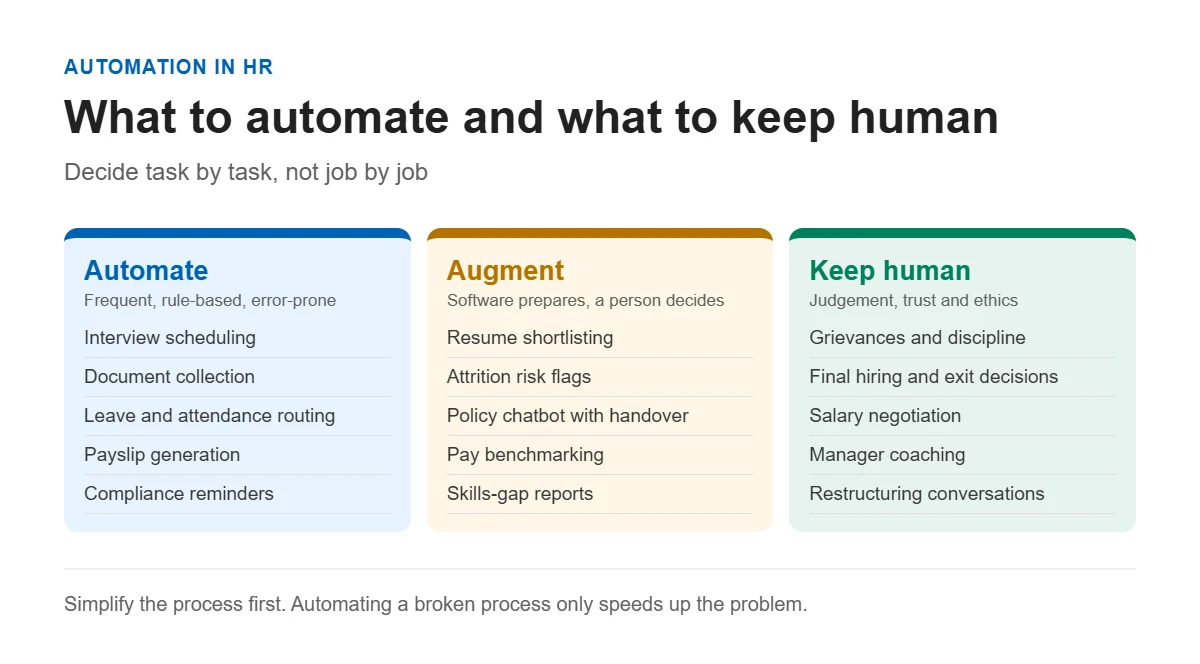
What to automate, augment and keep human in HR.
| HR area | Task | What automation does |
|---|---|---|
| Recruitment | Posting jobs, scheduling interviews, sending status emails | Triggers messages and calendar invites |
| Onboarding | Collecting documents, creating accounts, sending welcome tasks | Runs a checklist and reminds new joiners |
| Payroll | Attendance import, salary calculation, statutory deductions, payslips | Calculates and generates outputs, with exceptions flagged |
| Leave and attendance | Balance checks, approvals, regularisation | Routes requests and updates records |
| Employee queries | Policy and payslip questions | Chatbot answers common questions, hands over complex ones |
| Compliance | Filing reminders, record retention, audit trails | Alerts owners before deadlines |
| Reporting | Headcount and attrition dashboards | Refreshes data automatically |
Many of these workflows sit in one system that holds employee records.
Tasks to keep human
Automate the process around these tasks, but keep a person in charge of the decision:
- handling grievances, harassment complaints and disciplinary cases
- final hiring, promotion and termination decisions
- salary negotiation and counter-offers
- coaching managers and resolving team conflict
- explaining difficult news such as restructuring
- judging culture fit, potential and ethics
Benefits of HR automation
- Time saved. Hours on data entry move to advisory work.
- Fewer errors. Rules apply the same way each time.
- Faster service. Employees get answers and approvals sooner.
- Better compliance. Deadlines and records are tracked.
- Better data. Clean, connected records make reporting possible.
- Better experience. Candidates and new joiners get quick, consistent communication.
Risks and limits
- Automating a broken process. A confusing approval chain only becomes a faster confusing approval chain.
- Poor data. Wrong inputs create wrong outputs at scale.
- Loss of the human touch. Employees in distress should not be sent to a chatbot loop.
- Privacy and security. HR data is sensitive. India’s Digital Personal Data Protection Act, 2023 sets obligations for handling personal data, so check consent, access control and vendor terms.
- Bias in AI-assisted steps. Where automation includes scoring or ranking, test for unfair patterns and keep human review.
How to start: a five-step approach
- Map the process. Draw each step, who does it and how long it takes.
- Simplify first. Remove steps that exist only by habit.
- Pick candidates. Look for tasks that are frequent, rule-based and error-prone.
- Pilot one workflow. For example, new-joiner onboarding for one department.
- Measure and improve. Track time saved, error rate and employee feedback, then expand.
Illustrative example: an HR team handles 40 new joiners a month. Manual onboarding takes about 3 hours of HR time per person for forms, account requests and reminders. If a workflow cuts this to 1 hour, the team saves about 80 hours a month, which can go to induction quality and manager follow-up. Figures are illustrative.
The impact of automation on HR jobs
The effect is on tasks first, jobs second.
- Transaction-heavy roles shrink or change. Data entry and manual record-keeping roles are most exposed.
- Advisory roles grow. HR business partners, workforce planners and employee-experience specialists gain importance.
- New roles appear. Examples are HR technology specialist, people analyst and HR process designer.
- Every role needs digital skills. Even a generalist must work with dashboards, workflows and chatbots.
HR professionals can respond by learning how their systems work, building an understanding of HR data, and moving up the value chain from processing to problem-solving.
A simple automation checklist
- ☐ Is the task frequent and rule-based?
- ☐ Is the process already simple and documented?
- ☐ Is the data accurate and complete?
- ☐ Is there a human check for exceptions and sensitive cases?
- ☐ Are privacy and access controls in place?
- ☐ Do we know how to measure success?
