

Not long ago, a typical HR department ran on paper files, attendance registers and a dozen Excel sheets that only one person fully understood. Finding an employee’s joining date meant opening a cabinet. Preparing a headcount report took two days.
A human resource information system replaces that with one central system. For anyone starting in HR today, knowing how an HRIS works is as basic as knowing Excel.
What is HRIS?
HRIS stands for human resource information system. It is software that stores employee data in one central place and supports the core administrative processes of HR, such as records, attendance, leave, payroll, benefits and reporting.
The key word is information. An HRIS is first a reliable database of people information: who works here, in what role, at what salary, reporting to whom, since when. Everything else HR does depends on that data being correct.
Most HRIS platforms today are cloud-based and include a self-service portal, so employees can update their own details, apply for leave and download payslips without emailing HR.
Core modules of an HRIS
Different vendors package features differently, but most HRIS platforms are built around the same core modules.
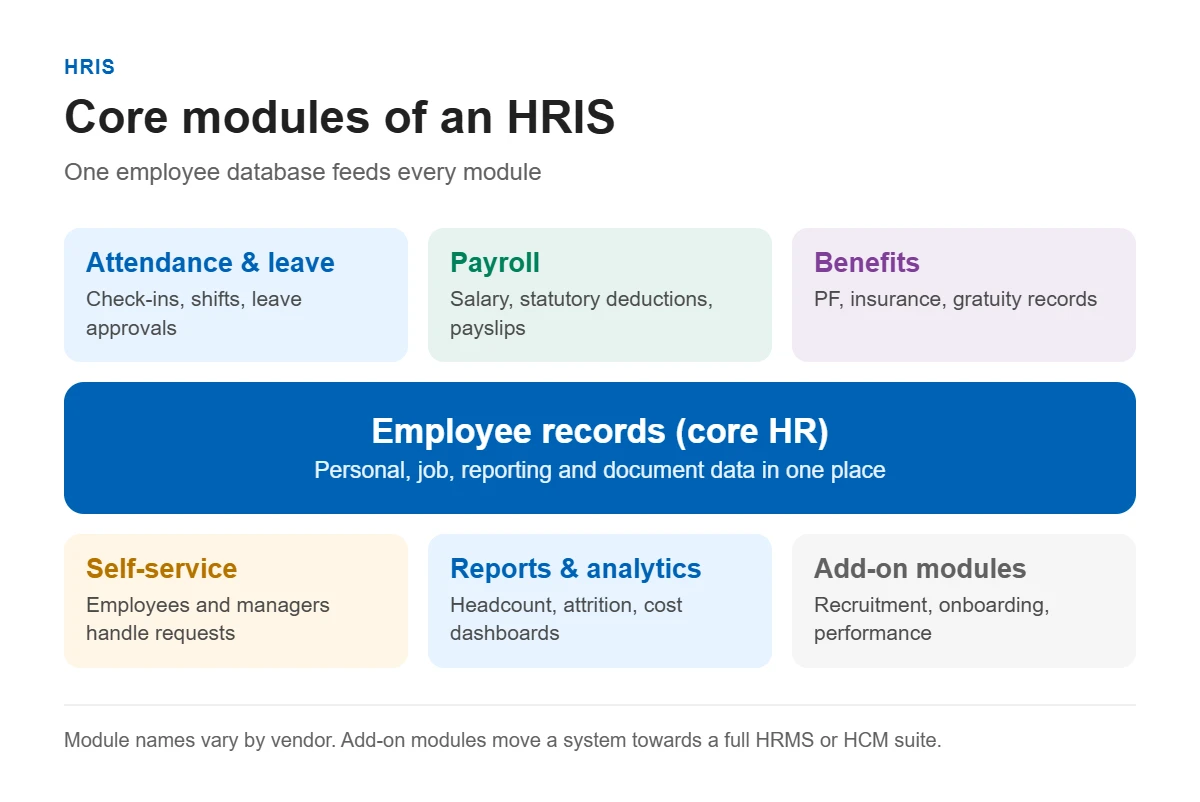
Core modules of an HRIS around one employee database.
Employee records (core HR)
The central employee database: personal details, job information, reporting lines, documents, contracts and employment history. Every other module draws from here.
Attendance and leave
Captures attendance from biometric devices, mobile apps or web check-ins, manages shifts and holidays, and handles leave applications and approvals.
Payroll
Calculates salaries from attendance and salary structures, applies statutory deductions, generates salary slips and prepares statutory reports. Some HRIS platforms include payroll. Others connect to a separate payroll system.
Benefits administration
Manages enrolment and records for health insurance, provident fund, gratuity and other benefits.
Employee self-service (ESS) and manager self-service
Portals where employees view payslips, update details and raise requests, and where managers approve leave, attendance and expenses.
Reporting and analytics
Headcount, attrition, leave trends, payroll cost and compliance reports, often with dashboards that update in real time.
Many systems also include modules for recruitment and applicant tracking, onboarding, performance reviews and learning, which moves them closer to a full HRMS or HCM suite.
How an HRIS works in practice
Take a new joiner as an example. The recruiter marks the candidate as hired, and the profile moves into the HRIS. The new employee fills in personal details and uploads documents through the self-service portal before day one. IT gets an automatic request for a laptop and email ID. On joining, attendance starts flowing in from the biometric device, leave balances are set by policy, and at month-end payroll picks up the attendance and salary structure automatically.
No one re-types the same data four times, which is where most HR errors used to come from. If you’d like to see the human side of that same joining journey, read our guide to what a smooth first week looks like for new hires.
HRIS vs HRMS vs HCM
These three terms are often used interchangeably, and vendors don’t always agree on the boundaries. Traditionally, though, they differ by scope.
| HRIS | HRMS | HCM | |
|---|---|---|---|
| Full form | Human resource information system | Human resource management system | Human capital management |
| Focus | Employee data and core HR administration | HRIS features plus broader process management | Strategic, end-to-end talent and workforce management |
| Typical features | Records, attendance, leave, payroll, benefits, reporting | All of HRIS plus recruitment, onboarding, performance, time management | All of HRMS plus learning, succession, compensation planning, workforce planning, engagement |
| Best for | Getting core HR organised | Running most HR processes in one place | Large organisations managing talent strategically |
In India, the word HRMS is the one you’ll hear most often in job descriptions and vendor marketing, and many products sold as “HRMS” or “HR software” cover the same ground an HRIS does. When evaluating a system, look at the actual modules rather than the label.
One thing to know when you search the term: many state government departments in India run their own employee portals named “HRMS” for salary slips and service records. Those are specific government systems, not the general category of HR software described here.
Who uses an HRIS?
- HR operations teams maintain records, attendance, leave and documents.
- Payroll teams run salary processing and statutory reports.
- HR managers and business partners use reports and dashboards for decisions.
- Managers approve requests and view team information.
- Employees use self-service for payslips, leave and personal details.
- Finance and leadership use headcount and cost reports.
There’s often also an HRIS analyst or HRIS administrator: the person who configures the system, manages access, maintains data quality and builds reports. It’s a growing role for HR professionals who enjoy both people processes and technology.
Keeping HRIS data safe
An HRIS holds some of the most sensitive data in a company: salaries, bank details, ID numbers, health information and disciplinary records. Basic safeguards include:
- role-based access, so people see only what their job requires
- strong passwords and two-factor login
- regular access reviews, especially when people change roles or leave
- data retention rules, so old records aren’t kept longer than needed
- choosing vendors with recognised security certifications and clear data-protection terms
India’s Digital Personal Data Protection Act also places obligations on organisations that process personal data, which includes employee data held in HR systems. HR teams should work with legal and IT to understand what applies to them.
In the next two lessons, we look at the most widely used HRIS software and the specific benefits a company gets from implementing one.
If you’re preparing for HR roles where HRIS or HRMS tools are part of daily work, an HR course with hands-on HR software practice can help you get comfortable with them before your first job.
