Table of Contents
Retail investing has exploded across India over the past few years. Millions of new investors are entering the equity markets every month. Young professionals, homemakers, and experienced traders all want to track their money on the go. To make this easier, a highly anticipated tool has entered the digital space.
The Google Finance Android app is finally live. An earlier Android version of Google finance app was removed from Google Play Store back in 2015. Hence, for more than 10 years, users had to access this service through mobile web browsers or Google Search shortcuts.
The wait is now over. This standalone app is built specifically for mobile screens. It combines clean design with smart features. It aims to help Indian retail investors monitor market indices, domestic shares, global trends, and digital assets.
Learn Stock Marketing with a Share Trading Expert! Explore Here!
Key Takeaways
- A Dedicated Experience: Google has launched a standalone Android application for its finance platform.
- AI Integration: The tool uses smart technology to explain sudden price movements.
- Global Access: You get real-time market tracking, curated financial news, and watchlists on your phone.
- Web Feature Upgrades: The web version brings out-of-beta features like portfolio uploads via screenshots or PDFs, which will move to mobile soon.
- Future Roadmap: Live earnings calls and deep portfolio metrics will roll out to the mobile version in the coming months.
The Big Launch: What is the Google Finance Android App?
1: What is a stock?
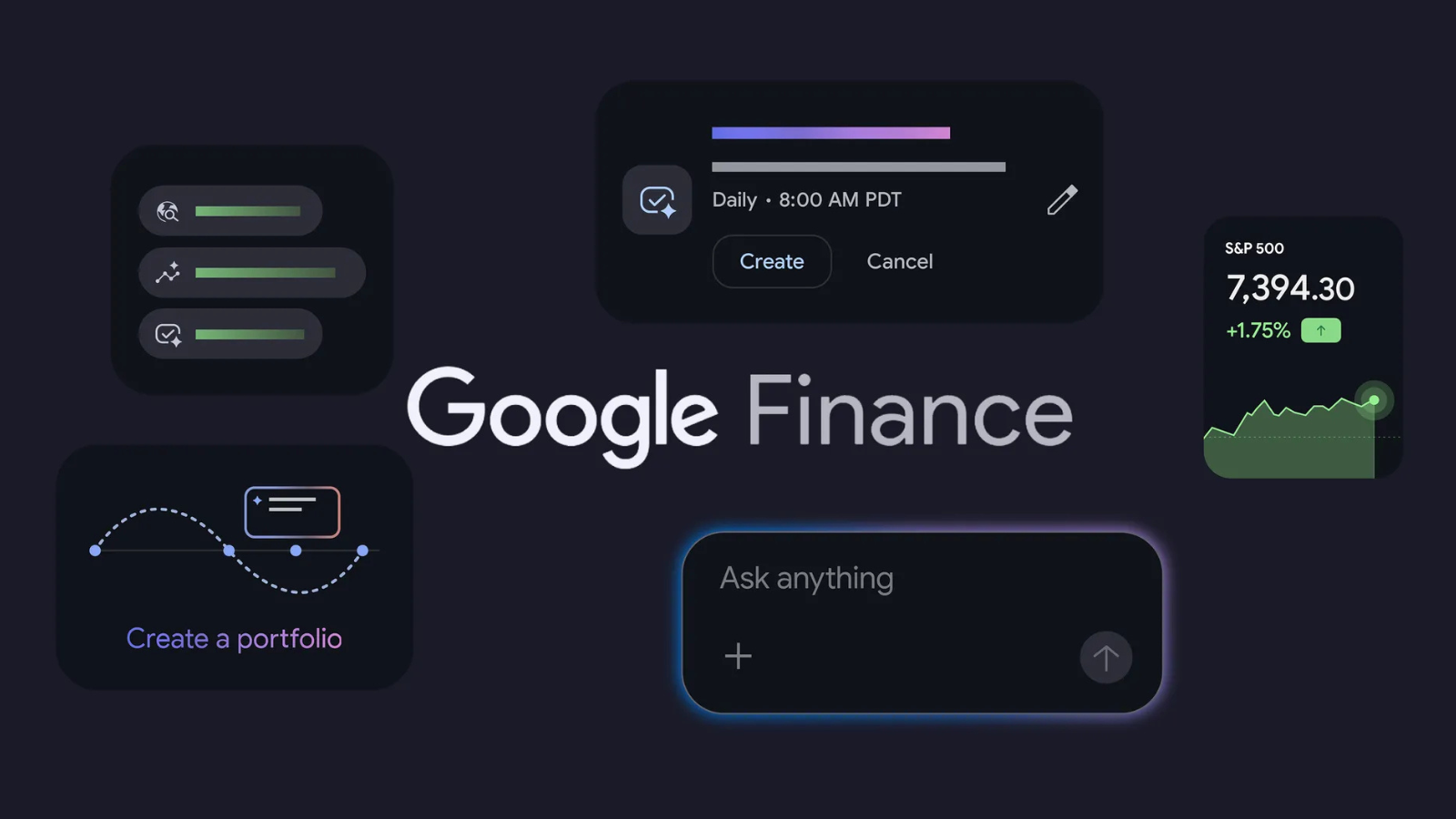 Google officially released a dedicated application for Android users globally. Alongside this launch, the web version of the finance platform has officially moved out of its testing beta phase.
The Google Finance Android app acts as a centralized space for market tracking. You do not need to keep multiple tabs open in your browser anymore. The software is built using modern mobile design principles. It features a bottom navigation bar and highly legible text fields.
It focuses heavily on fast performance. Indian markets move very quickly during trading hours. This tool ensures that you do not face lagging screens when checking your watchlist.
Key Features Available on Mobile at Launch
The mobile application serves as an excellent market monitor right out of the box. Google has included several core functionalities to help you check the markets multiple times a day.
1. Personalized Watchlists
You can create custom watchlists to track the entities you care about. If you are tracking large Indian companies, mid-caps, or dynamic sectors, you can group them together.
The watchlists sync instantly with your Google Account. If you add a security on your desktop browser, it shows up on your phone immediately.
2. Real-Time Market Data
Price changes happen in fractions of a second. The new app delivers live data feeds. You can monitor the major Indian indices like Nifty 50 and Sensex.
You can also view global benchmarks, currency conversion rates, and major commodity prices. The interface uses clear color coding to highlight gains and losses.
3. Live Financial News Feed
You need context to understand the numbers on your screen. The app features a curated news feed. It aggregates financial reports from credible publishers across the internet.
It matches relevant news articles with the specific shares you are viewing. This helps you read updates without searching for them separately.
4. AI-Powered “Key Moments”
This is the standout mobile feature. Have you ever opened a chart and noticed a massive 5% spike or drop? Figuring out the reason usually requires reading multiple news articles. The new application solves this with artificial intelligence.
The “Key Moments” feature places automated notes directly on the price chart. The AI system reads news summaries and corporate disclosures. It then writes a simple sentence explaining what triggered the price movement. It turns an abstract line chart into a clear story.
Next-Generation Web Upgrades (Coming Soon to Mobile)
The web platform received massive upgrades alongside the mobile launch. While some advanced tools are currently web-only, Google confirmed they will arrive on the Google Finance Android app in the coming months.
Advanced Portfolio Dashboard
The web version now allows you to consolidate your investments into a single, private dashboard. It shows overall performance and asset allocation metrics.
The data ingestion process is incredibly modern. You do not need to type every transaction manually. Instead you can upload local files like PDFs or CSV statements. You can even upload basic screenshots of your current holdings.
The backend AI parses the image, extracts the text, and populates your dashboard automatically. You can also describe your investments to a chatbot using natural language to build a portfolio.
Interactive AI Research Tool
Once a portfolio is uploaded, you can use a conversational assistant to analyze it. You can ask deep questions like:
- “What sectors are underrepresented in my holdings?”
- “How does my fixed-income allocation impact my long-term growth potential?”
The AI tool helps you evaluate concentration risks. It also generates performance heatmaps so you can instantly spot what is driving your biggest gains or losses.
Custom Scheduled Briefings
Users can now set up automated background tasks. You can type a simple command in plain English. For example, you can say: “Send me a daily pre-market briefing analyzing significant overnight moves across major cryptocurrencies.”
The system runs this task in the background. It prepares a custom summary. Once ready, it sends a direct alert to your smartphone via the main Google app. This creates an automated loop of financial intelligence.
Live Earnings Coverage
Tracking corporate earnings reports is vital for fundamental investors. The updated web system allows you to stream live corporate earnings calls. It provides synchronized text transcripts. It also uses AI to generate summary highlights before, during, and after the live audio call.
Design and User Experience
The application utilizes a modern visual framework. The interface is clean, spacious, and highly intuitive. A key design element is the floating action toolbar.
An interactive “Ask” tool sits neatly in the corner of your screen. It allows you to quickly query market terms or asset data. The software adapts beautifully to dark mode settings.
It ensures comfortable viewing during late-night research sessions. It avoids the cluttered, chaotic feel of traditional trading terminals. This makes it highly approachable for beginners.
Stock Market Training Reviewed & Monitored by SEBI Registered Investment Advisor
Trusted, concepts to help you grow with confidence. Enroll now and learn to start investing the right way.
Know moreWhy this App Matters for Indian Retail Investors
The Indian retail investment landscape is highly competitive. Many individuals use specialized brokerage apps to buy and sell. However, using a brokerage app just to monitor the market can lead to emotional trading decisions.
The Google Finance Android app acts as a neutral research layer. It does not force you to execute trades immediately. Instead, it provides an organized, calm environment to track data. The AI-driven summaries bridge the knowledge gap for new investors.
You do not need an advanced degree in business to understand why an index is moving. The application translates complex market actions into plain, simple English.
As confirmed by Google, they are planning for the release of a Google Finance app for iOS later this year. However, the company did not divulge the exact timeline.
A Note of Caution for Investors
While these modern digital tools offer immense convenience, you must use them responsibly. The built-in AI models synthesize information from third-party websites across the internet. Artificial intelligence can sometimes make mistakes or hallucinate details.
Google includes clear warnings inside the system. It reminds users that all insights are strictly for informational purposes. You should always cross-verify critical numbers.
It is wise to consult a licensed financial advisor before allocating large sums of money. Technology is an excellent assistant, but it should not replace human diligence.
Learn Stock Marketing with a Share Trading Expert! Explore Here!
Conclusion
The arrival of the Google Finance Android app marks an important milestone for mobile market research. It centralizes watchlists, real-time prices, and news into a fast standalone product. The addition of AI-powered features makes financial data readable for everyone.
As portfolio dashboards and live earnings tools transition from the web to the mobile screen, this app will become a primary hub for casual and serious investors alike. You can download the application from the Play Store today to streamline your market tracking.
|
RELATED POSTS |
|
| Why FII Selling is Shaking Indian Markets in 2026 and What it Means for You | |
| How to Invest in Crypto SIP in India? | |
| CRED Founder Kunal Shah Named Global WhatsApp CEO | |
Stock Market Training Reviewed & Monitored by SEBI Registered Investment Advisor
Trusted, concepts to help you grow with confidence. Enroll now and learn to start investing the right way.
Know moreFrequently Asked Questions
Is the Google Finance app free to use?
Yes. The application is completely free to download and use on Android devices.
Can I buy or sell shares directly inside the app?
No. It is a research and tracking platform. You cannot execute direct market trades inside it.
Does the mobile app support portfolio tracking at launch?
No. Advanced portfolio dashboards are currently web-only. Google will add this feature to the app soon.
What is the "Key Moments" feature?
It is an AI tool that puts brief summaries on stock charts to explain why a price moved.
Is there an iOS version available for Apple users?
Not yet. Google has confirmed that an iOS version will launch later this year.
Can I use the application without signing into a Google account?
You can view basic data anonymously. However, saving custom watchlists requires signing into your Google account.
Does the app track cryptocurrencies and global commodities?
Yes. It provides real-time tracking for international markets, digital currencies, and major global commodities.