Table of Contents
Key Takeaways:
- Revit is a leading BIM software tool. It supports 3D modeling and data. It helps teams work together easily.
- It is used across many construction fields. These include architecture, MEP, and structure. It improves project coordination and planning.
- Revit helps create accurate digital building models. It stores design and project information. It reduces errors during construction.
- Learning Revit improves career opportunities. It is in demand across many companies. It supports long-term career growth.
- Revit works as part of BIM workflow. It connects design and execution stages. It improves overall project efficiency.
- It is important for modern construction projects. It supports digital transformation in the industry. It is widely used globally.
Get Career-Oriented BIM Certification Course with Expert Mentors! Get a free demo here!
🟢 What is Revit Software for BIM?
Autodesk Revit is a BIM tool for building design. It creates smart 3D models with data. It supports architecture, structure, and MEP work.
Revit is used to plan, design, and manage projects. It connects teams through shared models and data.
- What is Revit software?
- A BIM tool for 3D building modeling.
- How is Revit used in BIM?
- It creates and manages project data models.
- Who should learn Revit?
- Students, engineers, architects, and designers.
- Is Revit necessary for BIM careers?
- Yes, it is widely used in industry roles.
The construction industry is changing fast today. Digital tools are becoming very important now. You need smarter methods to work efficiently. Revit and BIM help solve these challenges. They make design and planning easier.
🎯 Why are Revit and BIM important?
- Improve project planning and design.
- Help create accurate digital models.
- Reduce errors during construction.
- Support better team coordination.
- Allow multiple users to work together.
- Share updates in real time.
- Save time and project costs.
- Reduce rework and delays.
- Improve overall efficiency.
📊 What will you learn in this blog?
- Basics of BIM and its role.
- Understand digital construction process.
- Introduction to Autodesk Revit software.
- Learn how it supports BIM work.
- Key features and working methods.
- Explore how Revit manages projects.
- Real-world applications and careers.
- See how it is used in industry.
Revit and BIM are shaping modern construction. Learning them helps you stay industry-ready.

Master BIM and Elevate Your Career – Enroll Today!
Stay ahead in the construction and design industry with our comprehensive BIM Course! Learn Building Information Modeling (BIM) from experts, gain hands-on experience with top software, and boost your career prospects. Join now and become a certified BIM professional!
Know More🧩 Background – Evolution of BIM and Revit
Construction methods have changed over time. Earlier, designs used simple 2D drawings. These drawings had limited detail and coordination. Errors were common during project execution.
📐 Traditional design methods
- Used 2D drawings for planning.
- Included plans, sections, and elevations.
- Required manual updates for every change.
- Had limited coordination between teams.
- Information was shared separately.
- Miscommunication often caused errors.
🏗️ Introduction of BIM
- BIM changed how projects were handled.
- Introduced smart 3D models with data.
- Combined design and information together.
- Improved coordination across teams.
- Enabled better communication and planning.
- Reduced clashes and rework.
💻 Rise of Autodesk Revit
- Revit was developed to support BIM workflows.
- Focused on intelligent building modeling.
- Allowed real-time updates in designs.
- Became widely used in the industry.
- Adopted by architects and engineers globally.
- Supported multiple project disciplines.
📊 How the evolution helped
- Improved accuracy in design and planning.
- Reduced project delays and errors.
- Enabled better collaboration between teams.
BIM and Revit transformed construction into a digital process.
🏗️ What is BIM (Building Information Modeling)?
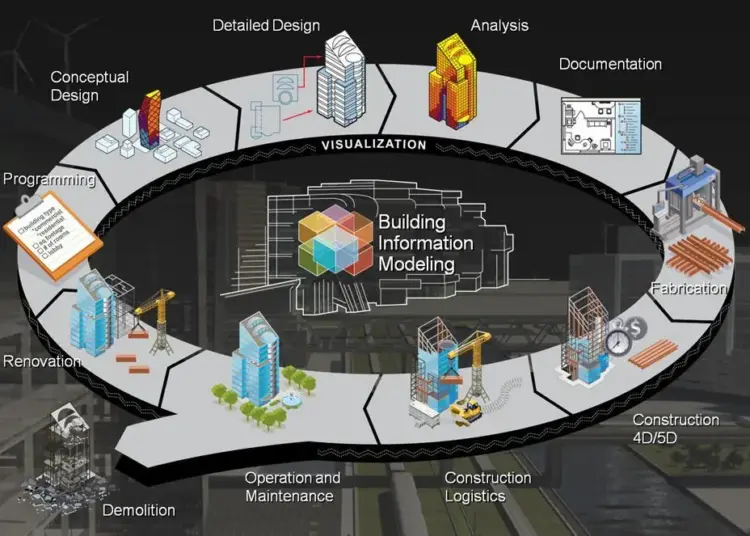
BIM stands for Building Information Modeling. It is a digital method for construction work. It helps you create and manage building projects. You work using a smart 3D model. This model contains both design and data.
🎯 What does BIM actually mean?
- BIM is not just a 3D drawing.
- It includes detailed project information.
- It stores data about every building element.
- It works as a digital representation.
- Shows how the building will look.
- Shows how the building will function.
⚙️ What does BIM include?
- Design model.
- 3D view of the building.
- Includes walls, floors, and systems.
- Project data.
- Materials, sizes, and specifications.
- Cost and time-related information.
- Process information.
- Planning and construction details.
- Maintenance and lifecycle data.
📊 How is BIM used?
- Helps in planning and designing buildings.
- Creates accurate and detailed models.
- Supports teamwork across disciplines.
- Architects and engineers work together.
- Improves construction and management.
- Reduces errors and delays.
⚡ Simple understanding
- BIM is a smart building model with data.
- It helps you design, build, and manage projects.
💻 What is Revit Software?
Autodesk Revit is a BIM-based design software. It helps you create smart building models. These models include both design and project data. You work on one model throughout the project.
🎯 What makes Revit different?
- Works with intelligent 3D models.
- Each element contains real project data.
- Changes update automatically across views.
- Supports multiple disciplines together.
- Used for architecture, structure, and MEP.
- Helps teams work in one shared model.
⚙️ How does Revit work?
- Uses parametric modeling technology.
- Elements are connected and interdependent.
- One change updates the entire model.
- Stores all project information centrally.
- Keeps data organized and accessible.
- Reduces duplication of work.
📐 What can you do with Revit?
- Create detailed building designs.
- Model walls, floors, and systems.
- Generate drawings and documentation.
- Produce plans, sections, and schedules.
- Visualize projects in 3D.
- Understand design before construction.
⚡ Simple understanding
- Revit is a smart design tool for buildings.
- It helps you design, manage, and coordinate projects.
Master BIM and Elevate Your Career – Enroll Today!
Stay ahead in the construction and design industry with our comprehensive BIM Course! Learn Building Information Modeling (BIM) from experts, gain hands-on experience with top software, and boost your career prospects. Join now and become a certified BIM professional!
Know More⚙️ How Revit Works in BIM Workflow
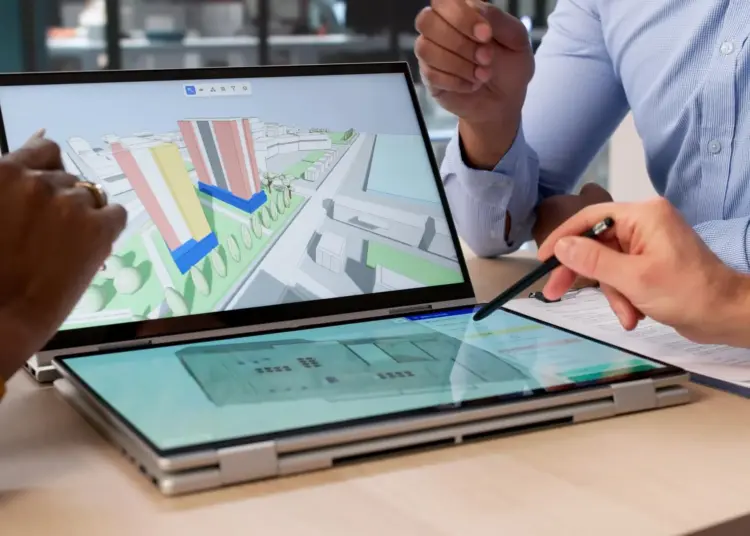
Autodesk Revit works as a central BIM tool. It creates one shared project model. All design and data stay in this model. Teams work on the same file together. Changes update automatically across all views. This keeps information consistent and accurate.
🔄 Key workflow functions
- Supports real-time collaboration.
- Multiple users work on one project.
- Connects different project stages.
- Links design, planning, and documentation.
- Improves coordination between teams.
- Reduces errors and clashes.
Revit keeps the entire workflow connected and efficient.
Master BIM and Elevate Your Career – Enroll Today!
Stay ahead in the construction and design industry with our comprehensive BIM Course! Learn Building Information Modeling (BIM) from experts, gain hands-on experience with top software, and boost your career prospects. Join now and become a certified BIM professional!
Know MoreFrequently Asked Questions
What is Revit software used for?
Autodesk Revit is used for building design and modeling. It helps create detailed 3D models with project data.
How does Revit support BIM workflows?
Revit creates a central model for all project data. It allows teams to work together on the same model.
Is Revit difficult for beginners to learn?
Revit may feel complex at the start. Regular practice makes it easier over time.
Who should learn Revit software?
Students and professionals in construction fields should learn it. It is useful for architecture, engineering, and design roles.
Is Revit required for BIM careers?
Yes, it is widely used in BIM-related jobs. Many companies prefer candidates with Revit skills.
What are the main features of Revit?
It includes parametric modeling and 3D visualization tools. It also supports collaboration and data management.
Can Revit be used for small projects?
Yes, it works for both small and large projects. It adapts to different project needs easily.
What industries use Revit software?
Construction, architecture, and engineering industries use it. It is common in infrastructure and design projects.
Does Revit replace AutoCAD?
Revit is used for BIM-based modeling. AutoCAD is mainly used for 2D drafting tasks.
What are the benefits of learning Revit?
It improves job opportunities and career growth. It helps develop modern construction and design skills.