Table of Contents
Key Takeaways:
- BIM shortcuts improve speed and overall efficiency. They reduce time spent on repeated actions. They help complete tasks much faster.
- Shortcuts reduce the need for mouse usage. This improves workflow and user focus. It makes navigation smoother and quicker.
- Common shortcuts handle basic daily operations. These include move, copy, and rotate. They are used frequently in most tasks.
- Different BIM tools use similar shortcut systems. Some keys may change slightly. Core functions usually remain the same.
- Custom shortcuts improve personal workflow comfort. Users can assign keys based on needs. This increases speed and ease of use.
- Regular practice helps master shortcuts faster. Start with commonly used commands first. Gradually learn more advanced shortcuts.
Get Career-Oriented BIM Certification Course with Expert Mentors! Get a free demo here!
What are BIM Keyboard Shortcuts and Why Do They Matter?
BIM keyboard shortcuts are quick keys for commands. They speed up tasks and reduce manual work. Tools like Autodesk Revit and Autodesk Navisworks use these shortcuts.
📌 Most-used BIM shortcuts
- MV.
- Opens move command quickly.
- CO.
- Copies selected elements instantly.
- RO.
- Rotates elements with ease.
- AL.
- Aligns objects accurately.
- DI.
- Measures distances between points.
- CS.
- Creates new sections quickly.
- TL.
- Uses trim or extend tool.
Master BIM and Elevate Your Career – Enroll Today!
Stay ahead in the construction and design industry with our comprehensive BIM Course! Learn Building Information Modeling (BIM) from experts, gain hands-on experience with top software, and boost your career prospects. Join now and become a certified BIM professional!
Know More🏗️ What is BIM?
BIM stands for Building Information Modeling. It is a smart digital building process. It helps plan, design, and manage projects. BIM uses 3D models with real project data. This makes work more accurate and clear. Teams can understand designs before construction starts.

📘 What does BIM include?
- 3D building models.
- Show structure, layout, and design clearly.
- Help visualize the final project easily.
- Project data and details.
- Include materials, sizes, and specifications.
- Store all information in one place.
- Collaboration tools.
- Allow teams to work together easily.
- Share updates in real time.
🎯 Why is BIM important?
- Improves planning and decision making.
- Helps detect problems early.
- Reduces errors during construction.
- Minimizes rework and delays.
- Saves time and project costs.
- Makes workflows more efficient.
- Improves communication between teams.
- Keeps everyone on the same page.
⌨️ Why Keyboard Shortcuts Matter in BIM
Keyboard shortcuts make BIM work faster and smoother. They help reduce time spent on menus. This improves overall productivity during daily tasks.
⚡ Faster task execution
- Shortcuts complete actions quickly.
- No need to search for tools.
- Commands run instantly.
- Saves time on repeated tasks.
- Useful for frequent actions.
- Reduces unnecessary delays.
🎯 Better workflow efficiency
- Keeps work continuous and smooth.
- Reduces breaks in workflow.
- Maintains steady work pace.
- Helps manage complex models easily.
- Speeds up navigation tasks.
- Improves handling of large projects.
🧠 Improved focus and control
- Reduces distraction from tool searching.
- Keeps attention on design work.
- Improves concentration levels.
- Gives better control over commands.
- Executes actions with precision.
- Avoids repeated corrections.
🖱️ Less dependency on mouse
- Minimizes repeated mouse movements.
- Reduces hand fatigue over time.
- Makes work more comfortable.
- Improves speed during long sessions.
- Helps maintain productivity.
- Supports efficient working habits.
⌨️ Top 20 Keyboard Shortcuts for BIM
Keyboard shortcuts help speed up BIM work. They reduce time spent on menus. These shortcuts are widely used in tools like Autodesk Revit. Learning them improves daily workflow efficiency.
🎯 Basic editing shortcuts
- MV for move command.
- Moves selected elements quickly.
- CO for copy command.
- Duplicates elements easily.
- RO for rotate command.
- Rotates objects accurately.
- MM for mirror command.
- Mirrors elements across a line.
- AL for align command.
- Aligns elements properly.
📏 Measurement and modification shortcuts
- DI for measure tool.
- Measures distance between points.
- TL for trim and extend.
- Adjusts elements quickly.
- TR for trim multiple.
- Trims several elements at once.
- OF for offset tool.
- Creates parallel elements easily.
- CS for create section.
- Generates section views quickly.
🔍 Navigation shortcuts
- ZE for zoom to fit.
- Fits entire model on screen.
- ZR for zoom region.
- Zooms into selected area.
- ZF for zoom out.
- Moves view backward smoothly.
- WT for tile windows.
- Displays multiple views together.
- F8 for temporary hide.
- Hides elements temporarily.
🧩 Drawing and annotation shortcuts
- DR for draw reference line.
- Creates reference guides.
- TX for text tool.
- Adds text annotations quickly.
- DL for detail line.
- Draws detailed lines easily.
- TG for tag tool.
- Tags elements in views.
- AN for annotate tool.
- Opens annotation features.
🚀 How to use these shortcuts effectively
- Start with commonly used commands first.
- Practice shortcuts during daily tasks.
- Use them regularly for better memory.
- Gradually learn more advanced commands.
Using shortcuts consistently improves speed and workflow.

Master BIM and Elevate Your Career – Enroll Today!
Stay ahead in the construction and design industry with our comprehensive BIM Course! Learn Building Information Modeling (BIM) from experts, gain hands-on experience with top software, and boost your career prospects. Join now and become a certified BIM professional!
Know MoreFrequently Asked Questions
What are BIM keyboard shortcuts?
BIM keyboard shortcuts are quick key combinations for commands. They help perform tasks faster without using menus.
Why are keyboard shortcuts important in BIM?
They improve speed and reduce repetitive work. They also help maintain a smooth workflow.
Which BIM software uses keyboard shortcuts?
Most BIM tools support shortcuts for faster work. Common examples include Autodesk Revit and Autodesk Navisworks.
Can beginners learn BIM shortcuts easily?
Yes, beginners can start with basic shortcuts first. Regular practice helps in learning them faster.
Do shortcuts remain the same in all BIM tools?
No, shortcuts may vary between software. However, many basic functions use similar keys.
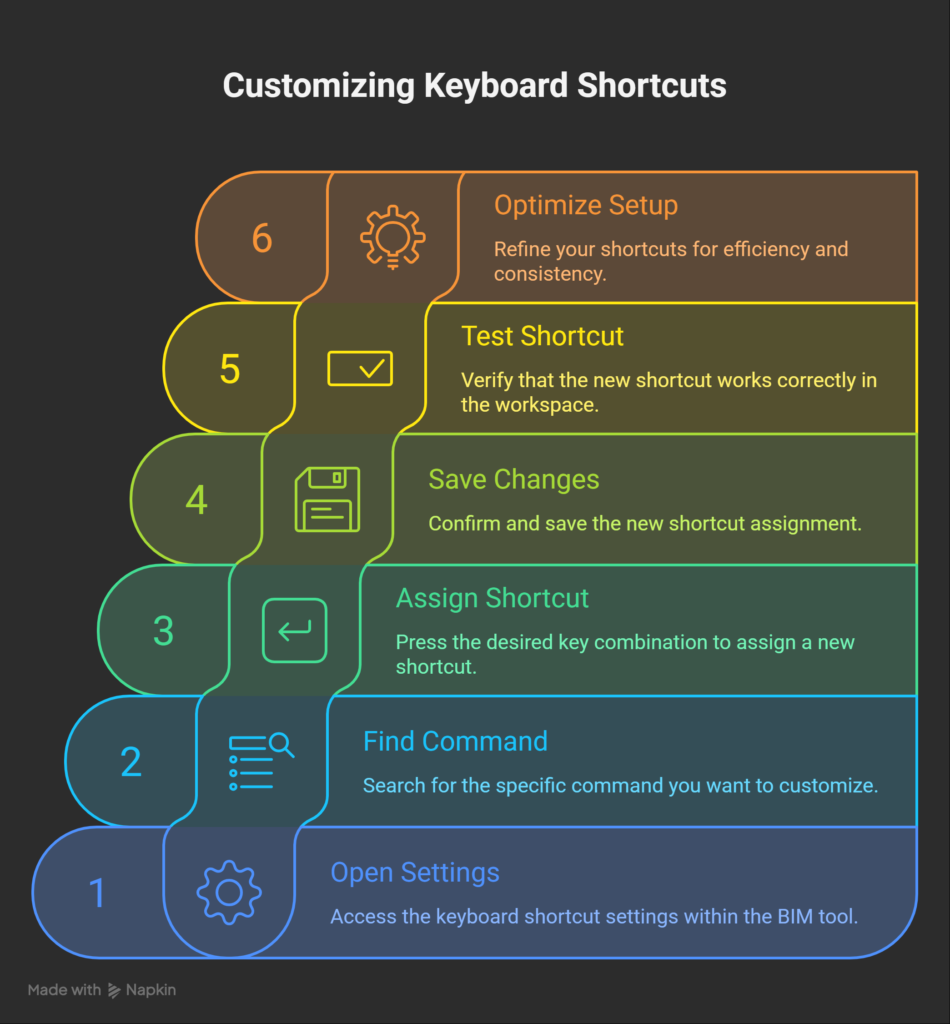
Can keyboard shortcuts be customized?
Yes, most BIM tools allow shortcut customization. Users can assign keys based on their preferences
How do shortcuts improve productivity?
They reduce time spent on manual actions. This helps complete tasks more efficiently.
How many shortcuts should be learned first?
Start with a few commonly used shortcuts. Gradually learn more based on usage.
Are shortcuts useful in large projects?
Yes, they help manage complex models quickly. They improve navigation and editing speed.
What is the best way to remember shortcuts?
Practice them regularly during work. Use simple and consistent key combinations.