
Table of Contents
Online Flight Check-in: Quick Answer
Online check-in lets passengers check in digitally. It happens before reaching the airport. Most airlines offer online check-in services. These services use websites or mobile apps.
The opening time varies between airlines. Many airlines open check-in 24 hours earlier. Some airlines open it 48 hours earlier. Closing times also vary by airline.
Passengers enter their booking details first. They then confirm their travel information. Seat selection may also be available. After completion, passengers receive boarding passes.
Online check-in does not skip airport procedures. Passengers with checked baggage need bag drop. Security screening remains mandatory before departure. International travelers may need document verification.
When Does Online Check-in Open?
The exact timing depends on the airline. Domestic and international flights may differ. Airport rules can also affect timings.
Common opening windows include:
- 24 hours before departure.
- 48 hours before departure.
- Earlier for selected routes.
The closing window also varies by airline. Always follow the displayed airline deadline.
Where Can Passengers Check In?
Passengers usually have several digital options. These include the airline website and app. Some airports also provide self-service kiosks.

Can Online Check-in Replace Airport Check-in?
Sometimes, but not always. Cabin-bag passengers can usually proceed directly. They must still complete security screening.
Passengers with checked baggage need bag drop. International travelers may require document checks.
What Is Online Flight Check-in?
Online flight check-in confirms travel digitally. It replaces some traditional airport procedures. Passengers complete basic check-in before arrival.
The process confirms important travel information. It can also provide seat selection.
What Does Online Check-in Include?
The process can confirm several details.
These may include:
- Passenger identity.
- Flight details.
- Seat selection.
- Baggage information.
- Travel declarations.
- Contact information.
After completion, passengers receive boarding passes.
What Is a Digital Boarding Pass?
A digital boarding pass proves check-in completion. It usually contains essential flight information.
Typical details include:
- Passenger name.
- Flight number.
- Departure airport.
- Destination.
- Boarding time.
- Seat number.
- Boarding gate.
- QR code or barcode.
Passengers can display this pass digitally. Airline rules may affect screenshot usage.
Do All Flights Support Online Check-in?
Many commercial flights support online check-in. Some passengers may face exceptions.
Restrictions can involve:
- Specific international routes.
- Unaccompanied minors.
- Special assistance passengers.
- Document verification.
- Group bookings.
- Special travel requirements.
Airline-specific rules always take priority.
✈️ Start Your Aviation Career Today
Explore career-focused insights on airport jobs, ground staff roles, and aviation training. Learn about salaries, skills, certifications, and hiring trends to start and grow your career in the aviation industry.
Join NowWhen Can You Check In Online?
Online check-in operates within fixed windows. Airlines determine their own check-in schedules. These windows differ between flights.
Typical Opening Times
Many airlines open check-in earlier. Common windows start 24 hours beforehand. Some airlines allow 48-hour check-in.
Timing can depend on several factors.
These include:
- Airline policy.
- Domestic or international travel.
- Departure airport.
- Destination country.
- Passenger category.
- Fare conditions.
Never assume one universal timing.
Typical Closing Times
Online check-in also has a deadline. This deadline occurs before departure. Some airlines close check-in several hours earlier. Others allow later online check-in.
Missing the deadline can create problems. Airport check-in may also have closed.
Domestic Flights
Domestic flights often have simpler procedures. Online check-in commonly opens earlier than departure. Exact timings depend on airline policies.
Passengers should check their booking confirmation. The airline usually displays the deadline.
International Flights
International flights can involve additional verification. Passport and visa information may require validation.
Some passengers may receive restricted boarding passes. Airport staff may need to verify documents.
This does not always mean check-in failed.
When Should Online Check-in Be Completed?
Completing check-in early offers several advantages. It provides more time for seat selection. It can also reduce airport waiting.
A practical approach involves early online check-in. Keep the boarding pass easily accessible afterward.
What If Online Check-in Has Closed?
Do not assume the flight is lost. Airport check-in may still remain available.
Airport deadlines still apply in such situations. Contact the airline when uncertain.
How to Check in Online for Your Flight
The online process is usually straightforward. Most airlines follow similar basic steps.
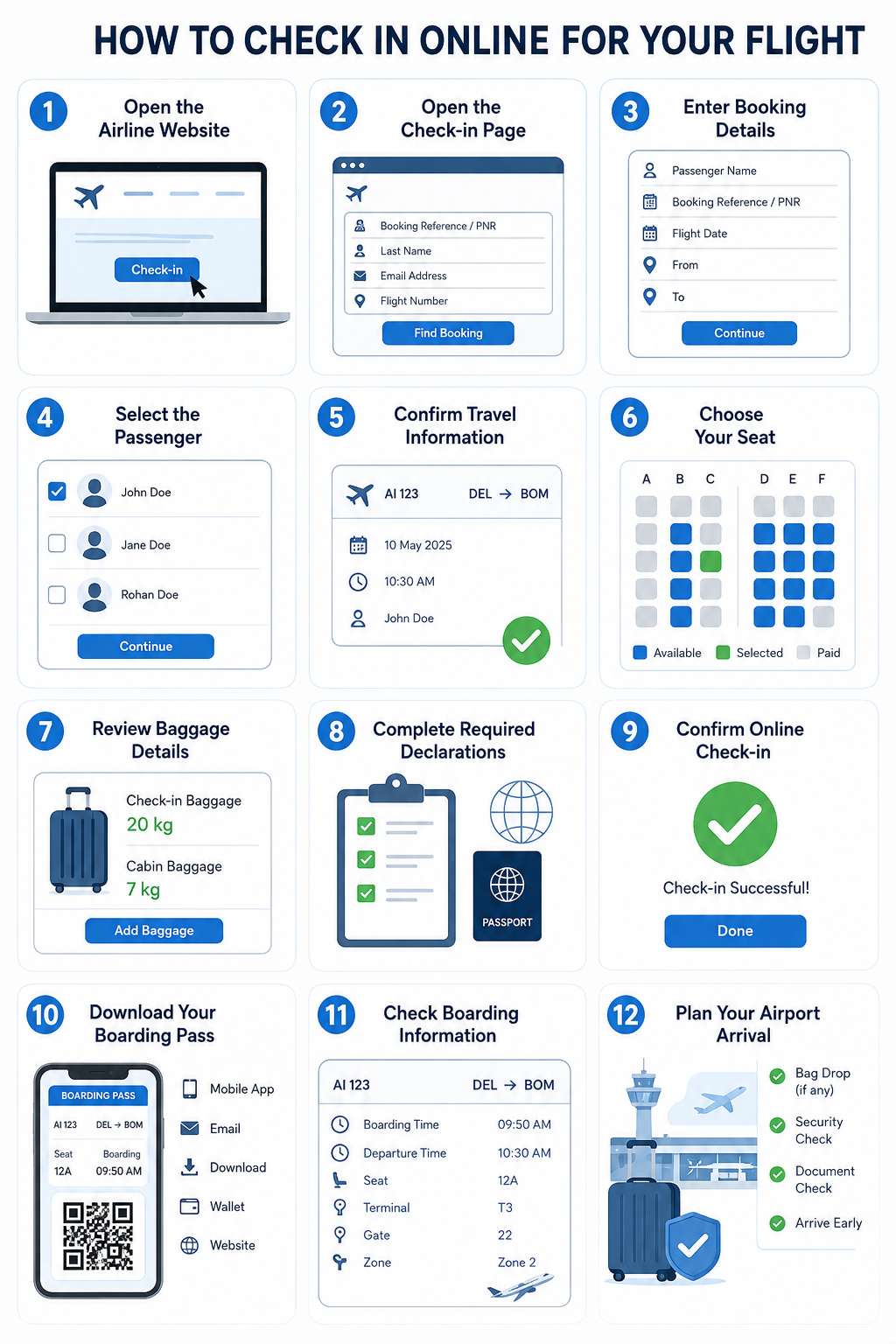
Step 1: Open the Airline Website
Visit the airline’s official website. Find the online check-in section.
Common options include:
- Check-in.
- Manage booking.
- My trips.
- Online check-in.
- Booking management.
Select the appropriate option.
Step 2: Open the Check-in Page
The page requests booking information. Enter the requested details carefully.
Common information includes:
- Booking reference.
- PNR number.
- Passenger surname.
- Email address.
- Flight number.
Different airlines request different details.
Step 3: Enter Booking Details
Type information exactly as shown. Avoid unnecessary spelling changes.
Check these details carefully:
- Passenger name.
- Booking reference.
- Flight date.
- Departure airport.
- Destination.
Incorrect information can prevent check-in.
Step 4: Select the Passenger
Some bookings contain multiple passengers. The system may display everyone together.
Select the passengers requiring check-in. Review each name carefully.
Group bookings may follow additional procedures.
Step 5: Confirm Travel Information
Review the displayed flight information.
Check:
- Flight number.
- Departure time.
- Destination.
- Travel date.
- Passenger details.
Confirm everything before continuing.
Step 6: Choose Your Seat
Seat selection may appear during check-in. Available seats depend on airline policy. Some seats require additional payment. Others may be included within fares.
Common options include:
- Window seats.
- Aisle seats.
- Middle seats.
- Front-row seats.
- Extra-legroom seats.
Choose based on personal preference.
Step 7: Review Baggage Details
Check the displayed baggage allowance. Confirm existing baggage selections. Additional baggage may require payment. Review charges before continuing.
Never assume every fare includes checked baggage.
Step 8: Complete Required Declarations
Some flights require additional information. International flights may require extra declarations.
These can include:
- Passport details.
- Visa information.
- Destination information.
- Contact details.
Enter every detail accurately.
Step 9: Confirm Online Check-in
Review all information once again. Then confirm the check-in process.
A confirmation message should appear afterward. This confirms successful online check-in.
Step 10: Download Your Boarding Pass
Download or save the boarding pass. Keep it accessible during airport travel.
You may receive it through:
- Mobile application.
- Email.
- Downloadable file.
- Digital wallet.
- Airline website.
Keeping a backup can also be useful.
Step 11: Check Boarding Information
Review the boarding pass carefully. Check the assigned gate when available.
Also note:
- Boarding time.
- Departure time.
- Seat number.
- Terminal.
- Boarding zone.
Gates can change after check-in. Continue checking airport displays.
Step 12: Plan Your Airport Arrival
Online check-in does not remove airport requirements. Security screening still takes time. Passengers with checked bags need bag drop. International travelers may need document checks.
Arrive early enough for these procedures.
Simple Online Check-in Routine
Follow these steps before leaving home. First, check the airline’s opening time. Then complete online check-in carefully. Confirm passenger and flight details afterward.
Next, select a seat if required. Download the boarding pass immediately afterward. Finally, check baggage and terminal information.
This routine reduces avoidable airport stress. It also prevents common last-minute mistakes.
What Happens After Online Check-in?
Online check-in completes the digital check-in process. However, airport procedures may still remain. The next steps depend on baggage and destination.
Passengers should check their boarding pass carefully. It contains important travel information.
Check Your Boarding Pass
Review these details after checking in:
- Passenger name.
- Flight number.
- Departure airport.
- Destination.
- Seat number.
- Boarding time.
- Gate number.
- Boarding zone.
Check every detail before leaving home. Report errors to the airline quickly.
Passengers With Cabin Baggage
Cabin-bag passengers have fewer airport steps. They can usually proceed toward security. Airport security screening remains mandatory.
After security, check the departure screens. Confirm the latest gate information. Then proceed toward the boarding gate.
Passengers With Checked Baggage
Online check-in does not check bags. Checked bags still require airport bag drop.
Look for the airline’s bag-drop counter. Some airports provide self-service bag drops. Follow the airport’s instructions carefully.
Keep the baggage receipt safely afterward. It may help during baggage-related issues.
International Passengers
International travel may require additional checks. Passport verification can happen at the airport. Visa documents may also require verification.
Some passengers receive restricted boarding passes. This can happen after online check-in.
Follow instructions from airline staff. Do not assume online check-in replaces checks.
Before Boarding
Check the boarding gate again. Gates can change after online check-in. Also check the boarding time. Reaching the gate early is important.
✈️ Start Your Aviation Career Today
Explore career-focused insights on airport jobs, ground staff roles, and aviation training. Learn about salaries, skills, certifications, and hiring trends to start and grow your career in the aviation industry.
Join NowSituations Where Online Check-in May Not Be Available
Online check-in is widely available today. However, some situations create exceptions. Airlines can restrict digital check-in for specific passengers.
1. Certain International Flights
Some international routes require document verification. Passengers may need airport verification.
The airline may therefore restrict online check-in.
2. Unaccompanied Minors
Children travelling alone may need assistance. Airlines often require special airport procedures.
Online check-in may therefore be unavailable.
3. Special Assistance Requirements
Passengers needing special assistance may require staff support. This can include wheelchair assistance or medical support.
Airport staff may need to verify arrangements.
4. Travel Document Verification
Some journeys require additional document checks. Passport and visa requirements can affect check-in.
The airline may require physical verification.
5. Group Bookings
Large group bookings can follow different procedures. Some systems may restrict online check-in.
Passengers should follow the airline’s instructions.
6. Infants or Special Travel Needs
Infants can require additional documentation. Certain seating arrangements may also apply.
Special travel requirements can affect online check-in.
7. Technical Problems
Website issues can sometimes prevent check-in. Mobile applications can also experience technical problems.
Try another official check-in method first. Contact airline support when necessary.
8. Codeshare Flights
Codeshare flights can involve multiple airlines. The operating carrier may control check-in.
Check the operating airline before starting.
9. Airport-Specific Restrictions
Some airports may have special procedures. These can affect digital check-in availability.
Always review the airline’s airport instructions.
What Should Passengers Do?
Do not panic when online check-in fails. Check the airline’s official instructions first. If airport check-in remains available, arrive early. Carry all required travel documents.
Online Check-in vs Airport Check-in
Both methods confirm passenger check-in. However, their processes are different.
| Feature | Online Check-in | Airport Check-in |
|---|---|---|
| Location | Home or anywhere | Airport |
| Timing | Before airport arrival | At airport |
| Seat selection | Often available | Usually available |
| Boarding pass | Digital | Printed or digital |
| Bag drop | Still required | Usually included |
| Waiting time | Usually shorter | Can be longer |
| Document checks | Sometimes limited | More common |
| Convenience | Higher | Lower |
| Best for | Prepared travelers | Special requirements |
Online Check-in
Online check-in saves airport time. Passengers can complete basic procedures beforehand.
It also allows earlier seat selection. Boarding passes can remain digitally accessible.
Airport Check-in
Airport check-in remains useful for special cases. Staff can handle complex travel requirements.
It also supports document verification. Checked baggage can usually be processed there.
Which Option Is Better?
Online check-in suits most prepared passengers. Airport check-in suits passengers needing assistance.
Passengers with complicated bookings may prefer counters. International travelers may also need airport support.
Benefits of Online Flight Check-in
Online check-in offers several practical advantages. These benefits can improve airport experiences.
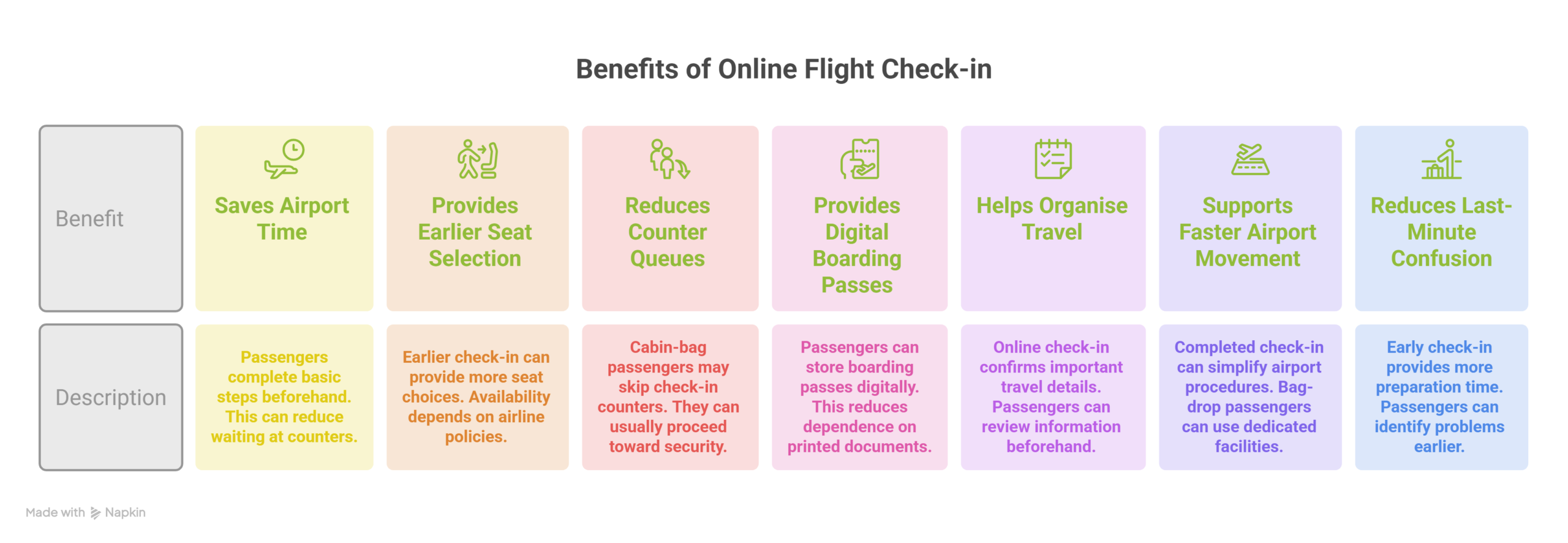
1. Saves Airport Time
Passengers complete basic steps beforehand. This can reduce waiting at counters.
2. Provides Earlier Seat Selection
Earlier check-in can provide more seat choices. Availability depends on airline policies.
3. Reduces Counter Queues
Cabin-bag passengers may skip check-in counters. They can usually proceed toward security.
4. Provides Digital Boarding Passes
Passengers can store boarding passes digitally. This reduces dependence on printed documents.
5. Helps Organise Travel
Online check-in confirms important travel details. Passengers can review information beforehand.
6. Supports Faster Airport Movement
Completed check-in can simplify airport procedures. Bag-drop passengers can use dedicated facilities.
7. Reduces Last-Minute Confusion
Early check-in provides more preparation time. Passengers can identify problems earlier.
Common Mistakes to Avoid
Online check-in looks simple and straightforward. However, small mistakes can create problems.
1. Entering Incorrect Booking Details
Check the PNR before submitting information. Incorrect details can prevent successful check-in.
2. Ignoring Check-in Deadlines
Online check-in has specific opening times. It also has specific closing times.
Missing deadlines can require airport assistance.
3. Forgetting Checked Baggage
Online check-in does not check luggage. Checked bags still require airport processing.
Reach the airport early for bag drop.
4. Not Checking the Boarding Pass
Review the boarding pass after downloading it. Check the name and flight details carefully.
5. Ignoring Gate Changes
Airport gates can change after check-in. Always monitor airport display screens.
6. Relying Only on a Screenshot
Some airlines may require live boarding passes. App-based passes can update important information.
Keep the official boarding pass accessible.
7. Arriving Too Late
Online check-in does not eliminate airport deadlines. Security and boarding still require time.
Arrive according to airline recommendations.
8. Ignoring Document Requirements
International flights may require additional verification. Carry passports and required documents.
Do not assume digital check-in replaces verification.
9. Choosing Seats Without Checking Fees
Some seats may require extra payment. Review the price before confirming selection.
10. Using Unofficial Websites
Always use official airline platforms. Avoid entering booking details elsewhere.
This also protects personal travel information.
Final Takeaway
Online check-in makes air travel easier. Passengers can complete basic procedures beforehand. It can also reduce airport waiting time.
However, online check-in does not end everything. Bag drop and security may remain necessary. International flights can require document verification. Always check deadlines and airport requirements.
Complete online check-in early when possible. Save the boarding pass securely afterward. Review gates, baggage, and travel documents. These steps can make airport travel smoother.
✈️ Start Your Aviation Career Today
Explore career-focused insights on airport jobs, ground staff roles, and aviation training. Learn about salaries, skills, certifications, and hiring trends to start and grow your career in the aviation industry.
Join NowFrequently Asked Questions
How early can I check in online?
Most airlines open online check-in 24–48 hours before departure. The exact window depends on the airline and flight.
Can I check in online using my phone?
Yes, most airlines offer mobile check-in options. Passengers can use the airline app or mobile website.
Do I need to print my boarding pass?
Not always, as many airlines accept digital boarding passes. However, some airports or routes may require printed documents.
Can I skip the airport check-in counter?
Yes, cabin-bag passengers can often skip the check-in counter. They can usually proceed directly toward security after online check-in.
Do I need to visit the airport for checked baggage?
Yes, checked baggage still needs to be handed over. Passengers must use the airline’s bag-drop or check-in counter.
Can I choose my seat during online check-in?
Many airlines allow seat selection during online check-in. Some preferred seats may require an additional fee.
What happens if online check-in is unavailable?
Some passengers may need airport check-in instead. This can happen because of document checks, special assistance, or route restrictions.
Can international passengers check in online?
Many international passengers can check in online. However, passport and visa verification may still happen at the airport.
What should I do after online check-in?
Save your boarding pass and verify its details. Also check baggage requirements, terminal information, and boarding times.
Does online check-in guarantee boarding?
No, online check-in does not guarantee boarding. Passengers must still meet baggage, security, documentation, and boarding requirements.