Table of Contents
HTML can be learned quickly with the right approach. Basic concepts can be understood in a few days. Strong understanding develops within two to four weeks. Mastery takes longer with regular project practice. Learning speed depends on consistency and daily effort. A clear plan helps avoid confusion early. This blog explains a complete HTML learning timeline. It breaks learning into simple and clear stages. It also covers factors affecting learning speed. You will find tips to learn faster. A step-by-step roadmap is also included. Common mistakes are explained to avoid early. This helps beginners learn HTML in a structured way.
Learn Full Stack Development with expert mentors! Get Free Demo Here!
Key Takeaways:
- HTML basics can be learned in a few days.
- Strong skills develop within a few weeks.
- Practice matters more than time spent.
- Projects improve understanding faster.
- HTML is the foundation of web development.
Introduction
Can you learn HTML in a week? This is a common question. Many beginners feel curious and excited to start. HTML is the base of every webpage online. It helps organize content in a clear structure. Browsers use HTML to display page elements correctly. It is simple and easy to begin with.
Learning speed is not the same for everyone. It depends on time and daily practice. Clear goals also improve learning progress. A focused approach gives better results quickly. Small efforts each day build strong understanding. Consistency matters more than long study hours.
This topic becomes easier with the right mindset. Beginners should stay patient and consistent.
🎯 What You Should Know Before Starting
- HTML is easy to understand.
- It uses simple tags and structure.
- It does not require prior coding knowledge.
- Learning speed depends on effort.
- Daily practice improves memory.
- Skipping days slows progress.
- Clear goals improve focus.
- Short goals give quick results.
- Step-by-step learning works best.
What is HTML?
1: Which of the following is a JavaScript framework/library?
2: What is the purpose of CSS in web development?
3: What does CRUD stand for in web development?
4: Which of the following is a popular CSS framework?
5: Which technology is commonly used for asynchronous communication between the client and server?
Ever wondered how much you really know? It's time to put your brain to the test!
HTML stands for HyperText Markup Language. It is used to create web pages. It tells browsers what content to show. It is simple and beginner-friendly to learn. No advanced knowledge is needed to start. Anyone can understand its basic structure quickly.
HTML works as the backbone of websites. It organizes text, images, and links clearly. It helps create a proper page layout. Without HTML, web pages cannot exist. It works together with other web technologies later.

🧱 What Does HTML Do?
HTML helps structure content on a webpage.
- Organizes content.
- Defines headings and paragraphs.
- Arranges sections clearly.
- Displays elements.
- Adds images and links.
- Shows lists and tables.
- Creates forms.
- Collects user input.
- Adds buttons and fields.
HTML makes web content readable and structured.
🚀 Start Coding Today! Enroll Now with Easy EMI Options. 💳✨
Get Hired as a Full-Stack Developer: Master the Skills Employers Are Looking For!
Start Learning With EMI Payment OptionsHow Long Does It Take to Learn HTML?
Learning HTML depends on practice and consistency. Some learners progress faster than others. A clear timeline helps set expectations. Each stage builds new understanding gradually. Regular effort improves confidence and clarity.
This timeline breaks learning into simple stages. Each stage focuses on specific skills. Following this plan makes learning easier.

📊 HTML Learning Timeline
| Timeframe | Focus Area |
|---|---|
| 1–3 Days | Basic tags and structure |
| 1 Week | Links, images, lists, forms basics |
| 2–3 Weeks | Tables, semantic HTML, forms |
| 1 Month+ | Projects and best practices |
🟢 1–3 Days: Learn Basic Tags
Start with simple HTML concepts first. Focus on page structure and content.
- Learn basic tags.
- Headings for titles and sections.
- Paragraphs for text content.
- Understand structure.
- Use html and body tags correctly.
- Follow opening and closing rules.
- Practice small pages.
- Create simple text pages.
- Arrange content clearly.
This stage builds a strong base.
🔵 1 Week: Learn Core Elements
Now add more useful elements. This improves page features and usability.
- Learn links.
- Connect pages using anchor tags.
- Add navigation between sections.
- Add images.
- Display visuals using image tags.
- Use proper file paths.
- Use lists.
- Create ordered and unordered lists.
- Organize information clearly.
- Learn forms basics.
- Add input fields and buttons.
- Collect simple user data.
This stage builds practical understanding.
🟡 2–3 Weeks: Improve Structure
Focus on better structure and readability. This stage improves code quality.
- Learn tables.
- Display data in rows and columns.
- Structure data clearly.
- Use semantic HTML.
- Add header and footer tags.
- Improve page meaning.
- Improve forms.
- Use labels and input types.
- Add basic validation.
This stage improves clarity and usability.
🔴 1 Month+: Build Real Projects
Start building real projects now. Practice becomes very important here.
- Build multi-page websites.
- Link pages together.
- Organize navigation properly.
- Follow best practices.
- Write clean and readable code.
- Use proper semantic tags.
- Improve structure.
- Keep layout simple and clear.
- Maintain consistent formatting.
This stage builds real experience.
👉 Important Note
Consistency matters more than study hours. Practice daily, even for short time. Avoid long gaps between learning sessions. Focus on understanding each concept clearly. Learn step by step without rushing. Build regularly to improve skills. Regular effort leads to better results over time.
What Factors Affect Learning Speed?
Learning speed differs for every learner. Many factors influence progress and understanding. Knowing these factors helps improve learning efficiency.
🧠 Key Factors That Matter
- Prior coding experience.
- Beginners may need more time initially.
- Experienced learners grasp concepts faster.
- Daily practice time.
- Regular practice improves retention.
- Short sessions work better than long sessions.
- Learning resources used.
- Structured courses provide clear guidance.
- Self-learning needs discipline and planning.
- Practical vs theory learning.
- Projects improve understanding faster.
- Only theory slows down progress.
📊 How These Factors Impact Learning
- Strong habits improve consistency.
- Daily learning builds routine.
- Regular effort strengthens memory.
- Right approach saves time.
- Focused learning avoids confusion.
- Clear goals improve direction.
- Practical learning builds confidence.
- Projects show real progress.
- Application improves problem-solving.
Learn Full Stack Development with expert mentors! Get Free Demo Here!
What Is the Fastest Way to Learn HTML?
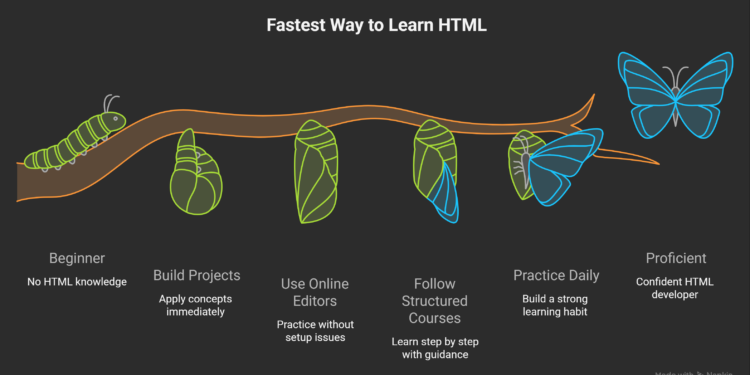
Learning HTML becomes easier with the right method. Smart strategies save time and reduce confusion. Active practice gives better results than passive learning. Consistency also plays a very important role.
⚡ Effective Ways to Learn Faster
- Learn by building projects.
- Start with small mini projects.
- Apply each concept immediately.
- Improve understanding through real examples.
- Use online editors.
- Practice using CodePen.
- Test code without setup issues.
- Experiment with different layouts quickly.
- Follow structured courses.
- Use platforms like freeCodeCamp.
- Learn step by step with guidance.
- Avoid random and confusing topics.
- Practice daily.
- Spend at least thirty minutes daily.
- Build a strong learning habit.
- Avoid long gaps between sessions.
🚀 Start Coding Today! Enroll Now with Easy EMI Options. 💳✨
Get Hired as a Full-Stack Developer: Master the Skills Employers Are Looking For!
Start Learning With EMI Payment OptionsHTML Learning Roadmap (Step-by-Step)
A clear roadmap makes learning HTML simple and structured. Beginners can follow steps without confusion. Each stage builds on previous knowledge. This improves understanding and confidence over time. Learning becomes easier with consistent practice and clear goals.
This roadmap focuses on core HTML concepts first. It avoids unnecessary complexity in early stages. Each step adds new skills gradually. Practice after each step is very important.

🧱 Step 1: Learn Basic Structure
Start with the basic HTML structure. Every webpage follows this format.
- Understand document setup.
- Use
<!DOCTYPE html>to define document type. - Use
<html>as the root element.
- Use
- Learn main sections.
<head>stores metadata and page title.<body>contains visible content.
- Practice structure.
- Create simple page layouts.
- Organize content clearly.
This step builds the foundation of all webpages.
✍️ Step 2: Learn Text Formatting Tags
Text formatting helps present content clearly. It improves readability and structure.
- Use heading tags.
<h1>for main title.<h2>to<h6>for subheadings.
- Use paragraph and text tags.
<p>for text blocks.<br>for line breaks.
- Add emphasis.
<strong>for important text.<em>for highlighted text.
This step improves content presentation.
🔗 Step 3: Learn Links and Images
Links and images make pages interactive. They improve user experience.
- Add links.
- Use
<a>tag for navigation. - Link internal and external pages.
- Use
- Add images.
- Use
<img>tag for visuals. - Include alt text for accessibility.
- Use
- Improve usage.
- Use proper file paths.
- Keep images optimized.
This step makes pages more engaging.
📋 Step 4: Learn Lists and Tables
Lists and tables help organize information clearly. They improve readability.
- Create lists.
- Use
<ul>for unordered lists. - Use
<ol>for ordered lists.
- Use
- Use list items.
<li>for each point.- Group related items together.
- Build tables.
- Use
<table>for structure. - Use
<tr>for rows. - Use
<td>for data cells.
- Use
This step helps present structured data.
📝 Step 5: Learn Forms
Forms allow user interaction. They help collect input data.
- Create input fields.
- Use
<input>for text fields. - Use
<textarea>for longer input.
- Use
- Add controls.
- Use buttons for actions.
- Add labels for clarity.
- Improve usability.
- Group fields properly.
- Use placeholders for guidance.
This step adds functionality to webpages.
🏷️ Step 6: Learn Semantic HTML
Semantic HTML improves code meaning and structure. It helps both users and search engines.
- Use semantic tags.
<header>for top section.<footer>for bottom section.<section>for grouping content.
- Structure content properly.
<article>for independent content.<nav>for navigation links.
- Improve readability.
- Code becomes easier to understand.
- Helps accessibility tools.
This step makes code more professional.
✅ How to Use This Roadmap
Follow each step in order for best results. Practice after learning each concept. Build small examples regularly. Avoid skipping any stage in the process.
Consistent effort leads to strong HTML skills.
What Common Mistakes Should You Avoid?
Many beginners make simple mistakes while learning HTML. These mistakes slow progress and cause confusion. Avoiding them helps build strong and clear basics. A practical approach improves learning speed and confidence.
⚠️ Mistakes to Avoid
- Memorizing instead of practicing.
- Reading alone does not build real skills.
- Practice helps understand how tags work.
- Small exercises improve memory and clarity.
- Skipping fundamentals.
- Basics are needed for strong understanding.
- Missing basics creates problems later.
- Learn structure and core tags first.
- Not building projects.
- Projects apply concepts in real situations.
- Practice improves problem-solving ability.
- Small projects build confidence quickly.
- Ignoring semantic HTML.
- Proper tags improve page structure.
- It helps search engines understand content.
- It improves accessibility and readability.
Can You Get a Job with Just HTML?
Getting a job with only HTML is not enough. HTML alone cannot create complete modern websites. Most roles require additional technical skills. However, it is the first step in web development. It helps beginners enter the field with basic knowledge.
🎯 Why HTML Alone Is Not Enough
- Limited capabilities.
- HTML only structures content.
- It cannot style or add interactivity.
- Industry expectations.
- Companies expect complete frontend skills.
- Multiple technologies are required together.
🚀 What Skills Should You Learn Next?
- Learn CSS for design.
- Style layouts and page elements.
- Improve visual appearance.
- Learn JavaScript for functionality.
- Add dynamic features to pages.
- Handle user interactions.
📈 How to Move Toward Job Readiness
- Build a strong portfolio.
- Create simple and clean web pages.
- Show your projects clearly.
- Learn step by step.
- Combine HTML with CSS and JavaScript.
- Practice regularly through projects.
This path leads to better job opportunities.
Conclusion
HTML can be learned quickly with the right plan. It is simple and easy to start. Basics can be learned in a few days. Strong skills grow with regular practice. Small projects improve understanding faster. A clear roadmap makes learning easy. Daily practice builds confidence slowly. Anyone can learn HTML with focus and patience.
Start learning HTML today without delay. Do not wait for the perfect time. Begin with simple pages first. Practice a little every day. Build small projects regularly. Progress may feel slow at first. But it improves with time. Stay consistent and keep learning. Success comes with daily effort.
🚀 Start Coding Today! Enroll Now with Easy EMI Options. 💳✨
Get Hired as a Full-Stack Developer: Master the Skills Employers Are Looking For!
Start Learning With EMI Payment OptionsFrequently Asked Questions
How long does it take to learn HTML basics?
HTML basics can be learned in a few days. Regular practice helps understand concepts clearly and quickly.
Can HTML be learned without coding experience?
Yes, HTML is beginner-friendly and easy to start. No prior coding knowledge is required to learn it.
Is HTML enough to build a website?
HTML can create basic page structure only. CSS and JavaScript are needed for design and functionality.
How much time should be spent daily learning HTML?
Spending thirty minutes to one hour daily is enough. Consistent practice improves learning speed.
What is the best way to learn HTML quickly?
Building small projects is the fastest method. Practice helps understand how HTML works in real cases.
Should HTML tags be memorized?
Memorizing is not necessary for beginners. Regular practice helps remember tags naturally.
What are some beginner HTML projects?
Simple pages like portfolios and landing pages are good. These projects help apply basic concepts.
Is HTML difficult to learn?
HTML is one of the easiest programming languages. It uses simple tags and structure.
Can HTML help in getting a job?
HTML alone is not enough for jobs. It is the first step toward web development skills.
What should be learned after HTML?
CSS should be learned next for styling. JavaScript should follow for adding interactivity.