Yes, web development can be learned in three months. The focus must stay on core skills only. Daily practice is very important for steady progress. Building real projects helps improve understanding quickly. A clear roadmap makes learning simple and structured. This blog gives a complete beginner roadmap to follow. It explains what to learn in each month. It also covers useful tools and learning resources. A simple daily study plan is included for guidance. You will find tips to learn faster and better. Common mistakes are explained to avoid confusion. It also discusses job chances after learning. This helps beginners stay focused and confident.
Learning web development in a short time can feel confusing. Many beginners struggle with too many learning options. A clear path helps remove this confusion quickly. It allows better focus on important skills. Simple steps make progress easier to follow. Regular practice builds confidence over time. Practical work improves understanding much faster. Consistency is the key to real improvement.
This blog explains a complete beginner learning path. It shows what to learn at each stage. The focus stays on useful and practical skills. It helps avoid wasting time on unnecessary topics. The structure is simple and easy to follow.
🎯 What You Will Achieve
By following this guide, learners can:
Build strong basics in web development.
Understand real website working clearly.
Create simple and useful web projects.
Learn tools used by developers.
Improve logical thinking skills.
Get closer to beginner job roles.
📌 What This Blog Covers
This blog includes the following sections:
A clear three-month learning roadmap.
Step-by-step skills for each month.
Recommended tools and resources.
A simple daily study plan.
Tips to learn faster and smarter.
Common mistakes to avoid early.
What Is the 3-Month Web Development Roadmap?
1: Which of the following is a JavaScript framework/library?
2: What is the purpose of CSS in web development?
3: What does CRUD stand for in web development?
4: Which of the following is a popular CSS framework?
5: Which technology is commonly used for asynchronous communication between the client and server?
Ever wondered how much you really know? It's time to put your brain to the test!
A clear roadmap makes learning faster and easier. Many beginners feel confused at the start. This plan gives a step-by-step learning path. It helps focus on important skills only. Each month has a clear learning goal. This improves direction and confidence. Small daily progress leads to strong results.
This roadmap focuses on practical learning methods. It avoids unnecessary topics in early stages. Projects are included in every phase. This makes learning more active and useful. By the end, learners can build real applications.
🚀 Start Coding Today! Enroll Now with Easy EMI Options. 💳✨
Get Hired as a Full-Stack Developer: Master the Skills Employers Are Looking For!
The first month builds a strong base. This stage is very important for beginners. Strong basics make future learning easier. Weak basics can slow progress later.
Focus on three main areas:
HTML for structure.
CSS for styling.
JavaScript for basic logic.
🧱 Learn HTML for Structure
HTML defines the structure of webpages. It helps organize content clearly.
Focus on:
Basic elements.
Use headings for titles and sections.
Use paragraphs for text content.
Use links to connect pages.
Media elements.
Add images to improve visuals.
Use proper alt text for accessibility.
Forms and inputs.
Create simple forms for user input.
Add buttons for actions.
🎨 Learn CSS for Styling
CSS controls how the page looks. It improves design and readability.
Focus on:
Styling basics.
Apply colors and background styles.
Adjust spacing using margin and padding.
Layout systems.
Use Flexbox for simple alignment.
Use Grid for complex layouts.
Typography.
Set font sizes and styles.
Align text properly.
⚙️ Learn Basic JavaScript
JavaScript adds interactivity to pages. It helps create dynamic behavior.
Focus on:
Core concepts.
Declare variables and use data types.
Write simple functions.
Logic building.
Use conditions for decision making.
Use loops to repeat tasks.
🎯 Goal for Month 1
The goal is to build simple websites:
Create static pages.
Combine HTML and CSS for layout.
Add small JavaScript features.
Practice page structure.
Organize sections clearly.
Keep design simple and clean.
👉 Mini-Projects for Month 1
Projects help apply learning in real scenarios.
Build these projects:
Personal portfolio page.
Create sections for personal details.
Add name, introduction, and skills.
Include education or interests.
Design a clean layout.
Use simple colors and fonts.
Align sections using Flexbox.
Add a contact section.
Include email or form.
Add basic navigation links.
Landing page.
Design a simple product or service page.
Add a headline and short description.
Include images or icons.
Add a call-to-action section.
Use buttons like “Get Started”.
Place them clearly on the page.
Improve layout.
Use Grid or Flexbox.
Ensure proper spacing and alignment.
🚀 Month 2: Build Intermediate Skills
The second month adds more depth. This stage focuses on real interaction. It also introduces useful development tools.
Focus on:
Advanced JavaScript.
Git and GitHub.
Responsive design.
React basics.
🧠 Learn Advanced JavaScript
This stage improves interactivity.
Focus on:
DOM manipulation.
Select elements using selectors.
Update content dynamically.
Events.
Handle click and submit actions.
Respond to user inputs.
APIs.
Fetch data from external sources.
Display results on the page.
🔄 Learn Git and GitHub
Version control helps manage projects.
Focus on:
Git basics.
Track changes using commits.
Save project history.
GitHub usage.
Upload projects online.
Share links with others.
📱 Learn Responsive Design
Responsive design improves usability.
Focus on:
Media queries.
Adjust layout for different screens.
Test on mobile and desktop.
Flexible layouts.
Use percentage widths.
Avoid fixed dimensions.
⚛️ Learn React Basics
React helps build modern interfaces.
Focus on:
Components.
Create reusable UI parts.
Organize code properly.
State and props.
Pass data between components.
Update UI dynamically.
👉 Projects for Month 2
Projects should include interaction and logic.
Build these projects:
To-do app.
Create a task input system.
Allow users to add new tasks.
Display tasks in a list format.
Add task management features.
Mark tasks as completed.
Remove tasks from the list.
Improve user experience.
Show messages for empty input.
Keep the layout clean.
Weather app.
Connect to a weather API.
Fetch real-time weather data.
Use city name as input.
Display weather details.
Show temperature and conditions.
Display city and country name.
Improve interface.
Add icons for weather types.
Use simple and clear layout.
💼 Month 3: Become Job Ready
The third month builds complete applications. It connects frontend and backend skills. This stage prepares learners for real projects.
Focus on:
Frontend frameworks.
Backend basics.
Databases.
Deployment.
🖥️ Learn Frontend Framework Skills
Improve application structure.
Focus on:
Routing.
Navigate between pages.
Manage URLs properly.
State management.
Store and update data.
Handle user interactions.
🔧 Learn Backend Basics
Backend handles logic and data flow.
Focus on:
Node.js setup.
Create a simple server.
Run backend code.
Express basics.
Create routes for requests.
Handle responses properly.
🗄️ Learn Database Basics
Databases store application data.
Focus on:
Data storage.
Save user inputs.
Retrieve stored data.
CRUD operations.
Create, read, update, and delete data.
🌍 Learn Deployment
Deployment makes projects live.
Focus on:
Hosting platforms.
Use Netlify or Vercel.
Upload frontend projects.
Testing.
Check if the app works online.
Fix small issues if needed.
👉 Final Project for Month 3
Build one complete full-stack project.
Project ideas include:
Task manager app.
Allow users to create accounts.
Save tasks in a database.
Update and delete tasks.
Notes app.
Add and store notes.
Edit and remove notes easily.
Include these features:
User interface.
Clean and simple design.
Easy navigation between pages.
Backend connection.
Send data to server.
Fetch stored data.
Database usage.
Store user information safely.
Retrieve data when needed.
Deployment.
Publish the project online.
Share live project link.
✅ What Should This Roadmap Achieve?
By the end, learners should:
Understand core concepts clearly.
HTML, CSS, and JavaScript basics.
Build real projects.
Static and interactive applications.
Use GitHub.
Share and manage code online.
Create responsive layouts.
Work across all devices.
Build full-stack apps.
Connect frontend and backend successfully.
This roadmap keeps learning practical and focused.
Using the right tools makes learning easier and faster. Good tools help write, test, and manage code smoothly. They also improve productivity and reduce common errors. Beginners should start with simple and reliable options. This helps build confidence during early learning stages.
💻 Code Editor
A code editor is needed to write code.
Visual Studio Code.
Lightweight and easy to use.
Supports many useful extensions.
Provides syntax highlighting for better readability.
Includes debugging and error checking features.
📚 Learning Platforms
Learning platforms provide structured courses and guidance.
freeCodeCamp.
Offers free courses for beginners.
Includes hands-on coding exercises.
Udemy.
Provides detailed paid courses.
Covers beginner to advanced topics.
🧪 Practice Platforms
Practice platforms improve coding skills.
LeetCode.
Helps improve problem-solving skills.
Offers coding challenges of different levels.
CodePen.
Allows testing frontend code quickly.
Helps build and share small UI projects.
Using these tools makes learning more effective.
What Should Your Daily Study Plan Look Like?
A clear daily plan improves learning speed. It helps maintain focus and consistency. Regular practice builds strong coding habits. Short and focused sessions work better daily.
Follow a simple study routine:
Study for three to five hours daily.
Stay consistent without long breaks.
Focus on one topic at a time.
📊 Suggested Time Split
Activity
Time Allocation
Learning
40%
Building
60%
Learning includes videos, notes, and reading concepts.
Building includes coding projects and practice tasks.
Spend more time applying what you learn.
Avoid only watching tutorials without practice.
This balance improves understanding and real skills.
How to Learn Web Development Faster?
Learning speed depends on practice and approach. Smart methods save time and reduce confusion. Active learning gives better results than passive watching. Consistency also plays a very important role.
⚡ Effective Learning Tips
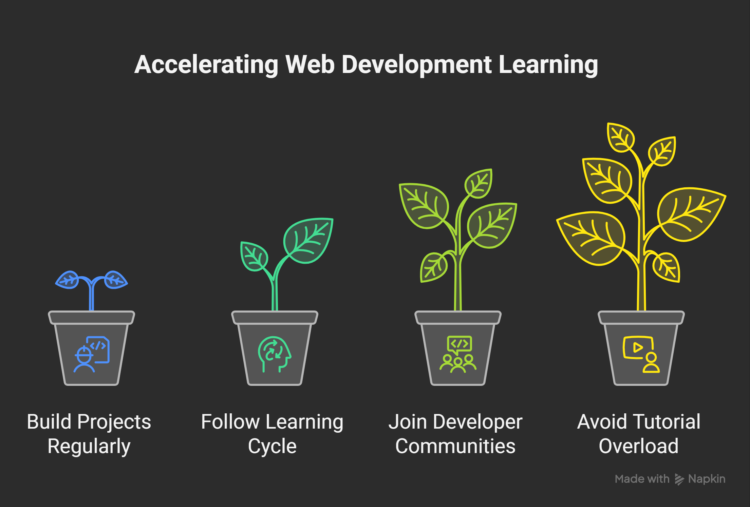
Follow these tips to improve faster:
Build projects regularly.
Apply concepts in real scenarios.
Improve problem-solving skills quickly.
Follow a learning cycle.
Learn a small concept first.
Build something using that concept.
Repeat the process daily.
Join developer communities.
Ask doubts and get quick help.
Learn from others’ experiences.
Avoid tutorial overload.
Do not watch too many videos.
Focus more on building projects.
These methods improve learning speed effectively.
What Common Mistakes Should You Avoid?
Many beginners make simple but serious mistakes. These mistakes slow learning and cause confusion. Avoiding them can improve progress quickly. A focused approach helps build strong skills.
⚠️ Mistakes to Avoid
Learning too many frameworks.
Focus on one tool at a time.
Avoid switching between technologies often.
Skipping JavaScript basics.
Learn core concepts clearly first.
Build logic before using frameworks.
Not building real projects.
Apply concepts through small projects.
Practice improves understanding faster.
Lack of consistency.
Study daily without long gaps.
Maintain a simple learning routine.
Avoiding these mistakes improves learning speed.
Can You Get a Job in 3 Months?
Getting a job in three months is possible. It depends on effort and consistency. Expectations should stay realistic and practical. Strong skills matter more than quick results. Focus on building useful and visible work.
🎯 What Matters Most
Portfolio over certificates.
Show real projects clearly.
Highlight skills through working apps.
Freelancing opportunities.
Start with small client projects.
Gain real experience quickly.
Internships.
Apply for beginner roles early.
Learn from real work environments.
Consistent effort improves chances over time.
Conclusion
Consistency and regular practice lead to real progress. Small efforts each day build strong skills. Projects help turn knowledge into real experience. Learning becomes easier through continuous practice. Focus on building rather than only learning. This approach creates confidence and better understanding.
Start today with a small and simple project. Do not wait for perfect knowledge or skills. Begin with basic ideas and improve slowly. Each project will make learning stronger. Stay consistent and keep building regularly. This is the key to success in web development.
Famida is an experienced educator with over a decade of teaching experience, specializing in grades 8 to 12, business management (BBM), and electronics engineering. Holding a Master's degree in Electronics and Communication Engineering, she has also trained interns in IoT. For the past four years, Famida has been writing articles for Entri, focusing on exam preparation tips, question papers, and study plans. She also creates practice questions for the Entri app and provides support to users. Additionally, Famida's writing skills extend to parenting and personal blogs, as well as curriculum development.