
Table of Contents
A robots.txt file is a text file that tells search engine crawlers which parts of a website to access and which parts to avoid. It is placed in the root directory of a website. It acts as the first set of instructions for search engine bots.
Key Takeaways
- Place a robots.txt file in your site’s root to tell crawlers which pages to crawl and which to avoid.
- Use core directives only – User-agent, Disallow, Allow, and Sitemap.
- Robots.txt optimizes crawl budget by blocking low-value pages. This does not prevent indexing.
- Don’t block critical resources (CSS/JS/images). Avoid accidental blocks (watch slashes/characters).
- Keep the file simple, include your XML sitemap, test changes (Google Search Console), and review regularly.
- Make robots.txt writable only by trusted users. Ensure it always returns a successful response (no 5xx errors).
The Purpose of Robots.txt
1: What is the primary goal of SEO (Search Engine Optimization)?
A robots.txt file serves the purpose of managing website crawling. It helps search engines focus on important pages. At the same time, it helps avoid sections that do not provide value in search results.
When a search engine crawler visits a website:
- It checks the robots.txt file before crawling other pages
- The crawler reads the instructions
- It decides which URLs or directories it can access
This process helps website owners guide search engines as well as improve crawl efficiency.
A properly configured robots.txt file supports SEO by helping search engines discover important content while reducing unnecessary crawling.
Become an AI-powered Digital Marketing Expert
Master AI-Driven Digital Marketing: Learn Core Skills and Tools to Lead the Industry!
Explore CourseWhy is Robots.txt Important for SEO?
Search engines use crawlers to discover and understand website content. A robots.txt file helps guide these crawlers. This is done by indicating which areas of a website should be crawled and which skipped.
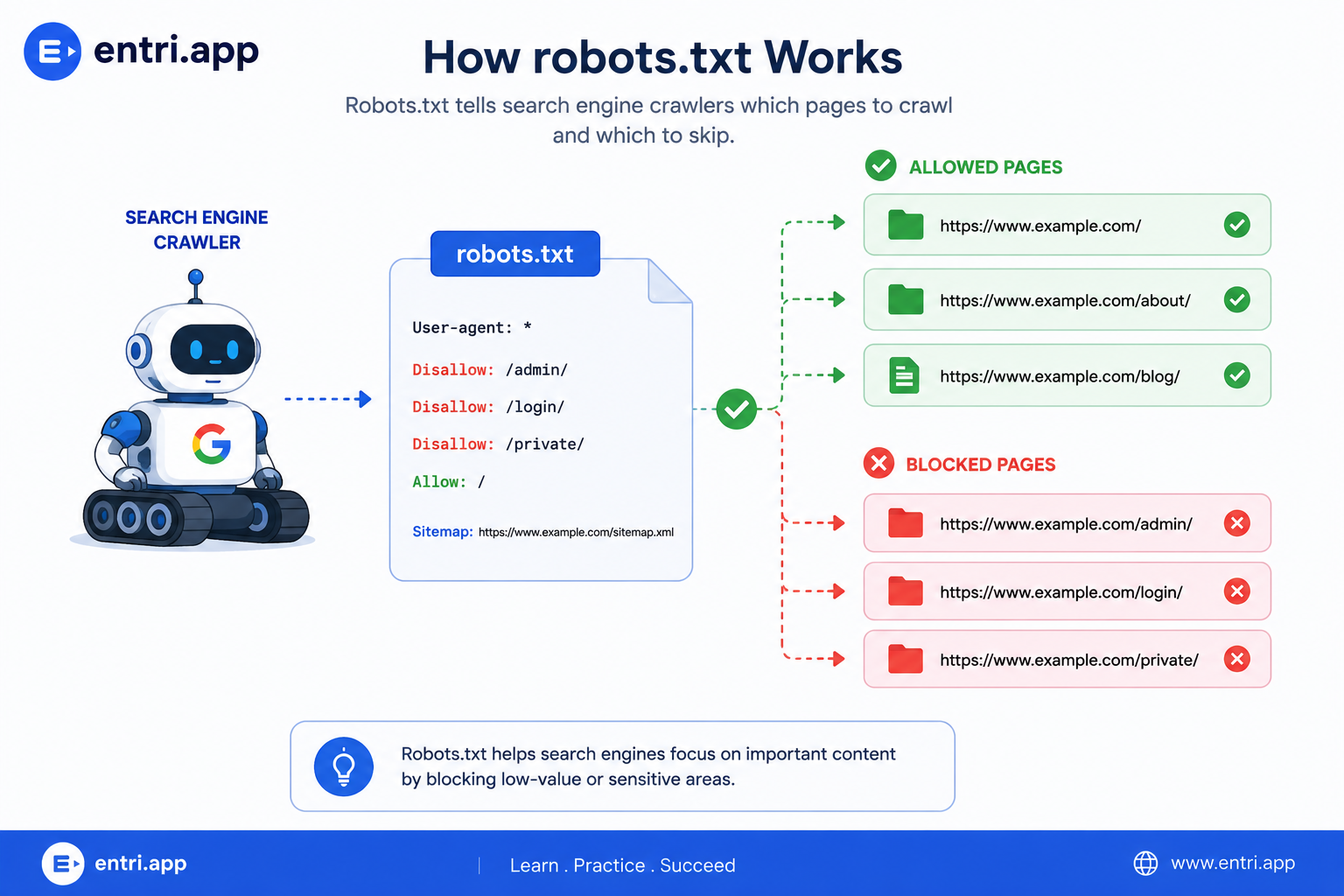
One of the biggest SEO benefits of robots.txt is crawl budget optimization. To understand how crawl budget impacts website visibility, learn the fundamentals of SEO and technical SEO through Entri’s Digital Marketing Course.
Search engines allocate a limited amount of crawling resources to each website. Website owners can help search engines spend more time on important content by restricting access to low-value pages.
Robots.txt also improves crawl efficiency. Instead of repeatedly visiting administrative pages, login areas, temporary URLs, or internal search result pages, crawlers can focus on pages that contribute to search visibility.
For large websites, an optimized robots.txt file can help search engines discover new content faster and prioritize valuable pages during crawling.
Although robots.txt influences crawling, it does not directly control indexing. A page may still appear in search results if search engines discover it through other sources. These sources can be backlinks or XML sitemaps.
Join Our Online Digital Marketing Course & Learn the Fundamentals!
Key Robots.txt Directives Explained
A robots.txt file uses directives to communicate instructions to search engine crawlers. Each directive serves a specific purpose and helps control how bots interact with a website.
User-agent
The User-agent directive specifies which crawler should follow the instructions. You can target a specific search engine bot or apply rules to all crawlers.
User-agent: *
The asterisk (*) represents all search engine crawlers.
Major Search Engines Crawlers
| Googlebot | Google’s primary web crawler. |
| Googlebot-News | Specialized crawler for Google News. |
| Googlebot-Image | Specialized crawler for Google Images. |
| Bingbot | Microsoft’s search crawler. |
| Slurp | Yahoo’s search crawler. |
| DuckDuckBot | DuckDuckGo’s search crawler. |
AI & Large Language Model (LLM) Crawlers
| GPTBot | OpenAI’s crawler used to train ChatGPT. |
| OAI-SearchBot | OpenAI’s web search crawler. |
| ClaudeBot / Claude-SearchBot | Anthropic’s crawlers. |
| PerplexityBot / PerplexityArchive | Perplexity AI’s crawlers. |
| Meta-WebIndexer | Meta’s crawler for citing and linking content in Meta AI. |
| Google-Extended | Google’s bot that controls web crawling for training AI and Gemini. |
| Applebot | Apple’s crawler used for both web search and AI features |
Common SEO & Miscellaneous Crawlers/Scrapers
| AhrefsBot / AhrefsSiteAudit | Ahrefs backlink and SEO crawler. |
|---|---|
| SemrushBot | Semrush SEO and traffic crawler. |
| MJ12bot | Majestic SEO backlink crawler. |
| PetalBot | Petal search engine (Huawei). |
Disallow
The Disallow directive prevents crawlers from accessing a specific page, folder, or directory.
User-agent: *
Disallow: /admin/
In this example, crawlers are instructed not to access the admin directory.
Allow
The Allow directive permits crawlers to access a specific page or folder, even when a broader directory is restricted.
User-agent: *
Disallow: /images/
Allow: /images/logo.png
Here, crawlers can access the logo image while other files inside the images folder remain restricted.
Sitemap
The sitemap directive helps search engines locate the website’s XML sitemap.
Sitemap: https://www.example.com/sitemap.xml
Including a sitemap makes it easier for search engines to discover and crawl important pages on your website.
XML sitemaps, robots.txt, and site architecture are essential topics covered in advanced SEO training programs.
Common Robots.txt Examples
The following examples demonstrate some of the most common robots.txt configurations used by website owners.
Allow All Crawlers
This configuration allows all search engine crawlers to access every page on the website.
User-agent: *
Disallow:
Block the Entire Website
This configuration prevents all search engine crawlers from accessing any page on the website.
User-agent: *
Disallow: /
This is commonly used on staging or development websites.
Block a Specific Directory
This configuration prevents crawlers from accessing a particular folder.
User-agent: *
Disallow: /admin/
All URLs within the admin directory will be excluded from crawling.
Block Multiple Directories
You can restrict access to multiple sections of a website by adding multiple Disallow directives.
User-agent: *
Disallow: /admin/
Disallow: /checkout/
Disallow: /cart/
Allow vs Disallow
The Allow and Disallow directives control crawler access to website content.
The Disallow directive tells search engine crawlers not to access a specific page, folder, or directory.
User-agent: *
Disallow: /admin/
The Allow directive permits crawlers to access a specific page or file, even when a parent directory is restricted.
User-agent: *
Disallow: /images/
Allow: /images/logo.png
Here, crawlers cannot access files inside the /images/ directory except for logo.png.
Understanding the Forward Slash (/)
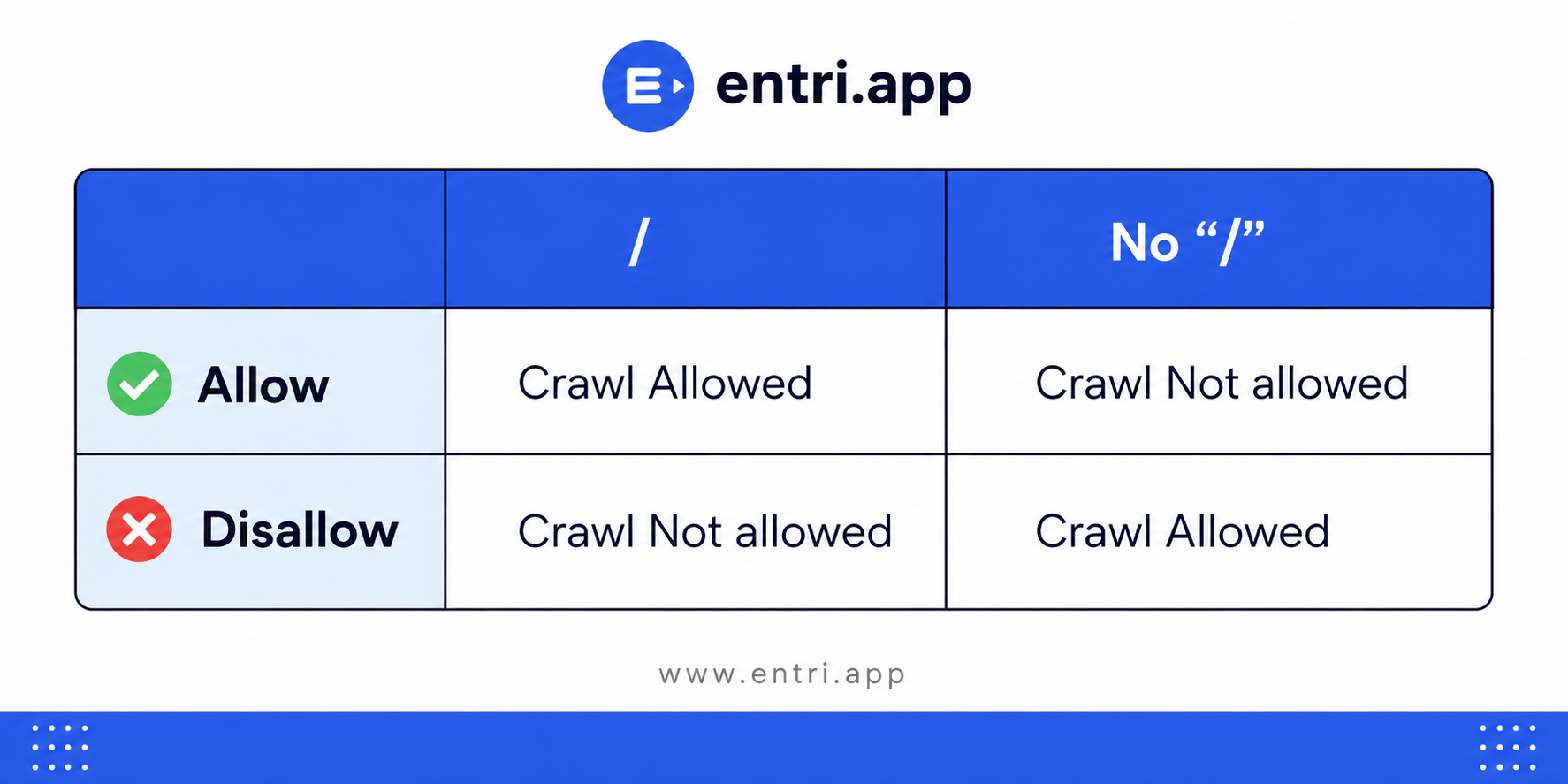
The forward slash (/) represents the root directory of a website. The way you use it with Allow and Disallow can completely change crawler behavior.
Disallow: /
User-agent: *
Disallow: /
Example: Blocks access to every page on example.com.
Disallow:
User-agent: *
Disallow:
Example: Allows crawlers to access all pages on example.com.
Disallow: /admin/
User-agent: *
Disallow: /admin/
Example: Blocks access to example.com/admin/ and everything inside that directory.
Allow: /
User-agent: *
Allow: /
Example: Explicitly allows crawlers to access all pages on example.com.
Allow: /blog/
User-agent: *
Disallow: /
Allow: /blog/
Example: Allows access to the /blog/ directory even when the rest of the website is restricted.
Understanding how the forward slash works is important. This is because a single misplaced character can accidentally block important pages or even an entire website from being crawled.
Become an AI-powered Digital Marketing Expert
Master AI-Driven Digital Marketing: Learn Core Skills and Tools to Lead the Industry!
Explore CourseCommon Robots.txt Mistakes to Avoid
A small error in a robots.txt file can prevent search engines from crawling important pages. If you can understand common mistakes, you can help avoid SEO issues.
Blocking the Entire Website
One of the most common mistakes is accidentally blocking the entire website.
User-agent: *
Disallow: /
This directive prevents search engine crawlers from accessing any page on the website.
Blocking Important Resources
Search engines often need access to CSS, JavaScript, and image files to understand how a page is rendered.
User-agent: *
Disallow: /assets/
If critical resources are stored inside the assets directory, search engines may not fully understand the page layout and content.
Using Robots.txt for Indexing Control
Many website owners assume that blocking a page in robots.txt will remove it from search results. Robots.txt only controls crawling, not indexing.
If a blocked page has backlinks or appears in a sitemap, search engines may still index the URL.
Forgetting to Update Robots.txt
Websites evolve. New directories, landing pages, and resources may require updates to robots.txt. Reviewing the file regularly helps ensure that important content remains accessible to search engines.
Failing to Protect the Robots.txt File
Restrict write permissions for the ‘robots.txt’ file to trusted users only. During attacks such as the Japanese Keyword Hack, attackers often try to modify the `robots.txt` file and replace the XML sitemap with a malicious sitemap containing spam URLs.
If the attacker cannot modify the ‘robots.txt’ file, search engines are less likely to discover the malicious sitemap. This reduces the crawling and indexing of spam pages while helping search engines continue to prioritize the legitimate pages on your website.
Ignoring Robots.txt Server Errors
If the robots.txt file returns a 5xx server error, Google temporarily stops crawling the website because it cannot determine which pages are allowed to crawl. This can happen due to server outages, programming mistakes, or plugin failures.
How to Create and Test a Robots.txt File

Creating a robots.txt file is straightforward. Open a plain text editor, add the required directives, and save the file as robots.txt.
Once created, upload the file to the root directory of your website. The file should be accessible at:
https://www.example.com/robots.txt
After uploading the file, verify that it is publicly accessible by opening the URL in your browser.
Testing Your Robots.txt File
Before deploying changes, test your robots.txt file to ensure that search engines can interpret the directives correctly.
You can test the file by:
- Reviewing the syntax manually
- Checking whether important URLs are blocked
- Verifying that critical resources remain crawlable
- Using Google Search Console to validate crawling rules
Regular testing helps prevent accidental blocking of important content and ensures that search engines can access pages that contribute to search visibility.
Important:
Robots.txt is not a security feature. It simply provides instructions to compliant search engine crawlers about which pages they should or should not crawl. It does not prevent someone from accessing those URLs directly, and malicious bots may ignore its instructions.
Robots.txt Best Practices
A well-structured robots.txt file helps search engines crawl your website efficiently. Following a few best practices can prevent crawling issues and improve SEO performance.
Keep the File Simple
Use only the directives you need. Complex rules can make the file difficult to maintain and troubleshoot.
Block Only Low-Value Content
Restrict access to pages that do not provide value in search results, such as admin areas, login pages, and temporary directories.
Include Your XML Sitemap
Adding your sitemap helps search engines discover important pages faster.
Sitemap: https://www.example.com/sitemap.xml
Test Before Publishing
Always review and test changes before deploying a new robots.txt file. A single mistake can affect crawling across the entire website.
Review the File Regularly
As your website grows, new sections and directories may require updates. Periodic reviews help ensure the file remains aligned with your SEO goals.
Avoid Using Robots.txt for Sensitive Information
Robots.txt is publicly accessible. It should not be used to protect confidential files or private content. Use proper authentication and access controls instead.
Keep the Robots.txt File Accessible
Ensure the robots.txt file always returns a successful response. A missing or unavailable robots.txt file can interrupt crawling and affect how search engines access your website.
Robots.txt relies on crawler compliance. Major search engines such as Google and Bing follow their directives. But malicious or non-compliant crawlers may ignore them.
Join Our Online Digital Marketing Course & Learn the Fundamentals!
Conclusion
A robots.txt file is one of the simplest yet most important technical SEO files on a website. It helps search engines understand which areas of a website should be crawled. It also allows website owners to optimize crawl efficiency.
When used correctly, robots.txt can improve crawl budget utilization, support content discovery, and prevent unnecessary crawling. If you follow the best practices and regularly review your configuration, you can ensure that search engines focus on the pages that matter most.
|
RELATED POSTS |
|
| Vector Databases and the Evolution of Semantic SEO | |
| What are AEO Tools? A Beginner’s Guide to Answer Engine Optimization | |
| Why Every Entrepreneur Needs Digital Marketing Skills in 2026 | |
Frequently Asked Questions
How does a robots.txt file help my website’s SEO?
It guides search engine crawlers toward valuable pages and away from low-priority sections.
Where should I upload my website’s robots.txt file?
Upload it to your website’s root directory, such as https://www.example.com/robots.txt.
Will blocking a page in robots.txt remove it from Google?
No. Robots.txt controls crawling, not indexing. A blocked URL may still appear through backlinks or sitemaps.
Which pages should I block with robots.txt?
You can block low-value areas such as admin pages, login sections, checkout pages, cart pages, and temporary directories.
Could my robots.txt file block important website resources?
Yes. Blocking CSS, JavaScript, or image files may prevent search engines from properly understanding your webpages.
Can I use robots.txt to protect private files?
No. Robots.txt is publicly accessible and is not a security tool. Use passwords and proper access controls for sensitive content.
How can I check whether my robots.txt file is working correctly?
Review the rules, check important URLs, and test the file using Google Search Console before publishing changes.
How often should I update my website’s robots.txt file?
Review it whenever you add new sections, change your site structure, or update important pages.