
Table of Contents
Key Takeaways
- CAD Engineers make drawings on computers
- CAD software is used for this work
- Practice helps you learn better
- Many jobs are available in this field
- CAD is a good career choice
Get Career oriented MEP training with Expert Mentors! Get Free Demo Here!
How to Become a CAD Engineer?
What is a CAD Engineer?
Why Choose CAD Engineering as a Career?
CAD Engineering is a good career for people who enjoy computer work and drawing. Today, many companies need CAD Engineers for design work.
This field offers many job options and good career growth.
👉 Choosing CAD Engineering can help you build a good future.
Career Opportunities
A CAD Engineer can work in many roles.
Some job roles are:
- CAD Engineer
- CAD Designer
- CAD Technician
- Draftsman
- BIM Modeler
- Design Engineer
👉 As you gain experience, you can move to higher roles.
Demand in Different Industries
CAD Engineers are needed in many industries.
Some industries are:
- Construction
- Architecture
- Civil Engineering
- Manufacturing
- Mechanical Engineering
- Electrical Engineering
👉 Many industries need CAD professionals.
Future Scope of CAD Engineering
- CAD has a bright future
- New projects create more jobs
- More companies use CAD software
- Skilled people can get good jobs
Skills Needed for CAD Engineering
Companies look for people with useful skills.
Important skills include:
- CAD software knowledge
- Drawing ability
- Computer skills
- Basic engineering knowledge
- Communication
- Teamwork
👉 Strong skills can improve job opportunities.
Benefits of Choosing CAD Engineering
Some benefits are:
- Good job opportunities
- Career growth
- Work in different fields
- Learn modern tools
- Better chances with experience
👉 CAD Engineering is a good choice for people who want a stable and growing career.
Master MEP Design with Industry-Leading Training!
Gain in-depth knowledge of Mechanical, Electrical, and Plumbing (MEP) Design with expert-led courses. Learn HVAC, fire safety, sustainable building strategies, and BIM applications to excel in the construction industry.
Know MoreEducational Requirements to Become a CAD Engineer
Essential CAD Software You Should Learn
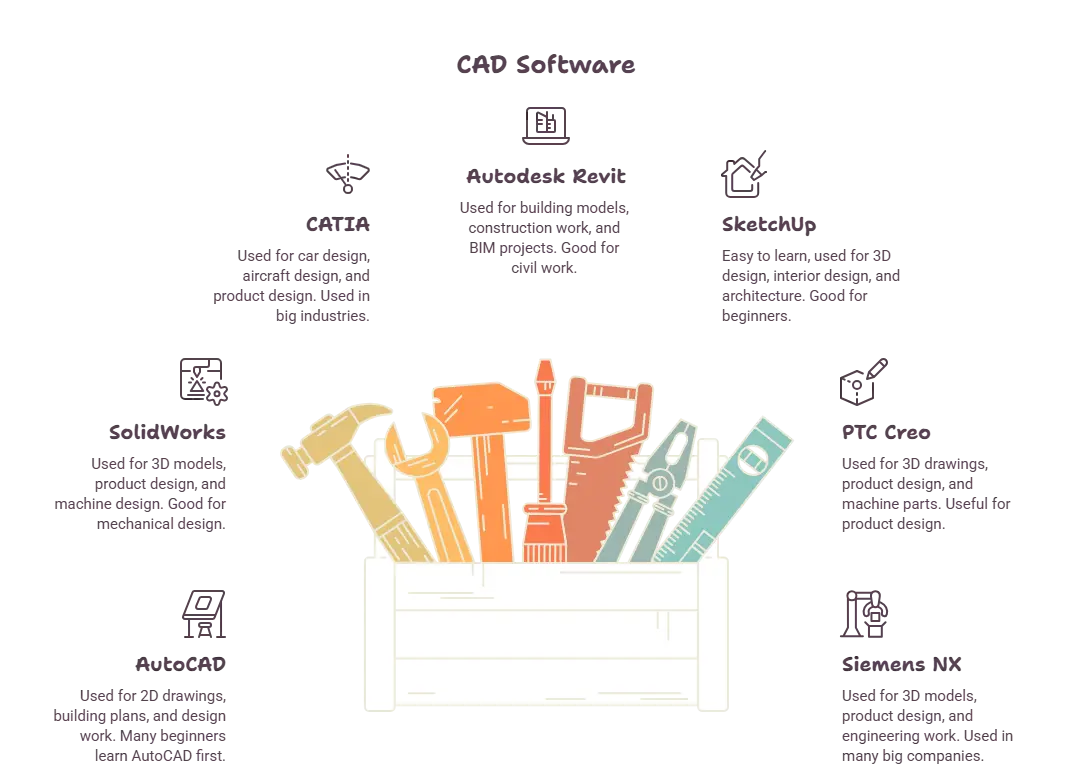
| Software | Industry | Beginner Friendly | Primary Use |
|---|---|---|---|
| AutoCAD | Construction | Yes | 2D Drawings |
| SolidWorks | Manufacturing | Yes | 3D Design |
| CATIA | Automobile | No | Product Design |
| Revit | Construction | Yes | Building Design |
| Creo | Manufacturing | Moderate | Product Design |
| STAAD.Pro | Civil Engineering | Moderate | Structural Design |
Skills Required to Become a Successful CAD Engineer
To become a good CAD Engineer, you need some important skills. These skills help you do your work better and grow in your career.
1. CAD Software Skills
A CAD Engineer should know how to use CAD software properly.
Important software skills:
- Use drawing tools
- Make designs on computer
- Edit drawings
👉 Good software skills are very important.
2. Drawing Skills
Drawing skills help you create clear designs.
You should know how to:
- Draw properly
- Read drawings
- Understand design plans
👉 Good drawing skills help avoid mistakes.
3. Computer Skills
CAD work is done on a computer. So computer knowledge is needed.
Basic computer skills:
- Use computer well
- Manage files
- Use basic software
👉 Computer skills make work easier.
4. Basic Engineering Knowledge
A CAD Engineer should know basic engineering concepts.
This helps in:
- Understanding designs
- Reading measurements
- Doing technical work
👉 Basic knowledge improves work quality.
5. Attention to Detail
Small mistakes in drawings can cause problems.
You should:
- Check work carefully
- Notice small details
- Avoid errors
👉 Careful work gives better results.
6. Problem-Solving Skills
Sometimes design problems happen during projects.
A CAD Engineer should:
- Find problems
- Think of solutions
- Fix design issues
👉 Problem-solving helps in project work.
7. Communication Skills
CAD Engineers work with many people.
Good communication helps you:
- Share ideas clearly
- Understand instructions
- Work better with others
👉 Good communication improves teamwork.
8. Teamwork Skills
Many projects need team work.
You should be able to:
- Work with others
- Help team members
- Finish work together
👉 Teamwork is important in big projects.
9. Time Management
Projects often have deadlines.
Good time management helps you:
- Finish work on time
- Plan tasks well
- Avoid delays
👉 Managing time helps you work better.
10. Learning Mindset
Technology keeps changing. Keep learning new things.
You should:
- Learn new software
- Improve skills
- Stay updated
👉 Continuous learning helps you grow as a CAD Engineer.
Master MEP Design with Industry-Leading Training!
Gain in-depth knowledge of Mechanical, Electrical, and Plumbing (MEP) Design with expert-led courses. Learn HVAC, fire safety, sustainable building strategies, and BIM applications to excel in the construction industry.
Know MoreStep-by-Step Roadmap to Become a CAD Engineer
Becoming a CAD Engineer needs learning, practice, and patience. You need to study, learn software, and improve your skills step by step.
Step 1: Finish School
First, complete your school studies. Basic education is important.
Focus on:
- Finish 10th or 12th
- Learn maths
- Learn science
👉 School is the first step.
Step 2: Join a Course
After school, join a course related to this field.
You can choose:
- Diploma course
- Engineering course
- Design course
👉 A good course helps you learn basics.
Step 3: Learn CAD Software
CAD Engineers use software for drawing work. Learning software is necessary.
Learn to:
- Make drawings
- Use tools
- Edit designs
👉 Software skills are important.
Step 4: Understand Basics
Learn simple technical concepts for better work.
Important basics:
- Measurements
- Drawing rules
- Design basics
👉 Basic knowledge helps a lot.
Step 5: Practice Every Day
Regular practice improves your skills.
You can:
- Draw simple designs
- Do small projects
- Practice daily
👉 More practice gives better skills.
Step 6: Get Training
Training helps you learn in a better way.
Training can help you:
- Learn from experts
- Improve skills
- Gain confidence
👉 Training gives practical knowledge.
Step 7: Make Sample Work
Keep your best drawings ready. This shows your skills.
You can keep:
- Sample drawings
- Design work
- Practice projects
👉 Good work helps during job search.
Step 8: Search for Jobs
After learning, start applying for jobs.
Do these:
- Prepare resume
- Apply for jobs
- Attend interviews
👉 Jobs help you gain experience.
Step 9: Keep Improving
Learning should not stop.
Keep doing:
- Learn new software
- Improve skills
- Stay updated
👉 Learning helps career growth.
Step 10: Gain Experience
Experience helps you grow in your career.
With experience you can:
- Get better jobs
- Work on big projects
- Earn more salary
👉 Step by step, you can become a successful CAD Engineer.
Certifications that Can Boost Your Career
| Feature | CAD Engineer | CAD Designer | Draftsman |
|---|---|---|---|
| Main Work | Creates engineering drawings and designs | Creates design layouts and models | Prepares technical drawings |
| Education | Degree or Diploma | Degree, Diploma, or CAD Course | Diploma or CAD Course |
| Technical Knowledge | High | Medium | Basic |
| Software Use | High | High | Medium |
| Design Work | Yes | Yes | Limited |
| Career Growth | High | Good | Moderate |
| Salary Potential | Higher | Medium | Medium |
How to Build a Strong CAD Portfolio
A CAD portfolio is a file of your best work. It shows your drawings and skills. A good portfolio can help you get a job.
1. Add Best Work
Add your best drawings only.
You can add:
- CAD drawings
- Design work
- Project samples
👉 Show good work.
2. Add Different Projects
Show different types of work.
Examples:
- Building drawings
- Machine drawings
- 2D designs
- 3D designs
👉 Different work shows more skills.
3. Keep Work Clean
Your drawings should look neat.
Remember:
- Clear lines
- Proper names
- Clean layout
👉 Clean work looks better.
4. Show Software Skills
Mention the software you know.
Examples:
- AutoCAD
- Autodesk Revit
- SolidWorks
👉 Software skills are important.
5. Add Project Details
Write small details for each project.
Add:
- Project name
- Software used
- Work type
👉 Small details help others understand.
6. Update Often
Keep adding new work.
Do this:
- Add new projects
- Remove old work
- Improve portfolio
👉 Updated work looks good.
7. Keep It Simple
Make the portfolio easy to see.
- Keep it neat
- Arrange well
- Use less text
👉 Simple portfolios look better.
8. Make Digital Copy
Keep your portfolio on computer.
You can save it as:
- Slides
- Online file
👉 Easy to share with companies.

Career Opportunities After Becoming a CAD Engineer
CAD Engineer Salary and Career Growth
CAD Engineers can earn a good salary. Salary may change based on skills, experience, and company.
👉 Good skills can help you earn more.
| Experience Level | Salary | Growth |
|---|---|---|
| Fresher | Basic salary | Start career |
| 2–5 Years | Better salary | More skills |
| Experienced | High salary | Better position |
Career Growth
CAD Engineers can grow to higher jobs.
- Senior CAD Engineer
- Team Leader
- Project Manager
👉 Experience helps you get better salary and better jobs.
Is CAD Engineering a Good Career in 2026 and Beyond?
Yes, CAD Engineering is a good career in 2026. Many companies need CAD Engineers.
👉 CAD has a good future.
Why Choose It?
- Many jobs
- Good salary
- Good growth
- Work in many fields
👉 It gives good career chances.
Future Scope
- More projects
- More CAD jobs
- More company demand
👉 CAD Engineers can get good jobs.
Get Career oriented MEP training with Expert Mentors! Get Free Demo Here!
Conclusion
CAD Engineering is a good career for people who like drawing and computers. It has many job opportunities and good future growth.
If you learn CAD software and keep practicing, you can get good jobs and build a strong career as a CAD Engineer.
| Related Links | |
| How to Optimize Linkedin for A Mechanical Engineering Fresher | Top Skills Mechanical Engineers Need to Get Placed |
Master MEP Design with Industry-Leading Training!
Gain in-depth knowledge of Mechanical, Electrical, and Plumbing (MEP) Design with expert-led courses. Learn HVAC, fire safety, sustainable building strategies, and BIM applications to excel in the construction industry.
Know MoreFrequently Asked Questions
What is a CAD Engineer?
CAD Engineer is a person who makes technical drawings using computer software. These drawings help in building machines, buildings, and other products. CAD Engineers work in many industries like construction, manufacturing, and design.
How can I become a CAD Engineer?
To become a CAD Engineer, you need basic education, CAD software knowledge, and practical skills. Learning design basics and practicing regularly can help you start this career.
What qualifications are needed to become a CAD Engineer?
Most CAD Engineers complete a diploma, engineering course, or design course. Basic knowledge of maths, science, and computer skills is also helpful.
Which CAD software should I learn?
Popular CAD software includes AutoCAD, Autodesk Revit, SolidWorks, and CATIA. The software you choose depends on your career field.
Is CAD Engineering a good career in 2026?
Yes, CAD Engineering is a good career in 2026. Many companies need CAD Engineers for design and drawing work, creating good job opportunities and career growth.
What skills are required to become a CAD Engineer?
Important skills include:
- CAD software skills
- Drawing skills
- Computer knowledge
- Basic engineering knowledge
- Communication skills
These skills help you perform better at work.
What is the salary of a CAD Engineer?
CAD Engineer salary depends on skills, experience, and company. Freshers usually start with basic pay, and salary increases as experience grows
Which industries hire CAD Engineers?
Many industries hire CAD Engineers for design work.
Common industries include:
- Construction
- Architecture
- Manufacturing
- Civil Engineering
- Mechanical Engineering
- Electrical Engineering
These industries offer many career opportunities for CAD Engineers.