Table of Contents
Key Takeaways:
- ATS-friendly resumes help students get more interview calls.
- Use simple resume format and clear headings.
- Add important technical skills and keywords.
- Include projects, internships, and certifications.
- Avoid fancy designs, graphics, and long paragraphs.
- Keep the resume short, clear, and easy to read.
An ATS-friendly resume helps engineering students get noticed by companies and recruiters. Freshers should use simple formatting, clear headings, important skills, projects, internships, and keywords related to the job role. A clean and easy-to-read resume improves the chances of passing ATS software and getting interview calls.
Step-by-Step Guide to Creating an ATS Resume
An ATS-friendly resume should be simple, clear, and easy to read. Engineering students should use proper headings, important keywords, and clean formatting.
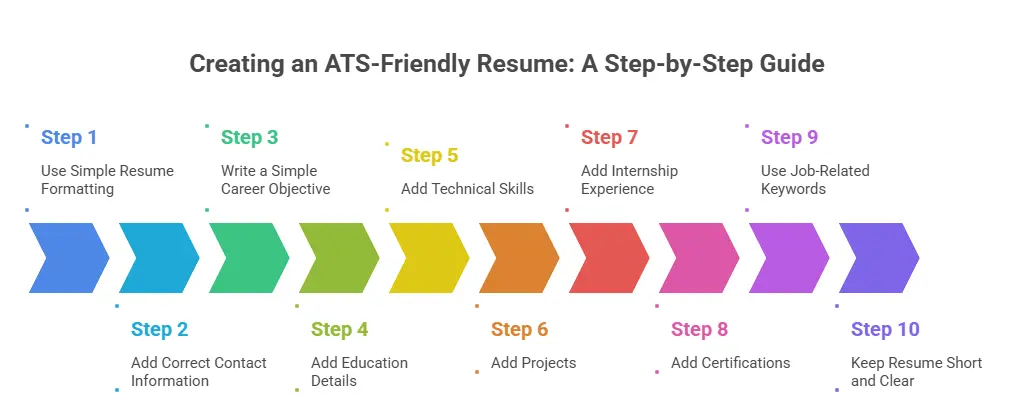
Step 1: Use Simple Resume Formatting
Keep the resume neat and simple.
Tips:
- Use simple fonts
- Use proper headings
- Keep enough spacing
- Use black text color
- Save resume as PDF if required
Avoid:
- Too many colors
- Complex designs
- Graphics and images
- Fancy fonts
Step 2: Add Correct Contact Information
Add basic contact details clearly.
Include:
- Full name
- Phone number
- Email address
- LinkedIn profile
- Location
Step 3: Write a Simple Career Objective
The objective should explain career interests briefly.
Example:
“Engineering fresher interested in software development and looking for opportunities to improve technical skills.”
Step 4: Add Education Details
Mention education clearly.
Include:
- College name
- Degree name
- Branch
- Graduation year
- Percentage or CGPA
Step 5: Add Technical Skills
Technical skills are very important for ATS.
Examples:
- Python
- Java
- AutoCAD
- Embedded Systems
- MATLAB
- Communication skills
Step 6: Add Projects
Projects show practical knowledge.
Mention:
- Project title
- Tools used
- Simple explanation
- Your role in the project
Step 7: Add Internship Experience
Internships improve job opportunities.
Include:
- Company name
- Internship role
- Skills learned
- Work done
Step 8: Add Certifications
Certifications show extra learning.
Examples:
- Python course
- AutoCAD certification
- Data Analytics course
- Embedded Systems training
Step 9: Use Job-Related Keywords
Read the job description carefully.
Add related keywords naturally.
Examples:
- Programming
- Automation
- PLC
- CAD Design
- Testing
Step 10: Keep Resume Short and Clear
Freshers should keep resumes simple.
Best practice:
- 1-page resume for freshers
- Clear headings
- Simple language
- Easy-to-read points
Step 11: Check Grammar and Spelling
Avoid mistakes in resumes.
Check:
- Spelling
- Grammar
- Sentence clarity
Step 12: Update Resume Regularly
Keep resumes updated with new learning.
Add:
- New skills
- Projects
- Certifications
- Internship experience
Key Differences Engineers Should Know: ATS Resume vs Traditional Resume
An ATS resume is different from a traditional resume. Today, many companies use ATS software to scan resumes before recruiters read them.
ATS Resume Uses Simple Formatting
ATS-friendly resumes use:
- Simple fonts
- Clear headings
- Basic layout
- Proper spacing
They avoid:
- Tables
- Graphics
- Icons
- Text boxes
- Fancy colors
Simple formatting helps ATS software read the resume correctly.
Traditional Resume Uses Creative Design
Traditional resumes often include:
- Multiple columns
- Images
- Charts
- Decorative designs
- Creative layouts
These designs may look attractive but can create problems during ATS scanning.
ATS Resume Focuses on Keywords
ATS software searches resumes for keywords related to the job role.
Examples of engineering keywords:
- Python
- Java
- SQL
- AutoCAD
- Machine Learning
- Embedded Systems
Using proper keywords improves the chances of getting shortlisted.
Traditional Resume May Ignore Keywords
- Traditional resumes often focus more on writing style and visual presentation.
- Important technical keywords may sometimes be missing.
- This can reduce ATS score and resume visibility.
ATS Resume Uses Standard Headings
ATS resumes use clear section names like:
- Education
- Skills
- Experience
- Projects
- Certifications
These headings help ATS software understand resume content easily.
Traditional Resume Uses Creative Headings
Traditional resumes may use headings like:
- My Journey
- Career Story
- What I Have Done
ATS systems may not recognize these headings properly.
ATS Resume Is Easy to Read
ATS-friendly resumes are clean and properly organized. Recruiters can quickly find:
- Technical skills
- Internship details
- Projects
- Certifications
Traditional Resume Can Look Complex
- Traditional resumes sometimes contain too many design elements.
- Important information may become difficult to notice quickly.
ATS Resume Works Better for Engineers
Most companies now use ATS software during hiring. ATS-friendly resumes help engineering students:
- Pass resume screening
- Improve shortlist chances
- Highlight technical skills
- Apply for placements and jobs more effectively
Master Robotics and AI!
Ready to build the future? Join our comprehensive robotics course to bridge the gap between complex code and physical motion. You’ll gain hands-on experience giving you the technical edge needed to lead in the age of automation.
Know MoreCommon Mistakes to Avoid
Many engineering students make small resume mistakes that reduce their chances of getting shortlisted. Avoiding these mistakes can improve ATS score and recruiter attention.
Using Fancy Resume Designs
Many students use:
- Graphics
- Icons
- Tables
- Multiple columns
- Bright colors
These designs may look attractive but ATS software may not read them properly.
Adding Too Many Unnecessary Details
Some resumes include:
- Long paragraphs
- Personal information
- Irrelevant hobbies
- Unrelated experiences
Recruiters usually prefer short and relevant information.
Not Using Job Keywords
Many students forget to include keywords from the job description.
Examples:
- Python
- Java
- AutoCAD
- SQL
- Data Analysis
ATS software searches for these keywords.
Using Incorrect Resume Headings
Creative headings can confuse ATS software. Avoid headings like:
- My Journey
- Career Story
- About Me
Use simple headings such as:
- Skills
- Education
- Projects
- Experience
Spelling and Grammar Mistakes
Small writing mistakes can create a bad impression. Always check:
- Spelling
- Grammar
- Sentence clarity
Writing Very Long Resumes
Many freshers create resumes with too much content. For students and freshers:
- 1-page resume is usually enough
- Add only important details
Adding Fake Information
Some students add fake:
- Skills
- Projects
- Experience
- Certifications
Recruiters may verify details during interviews.
Ignoring Technical Skills
Engineering resumes should clearly mention technical skills.
Examples:
- Programming languages
- Software tools
- Technical certifications
- Engineering projects
Using Poor File Formats
Some file types may create formatting issues.
Best formats:
- DOCX
Not Updating the Resume
Students sometimes use the same resume for every job application.
Different jobs may require different:
- Skills
- Keywords
- Projects

Practical Impact of ATS Optimization
ATS optimization can make a big difference during job applications. Many companies use ATS software to filter resumes before recruiters read them.
A well-optimized ATS resume improves the chances of getting noticed and shortlisted.
Helps Resumes Pass ATS Screening
ATS software checks resumes for:
- Keywords
- Skills
- Education
- Experience
- Resume format
If the resume is properly optimized, the software can read the information easily. ATS-friendly resumes have better chances of passing the first screening round.
Increases Shortlist Chances
- Many students apply for the same engineering jobs.
- Recruiters cannot manually read every resume.
- ATS software selects resumes that match the job requirements.
- Proper ATS optimization improves shortlist opportunities.
Improves Resume Visibility
ATS systems search resumes using keywords from the job description.
For example:
- Python
- Java
- SQL
- AutoCAD
- Machine Learning
When these keywords are added naturally, the resume becomes easier to find. Good keyword usage improves resume visibility.
Helps Recruiters Find Important Details Quickly
Recruiters usually spend only a few seconds checking resumes. ATS-friendly resumes make it easier to find:
- Technical skills
- Projects
- Internship experience
- Certifications
Supports Freshers During Placements
Freshers often have limited work experience. ATS optimization helps students highlight:
- Academic projects
- Technical skills
- Certifications
- Internships
Reduces Resume Rejection
Many resumes get rejected because of:
- Poor formatting
- Missing keywords
- Complex designs
- Incorrect headings
ATS optimization helps avoid these common problems. Proper formatting improves resume acceptance.
Improves Opportunities in Technical Roles
Engineering jobs often require specific technical skills. ATS systems search for:
- Programming languages
- Software tools
- Technical certifications
- Engineering technologies
Saves Time for Recruiters
- Companies receive thousands of resumes.
- ATS helps recruiters quickly identify suitable candidates.
- Well-optimized resumes are easier to process and review.
- ATS-friendly resumes improve recruitment efficiency.
Builds Professional Resume Quality
ATS optimization encourages students to create resumes that are:
- Organized
- Clear
- Professional
- Easy to read
Better resume quality improves overall job application performance.
Best Practices for Engineers
A good ATS-friendly engineering resume should be:
- Simple
- Professional
- Keyword-focused
- Easy to read
- Properly organized
Following these best practices can improve ATS score and increase job opportunities for engineers.
Expert Tips to Improve ATS Score
- Engineering students should create resumes that are simple, clear, and easy for ATS software to read.
- Small improvements can increase ATS score and improve interview chances.
Use Simple Resume Formatting
Keep the resume layout clean and simple.
Use:
- Simple fonts
- Clear headings
- Proper spacing
- Basic black text
Avoid:
- Graphics
- Icons
- Tables
- Text boxes
- Fancy colors
Add Important Technical Keywords
Include keywords related to the job role.
Examples:
- Python
- Java
- SQL
- AutoCAD
- Machine Learning
- Embedded Systems
- Data Analysis
Use keywords naturally in:
- Skills section
- Projects
- Experience
- Certifications
Use Standard Resume Headings
ATS software understands common headings better. Use headings like:
- Education
- Skills
- Projects
- Experience
- Certifications
Avoid creative headings. Standard headings improve resume scanning.
Mention Technical Skills Clearly
Engineering resumes should highlight technical abilities.
Examples:
- Programming languages
- Software tools
- Technical platforms
- Engineering technologies
Include Projects and Internships
Mention:
- Academic projects
- Mini projects
- Final-year projects
- Internship experience
Explain:
- Technologies used
- Your role
- Project outcome
Customize Resume for Every Job
Different jobs require different skills and keywords. Read the job description carefully and update the resume based on:
- Required skills
- Tools
- Technologies
- Certifications
Keep Resume Short and Clear
Freshers should usually use:
- One-page resume
- Short bullet points
- Clear sentences
Avoid long paragraphs.
Use Correct File Format
Best file formats:
- DOCX
These formats work properly with most ATS software.
Check Spelling and Grammar
Always review the resume before applying.
Check:
- Spelling mistakes
- Grammar errors
- Incorrect information
Add Relevant Certifications
Include certifications related to engineering and technical skills.
Examples:
- Programming courses
- Software certifications
- Technical training
- Online certifications
Use Action Words
Use simple action words in project and experience sections.
Examples:
- Developed
- Designed
- Created
- Tested
- Implemented
New to Robotics? Start from the Basics. Join Now!
Conclusion
Master Robotics and AI!
Ready to build the future? Join our comprehensive robotics course to bridge the gap between complex code and physical motion. You’ll gain hands-on experience giving you the technical edge needed to lead in the age of automation.
Know MoreFrequently Asked Questions
What is an ATS-friendly resume?
An ATS-friendly resume is a resume designed to work properly with Applicant Tracking System software. It uses simple formatting, proper headings, and important keywords so the software can easily read and scan the resume.
Why do companies use ATS software?
Companies use ATS software to manage large numbers of job applications. The software helps recruiters quickly filter resumes based on skills, keywords, education, and experience.
Why is ATS important for engineering students?
Many engineering companies use ATS during hiring. An ATS-friendly resume helps students improve their chances of getting shortlisted for internships, placements, and technical jobs.
What are the best resume formats for ATS?
Simple resume formats work best for ATS.
Recommended formats:
- DOCX
The resume should include:
- Clear headings
- Simple fonts
- Proper spacing
- Basic layout
What should engineers include in an ATS resume?
Engineering students should include:
- Technical skills
- Programming languages
- Projects
- Internships
- Certifications
- Education details
Adding relevant keywords from the job description is also important.
What mistakes should be avoided in ATS resumes?
Common mistakes include:
- Using graphics and tables
- Adding fancy designs
- Using incorrect headings
- Missing important keywords
- Spelling and grammar mistakes
Simple resumes usually perform better in ATS systems.