
Table of Contents
Great editing follows proven principles. These principles improve every video. They strengthen storytelling and pacing. They also improve viewer engagement. No universal set of seven laws exists. However, professional editors follow similar guidelines.
These editing principles work across films, YouTube videos, documentaries, commercials, and social media. Learning these laws helps beginners edit with greater confidence and create polished, engaging videos.
Build a Career in AI-Powered Video Editing
Quick Overview
| Editing Law | Purpose | Importance | Common Beginner Mistake |
|---|---|---|---|
| Story Comes First | Strengthen the narrative | Very High | Adding unnecessary clips |
| Cut with Purpose | Improve flow | Very High | Random cuts |
| Maintain Continuity | Avoid viewer confusion | High | Breaking screen direction |
| Prioritize Audio Quality | Improve clarity | High | Ignoring background noise |
| Use Transitions Intentionally | Connect scenes naturally | Medium | Overusing effects |
| Control Rhythm and Pacing | Maintain engagement | High | Uneven pacing |
| Review, Refine, and Remove | Improve final quality | Very High | Exporting too quickly |
What are the Laws of Video Editing?
Video editing follows guiding principles. These principles improve every project. They help editors make better decisions. They also create consistent viewing experiences.
Editing laws are not strict rules. Creative freedom always remains important. Different projects require different approaches. Professional editors adjust techniques carefully. However, strong editing principles remain valuable across every video type.

Principles Over Rules
Editing allows creativity. Every project feels different. Editors solve different challenges daily.
Principles help editors:
- Build stronger stories.
- Improve video flow.
- Create better pacing.
- Avoid common mistakes.
Editors adapt these principles naturally.
Creative Choices Matter
Every creative decision shapes videos. Editors choose how stories unfold. Technical skills support creativity.
Creative choices include:
- Scene order.
- Cut timing.
- Music selection.
- Visual pacing.
Good decisions improve engagement.
Technical Standards Support Quality
Technical skills create consistency. Professional editing needs careful attention.
Editors manage:
- Audio quality.
- Color consistency.
- File organization.
- Export settings.
Strong technical skills support creativity.
Professional Editors Apply These Principles
Experienced editors rarely edit randomly. Every decision has purpose. Every change improves the final video.
Professional editors focus on:
- Story clarity.
- Viewer emotions.
- Natural pacing.
- Clean visuals.
These habits improve every project.
Become an AI-powered Video Editor
Master the future of video editing with AI-powered tools and techniques. Learn how to create professional-quality videos faster, automate repetitive editing tasks, generate engaging content, and boost your creative productivity.
Start Learning!Why Editing Principles Matter
Editing transforms raw footage. Good editing creates meaningful stories. Small improvements create stronger videos.
Better Storytelling
Storytelling remains the foundation. Every edit supports the message. Every scene needs purpose.
Strong storytelling helps:
- Build emotional moments.
- Improve scene flow.
- Remove distractions.
- Keep viewers engaged.
Simple stories often feel stronger.
Better Viewer Retention
Interesting videos hold attention longer. Better pacing reduces viewer drop-off.
Editors improve retention by:
- Removing slow scenes.
- Improving timing.
- Creating smoother flow.
- Building curiosity.
Good pacing keeps viewers watching.
Emotional Engagement
Videos should create emotions. Editing controls emotional timing. Music also supports emotional impact.
Editors build emotions through:
- Meaningful pauses.
- Facial expressions.
- Scene order.
- Music timing.
Emotion makes videos memorable.
Visual Clarity
Clear visuals improve understanding. Confusing edits distract viewers. Every scene should remain easy to follow.
Visual clarity comes from:
- Clean cuts.
- Organized sequences.
- Consistent colors.
- Balanced graphics.
Simple editing improves communication.
Professional Quality
Professional videos create trust. Clean editing reflects attention to detail.
Professional editing includes:
- Smooth transitions.
- Balanced audio.
- Stable pacing.
- Organized visuals.
Quality creates better impressions.
Brand Consistency
Businesses rely on consistency. Every video should match brand identity.
Editors maintain consistency through:
- Similar colors.
- Matching fonts.
- Consistent music.
- Uniform editing style.
Consistency builds recognition.
Law 1: Story Comes First
Every edit should support the story. Viewers remember stories first. Effects remain secondary. Strong storytelling creates lasting impact.
Every Edit Needs Purpose
Every clip should contribute. Unnecessary scenes weaken storytelling.
Ask before adding clips:
- Does it help?
- Does it explain?
- Does it improve?
- Does it engage?
If not, remove it.
Remove Unnecessary Footage
Long videos reduce attention. Shorter edits often feel stronger.
Remove:
- Repeated scenes.
- Long pauses.
- Weak camera angles.
- Unimportant moments.
Simple edits improve storytelling.
Maintain Narrative Flow
Stories should progress naturally. Smooth flow keeps viewers comfortable.
Maintain flow by:
- Following logical order.
- Connecting scenes naturally.
- Avoiding sudden changes.
- Ending clearly.
Natural flow improves understanding.
Practical Example
Imagine a travel vlog.
Instead of showing:
- Packing everything.
- Every road.
- Every meal.
Show:
- Best locations.
- Beautiful scenery.
- Important experiences.
- Memorable highlights.
The story becomes stronger.
Law 2: Cut with Purpose
Every cut changes attention. Random cuts confuse viewers. Good timing improves flow.
Purposeful editing creates stronger videos.
Every Cut Needs Meaning
Cuts should improve storytelling. Every transition should feel natural.
Cut when:
- Scenes change.
- Actions finish.
- Conversations shift.
- New ideas begin.
Avoid unnecessary edits.
Avoid Random Cuts
Random cuts feel distracting. Frequent cuts reduce comfort.
Poor editing includes:
- Cutting every second.
- Jumping between angles.
- Ignoring conversation flow.
- Changing scenes without reason.
Viewers notice distractions quickly.
Keep Pacing Natural
Pacing depends on content. Different videos need different speeds.
Examples include:
- Tutorials need steady pacing.
- Commercials need faster energy.
- Interviews need comfortable timing.
- Films need emotional rhythm.
Always match the content.
Common Beginner Mistakes
Many beginners cut excessively. Others wait too long.
Avoid:
- Rushed edits.
- Long silent pauses.
- Constant camera switching.
- Awkward timing.
Practice improves rhythm.
Become an AI-powered Video Editor
Master the future of video editing with AI-powered tools and techniques. Learn how to create professional-quality videos faster, automate repetitive editing tasks, generate engaging content, and boost your creative productivity.
Start Learning!Law 3: Maintain Continuity
Continuity keeps videos believable. Smooth scenes prevent confusion. Good continuity supports storytelling naturally.
Continuity Editing
Continuity creates smooth viewing. Every scene connects naturally.
Editors maintain continuity by:
- Matching movements.
- Following actions.
- Keeping visual consistency.
- Preserving scene order.
Viewers stay focused.
Screen Direction
Characters should move consistently. Changing directions suddenly confuses viewers.
Maintain direction by:
- Planning camera angles.
- Matching movement.
- Following action carefully.
Small details matter greatly.
Eye-Line Matching
Eye contact creates realism. Characters should look naturally.
Editors match:
- Eye direction.
- Camera position.
- Conversation angles.
- Character focus.
Good eye-lines improve conversations.
The 180-Degree Rule
The 180-degree rule maintains orientation. Viewers understand positions easily.
Following this rule helps:
- Maintain direction.
- Reduce confusion.
- Improve conversations.
- Create consistency.
Breaking the rule needs purpose.
Match Cuts
Match cuts connect similar actions. Movement continues naturally.
Examples include:
- Opening doors.
- Walking scenes.
- Sitting actions.
- Object movements.
Smooth transitions improve realism.
Practical Example
Imagine an interview.
Poor continuity shows:
- Sudden direction changes.
- Different hand positions.
- Jumping camera angles.
Good continuity feels invisible.
Law 4: Prioritize Audio Quality
Audio shapes viewer experience. Good sound improves every video. Poor audio quickly reduces quality.
Keep Dialogue Clear
Speech should remain understandable. Clear voices improve communication.
Improve dialogue by:
- Removing background noise.
- Adjusting volume.
- Reducing echo.
- Using clean recordings.
Speech should always remain clear.
Balance Background Music
Music supports storytelling. Loud music hides dialogue.
Balance music by:
- Lowering background volume.
- Matching scene emotions.
- Avoiding distractions.
- Supporting conversations.
Music should never dominate.
Use Ambient Sound Naturally
Background sounds improve realism. Natural environments feel authentic.
Examples include:
- Birds.
- Rain.
- City traffic.
- Ocean waves.
Ambient sound creates atmosphere.
Add Sound Effects Carefully
Effects improve storytelling. Too many effects feel distracting.
Use effects for:
- Doors closing.
- Footsteps.
- Button clicks.
- Object movement.
Less often feels better.
Smooth Audio Transitions
Abrupt sound changes feel uncomfortable. Smooth fades improve listening.
Use audio fades between:
- Music.
- Dialogue.
- Ambient sounds.
- Sound effects.
Balanced audio creates professional videos.
Law 5: Use Transitions Intentionally
Transitions connect scenes smoothly. They should support the story. They should never distract viewers. Professional editors usually prefer simple transitions.
Use Straight Cuts Often
Straight cuts feel natural. They keep viewers focused. Most professional videos use simple cuts.
Straight cuts work well for:
- Conversations.
- Tutorials.
- Vlogs.
- Interviews.
Simple edits often look cleaner.
Use Dissolves Carefully
Dissolves show gentle changes. They often represent time passing. They also soften scene changes.
Use dissolves for:
- Memories.
- Dream sequences.
- Emotional scenes.
- Nature videos.
Avoid using them everywhere.
Use Fades for Beginnings and Endings
Fades create smooth openings. They also create natural endings. They help viewers prepare for changes.
Fades work best for:
- Opening scenes.
- Closing scenes.
- Chapter endings.
- Emotional moments.
Keep fade durations consistent.
Avoid Excessive Wipes
Wipes attract attention quickly. They suit specific styles only. Overusing them reduces professionalism.
Use wipes only when:
- Changing locations.
- Showing comparisons.
- Creating themed videos.
Simple transitions remain better.
Know When Transitions Help
Transitions should improve clarity. Every effect needs a purpose.
Good transitions:
- Connect scenes.
- Improve flow.
- Support storytelling.
- Maintain rhythm.
Avoid transitions without meaning.
Law 6: Control Rhythm and Pacing
Pacing controls viewer attention. Rhythm creates emotional impact. Good timing improves every project.
Fast-Paced Editing
Fast editing creates excitement. It suits energetic content.
Fast pacing works well for:
- Sports videos.
- Commercials.
- Action scenes.
- Social media content.
Quick cuts increase energy.
Slow Storytelling
Some stories need patience. Slow pacing builds emotion.
Slow pacing suits:
- Documentaries.
- Interviews.
- Travel films.
- Emotional stories.
Give viewers time to connect.
Choose the Right Timing
Every cut affects rhythm. Good timing feels invisible.
Editors should:
- Cut naturally.
- Match conversations.
- Avoid awkward pauses.
- Maintain viewer comfort.
Practice improves timing.
Match Edits with Music
Music guides pacing naturally. Good rhythm improves engagement.
Editors often:
- Cut on beats.
- Match scene changes.
- Build emotional moments.
- Support visual flow.
Music and editing should work together.
Build Emotional Rhythm
Every story creates emotions. Editing controls emotional intensity.
Editors create emotion through:
- Scene length.
- Music.
- Silence.
- Visual timing.
Emotional pacing improves storytelling.
Law 7: Review, Refine, and Remove
Editing rarely ends immediately. Final reviews improve quality. Small corrections create better results.
Review with Fresh Eyes
Take short breaks first. Fresh reviews reveal mistakes.
Watch for:
- Awkward cuts.
- Missing scenes.
- Timing problems.
- Audio issues.
Fresh perspectives improve quality.
Remove Unnecessary Footage
Extra clips weaken videos. Every scene should matter.
Remove:
- Repeated shots.
- Long pauses.
- Weak angles.
- Unimportant moments.
Shorter edits often feel stronger.
Check Continuity Again
Final reviews catch hidden problems. Small mistakes reduce professionalism.
Review:
- Screen direction.
- Eye-line matching.
- Color consistency.
- Scene order.
Consistency builds trust.
Review Before Exporting
Never rush exports. Final checks prevent mistakes.
Confirm:
- Resolution.
- Audio quality.
- Captions.
- Graphics.
- File format.
Professional exports improve quality.
Professional Editing Checklist
Before exporting, check:
- Story flows naturally.
- Audio sounds balanced.
- Colors remain consistent.
- Cuts feel smooth.
- Captions appear correctly.
- Export settings are correct.
Careful reviews improve every project.
Walter Murch’s Rule of Six vs the Seven Laws
Walter Murch introduced the Rule of Six. It remains highly respected. Many editors still follow it today.
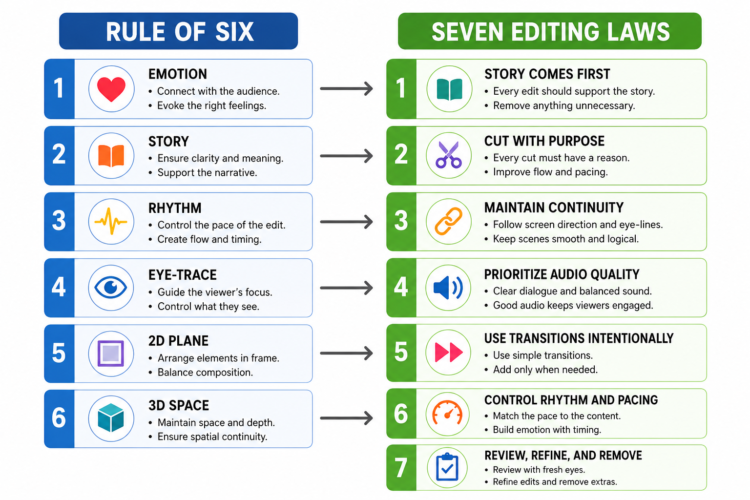
His Rule of Six includes:
- Emotion.
- Story.
- Rhythm.
- Eye-trace.
- Two-dimensional plane.
- Three-dimensional space.
The seven editing laws focus more broadly. They combine storytelling with technical editing practices. Both approaches share similar goals.
| Walter Murch’s Rule of Six | Seven Editing Laws |
|---|---|
| Focuses on six editing priorities. | Focuses on seven editing principles. |
| Emphasizes emotion first. | Emphasizes storytelling first. |
| Includes eye-trace techniques. | Includes continuity techniques. |
| Prioritizes editing decisions. | Covers complete editing workflow. |
Both methods encourage thoughtful editing. Neither depends on software features. Strong fundamentals remain the highest priority.
Examples of the Seven Laws in Different Types of Videos
These principles apply everywhere. Different projects simply use them differently.
YouTube Videos
Editors focus on:
- Strong introductions.
- Clear storytelling.
- Natural pacing.
- Audience retention.
Short-Form Videos
Editors emphasize:
- Fast pacing.
- Quick hooks.
- Simple transitions.
- Vertical formats.
Films
Film editors prioritize:
- Character development.
- Emotional storytelling.
- Smooth continuity.
- Cinematic pacing.
Wedding Videos
Wedding editors create:
- Emotional moments.
- Beautiful transitions.
- Natural music.
- Memorable highlights.
Corporate Videos
Corporate editors maintain:
- Brand consistency.
- Professional visuals.
- Clear communication.
- Organized structure.
Documentaries
Editors focus on:
- Real stories.
- Interview flow.
- Accurate continuity.
- Emotional pacing.
Commercial Advertisements
Commercial editors create:
- Fast engagement.
- Clear messages.
- Strong branding.
- Powerful endings.
Every video benefits from these principles.
Common Editing Mistakes That Break These Laws
Many beginners repeat similar mistakes. Better habits improve every project.
Avoid mistakes like:
- Over-editing scenes.
- Excessive transitions.
- Poor pacing.
- Inconsistent audio.
- Jump cuts without purpose.
- Weak storytelling.
- Ignoring continuity.
- Unnecessary visual effects.
- Inconsistent color correction.
- Rushing exports.
- Skipping final reviews.
- Cluttered timelines.
Fix these mistakes by:
- Planning every project.
- Keeping edits simple.
- Organizing files.
- Reviewing carefully.
- Matching pacing naturally.
- Practicing consistently.
Good habits create better editors.
How Beginners Can Apply These Laws
Learning becomes easier through practice. Following a clear workflow improves confidence.
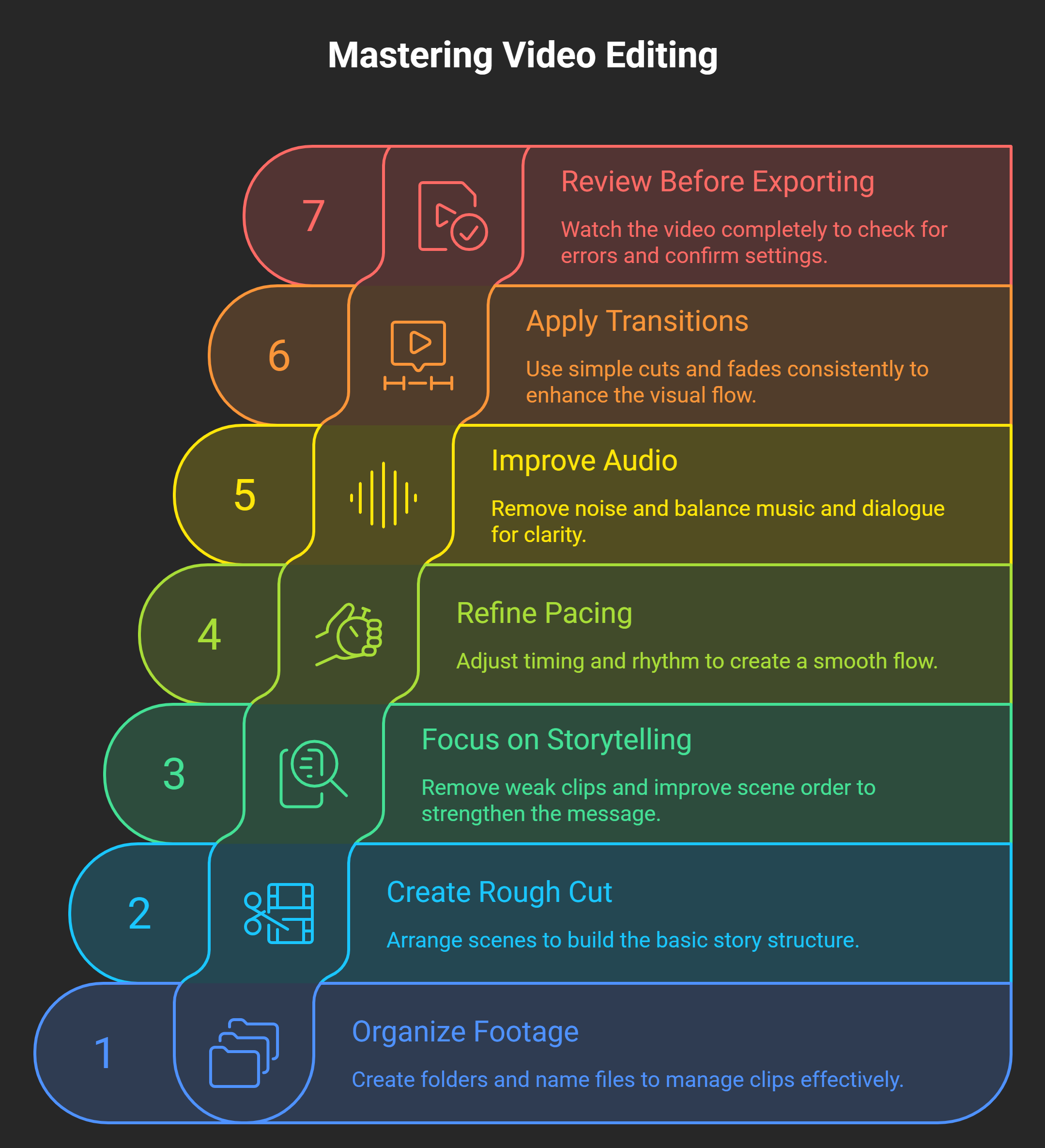
1. Organize Footage
- Create folders.
- Name files.
- Remove duplicates.
2. Create a Rough Cut
- Arrange scenes.
- Build the story.
- Ignore fine details first.
3. Focus on Storytelling
- Remove weak clips.
- Improve scene order.
- Strengthen the message.
4. Refine Pacing
- Adjust timing.
- Improve rhythm.
- Shorten slow scenes.
5. Improve Audio
- Remove noise.
- Balance music.
- Improve dialogue.
6. Apply Subtle Transitions
- Prefer simple cuts.
- Add fades carefully.
- Keep effects consistent.
7. Review Before Exporting
- Watch completely.
- Check audio.
- Verify colors.
- Confirm export settings.
Practice builds confidence steadily.
Upskill with AI Video Editing Skills
AI and Modern Editing
AI continues improving editing workflows. It saves valuable time. Creative decisions still require people.
AI helps with:
- Rough cuts.
- Auto captions.
- Audio cleanup.
- Scene detection.
- Clip organization.
Editors still decide:
- Storytelling.
- Emotional pacing.
- Creative timing.
- Visual style.
- Client preferences.
AI improves efficiency. Human creativity remains irreplaceable.
Final Verdict
The seven editing laws remain valuable today. They improve storytelling, pacing, continuity, and viewer engagement. These principles work across every editing style. They also suit beginners and professionals alike.
Strong fundamentals always outperform unnecessary effects. Practice strengthens editing decisions over time. Careful reviews improve final quality. AI can support faster workflows. Creative judgment still belongs to skilled editors.
Learn these seven laws. Apply them consistently. Every project will become clearer, smoother, and more professional. Keep practicing every day. Great editing develops through patience, thoughtful decisions, and continuous improvement.
Become an AI-powered Video Editor
Master the future of video editing with AI-powered tools and techniques. Learn how to create professional-quality videos faster, automate repetitive editing tasks, generate engaging content, and boost your creative productivity.
Start Learning!Frequently Asked Questions
What are the seven laws of editing?
The seven laws of editing are core principles that improve storytelling, pacing, continuity, audio, and overall video quality. They help editors create more engaging and professional videos.
Are the seven laws of editing official rules?
No, they are not official rules. They are widely accepted principles used by many professional editors.
Why is storytelling the first law of editing?
Storytelling gives every video purpose and direction. Strong stories keep viewers engaged and interested.
Why is continuity important in editing?
Continuity keeps scenes connected and prevents viewer confusion. It helps videos feel smooth and natural.
Why is audio quality so important?
Clear audio improves the viewing experience and makes videos easier to understand. Poor sound can reduce overall video quality.
Should beginners use many transitions?
No, simple transitions usually work best. Use effects only when they support the story.
Can these editing laws improve YouTube videos?
Yes, they improve storytelling, pacing, and viewer retention. They also create a more professional viewing experience.
Do professional editors follow these principles?
Yes, professionals use these principles across films, advertisements, documentaries, and online content. They adapt them to suit each project.
Can AI replace these editing laws?
No, AI supports editing tasks but cannot replace creativity or storytelling. Human judgment remains essential.
How can beginners apply these laws?
Organize footage, build a clear story, refine the edit, and review everything before exporting. Regular practice improves editing skills over time.