Key Takeaways:
- AI coding tools help you code faster.
- Choose the right tool for your work.
- Always check AI-generated code.
- Use AI to learn and improve coding.
- Practice using AI tools every day.
Introduction
Artificial Intelligence (AI) is changing the way developers work. In 2026, many developers use AI every day. AI helps developers work faster and more easily. AI coding tools can help with many jobs.
They can:
- Write code
- Find errors
- Fix bugs
- Explain code
- Create documents
👉 These tools save both time and effort.
How AI Has Changed Software Development in 2026
Software development is now faster than before. Many coding tasks are easier because of AI.
Developers use AI to:
- Build websites
- Create mobile apps
- Write backend code
- Test programs
- Improve old code
👉 AI helps developers complete work more quickly.
AI also helps beginners. It explains coding in simple words. It gives examples that are easy to understand.
👉 Learning programming has become easier.
Experience the power of our web development course with a free demo – Enroll now!
Why AI Coding Assistants Have Become Essential Productivity Tools
AI coding assistants are now useful for almost every developer. They help during the whole development process.
AI can:
- Suggest code
- Complete code
- Find mistakes
- Explain errors
- Answer coding questions
- Write comments
👉 Developers spend less time on small tasks.
AI also helps developers learn new technologies.
For example:
- Python
- JavaScript
- React
- Node.js
- SQL
👉 Developers can learn faster with AI.
AI does not replace developers. Developers still make the final decisions. AI works like a helpful assistant.
👉 It helps developers become more productive every day.
What Are AI Coding Tools?
1: Which of the following data structures allows elements to be added and removed in a Last-In, First-Out (LIFO) order?
Best AI Coding Tools for Full Stack Developers in 2026
Man
Table of Contents
1. GitHub Copilot
GitHub Copilot is one of the most popular AI coding tools.
Primary Use
It helps developers write code.
Key Features
- Code suggestions
- Code completion
- Bug fixing
- Code explanation
Advantages
- Easy to use
- Saves time
- Supports many languages
Limitations
- May give incorrect code
- Needs review before use
Best For
- Full stack developers
- Beginners
- Professional developers
2. ChatGPT
ChatGPT helps developers solve coding problems.
Primary Use
It explains and writes code.
Key Features
- Code generation
- Error explanation
- Documentation writing
- Learning support
Advantages
- Easy to ask questions
- Gives simple explanations
- Supports many programming languages
Limitations
- Some answers may need checking
Best For
- Learning programming
- Debugging
- Writing code
3. Google Gemini
Gemini is Google’s AI coding assistant.
Primary Use
It helps with coding and problem solving.
Key Features
- Code writing
- Code explanation
- Bug fixing
- Coding suggestions
Advantages
- Fast answers
- Easy to use
- Good for developers
Limitations
- Some answers may not be perfect
Best For
- Web developers
- Students
- Beginners
4. Amazon Q Developer
Amazon Q helps developers build software.
Primary Use
It supports software development.
Key Features
- Code suggestions
- Debugging
- AWS support
- Documentation
Advantages
- Works well with AWS
- Saves development time
Limitations
- Best for AWS users
Best For
- Cloud developers
- AWS developers
5. Cursor AI
Cursor is an AI code editor.
Primary Use
It helps developers write and edit code.
Key Features
- AI coding
- Code editing
- Error fixing
- Code explanation
Advantages
- Fast coding
- Easy editing
- Simple interface
Limitations
- Some features need a paid plan
Best For
- Full stack developers
- Daily coding work
6. Codeium
Codeium is a free AI coding assistant.
Primary Use
It helps developers write code faster.
Key Features
- Code completion
- AI suggestions
- Multiple language support
Advantages
- Free to use
- Easy setup
- Fast suggestions
Limitations
- Suggestions may not always be correct
Best For
- Students
- Beginners
- Freelance developers
7. Tabnine
Tabnine is an AI autocomplete tool.
Primary Use
It helps complete code while typing.
Key Features
- Code completion
- AI suggestions
- Many language supports
Advantages
- Saves typing time
- Improves productivity
Limitations
- Limited free features
Best For
- Developers who write code every day
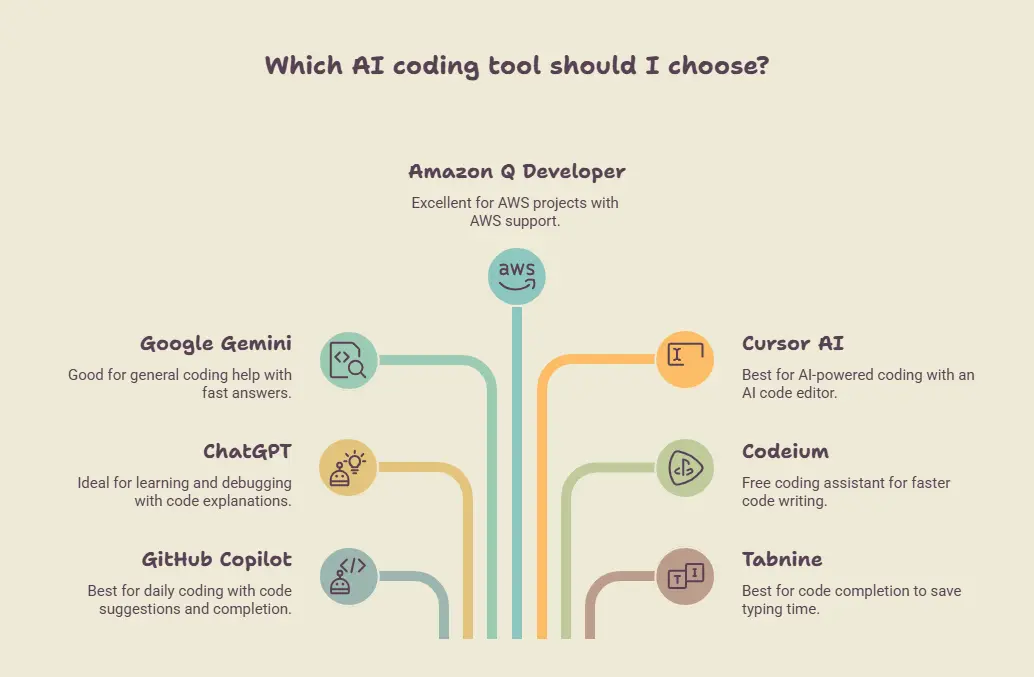
Which Tool Should You Choose?
The best tool depends on your needs.
- GitHub Copilot – Best for daily coding.
- ChatGPT – Best for learning and debugging.
- Google Gemini – Best for coding help.
- Amazon Q Developer – Best for AWS projects.
- Cursor AI – Best for AI-powered coding.
- Codeium – Best free coding assistant.
- Tabnine – Best for code completion.
👉 Try a few tools and choose the one that works best for your projects.
AI Coding Tools Comparison
Learn Prompt Engineering for Free
Get better results from ChatGPT and Gemini with free, beginner-friendly prompt engineering guides. Learn how to write prompts that save time and improve your code, content, and work.
Start Learning FreeHow AI Improves the Full Stack Development Workflow
Best Practices for Using AI Coding Tools
AI coding tools are very helpful. But you should use them carefully. Good habits help you get better results.
Review Generated Code Before Deployment
Never use AI code without checking it.
Check the Code Carefully
Read the code before using it. Make sure it works correctly.
👉 Do not trust AI code without checking.
Fix Mistakes if Needed
Sometimes AI makes mistakes. Correct the code before deployment.
👉 Always improve the code if needed.
Protect Sensitive Project Data
Do not share private information with AI.
Keep Your Data Safe
Do not enter:
- Passwords
- Secret keys
- Personal information
- Company data
👉 Keep your project safe.
Share Only Needed Information
Give AI only the details needed for the task.
👉 This protects your data.
Use AI as a Productivity Assistant
AI is a helper, not a replacement.
Let AI Help You
AI can help you:
- Write code
- Explain code
- Find bugs
- Give ideas
👉 AI makes work easier.
Developers Make the Final Decision
Always think before using AI answers.
👉 The final decision is yours.
Validate Security and Performance
Check if the code is safe.
Check Security
Look for security problems. Fix unsafe code.
👉 Safe code protects your project.
Check Performance
Make sure the program runs well. Improve slow code if needed.
👉 Good performance gives a better user experience.
Combine AI Suggestions with Manual Testing
Always test the code yourself.
Test the Program
Run the program. Check whether everything works correctly.
👉 Testing helps find problems.
Use AI and Manual Testing Together
AI can find many mistakes. Manual testing can find more.
👉 Using both gives the best results.
Common Challenges and Limitations
AI coding tools are very helpful. But they are not perfect. Developers should know their limits.
Incorrect Code Suggestions
Sometimes AI gives the wrong code.
Wrong Answers
AI may:
- Write incorrect code
- Miss some details
- Give incomplete answers
👉 Always check the code.
Review Before Using
Read the code carefully. Test it before using it.
👉 Never copy AI code without checking.
Hallucinated APIs
Sometimes AI creates APIs that do not exist.
Fake API Names
AI may:
- Give a wrong API name
- Use a function that is not real
- Show incorrect examples
👉 Always check the official documentation.
Verify API Details
Make sure the API is real. Check the method and syntax.
👉 Verification prevents errors.
Security Concerns
AI may not always write secure code.
Unsafe Code
Sometimes AI may:
- Miss security checks
- Suggest unsafe code
- Ignore best practices
👉 Check security before using the code.
Protect Your Data
Do not share:
- Passwords
- Secret keys
- Private project details
👉 Keep your information safe.
Licensing Considerations
Some code may have license rules.
Know the License
Always check if you can use the code.
👉 Follow the license rules.
Use Trusted Sources
Use code from trusted places.
👉 This helps avoid problems later.
Overreliance on AI
Do not depend on AI for everything.
Keep Learning
Practice coding yourself. Learn programming concepts.
👉 Your own skills are important.
Think Before Using AI
Read and understand every answer.
👉 Developers should make the final decision.
Context Limitations
AI cannot always understand the whole project.
Limited Information
Sometimes AI sees only part of your code. It may miss important details.
👉 Give clear and useful information.
Explain Your Project
Tell AI about:
- Your project
- Programming language
- Framework
- Task
👉 Better details help AI give better answers.

Future Trends
AI coding tools are improving every year. Future AI will make coding easier and faster.
Autonomous Coding Agents
Doing Coding Tasks
AI may:
- Write code
- Fix bugs
- Test programs
👉 Developers save time.
Helping Developers
AI helps with coding.
👉 Developers make the final decisions.
Multi-Agent Development Workflows
Different AI for Different Jobs
Different AI tools can:
- Write code
- Test code
- Find bugs
👉 Work finishes faster.
Better Teamwork
Many AI tools can work together.
👉 Projects become easier.
AI-Powered DevOps
Easy Deployment
AI can help:
- Deploy apps
- Find problems
- Suggest fixes
👉 DevOps becomes simple.
AI-Assisted Software Architecture
Better Planning
AI can suggest:
- Project structure
- Better design
👉 Planning becomes easier.
Personalized Coding Assistants
Learning Your Coding Style
AI can learn how you write code.
👉 It gives better suggestions over time.
Increasing IDE Integration
Built-in AI Support
More IDEs will include AI. AI can help while you:
- Write code
- Fix errors
- Test programs
👉 Coding becomes faster and easier.
Experience the power of our web development course with a free demo – Enroll now!
Conclusion
AI coding tools make coding easier and faster. They help you write code, fix errors, and save time. Choose the AI tool that fits your work and your project.
Try different AI coding tools and practice using them. Always check the AI’s answers before using them. 👉 AI is a helpful tool, but your coding skills are still the most important.
| Related Links | |
| What Is RAG (Retrieval-Augmented Generation)? Explained for Developers | |
Learn Prompt Engineering for Free
Get better results from ChatGPT and Gemini with free, beginner-friendly prompt engineering guides. Learn how to write prompts that save time and improve your code, content, and work.
Start Learning FreeFrequently Asked Questions
What are AI coding tools?
AI coding tools are software that help developers write code.
They can help you:
- Write code
- Fix errors
- Explain code
- Save time
👉 They make coding easier.
Can beginners use AI coding tools?
Yes.Many AI coding tools are easy to use.
They explain coding in simple words.
👉 Beginners can learn faster with AI.
Which AI coding tool is best for full stack developers?
There is no single best tool.
Some popular tools are:
- GitHub Copilot
- ChatGPT
- Cursor AI
- Google Gemini
- Codeium
👉 Choose the tool that matches your work.
Can AI write a complete application?
AI can help write many parts of an application.
But developers still need to:
- Check the code
- Test the program
- Fix mistakes
👉 AI cannot replace developers.