Table of Contents
Video editing is a popular creative career today. It helps create videos for YouTube, movies, social media, advertising, and businesses. Video editors use different tools and software to cut, arrange, and improve videos.
Many companies and creators need skilled video editors today. This creates good career opportunities in 2026. Video editing offers creative work and good career growth. Video editing helps make videos more interesting and professional.
Key Takeaways:
- Learn one editing software
- Practice editing videos daily
- Build a simple portfolio
- Learn basic AI editing
- Improve skills with practice
Join Our Online Video Editing Course in Kerala. Get Ready for your Dream Job!
What is Video Editing?
Essential Video Editing Skills You Need to Master
Video editing needs different skills. Some skills are technical, some are creative, and some are soft skills. All these help you become a good video editor.
♦️Technical Skills
Technical skills are needed to use editing software.
You should know:
- Cutting and trimming videos
- Adding music and sound
- Using editing software
- Adding effects and transitions
- Exporting videos in good quality
👉 Technical skills help you edit videos properly.
♦️Creative Skills
Creative skills help you make videos look interesting.
You should know:
- Storytelling with videos
- Choosing right music
- Using colors and styles
- Making videos attractive
- Planning video flow
👉 Creativity makes your videos more engaging.
♦️Soft Skills
Soft skills help you work better and improve your editing career.
You should have:
- Patience while editing
- Attention to small details
- Time management
- Good communication
- Ability to accept feedback
Become an AI-powered Video Editor
Master the future of video editing with AI-powered tools and techniques. Learn how to create professional-quality videos faster, automate repetitive editing tasks, generate engaging content, and boost your creative productivity.
Start Learning!Best Video Editing Software in 2026: A Honest Comparison
What Hardware Do You Need to Edit Video in 2026?
Video editing needs a good computer and basic tools. Good hardware helps videos run smoothly without lag. Better hardware makes editing faster and easier.
♦️Computer or Laptop
You need a strong computer or laptop.
It should have:
- Fast processor (CPU)
- Good RAM (8GB–16GB or more)
- Good storage (SSD is better)
- Good graphics card (GPU)
👉 A good system helps editing run smoothly.
♦️Monitor Screen
A good screen helps you see video clearly.
You need:
- Large screen
- Clear display
- Good color quality
👉 Better screen helps better editing work.
♦️Storage Device
Video files are large, so storage is important.
You can use:
- SSD drive
- External hard disk
- Cloud storage
👉 Storage helps save and manage videos safely.
♦️Internet Connection
Internet is needed for:
- Uploading videos
- Downloading files
- Using online tools
- AI editing tools
👉 Fast internet saves time.
♦️Audio Devices
Good sound is important in video editing.
You may need:
- Headphones
- Speakers
- Microphone (for voice recording)
👉 Clear sound improves video quality.
♦️Graphic Card (GPU)
A GPU helps video editing software work faster.
It is useful for:
- High-quality videos
- 4K editing
- Smooth playback
👉 GPU improves editing performance.
How to Learn Video Editing: A Step-by-Step Path
Video editing can be learned step by step. Beginners should start small and practice daily. Slowly, skills will improve with time.
Step-by-Step Beginner Roadmap
1. Choose One Software
Start with only one editing software.
- Do not switch tools again and again
- Learn one tool properly first
👉 Focus on one software.
2. Learn Basic Tools
Understand the simple parts of editing software.
- Timeline
- Cut and trim tools
- Import and export videos
👉 Learn basic functions first.
3. Practice with Short Videos
Start editing small clips.
- Use phone videos
- Edit daily practice videos
- Try simple edits
👉 Practice helps improve skills.
4. Watch Other Editors
Learn by watching good video editors.
- Observe their editing style
- See how they cut videos
- Understand their effects
👉 Learning from others is helpful.
5. Work on Real Projects
Start real editing work.
- Personal videos
- Small projects
- Free practice work
👉 Real work builds experience.
6. Get Feedback
Ask others to check your work.
- Join online groups
- Share your videos
- Learn from feedback
👉 Feedback helps you improve faster.
Learning Resources (2026)
You can learn video editing from:
- YouTube tutorials
- Online courses
- Learning websites
- Beginner books
👉 Many resources are available online.
Practice Project Ideas for Beginners
Try simple projects like:
- Travel videos
- Short reels
- Birthday videos
- Simple vlog editing
- Social media clips
How to Build a Video Editing Portfolio that Gets You Hired
A portfolio shows your best editing work. It helps clients and companies understand your editing skills.
Add Your Best Work
Add only good-quality videos.
You can include:
- Short videos
- Reels
- YouTube videos
- Social media edits
👉 Best work creates a good impression.
Show Different Video Types
Try different editing styles.
You can add:
- Travel videos
- Vlogs
- Promo videos
- Cinematic videos
👉 Different styles show creativity.
Keep Videos Simple and Short
Short videos are better for portfolios.
Your videos should be:
- Clear
- Simple
- Interesting
👉 Short videos are easy to watch.
Use Real Editing Projects
Real projects improve your portfolio.
You can use:
- Personal projects
- College work
- Practice videos
- Freelance projects
👉 Real work builds trust.
Share Portfolio Online
Upload your work online.
You can use:
- YouTube
- Vimeo
- Personal website
- Social media pages
👉 Online portfolios are easy to share.
Update Your Portfolio
Keep adding new videos.
Remove old videos that are not good.
👉 Updated portfolios look professional.
Show Your Editing Skills
Your portfolio should show:
- Smooth editing
- Good transitions
- Clear sound
- Creative video style
👉 Clients look for good editing skills.
Add Contact Details
Make it easy for people to contact you.
You can add:
- Email address
- Social media links
- Portfolio website
👉 Easy contact helps get more opportunities.
Video Editing Career Paths: Freelance vs. Full-Time in 2026
Become an AI-powered Video Editor
Master the future of video editing with AI-powered tools and techniques. Learn how to create professional-quality videos faster, automate repetitive editing tasks, generate engaging content, and boost your creative productivity.
Start Learning!Video Editing Specializations: Finding Your Niche
How AI is Changing Video Editing in 2026
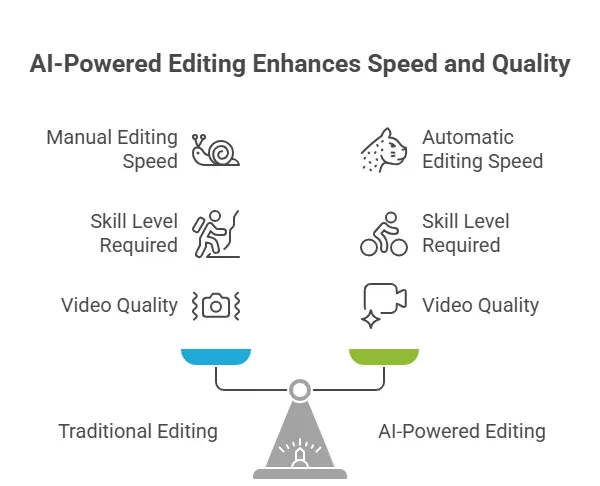
AI is changing video editing very quickly. Many editors now use AI tools to edit videos faster and easier. So, AI helps save time and reduce editing work.
AI Tools in Video Editing
These tools can now do many editing tasks automatically.
They help with:
- Auto captions
- Scene detection
- Noise removal
- Background cleanup
- Quick editing support
👉 AI tools are now common in editing work.
Transcript-Based Editing
Editors can now edit videos using words instead of video frames.
This means:
- Cut videos using text
- Remove mistakes easily
- Faster editing process
👉 Editing becomes simpler and quicker.
AI Color Matching and Auto-Grading
AI can improve video colors automatically.
It helps with:
- Color correction
- Matching video colors
- Improving video quality
👉 AI makes videos look professional.
Generative Video and B-Roll Creation
AI can create simple video clips and extra footage.
It can help create:
- Background clips
- AI-generated visuals
- Simple animations
- Extra B-roll videos
👉 AI helps editors create content faster.
Will AI Replace Video Editors?
Many people worry about AI replacing editors.
But AI still needs human creativity.
Editors are needed for:
- Storytelling
- Creative ideas
- Emotional editing
- Final decisions
AI helps editors, not fully replace them. Editors who learn AI tools will have better opportunities in 2026. Editors using AI are growing faster than editors who avoid AI.
Common Video Editing Mistakes (And How to Avoid Them
Small editing mistakes can reduce video quality.
👉 Avoiding mistakes improves editing skills.
Too Many Effects
- Use simple effects
- Avoid over-editing
- Keep videos clean
👉 Simple editing looks better.
Poor Audio
- Use clear sound
- Remove background noise
- Balance audio properly
👉 Good audio improves videos.
Long Videos
- Remove extra parts
- Keep videos short
- Make videos interesting
👉 Short videos keep attention.
Wrong Music
- Use suitable music
- Keep volume balanced
- Avoid loud music
👉 Good music improves videos.
Low Video Quality
- Use good quality
- Export videos properly
- Check final output
Join Our Online Video Editing Course in Kerala. Get Ready for your Dream Job!
Video Editing Glossary: Terms Every Editor Should Know
Conclusion
Video editing is a creative and growing career in 2026. Anyone can learn it with regular practice and patience. Start with one editing software and practice simple videos daily. Learn basic editing skills, create small projects, and slowly improve your creativity. Consistent practice and learning can help you become a skilled video editor.
| Related Articles | |
| What is Video Editing? A Complete Beginner’s Guide | How to become a freelance video Editor |
Become an AI-powered Video Editor
Master the future of video editing with AI-powered tools and techniques. Learn how to create professional-quality videos faster, automate repetitive editing tasks, generate engaging content, and boost your creative productivity.
Start Learning!Frequently Asked Questions
What is video editing?
Video editing is the process of changing and improving video clips to create a final video.
It includes:
- Cutting unwanted parts
- Adding music and sound
- Using effects and transitions
- Adding text and subtitles
👉 Video editing helps make videos more professional and interesting.
Which video editing software is best for beginners?
Some beginner-friendly editing software are:
- CapCut
- Filmora
- DaVinci Resolve
- Adobe Premiere Pro
👉 Beginners should choose simple software and learn basic editing first.
Can I learn video editing at home?
Yes, video editing can be learned from home.
You can learn through:
- YouTube tutorials
- Online courses
- Practice projects
- Editing simple videos daily
👉 Regular practice is the best way to improve.
What skills are needed for video editing?
Video editors need both technical and creative skills.
Important skills include:
- Cutting and trimming videos
- Creativity
- Storytelling
- Audio editing
- Time management
👉 Good editing skills improve video quality.
Is video editing a good career in 2026?
Yes, video editing is a growing career in 2026.
Many industries need video editors for:
- YouTube content
- Social media videos
- Advertising
- Movies and TV
👉 Skilled editors have good career opportunities.
Can AI replace video editors?
AI helps make editing faster, but it cannot fully replace human creativity.
AI can help with:
- Auto captions
- Background removal
- Quick editing tasks
👉 Human creativity is still very important in video editing.
How can beginners build a video editing portfolio?
Beginners can build portfolios by editing:
- Personal videos
- Short reels
- College projects
- Practice videos
👉 A portfolio helps show editing skills to clients and companies.
How much can video editors earn in 2026?
Video editor salaries depend on:
- Skills
- Experience
- Portfolio quality
- Type of projects
Freelancers earn per project, while full-time editors usually receive monthly salaries.