
Table of Contents
Good video editing needs more than software skills. Every edit needs careful planning. Creative decisions also matter. Small improvements create better videos. Strong editing keeps viewers interested. It also improves storytelling.
Clean edits look more professional. These nine editing tips help beginners and professionals create smoother, engaging, and high-quality videos.
Build a Career in AI-Powered Video Editing
Quick Overview
| Tip | Why It Matters | Difficulty | Biggest Benefit |
|---|---|---|---|
| Plan before editing | Saves time | Easy | Better workflow |
| Focus on storytelling | Improves engagement | Medium | Better viewer retention |
| Keep cuts purposeful | Creates smooth flow | Easy | Professional editing |
| Improve audio quality | Better viewing experience | Medium | Clear communication |
| Use transitions wisely | Avoids distractions | Easy | Cleaner videos |
| Maintain color consistency | Improves visual quality | Medium | Professional appearance |
| Edit for each platform | Matches audience expectations | Medium | Better performance |
| Learn shortcuts | Increases speed | Medium | Faster editing |
| Review before exporting | Finds mistakes | Easy | Higher quality output |
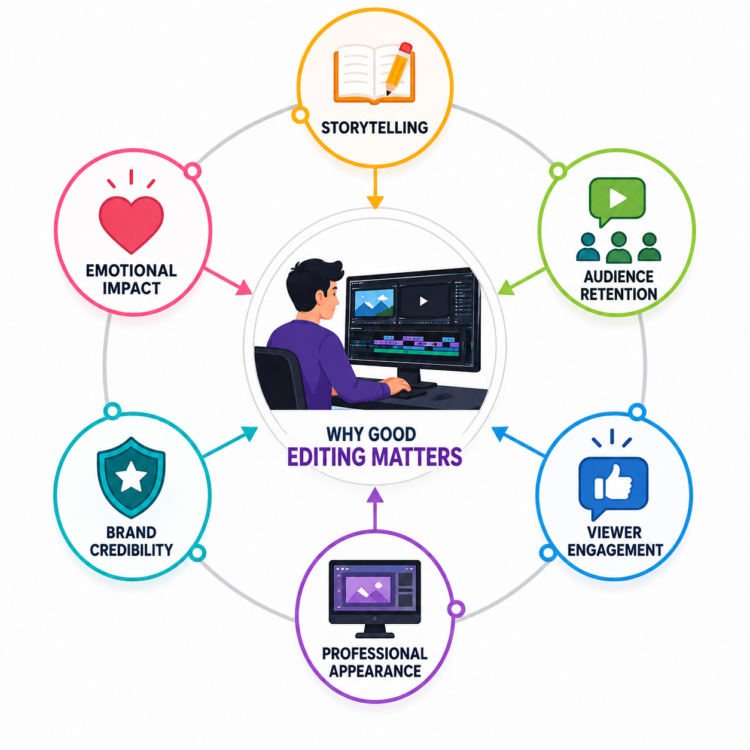
Why Good Editing Matters
Editing shapes every video. It improves visual quality. It also controls viewer attention. Every editing decision affects the final result.
Good editing improves many areas.
Better Storytelling
Stories need clear structure. Good editing connects every scene. Every cut supports the message.
Good storytelling helps:
- Build emotional connections.
- Improve scene flow.
- Remove unnecessary clips.
- Keep viewers interested.
Films rely on storytelling. YouTube creators also use strong editing. Businesses depend on clear communication.
Audience Retention
Viewers quickly lose interest. Slow videos reduce watch time. Good editing maintains attention.
Editors improve retention by:
- Removing boring sections.
- Improving pacing.
- Using clean transitions.
- Keeping videos focused.
Longer watch time benefits every platform.
Viewer Engagement
Interesting videos receive more interaction. Better editing encourages viewers to continue watching.
Engagement improves through:
- Clear storytelling.
- Smooth editing.
- Good audio.
- Strong pacing.
Satisfied viewers often return.
Professional Appearance
Professional editing creates trust. Clean videos reflect quality. Businesses value polished content.
Professional videos include:
- Smooth cuts.
- Balanced colors.
- Clear sound.
- Organized graphics.
Small details create better impressions.
Brand Credibility
Businesses represent their brands through videos. Poor editing reduces credibility. High-quality videos build confidence.
Professional editing helps:
- Strengthen branding.
- Improve customer trust.
- Create consistency.
- Increase professionalism.
Good editing reflects business quality.
Emotional Impact
Editing controls emotions carefully. Music and pacing work together. Timing creates stronger reactions.
Editors build emotions through:
- Music selection.
- Scene timing.
- Facial expressions.
- Smooth transitions.
Emotion creates memorable videos.
Become an AI-powered Video Editor
Master the future of video editing with AI-powered tools and techniques. Learn how to create professional-quality videos faster, automate repetitive editing tasks, generate engaging content, and boost your creative productivity.
Start Learning!Tip 1: Plan Your Edit Before You Start
Planning saves valuable time. Organized projects reduce confusion. Better preparation creates smoother editing.
Good planning starts before editing.
Organize Your Footage
Organized footage speeds editing. Finding clips becomes easier. Good organization prevents mistakes.
Create folders for:
- Videos.
- Audio.
- Images.
- Graphics.
- Project files.
Clear folders improve productivity.
Create a Rough Storyboard
A simple storyboard helps planning. Editors understand scene order. Story flow becomes clearer.
Storyboards help:
- Arrange scenes.
- Plan transitions.
- Identify missing clips.
- Improve structure.
Even simple sketches help greatly.
Name Files Properly
Clear file names reduce confusion. Editors locate clips faster. Organized projects remain manageable.
Good file names include:
- Date.
- Scene name.
- Camera number.
- Version number.
Avoid random file names.
Plan the Sequence
Scene order affects storytelling. Good planning improves pacing. Every clip should support the story.
Before editing:
- Arrange main scenes.
- Remove weak clips.
- Plan introductions.
- Plan endings.
Preparation reduces editing time.
Tip 2: Focus on Storytelling First
Storytelling matters most. Effects cannot replace strong stories. Viewers remember emotions longer. Good stories create stronger engagement.
Build a Clear Narrative
Every video tells something. Viewers should understand easily. Confusing stories reduce interest.
Strong narratives include:
- Clear beginning.
- Logical middle.
- Strong ending.
- Smooth progression.
Simple stories often perform better.
Keep Relevant Clips Only
Extra footage creates distractions. Every clip needs purpose. Shorter videos often feel stronger.
Remove:
- Long pauses.
- Repeated shots.
- Unnecessary scenes.
- Weak footage.
Every second should matter.
Keep Viewers Interested
Viewer attention changes quickly. Interesting videos keep audiences engaged.
Improve interest through:
- Faster pacing.
- Visual variety.
- Strong introductions.
- Meaningful scenes.
Avoid unnecessary distractions.
Create Emotional Connections
Emotion builds memorable videos. Viewers connect with stories naturally.
Editors create emotions using:
- Music.
- Facial expressions.
- Scene timing.
- Meaningful moments.
Stories remain more important than effects.
Tip 3: Keep Cuts Clean and Purposeful
Cuts guide viewers naturally. Good timing feels invisible. Clean edits improve professionalism.
Every cut needs purpose.
Avoid Unnecessary Jump Cuts
Too many jump cuts distract viewers. Smooth editing feels natural.
Reduce jump cuts by:
- Planning recordings.
- Using B-roll.
- Cutting carefully.
- Improving pacing.
Natural flow improves viewing.
Use Match Cuts Carefully
Match cuts connect similar actions. They create smoother transitions.
Match cuts help:
- Continue movement.
- Improve flow.
- Build visual interest.
- Reduce distractions.
Practice improves timing.
Cut at the Right Moment
Timing affects every scene. Early cuts feel rushed. Late cuts reduce energy.
Good timing creates:
- Better rhythm.
- Clear storytelling.
- Natural conversations.
- Comfortable viewing.
Every cut influences pacing.
Maintain Natural Pacing
Pacing controls viewer attention. Different videos need different speeds.
For example:
- Vlogs need relaxed pacing.
- Reels need faster cuts.
- Interviews need steady flow.
- Commercials need strong energy.
Always match the content.
Become an AI-powered Video Editor
Master the future of video editing with AI-powered tools and techniques. Learn how to create professional-quality videos faster, automate repetitive editing tasks, generate engaging content, and boost your creative productivity.
Start Learning!Tip 4: Pay Attention to Audio Quality
Many viewers forgive average visuals. Poor audio quickly reduces quality. Clean sound improves every video.
Remove Background Noise
Noise distracts viewers. Clear voices sound professional.
Remove sounds like:
- Traffic.
- Fans.
- Wind.
- Keyboard clicks.
Cleaner audio improves experience.
Balance Music Properly
Music supports storytelling. Loud music hides speech. Soft music creates balance.
Adjust music carefully during:
- Dialogue.
- Introductions.
- Emotional scenes.
- Ending sequences.
Speech should remain clear.
Improve Voice Clarity
Viewers must hear everything. Clear voices improve understanding.
Improve voice quality by:
- Adjusting volume.
- Reducing echo.
- Removing noise.
- Equalizing sound.
Small adjustments make big differences.
Use Sound Effects Carefully
Effects improve storytelling. Too many become distracting.
Good effects include:
- Door sounds.
- Nature sounds.
- Click sounds.
- Transition effects.
Less usually works better.
Add Smooth Audio Transitions
Abrupt sound changes feel unpleasant. Smooth transitions improve quality.
Use fades between:
- Music.
- Dialogue.
- Sound effects.
- Background ambience.
Audio should feel natural.
Tip 5: Use Transitions Sparingly
Transitions connect scenes smoothly. Simple cuts usually work best. Fancy effects often distract viewers.
Professional editors prefer simplicity.
Use Transitions When Necessary
Transitions work well between:
- Different locations.
- Different time periods.
- New topics.
- Scene changes.
Purpose matters most.
Simple Cuts Often Work Better
Straight cuts feel natural. Viewers notice content first. Simple editing improves storytelling.
Simple cuts create:
- Faster pacing.
- Better focus.
- Cleaner videos.
- Professional appearance.
Avoid Common Transition Mistakes
Many beginners overuse effects. Too many transitions reduce quality.
Avoid mistakes like:
- Random animations.
- Flashy effects.
- Constant zooms.
- Excessive wipes.
Keep transitions consistent.
Follow Professional Practices
Professional editors prioritize storytelling. Effects support content. They never become distractions.
Remember these habits:
- Keep transitions simple.
- Match video style.
- Maintain consistency.
- Focus on viewer experience.
Thoughtful editing always produces stronger videos.
Tip 6: Maintain Consistent Color and Lighting
Good colors improve every video. Consistent visuals look more professional. Color differences easily distract viewers. Small adjustments create polished results.
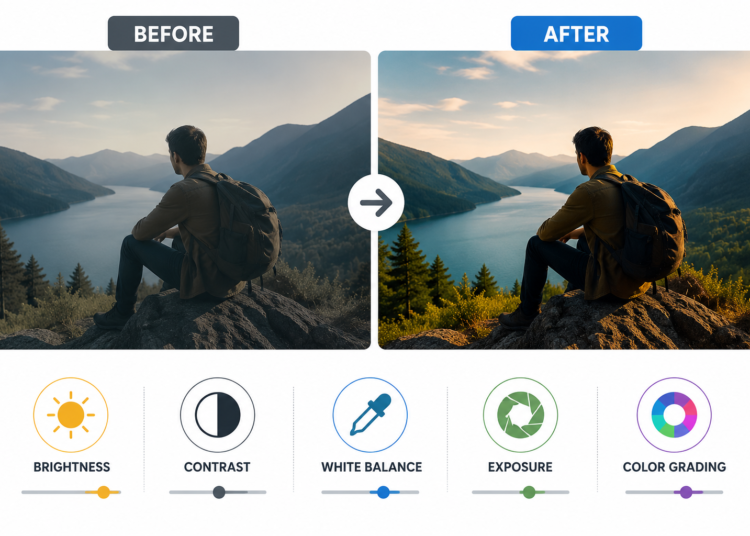
Correct Colors First
Every camera records differently. Color correction creates consistency. Balanced colors improve visual quality.
Adjust:
- Brightness.
- Contrast.
- White balance.
- Exposure.
- Saturation.
Balanced colors create natural videos.
Apply Simple Color Grading
Color grading creates a style. Every project needs consistency. Avoid unrealistic color effects.
Good color grading helps:
- Create mood.
- Match scenes.
- Strengthen branding.
- Improve visual appeal.
Simple grading often works best.
Match Lighting Between Clips
Different lighting feels distracting. Similar lighting creates smoother videos.
Check for:
- Brightness differences.
- Shadow changes.
- White balance.
- Indoor and outdoor scenes.
Consistency improves professionalism.
Tip 7: Edit for the Target Platform
Every platform works differently. Editing should match viewer expectations. The same video rarely fits everywhere.
YouTube
YouTube supports longer videos. Viewers expect detailed content.
Focus on:
- Clear introductions.
- Smooth storytelling.
- Good pacing.
- High-quality thumbnails.
Instagram Reels
Reels need quick attention. Strong openings improve watch time.
Remember to:
- Use vertical format.
- Add captions.
- Keep edits fast.
- Highlight important moments.
TikTok
TikTok rewards engaging content. Trends change quickly.
Editors should:
- Start immediately.
- Use energetic pacing.
- Keep videos short.
- Follow popular formats.
Facebook audiences scroll quickly. Videos must attract attention immediately.
Improve videos by:
- Adding captions.
- Showing key moments early.
- Using clear visuals.
- Keeping messages simple.
LinkedIn audiences prefer professional content. Educational videos perform well.
Focus on:
- Business topics.
- Clean editing.
- Clear audio.
- Professional presentation.
Corporate Videos
Corporate videos need consistency. Branding should remain professional.
Remember to:
- Follow brand colors.
- Maintain clean graphics.
- Use professional music.
- Export correctly.
Every platform has different expectations.
Tip 8: Learn Keyboard Shortcuts and Efficient Workflows
Editing speed matters greatly. Faster workflows save valuable time. Good habits also reduce mistakes.
Learn Keyboard Shortcuts
Shortcuts improve productivity daily. Small time savings become significant.
Useful shortcuts include:
- Cut clips.
- Undo changes.
- Copy edits.
- Paste settings.
- Zoom timeline.
Practice one shortcut daily.
Organize Your Timeline
Clean timelines improve editing. Organized projects remain easier to manage.
Good habits include:
- Label tracks.
- Group similar clips.
- Remove unused media.
- Keep sequences organized.
Organization reduces confusion.
Use Proxy Files
Large videos edit slowly. Proxy files improve performance. Editing becomes smoother on slower computers.
Proxy workflows help:
- Reduce lag.
- Improve playback.
- Speed editing.
- Save time.
Backup Every Project
Losing work feels frustrating. Backups protect valuable projects.
Create backups using:
- External drives.
- Cloud storage.
- Automatic saving.
- Project copies.
Never depend on one copy.
Tip 9: Review and Revise Before Exporting
Never export immediately. Small mistakes often remain hidden. Final reviews improve overall quality.
Watch the Complete Video
Watch without editing. Notice small mistakes. View videos like viewers.
Look for:
- Awkward cuts.
- Missing clips.
- Long pauses.
- Timing issues.
Fresh reviews improve quality.
Check Audio Levels
Audio problems appear easily. Consistent volume sounds professional.
Check:
- Voice clarity.
- Music volume.
- Sound effects.
- Background noise.
Balanced audio improves viewing.
Find Continuity Errors
Small mistakes reduce professionalism. Careful reviews prevent obvious problems.
Check for:
- Wrong clip order.
- Color differences.
- Missing graphics.
- Visual inconsistencies.
Attention improves final quality.
Review Captions
Captions improve accessibility. Incorrect captions confuse viewers.
Review:
- Spelling.
- Timing.
- Grammar.
- Placement.
Correct captions improve communication.
Verify Export Settings
Wrong settings reduce quality. Always review export options.
Before exporting:
- Check resolution.
- Select correct format.
- Confirm frame rate.
- Review file size.
Correct exports prevent problems.
Pre-Export Checklist
Before exporting, confirm:
- Story flows naturally.
- Audio sounds balanced.
- Colors remain consistent.
- Graphics appear correctly.
- Captions are accurate.
- Export settings are correct.
A final review saves time.
Practical Examples of Applying These Tips
Editing improves through practice. Small improvements create better videos. Every project teaches valuable lessons.
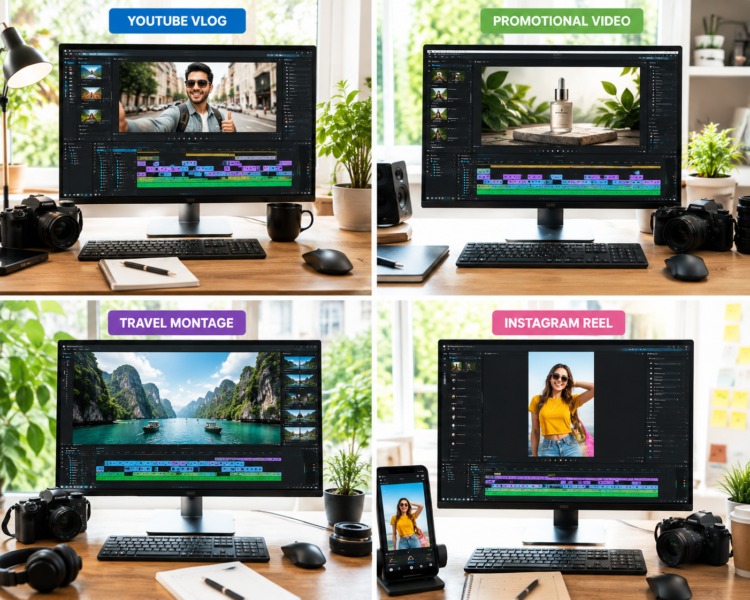
Travel Vlog
Improve by:
- Removing unnecessary clips.
- Using natural transitions.
- Balancing background music.
- Correcting outdoor colors.
The final video feels smoother.
Promotional Video
Improve by:
- Highlighting products quickly.
- Keeping branding consistent.
- Using clean graphics.
- Ending with clear messages.
Professional edits increase trust.
Travel Montage
Improve by:
- Matching music carefully.
- Following visual rhythm.
- Correcting color differences.
- Creating smooth pacing.
The story feels more engaging.
Social Media Video
Improve by:
- Starting immediately.
- Using captions.
- Keeping edits fast.
- Ending clearly.
Short videos hold attention longer.
Common Video Editing Mistakes Beginners Make
Beginners often repeat similar mistakes. Better habits improve results quickly.
Avoid these common mistakes:
- Overusing transitions.
- Ignoring audio quality.
- Poor pacing.
- Weak storytelling.
- Cluttered timelines.
- Forgetting backups.
- Wrong export settings.
- Excessive visual effects.
- Inconsistent colors.
- Cutting too quickly.
- Forgetting captions.
- Skipping final reviews.
Improve by:
- Planning projects.
- Organizing files.
- Reviewing carefully.
- Practicing regularly.
- Keeping edits simple.
- Learning continuously.
Small improvements create professional videos.
Recommended Software for Applying These Tips
| Software | Best For | Ease of Use | Professional Features |
|---|---|---|---|
| Adobe Premiere Pro | Professional editing | Medium | Excellent |
| DaVinci Resolve | Color grading | Medium | Excellent |
| Final Cut Pro | Mac users | Easy | Excellent |
| CapCut | Short-form videos | Very Easy | Good |
| Filmora | Beginners | Easy | Good |
Choose software matching your goals. Master one program before learning another.
Daily Habits that Improve Editing Skills
Daily practice builds confidence. Small habits improve skills steadily.
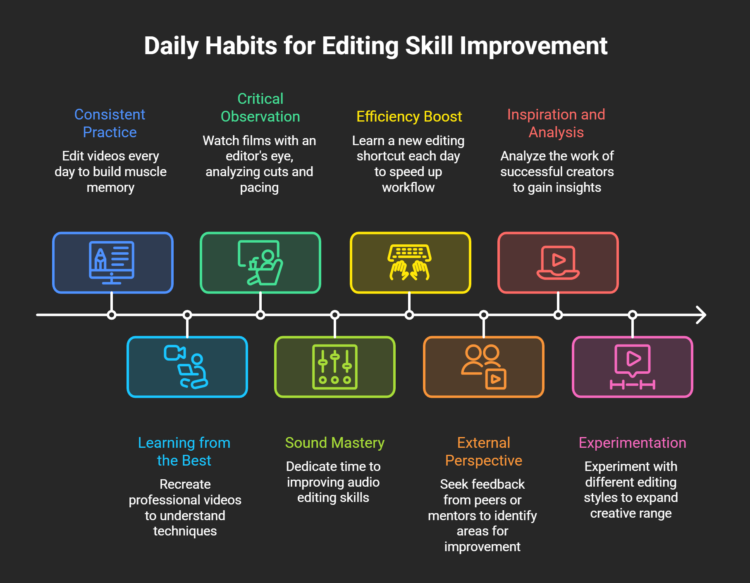
Practice every day by:
- Editing regularly.
- Recreating professional videos.
- Watching films carefully.
- Practicing audio editing.
- Learning one shortcut daily.
- Asking for feedback.
- Studying successful creators.
- Trying new editing styles.
Consistency creates long-term improvement.
Upskill with AI Video Editing Skills
How AI Can Help
AI speeds many editing tasks. It improves productivity significantly. Human creativity still remains essential.
AI helps with:
- Auto captions.
- Silence removal.
- Rough cuts.
- Background noise reduction.
- Clip organization.
Editors still make important decisions.
Humans remain responsible for:
- Storytelling.
- Creative pacing.
- Emotional editing.
- Brand consistency.
- Client communication.
AI works as a helpful assistant.
Final Verdict
Great editing starts with strong fundamentals. Advanced software alone is never enough. These nine tips improve every editing project. They apply across every editing niche. Careful planning saves valuable time.
Strong storytelling keeps viewers interested. Clean audio improves every video. Consistent colors create professional results. Platform-specific editing increases engagement. Final reviews prevent costly mistakes. Daily practice builds confidence steadily.
Continuous learning improves long-term success. Apply these tips consistently. Every project becomes better than the last. Professional editing develops through patience, practice, and thoughtful creative decisions.
Become an AI-powered Video Editor
Master the future of video editing with AI-powered tools and techniques. Learn how to create professional-quality videos faster, automate repetitive editing tasks, generate engaging content, and boost your creative productivity.
Start Learning!Frequently Asked Questions
What is the most important tip for better video editing?
Planning before editing is one of the most important tips. Organizing footage and following a clear plan saves time and improves video quality.
Why is storytelling important in video editing?
Storytelling keeps viewers interested from beginning to end. A clear story creates a stronger impact than using many visual effects.
How can I improve my video editing skills?
Practice regularly and complete different editing projects. Learning from feedback and studying professional videos also helps.
Why does audio quality matter?
Clear audio improves the viewing experience and keeps audiences engaged. Poor sound often reduces the overall quality of a video.
Should beginners use many transitions?
No, simple cuts usually look more professional. Use transitions only when they support the story.
Why should videos be edited differently for each platform?
Every platform has different formats and audience expectations. Adjusting pacing, captions, and aspect ratios improves performance.
Which editing software is best for beginners?
CapCut, Filmora, and DaVinci Resolve are popular beginner-friendly options. Learn one software well before exploring others.
Can AI replace video editors?
No, AI helps automate repetitive tasks but cannot replace creativity or storytelling. Human decisions remain essential for quality editing.
What mistakes should beginners avoid?
Avoid poor planning, weak storytelling, messy timelines, excessive effects, and skipping final reviews. Good habits lead to better editing results.
How do professionals create better videos?
Professional editors focus on planning, clean cuts, balanced audio, and consistent visuals. They also review every project before exporting.