Table of Contents
AutoCAD Software for BIM: Complete Guide for Beginners & Professionals
Background / Context
The construction and engineering industry has changed a lot in recent years. Earlier, most engineers and architects used only 2D drafting software for building designs and construction drawings. Today, many companies use BIM (Building Information Modeling) for better project planning and management.
AutoCAD is one of the most commonly used drafting software tools in construction and engineering projects. Many professionals use AutoCAD for:
- Floor plans
- Elevations
- Sections
- Layouts
- Technical drawings
What is BIM?
BIM stands for Building Information Modeling.
BIM helps professionals:
- Create intelligent building models
- Manage project information
- Improve coordination
- Reduce construction errors
Why AutoCAD is Still Important
Even though many companies use BIM software today, AutoCAD is still widely used.
AutoCAD helps in:
- 2D drafting
- Construction documentation
- Drawing editing
- DWG file management
Difference Between CAD and BIM
CAD software mainly focuses on drawings and designs.
BIM software focuses on:
- Smart building models
- Project data
- Coordination
- Quantity information
Why Professionals Learn AutoCAD for BIM Projects
Many BIM projects still require AutoCAD drawings.
Professionals use AutoCAD for:
- Drafting support
- Editing drawings
- Construction documentation
- Sharing DWG files
Industries Using AutoCAD and BIM
Many industries use AutoCAD and BIM together.
Examples:
- Architecture
- Construction
- Civil engineering
- MEP engineering
- Interior design
Importance for Students and Engineers
Learning AutoCAD and BIM tools improves career opportunities.
These skills help students:
- Understand construction drawings
- Learn design workflows
- Improve technical knowledge
- Prepare for industry jobs
Core Explanation
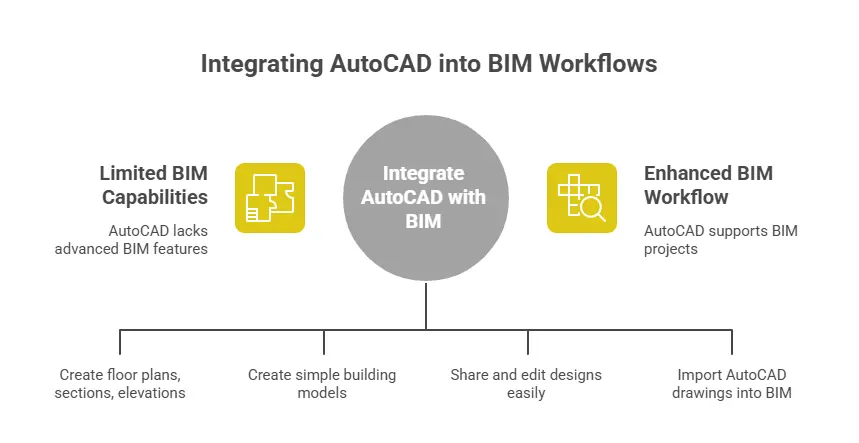
AutoCAD is mainly a drafting and design software used in engineering and construction projects. Many people use AutoCAD together with BIM workflows for creating drawings and project documentation.
What AutoCAD Does in BIM Projects
AutoCAD helps professionals create:
- Floor plans
- Sections
- Elevations
- Layouts
- Construction drawings
👉 AutoCAD is mainly used for drafting work.
AutoCAD Supports 2D Drafting
2D drafting is one of the main uses of AutoCAD.
Engineers use AutoCAD to:
- Draw plans
- Create dimensions
- Add annotations
- Prepare technical drawings
👉 AutoCAD is very popular for 2D design work.
AutoCAD Supports Basic 3D Modeling
AutoCAD also supports simple 3D design features.
Users can create:
- Basic building models
- Mechanical parts
- Structural components
👉 AutoCAD supports basic 3D work but not advanced BIM modeling.
AutoCAD Helps in Documentation
Construction projects need many technical documents.
AutoCAD helps create:
- Construction drawings
- Working drawings
- Site layouts
- Detail drawings
👉 Documentation is an important part of BIM projects.
DWG Files are Important
AutoCAD mainly uses DWG file format.
DWG files help professionals:
- Share drawings
- Edit designs
- Coordinate with teams
👉 Many BIM software tools support DWG files.
AutoCAD Works With BIM Software
Many companies use AutoCAD along with BIM software like:
- Autodesk Revit
- Navisworks
AutoCAD drawings can be imported into BIM software.
👉 AutoCAD supports BIM workflows in many projects.
Limitations of AutoCAD in BIM
AutoCAD is not a complete BIM software.
It does not provide:
- Intelligent object modeling
- Automatic quantity updates
- Real-time coordination
- Clash detection
👉 Advanced BIM tasks need dedicated BIM software.
Difference Between AutoCAD and BIM Software
AutoCAD mainly focuses on:
- Drafting
- Drawing creation
- Layout preparation
BIM software focuses on:
- Smart building models
- Data management
- Coordination
- Project collaboration
👉 BIM software provides more advanced project features.
When to Use AutoCAD in BIM Projects
AutoCAD is useful for:
- Drafting work
- Construction documentation
- Editing DWG files
- Simple layouts
- Basic 3D models
👉 Many professionals still use AutoCAD daily in BIM projects.
Why AutoCAD is Still Popular
Many engineers and architects continue using AutoCAD because:
- It is easy to learn
- It supports drafting work
- Many companies use DWG files
- It works well with BIM software
👉 AutoCAD remains important in construction and engineering industries.
Comparison Section
Many people get confused between AutoCAD and BIM software. Both are used in construction and engineering projects, but their work and features are different.
AutoCAD vs BIM Software
| Feature | AutoCAD | BIM Software |
|---|---|---|
| Main Purpose | Drafting and drawing | Smart building modeling |
| Type of Software | CAD software | BIM software |
| 2D Drafting | Yes | Yes |
| 3D Modeling | Basic | Advanced |
| Intelligent Models | No | Yes |
| Automatic Updates | Limited | Yes |
| Quantity Estimation | Manual | Automatic |
| Project Coordination | Limited | Better coordination |
| Clash Detection | No | Yes |
| Data Management | Limited | Advanced |
| Construction Documentation | Yes | Yes |
| Collaboration Features | Basic | Advanced |
| File Format | DWG | BIM project files |
| Best Use | Drafting and layouts | Full BIM project management |
👉 AutoCAD is mainly used for drafting and drawings.
👉 BIM software is used for smart building design and project management.
AutoCAD vs Revit
| Feature | AutoCAD | Autodesk Revit |
|---|---|---|
| Software Type | CAD | BIM |
| Main Use | Drafting | Building Information Modeling |
| Floor Plans | Yes | Yes |
| Smart Objects | No | Yes |
| Real-Time Changes | Limited | Yes |
| Collaboration | Basic | Advanced |
| Quantity Takeoff | Manual | Automatic |
| Learning Difficulty | Easier | Slightly advanced |
👉 Revit provides more BIM features than AutoCAD.
When to Use AutoCAD
AutoCAD is useful for:
- 2D drafting
- Construction drawings
- Layout preparation
- Editing DWG files
👉 AutoCAD works well for drafting tasks.
When to Use BIM Software
BIM software is useful for:
- Full building modeling
- Project coordination
- Quantity estimation
- Clash detection
- Team collaboration
👉 BIM software supports complete project management.
Practical Applications
AutoCAD is widely used in construction, engineering, and design projects. Many professionals use AutoCAD for drafting, planning, and project documentation in BIM-related work.
Architectural Drawings
Architects use AutoCAD to create:
- Floor plans
- Elevations
- Sections
- Building layouts
👉 AutoCAD helps create accurate building drawings.
Civil Engineering Projects
Civil engineers use AutoCAD for:
- Site plans
- Road layouts
- Drainage drawings
- Infrastructure designs
👉 AutoCAD supports civil engineering drafting work.
Structural Engineering Work
Structural engineers use AutoCAD for:
- Beam layouts
- Column drawings
- Structural details
- Reinforcement drawings
👉 AutoCAD helps prepare structural construction drawings.
MEP Design Work
MEP engineers use AutoCAD for:
- HVAC layouts
- Electrical drawings
- Plumbing plans
- Ducting layouts
👉 AutoCAD is commonly used in MEP projects.
Construction Documentation
Construction projects need many technical documents.
AutoCAD helps create:
- Working drawings
- Detail drawings
- Site layouts
- Construction documents
👉 Documentation is an important use of AutoCAD.
Interior Design Projects
Interior designers use AutoCAD for:
- Furniture layouts
- Space planning
- Interior drawings
- Ceiling plans
👉 AutoCAD supports interior design work.
Mechanical Design Work
Mechanical engineers use AutoCAD for:
- Machine drawings
- Mechanical components
- Product designs
- Manufacturing layouts
👉 AutoCAD is useful in mechanical drafting.
Editing and Sharing DWG Files
Many companies use DWG files in projects.
AutoCAD helps professionals:
- Edit drawings
- Share designs
- Coordinate with teams
👉 DWG support makes AutoCAD very popular.
Supporting BIM Workflows
Many BIM projects still use AutoCAD for:
- Drafting support
- Drawing corrections
- Documentation work
- File coordination
👉 AutoCAD supports many BIM-related activities.

Advantages and Concerns
AutoCAD provides many benefits in engineering and construction projects. However, it also has some limitations when compared with full BIM software.
🔶Advantages of AutoCAD for BIM
1. Easy for Drafting Work
AutoCAD is very useful for:
- 2D drawings
- Floor plans
- Layouts
- Construction details
👉 AutoCAD is simple and effective for drafting.
2. Widely Used in Industry
Many companies use AutoCAD in:
- Construction
- Architecture
- Civil engineering
- MEP projects
👉 AutoCAD skills improve job opportunities.
3. Supports DWG Files
DWG is one of the most common drawing file formats.
AutoCAD helps users:
- Edit drawings
- Share files
- Coordinate projects
👉 DWG support makes AutoCAD very popular.
4. Easy to Learn for Beginners
Many students start learning AutoCAD first because:
- Interface is simple
- Basic drafting is easy
- Many tutorials are available
👉 AutoCAD is beginner-friendly.
5. Works With BIM Software
AutoCAD drawings can be used with BIM software like:
- Autodesk Revit
- Navisworks
👉 AutoCAD supports BIM workflows.
🔶Concerns and Limitations
1. Not a Full BIM Software
AutoCAD is mainly CAD software.
It does not provide:
- Intelligent building models
- Smart object information
Advanced BIM features are limited.
2. Limited Real-Time Coordination
AutoCAD does not support advanced real-time collaboration like BIM software. Team coordination becomes harder in large projects.
3. Manual Quantity Updates
In AutoCAD, many changes need manual updates. This can increase work time and errors.
4. Limited Clash Detection
AutoCAD cannot automatically detect clashes between:
- Pipes
- Ducts
- Structural elements
Dedicated BIM software handles clash detection better.
Career & Learning Perspective
Learning AutoCAD and BIM concepts can improve career opportunities in construction and engineering industries. Many companies look for students and professionals with drafting and BIM knowledge.
Why AutoCAD Skills Are Important
Many industries use AutoCAD for:
- Drafting
- Construction drawings
- Layout planning
- Technical documentation
👉 AutoCAD skills are useful in many engineering jobs.
Industries Using AutoCAD
AutoCAD is commonly used in:
- Architecture
- Civil engineering
- Mechanical engineering
- MEP engineering
- Interior design
👉 Many industries require AutoCAD knowledge.
Career Opportunities
Students with AutoCAD and BIM skills can apply for jobs such as:
- CAD Draftsman
- BIM Modeler
- Design Engineer
- MEP Draftsman
- Civil Draftsman
👉 AutoCAD skills improve placement opportunities.
Importance of BIM Knowledge
Today, many companies use BIM workflows in projects.
Learning BIM helps students:
- Understand modern construction methods
- Improve technical knowledge
- Work on advanced projects
👉 BIM knowledge is important for future careers.
Why Learn Both AutoCAD and BIM Software
Many companies use both:
- AutoCAD
- BIM software like Autodesk Revit
Learning both tools helps:
- Improve technical skills
- Handle different project tasks
- Increase job opportunities
👉 Both skills are valuable in the industry.
Easy Starting Point for Beginners
Many students start learning AutoCAD first because:
- It is easier to understand
- Drafting basics are simple
- It builds design knowledge
👉 AutoCAD is a good starting software for beginners.
Importance of Certifications
AutoCAD certifications help students:
- Improve resumes
- Show technical knowledge
- Attract recruiters
👉 Certifications improve career value.
Learning Resources
Students can learn AutoCAD through:
- Online courses
- YouTube tutorials
- Training institutes
- Practice projects
👉 Many learning options are available today.
Future Scope
Construction and engineering industries continue using:
- CAD software
- BIM workflows
- Digital construction technologies
👉 AutoCAD and BIM skills will remain important in future careers.
Get Career-Oriented BIM Certification Course with Expert Mentors! Get a free demo here!
Conclusion
AutoCAD is an important software used in engineering and construction projects. It helps professionals create drawings, layouts, and construction documents easily. Many companies still use AutoCAD for drafting and BIM-related work.
Although AutoCAD is not a complete BIM software, it supports many BIM workflows and project tasks. Learning AutoCAD and BIM tools together can improve technical skills, job opportunities, and career growth in the construction industry.
Master BIM and Elevate Your Career – Enroll Today!
Stay ahead in the construction and design industry with our comprehensive BIM Course! Learn Building Information Modeling (BIM) from experts, gain hands-on experience with top software, and boost your career prospects. Join now and become a certified BIM professional!
Know MoreFrequently Asked Questions
What is AutoCAD software?
AutoCAD is a popular CAD software used for creating 2D drawings and basic 3D designs. Engineers, architects, and designers use it for drafting, layouts, and construction drawings.
Is AutoCAD a BIM software?
AutoCAD is not a complete BIM software. It mainly focuses on drafting and design work. However, it supports some BIM-related workflows like documentation and drawing coordination.
Can AutoCAD be used for BIM projects?
Yes, AutoCAD can be used in BIM projects for:
- Drafting work
- Construction drawings
- Layout preparation
- DWG file editing
Many companies use AutoCAD along with BIM software.
What is the difference between AutoCAD and BIM software?
AutoCAD mainly focuses on:
- Drawings
- Drafting
- Layouts
BIM software focuses on:
- Smart building models
- Data management
- Project coordination
- Collaboration
BIM software provides more advanced project features.
Which BIM software is commonly used with AutoCAD?
Many professionals use AutoCAD together with:
- Autodesk Revit
- Navisworks
- ArchiCAD
These software tools support advanced BIM workflows.
Why is AutoCAD still important in construction projects?
AutoCAD is still important because it helps create:
- Floor plans
- Construction drawings
- Technical layouts
- Working drawings
Many companies still use DWG files and drafting workflows.
Is AutoCAD easy for beginners to learn?
Yes, AutoCAD is beginner-friendly compared to many advanced BIM software tools. Many students start learning AutoCAD first because:
- Basic drafting is simple
- Many tutorials are available
- It helps build design knowledge
Does learning AutoCAD improve career opportunities?
Yes, learning AutoCAD can improve job opportunities in:
- Architecture
- Civil engineering
- Mechanical engineering
- MEP engineering
- Interior design
AutoCAD skills are useful for drafting, design, and construction-related careers.