Table of Contents
Introduction
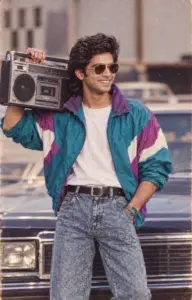
The 1980s are making a colourful comeback on social media. From bold hairstyles and statement outfits to soft studio lighting and analogue film effects, AI tools can now transform ordinary photographs into portraits inspired by the retro decade. From celebrities to marketing campaigns, the viral trend has revived the colourful generation.
Unlike a simple vintage filter, an AI-generated 80s portrait can change the clothing, hairstyle, background, lighting, and overall mood of an image while preserving the person’s recognisable features. Here is a step-by-step guide to creating your own 80s-inspired portrait using ChatGPT or another AI image-generation tool.
What Is the 80s AI Photo Trend?
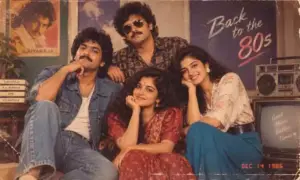
The 80s AI photo trend involves transforming a modern photograph into an image that appears to have been captured during the 1980s. The finished portrait may include period-inspired fashion, large hairstyles, warm lighting, faded colours, classic studio backgrounds, and subtle film grain. People are experimenting with several popular styles, including:
- Glamorous 1980s studio portraits.
- Old Bollywood-inspired photographs.
- Indian family-album pictures.
- Retro school or college portraits.
- Classic Hollywood-style photoshoots.
- Vintage passport or professional portraits.
- Colourful pop-culture-inspired images.
The final result depends largely on the reference photograph and the instructions included in the prompt.
Also read: Trending Nano-banana Prompts
How to Create an 80s Portrait
1. Choose a suitable photograph
Start with a clear photograph in which the face is visible. A front-facing or slightly angled image usually gives the AI tool enough information to understand the person’s facial structure. For better results, choose a photograph that has:
- Good lighting.
- A reasonably high resolution.
- Minimal blur.
- A clearly visible face.
- No heavy filters or visual effects.
- Limited obstruction from sunglasses, masks or hair.
You can use a selfie, a family photograph or a professional headshot. However, a clear image generally produces a more accurate result.
2. Open an AI image-generation tool
Open ChatGPT or another AI platform that supports image creation and image editing. Create a new conversation or project, depending on the tool you are using. The exact buttons may differ between platforms. Look for an option such as Upload, Attach, Add image or a plus symbol.
3. Upload the reference image
Attach the photograph you want to transform. Wait for the image to upload completely before entering your instructions. If you are using someone else’s photograph, make sure you have permission to edit and share it. You should also avoid uploading sensitive images or photographs containing private personal information.
4. Describe the overall 80s style
Your first prompt should clearly explain the transformation you want. Instead of simply writing “make this photo vintage” or “how would I look in the 80s”, mention the decade and the visual details associated with it. For example, you can request:
- An authentic 1980s portrait.
- Soft studio lighting.
- Subtle analogue film grain.
- Slightly faded but realistic colours.
- Period-appropriate clothing.
- A classic indoor or studio background.
- A natural, professionally photographed appearance.
Be specific, but avoid adding too many unrelated instructions in a single prompt.
5. Add details about clothing and styling
The clothing and hairstyle are important parts of an 80s portrait. Tell the AI what kind of appearance you want instead of leaving every creative decision open. You could request:
- A brightly coloured blazer.
- A patterned shirt.
- A saree with traditional jewellery.
- Denim and a graphic T-shirt.
- A formal shirt with a broad collar.
- Voluminous hair or a retro side-parted hairstyle.
- Period-inspired makeup.
- Statement earrings or chunky accessories.
If you want the image to reflect a particular culture or region, mention it directly. For example, you could ask for an Indian family-album style with clothing, accessories, and décor inspired by the 1980s.
6. Protect the person’s identity
If you want the result to resemble the original person, include clear instructions about facial accuracy. You can write:
Preserve the person’s recognisable facial structure, natural skin tone, face shape and expression. Do not change the person’s identity or make the face look like someone else.
AI image tools may sometimes alter facial details while changing the style. Asking the tool to preserve identity can help, although it cannot guarantee a perfect match.
7. Mention the background and lighting
The background can make the portrait feel more authentic. A plain modern wall may not match the retro style, so describe the setting you want. Possible options include:
- A traditional portrait studio.
- A patterned curtain backdrop.
- A warm living-room interior.
- A classic Indian family home.
- A softly lit Hollywood-style studio.
- A school photography background.
- A simple pastel-coloured wall.
You can also specify the lighting. Try phrases such as “warm studio lighting”, “soft flash photography”, “gentle shadows” or “slightly diffused analogue lighting”.
8. Add realistic vintage effects
A convincing 80s photograph should not look excessively damaged or artificially aged. Ask for subtle effects rather than extreme sepia tones, cracks or heavy scratches. Useful descriptions include:
- Mild film grain.
- Slightly faded colours.
- Soft focus.
- Natural analogue texture.
- Gentle colour shifts.
- A realistic old-camera appearance.
- Light photographic noise.
You can also tell the tool what to avoid:
Avoid excessive sepia, dramatic scratches, unrealistic distortion, plastic-looking skin and heavy artificial ageing.
9. Review the generated portrait
Once the AI creates the image, inspect it carefully. Check whether:
- The face still resembles the original person.
- The hands and accessories look natural.
- The clothing matches the requested decade.
- The background appears realistic.
- The colours are balanced.
- The image contains unwanted text or objects.
- The vintage effect is subtle rather than exaggerated.
Do not hesitate to request another version. AI image generation often requires a few adjustments before the result matches your idea.
10. Refine the prompt
If the first result is not accurate, give the tool targeted feedback. Avoid repeating the entire prompt unless necessary. For example, you could say:
- Keep the original face more accurately.
- Reduce the amount of film grain.
- Make the hairstyle look more natural.
- Replace the modern background with a 1980s portrait studio.
- Use realistic Indian clothing from the decade.
- Make the colours warmer but not sepia.
- Remove the extra jewellery.
- Create a more natural expression.
Small, specific changes can produce better results than a completely new request.
Ready-to-Use Prompt Ideas
1980s Bollywood Portrait
Transform this photograph into a realistic 1980s Bollywood-inspired studio portrait. Preserve the person’s recognisable facial features, natural skin tone, face shape and expression. Add period-appropriate Indian clothing, retro hairstyling and elegant accessories. Use warm studio lighting, soft focus, realistic analogue film grain and slightly faded colours. The image should look like a genuine photograph taken in India during the 1980s. Avoid excessive sepia, heavy scratches, unrealistic skin and exaggerated ageing.
Indian Family-Album Portrait
Recreate this photograph as a warm Indian family-album picture from the mid-1980s. Preserve the person’s identity and natural facial features. Add period-appropriate clothing, hairstyle and accessories, with a simple indoor home setting and soft flash photography. Use realistic film colours, mild grain and a slightly faded analogue texture. Keep the result natural and believable rather than overly dramatic or damaged.
Glamorous Studio Portrait
Turn this image into a glamorous 1980s studio portrait while retaining the original person’s facial identity. Add voluminous period-inspired hair, classic makeup, bold clothing and a professional studio background. Use diffused lighting, soft focus, subtle film grain and warm realistic colours. Make it look like a professionally printed portrait from the 1980s, without excessive vintage filters or artificial facial changes.
Retro College Photograph
Convert this photograph into a realistic 1980s college portrait. Preserve the person’s original face, natural skin tone and recognisable features. Add simple period-appropriate clothing, a natural retro hairstyle and a plain educational-institution background. Use soft analogue lighting, slightly faded colours and subtle film grain. Keep the image candid and realistic rather than glamorous.
How to Make the Result More Authentic
The best prompts combine a broad creative direction with practical visual details. Instead of saying only “make me look like I am from the 1980s”, describe the clothing, location, lighting, colours and photographic style. You can improve the result by:
- Using a sharp reference image.
- Naming the specific 80s aesthetic you prefer.
- Mentioning culturally relevant clothing and settings.
- Asking for realistic rather than exaggerated ageing.
- Requesting preservation of facial identity.
- Making one adjustment at a time.
- Avoiding too many conflicting visual instructions.
- Comparing multiple versions before choosing one.
For instance, “an Indian family portrait from the mid-1980s with warm indoor lighting and a patterned curtain background” gives the tool more direction than simply asking for a “retro photo”.
Important Privacy and Usage Tips
Before uploading a photograph, consider how the image may be processed and stored by the AI service. Avoid sharing confidential work photographs, identity documents, private family images or pictures of children without appropriate consent. You should also remember that AI-generated portraits are creative edits, not genuine historical photographs. If you share the image online, consider identifying it as AI-generated or AI-edited to avoid misleading viewers. When using a recognisable celebrity, brand or public figure as inspiration, avoid presenting the generated image as an authentic photograph or official endorsement.
Sharing Your Portrait Online
After creating the final image, you can post it on Instagram, Facebook, Pinterest or other social platforms. A short caption can explain the creative concept and invite others to try the trend. Example caption:
Bringing the 80s back, one AI portrait at a time. Which retro style should I try next?
You can also create a carousel showing the original photograph alongside the AI-generated version. This makes the transformation easier for viewers to understand and can encourage more engagement.
Final Thoughts
Creating an 80s trend portrait is a simple way to experiment with AI image editing and nostalgic visual styles. Start with a clear photograph, describe the decade-specific details carefully and refine the result through short follow-up instructions. Whether you prefer an old family-album look, a Bollywood-inspired studio portrait or a glamorous Hollywood aesthetic, the right prompt can turn an ordinary image into a convincing retro-style creation. The key is to balance creative styling with realistic facial details, natural colours and subtle vintage effects.