Table of Contents
Out of which, choosing the best option without considering only the price can be challenging at the same time. But finding the best 3D printer could change the career of the engineers who build and test these systems.
For beginners, the ideal 3D printer would definitely provide safety, affordability, and quality. A beginner-friendly 3D printer should have the qualities that shall help you to create higher-quality output while spending less time on troubleshooting.
-Choose a beginner-friendly 3D printer with reliability, accessibility, ease of understanding and budget-friendliness. –Speed, research, larger projects and experimentation are the core functions of 3D printers.
-Explore robotics, CAD, IoT, and PLA to understand complex designs and skill set improvements.
The ideal 3D printer should maintain a balance between quality and efficiency. It should provide facilities for expertise, experimentation and performance.
The best 3D printer should cater to creativity. It should ensure safety, reliability, affordability, quality, easy usage, calibration automation and learning space for beginners. Avoid relying on 3D printers that have multiple problems to locate and solve. Read on to learn more about the beginner-friendly 3D printers that make your work more efficient.
Best 3D Printers for Beginners
Here is the list of strongest recommendations for you to consider while purchasing 3D printers.
- Bambu Lab A1 facilitates an easy workflow and large build volume
- Bambu Lab A1 Mini facilitates a compact and simple workflow experience
- Creality Ender-3 V3 SE facilitates a budget-friendly option for beginners
- Elegoo Neptune 4 Pro facilitates experimentation and advanced features
- Creality Ender-3 V3 KE- facilitates more accuracy and speed along with larger build volume
The compact Bambu Lab A1 Mini, with its 180*180*180 mm build volume, guided workflow and calibration automation features, can be considered the most advanced beginner-friendly 3D printer.
Kickstart your embedded systems career and turn your tech passion into high-demand skills!
Why Choosing the Right Beginner 3D Printer Matters
As a beginner, your first choice of 3D printer can confuse you since you are slowly starting to familiarise yourself with the techniques of 3D printing.
Your first 3D printer moulds you and helps you to understand the basics of 3D printing. Your efficiency and precision in learning 3D printing depend upon the first 3D printer you’re handling.
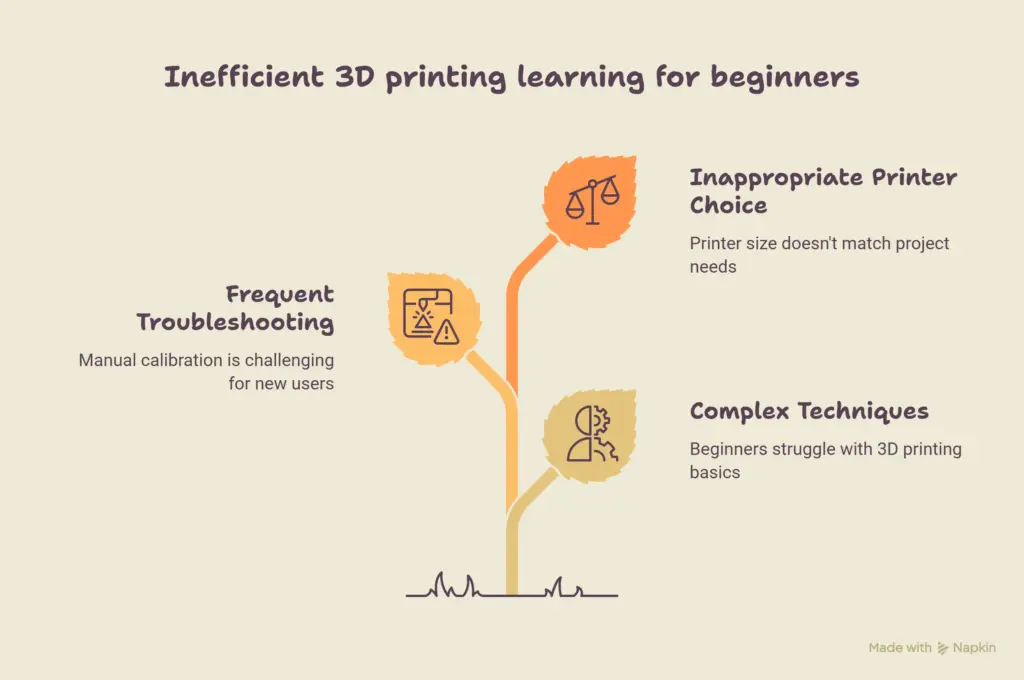
For a beginner, frequent troubleshooting and manual calibration can be challenging. An automated printer can aid new users in learning and understanding the nuances of 3D printing at a fast pace. This can also facilitate the user learning 3D design, materials, printing, and slicing in the most apt way. The ideal 3D printer should have the following features:
- Beginner-friendly materials
- Compatibility
- Replacement material availability
- Ample build volume for projects
- Easy-to-use software
- Simple set-up
- Automatic calibration
- First layer performance reliability
Before choosing the 3D printers, you should know the purpose and objective of the purchase. If it’s for small use, you don’t have to go for a high purchase. You need only a comparatively smaller printer if you are looking for a printer for desk accessories and small toys.
But if you are printing for robotics components, functional prototypes and cosplay parts, you need to find a larger 3D printer. Based on the requirements and specifications, you can choose your first 3D printer.
Master Embedded Systems Programming!
Launch your tech career with our Embedded Systems Course, designed for hands-on learning and industry readiness.
Know MoreHow We Selected the Best Beginner 3D Printers
During the first stage of learning, the 3D printer that helps in experimenting is regarded as the best 3D printer rather than only considering the expensive or faster model. Here are the reasons why the 3D printer became helpful while learning to use it.
Quality
Production of clean and accurate prints should be considered while choosing a 3D printer. When using materials of different types, clean printouts enhance your work quality.
Easy to use
The use of simple software can help in reducing complications, along with automatic calibration. The straightforward control system can also help in easing the use. a lessor.
Build volume
Flexibility will not be compromised if the build volume is larger. The compact printer comes in handy.
Build volume
Flexibility can be accomplished with the aid of the larger build area of the 3D printer you choose. The 3D printer with a smaller build volume can easily fit into the home, workspace or classroom space for better space utilisation.
Modern features
The modern features in the design can make it more convenient to use. The remarkable features such as filament sensors, wi-fi connectivity, bed levelling automation, and automatic calibration can give you an altogether new printing experience.
Reliability
The consistency in performance is really important while choosing the 3D printer. A lower-quality printer shows a tendency for frequent failures. Reliability thus plays a key role while choosing the 3D printer.
Value
The 3D printer that you choose should be a value for the money. Each penny you pay should be worth your experience. While choosing the 3D printer, make sure you are not wasting the money on something that you need to troubleshoot frequently.
Kickstart your embedded systems career and turn your tech passion into high-demand skills!
Best 3D Printers for Beginners
Here is the list of the best 3D printers for beginners.
Bambu Lab A1 Mini
The Bambu Lab A1 Mini is the best beginner-friendly 3D printer that is now widely available in the market. The compact setup and the ease of use of the Bambu Lab A1 Mini make it different from other 3D printers, and this gives the beginner an altogether new printing experience. Those beginners who prioritise experimentation with creativity and reliability can depend on the Bambu Lab A1 Mini.
The build volume of Bambu Lab A1 Mini is 180*180*180 mm, which makes it budget-friendly and pocket-friendly. The small build volume helps you to fit the printer in small spaces.
You can easily use it for educational projects and small functional tasks. The automated calibration makes it easy to use. Multi-colour printing is possible with the aid of the AMS Lite system.
The Bambu Lab A1 Mini printer is best for first-time users, small projects, home users and those who want less setup and fewer functionalities. The only limitation is that it is not built for larger build volumes.
Creality Ender-3 V3 SE
The Creality Ender-3 V3 SE is the best budget-friendly 3D printer that is now available on the market. The initial investment for the Creality Ender-3 V3 SE is comparatively low, which makes it a good choice for the beginner who prioritises experimentation.
The automatic levelling and direct drive extrusion are the features that make it an even more convenient option for beginners. The build volume of the Creality Ender-3 V3 SE is 220*220*250 mm.
The relatively high build volume of the Creality Ender-3 V3 SE with budget-friendly features can make it a more attractive and affordable choice for beginners. The Creality Ender-3 V3 SE is the best choice for users who are budget-conscious. Users should learn about maintenance and calibration to use this properly.
Creality Ender-3 V3 KE
If you are conscious about larger projects and speed, the Creality Ender-3 V3 KE is the best option. The Creality Ender-3 V3 KE is used by users who look for larger build volume and higher speed for printing. The Creality Ender-3 V3 KE supports automatic levelling and possesses a 220*220*240 mm build volume.
The print speed of the Creality Ender-3 V3 KE is 550 mm/s, which makes it even more powerful. The print speed can also depend on the settings, materials and models.
The Wi-Fi connectivity and touchscreen interface make it super comfortable for bigger projects. Those beginners who are more interested in faster printing models and robotics can depend upon the Creality Ender-3 V3 KE. The lack of additional settings limits the knowledge and experience needed for a beginner.
Elegoo Neptune 4 Pro
Elegoo Neptune 4 Pro is best for beginners’ experimentation. The Elegoo Neptune 4 Pro provides room for experimentation and growth. The build volume of the Elegoo Neptune 4 Pro is 225*225*265 mm. High-speed printing is the major feature of the Elegoo Neptune 4 Pro.
The Klipper-based features help boost printing speed and efficiency. The automatic bed levelling and direct-drive extruder. Extrusion is a major feature. Elegoo Neptune 4 Pro aids in understanding the features of 3D printers and allows beginners to experiment.
Those who wish to know more about printer tuning can make use of this facility. Engineering students and hobbyists find it even more appealing. Rather than being a fully automated ecosystem, it involves more hands-on intervention, which makes it less automated.
Bambu Lab A1
The major attraction of Bambu Lab A1 is its build space. More build space means more chances for exploration and research. Bambu Lab A1 gives more space and opportunities for larger projects. Users who wish to shift their focus from small projects to larger ones can make use of the Bambu Lab A1.
The structure is less complicated, which makes it more accessible and user-friendly. The user is guaranteed a more comprehensive experience and understanding of 3D printers. Large household parts printing, robotics component printing, etc. will be smoother with the use of the Bambu Lab A1. It is of a higher budget end when compared to other 3D printers.
Comparison of the Best Beginner 3D Printers
Here is the comparison table that helps you to understand the major and minor differences between the 3D printers.
| Name of the Printer | Build Volume | Best Use | Beginner-friendly, a lesser | Advantage |
| Bambu Lab A1 Mini | 180× 180× 180 mm | Beginners | Excellent | Automated, less complicated workflow |
| Creality Ender-3 V3 SE | 220× 220× 250 mm | Budget-conscious | Very Good | Larger build volume |
| Creality Ender-3 V3 KE | 220× 220× 240 mm | Projects | Very Good | Fast printing with modern features |
| Elegoo Neptune 4 Pro | 225 × 225 × 265 mm | Learning and Research | Good | Flexibility and advanced features |
| Bambu Lab A1 | 256 × 256 × 256 mm | Huge Projects | Excellent | Easy workflow |
The manufacturer, firmware and configuration can vary depending on the production, and this variation will be easily reflected in the specifications of the 3D printers as well. So the users should thoroughly read, review and understand the specifications at the time of purchase.
Master Embedded Systems Programming!
Launch your tech career with our Embedded Systems Course, designed for hands-on learning and industry readiness.
Know MoreWhat to Look for Before Buying Your First 3D Printer
While purchasing your 3D printer, make sure to check for all the specifications before making the purchase. You have to look out for certain specifications, configurations, and conditions before deciding to purchase.
Printing technology
The FDM 3D printers use plastic filaments, and it is a better option for beginners. The printer technology is best for robotics parts, educational models and functional components. The printing material, cleaning process, post-processing and ventilation considerations of resin printers are different, but they can produce models which are highly detailed.
Build volume
Your printing requirements should be considered in the first place before moving on to the purchase of the printer. Small models require only a compact printer; a larger build volume is required for robotics and bigger prototypes. Depending on the requirements, make the purchase more useful.
Filament compatibility
Beginners can choose PLA since your requirements are on point. This material is the most convenient. After gaining experience, you can depend on PETG and TPU materials based on the requirements.
Bed levelling automation
Automatic bed levelling makes the set-up easier and makes more room for experimentation by avoiding the initial frustration. Beginners usually struggle with this aspect.
Software
You need to find the best slicing software for the embedded printer to convert a 3D model into the instructions the printer comprehends.
Maintenance
The availability of the fans, belts, build plates, and nozzles should be confirmed before purchasing the 3D printers.
Pros and Limitations of Beginner 3D Printers
Here are the major Pros and limitations of the 3D printers for beginners –
- Physical prototyping has easy accessibility
- Engineering and educational projects can be done easily
- Customised objects creation
- Experimentation cost is lower.
- Downloadable models are of high quality.
- Product design knowledge boosting
- CAD learning opportunities
- IoT projects and robotics can be easily developed and accomplished
Here is the set of limitations of the 3D printers for beginners
- Failure in prints
- Tiresome initial set-up
- Proper storage of the filaments
- Specific conditions are required for most of the materials
- Several hours will be taken for printing larger items
- Maintenance and cleaning are required regularly
- Not all the traditional manufacturing methods are replaced by 3D printing
Kickstart your embedded systems career and turn your tech passion into high-demand skills!
Which Beginner 3D Printer Is Right for You?
Based on your priorities, you can choose your 3D printer.
- If you prioritise a budget-friendly, simple and compact printer, choose Bambu Lab A1 Mini.
- If your choice is based on a lower budget yet fundamental learning, go for Creality Ender-3 V3 SE.
- If you enjoy experimenting and researching printer settings, your better choice would be Elegoo Neptune 4 Pro.
- If you need a beginner-friendly printer but need to print larger objects, use Bambu Lab A1.
- Your budget, project size, objective, workspace, and range of experimentation are the ultimate considerations before buying a 3D printer.
Getting Started After Buying Your First 3D Printer
Avoid attempting a complicated model immediately after your 3D printer purchase. Understand the machine behaviour by running simple test prints.
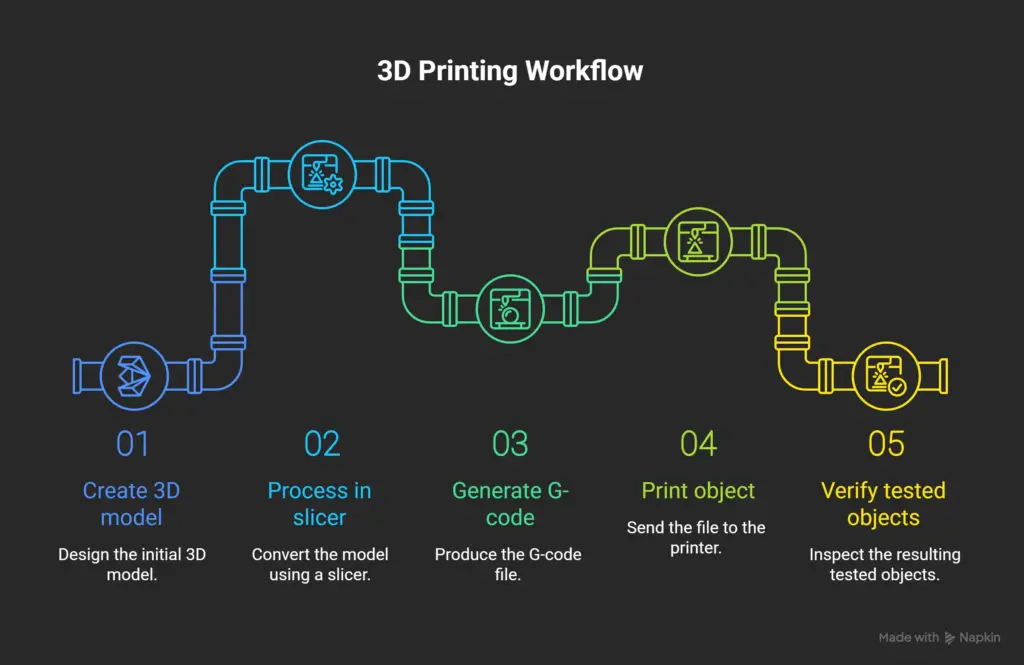
Start with PLA and learn major aspects of the purchased 3D model, which involve
- Filament loading
- Calibrating printing bed
- Print profile adjustment
- Model preparation in slicing software
- Initiate print
- First layer monitoring
- Deliver the finished print with care
- Maintain printer after cleaning
Make sure to experiment with CAD modelling only after understanding the basics of printing. For the beginner, along with learning 3D printing, you can learn more about electronics, ESP32, and Rand Robotics CAD to enhance practical knowledge and creativity.
Final Thoughts
Never complicate your first 3D printer model purchase. You need to understand your real need and purpose before initiating a purchase. Beginners should focus on flexibility, reliability, quality, budget considerations, accessibility, and automation when choosing a 3D printer for experimentation and research.
Your learning phase begins once you purchase your 3D printer; building your own products requires careful practice and preparation. The practical skills and knowledge will make the experimentation more meaningful and valuable.
Master Embedded Systems Programming!
Launch your tech career with our Embedded Systems Course, designed for hands-on learning and industry readiness.
Know MoreFrequently Asked Questions
What is the purpose of 3D printers?
3D printing combines PCBs, actuators, sensors, batteries, communication modules, microcontrollers, and displays that help in easy diagnosis of the system’s performance and potential.
What is build volume in 3D printers?
Small models require only a compact printer; a larger build volume is required for robotics and bigger prototypes.
What is the key role of Creality Ender-3 V3 SE printer?
The Creality Ender-3 V3 SE is the best budget-friendly 3D printer that is now available on the market. The initial investment for the Creality Ender-3 V3 SE is comparatively low, which makes it a good choice for a beginner who prioritises experimentation.
Which 3D printer shall i choose if i'm looking for budget friendly options?
- If you prioritise a budget-friendly, simple and compact printer, choose Bambu Lab A1 Mini.
What is filament compatability?
Beginners can choose PLA since your requirements are on point. This material is the most convenient. After gaining experience, you can depend on PETG and TPU materials based on the requirements.
What is the build volume of Elegoo Neptune 4 Pro?
The Elegoo Neptune 4 Pro provides room for experimentation and growth. The build volume of the Elegoo Neptune 4 Pro is 225*225*265 mm.
Why choosing the right 3D printer marks?
Your first 3D printer moulds you and helps you to understand the basics of 3D printing. Your efficiency and precision in learning 3D printing depend on the first 3D printer you handle.