Table of Contents
MyACCA Portal – Quick Answer
The MyACCA portal is the centralized, official online management system developed by ACCA Global to allow students, affiliates, and members to administer their professional qualifications from a single interface. Accessed securely at myacca.accaglobal.com, the platform serves as your operational command center.
Once your initial registration is verified, the portal unlocks the necessary administrative components required to complete your qualification. You will use MyACCA to book your quarterly computer-based exams (CBEs), pay annual student subscriptions, apply for paper exemptions, launch the free ACCA Study Hub textbook framework, track your 36-month practical experience requirement (PER), and view your official exam transcripts.
Introduction
1: Accounting provides information on
When you decide to pursue a global finance career through the ACCA qualification, your relationship with the UK-based body doesn’t live on paper or inside traditional university offices. It lives entirely inside a single online interface. From the moment you submit your initial passport and educational scans to the day you finally claim your letters as a fully qualified accountant, one tracking system coordinates every single step.
Yet, an incredible number of candidates register for the course but fail to utilize the actual mechanics built into their student dashboard. They view it merely as an invoice gateway to pay exam fees or check their results every quarter. This complete guide breaks down how the MyACCA portal functions behind the scenes in 2026, showing you exactly how to navigate its setup, avoid common registration traps, and leverage its free study tools to maximize your chances of exam success.
Become an Accounting Pro – Learn from Industry Experts!
Placement Oriented PWC Business Accounting Course
PWC Certified Business Accounting Course by Entri App: Master in-demand skills, ace interviews, and secure top-tier jobs.
Join Now!What is the MyACCA Portal?
The MyACCA portal is a secure, cloud-based relationship management platform that centralizes all administrative, financial, and educational activities connected to your qualification. Think of it as your virtual identity inside the global institute.
The dashboard provides a personalized overview of your exact position in the certification journey. Instead of managing separate logins for your study textbooks, exam bookings, and professional experience documentation, everything is unified under a single user profile. The interface automatically adapts its layout based on your current standing—whether you are a foundational student clearing applied knowledge papers, an affiliate waiting on practical experience approval, or a senior member submitting your annual continuous professional development (CPD) logs.
MyACCA Registration Process
Setting up your account requires building an official student file with the global body. This isn’t an instantaneous automated setup; it involves a formal document verification phase handled by the UK review teams.
The Pre-Registration Checklist
In order to prevent delay in verification, it is advisable to prepare all your scanned documents in clearly readable formats before proceeding with application process:
- Proof of Identity: One of these: Valid Passport, National Aadhaar card, and Driving License.
- Proof of Academics: All your degrees, university transcripts, school mark sheets (Class 10 & 12).
- Proof of Biometric Profile: A clear digital image of your passport size photograph.
Step-by-Step Account Setup
- Initiate the File: Visit the official site for ACCA Global and click on the “Apply Now” page. Fill in all your particulars including your name, contact details, and date of birth.
- Upload Your Credentials: Attach your documents to the matching fields. Ensure the edges are completely visible and text isn’t blurry.
- Exemption Assessment: The registration engine automatically cross-references your uploaded college marks to suggest potential paper exemptions.
- Onboarding Fee Settlement: Pay your initial registration balance securely via a credit or debit card.
- The Verification Window: Once submitted, the review team typically takes 5 to 10 working days to audit your paperwork. Once approved, you will receive a confirmation email containing your official 7-digit unique Student ID number.
How to Login to MyACCA
Once your account is activated and you have your 7-digit reference details, logging in is a straightforward process:
[Visit myacca.accaglobal.com] ➔ [Enter Registered Email / ID] ➔ [Input Secure Password] ➔ [Complete 2FA Verification]
- Step 1: Launch your browser and access the link: myacca.accaglobal.com.
- Step 2: Type in your registered corporate email or your personal student identification number.
- Step 3: Type in the password you chose during registration.
- Step 4: It is important to complete 2FA authentication if you access the service from a new device or location.
⚠️ Access Warning: Please do not try to enter your access details more than five times in a row if you happen to forget them because this would trigger a security lockout.
Placement Oriented PWC Business Accounting Course
PWC Certified Business Accounting Course by Entri App: Master in-demand skills, ace interviews, and secure top-tier jobs.
Join Now!Key Features of the MyACCA Portal
The main interface acts as a comprehensive map of your entire professional record. Understanding its distinct functional zones saves you hours of aimless clicking:
1. The Global Status Dashboard
The very first screen you encounter provides a high-level summary of your account’s health. It displays your current reference number, your annual student subscription status (whether it is active or past due), and immediate action banners requiring attention.
2. The Interactive Exam Planner
This is the area you will interact with most frequently throughout your studies. It houses the complete booking calendar for the upcoming March, June, September, and December exam windows. From here, you filter down by your remaining papers, select center-based testing (CBT) sites in your home city, and manage your exam booking cart.
3. The Professional Records Ledger
This section contains your complete, non-editable educational transcript. It lists the exact date you cleared specific modules, your official marks, and any exemptions officially granted based on your academic background.
What Can You Do Through MyACCA?
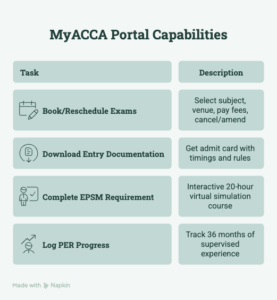
The portal handles a wide variety of administrative tasks, giving you complete control over your professional profile:
- Book and Reschedule Exams: You can pick your next target subject, select your testing center venue, and pay your entry fees. If an unexpected conflict arises, you can cancel or amend your test details through this engine, provided you act before the official standard entry closing date.
- Download Official Entry Documentation: Approximately two weeks before your scheduled exam window, the portal generates your official exam entry docket (admit card) containing your exact session timings and desk rules.
- Complete the EPSM Requirement: The mandatory Ethics and Professional Skills Module is an interactive, 20-hour virtual simulation course. It lives directly inside the portal, allowing you to work through its modules at your own pace.
- Log the MyExperience (PER) Progress: To unlock full membership, you must track 36 months of supervised corporate finance experience against ACCA’s core performance objectives. The PER tracker allows you to document your workplace achievements and send them directly to your supervisor’s portal for digital sign-off.
Benefits of Using the MyACCA Portal
Relying on the official dashboard gives you access to significant structural and financial advantages that external revision kits simply cannot replicate:
- Direct Integration with the ACCA Study Hub: Direct Connection with the ACCA Study Hub. If you click the “Qualification Progress” section of your account, then you will get free access to the official Study Hub. Here, you will find full e-books, flashcards, confidence tracker, and practice questions.
- Direct Access to the Practice Platform: This tool provides a precise digital replication of the actual exam interface, complete with response windows, on-screen spreadsheets, calculators, and navigation systems. Practicing here is essential for mastering your time management before exam day.
- Secure Financial Processing: Your fees, annual balances, and exemption payments are processed directly through an encrypted gateway, protecting your personal data and ensuring payments hit your account instantly.
Important Tips for Managing Your MyACCA Account
Keeping Personal Information Updated
Your portal profile is the single source of truth used to generate your final physical graduation certificates and membership documents. This makes regular account maintenance essential.
- Updating Your Address and Contact Information: If there is a change of address or if your contact details change, you can instantly do this by going to the “My Profile” tab on your account.
- Updating Your Legal Name: You may be able to make some online corrections to your name but if you want to change it legally (for example, if you got married or if there was a legal name change), it is important to upload documents related to your name change for the consideration of the review team.
- Subscription Management: Annual subscription renewals are due on January 1st every year. Failing to clear this balance on time blocks your ability to book exams and can lead to an account suspension, which requires an expensive £89 re-registration penalty to fix.
Become an Accounting Pro – Learn from Industry Experts!
Conclusion
In addition to being a mere record of your grades, the MyACCA portal serves as the backbone of your whole career in the profession. By learning how to use it properly, keeping personal information up-to-date, and utilizing the free resources which come with your membership such as Study Hub and Practice Platform, you will be able to organize all your administrative functions.
Placement Oriented PWC Business Accounting Course
PWC Certified Business Accounting Course by Entri App: Master in-demand skills, ace interviews, and secure top-tier jobs.
Join Now!Frequently Asked Questions
What is the difference between an exemption fee and an exam fee on MyACCA?
An exam fee is what you pay to book and sit for a paper during a standard quarterly testing window. An exemption fee is a reduced administrative charge you pay to claim credit for a paper you are eligible to skip based on a prior qualification (like a B.Com or CA degree).
Can I access the official Study Hub through a direct bookmark link?
No. To log in securely and authenticate your identity, you must log in to your MyACCA account first, navigate to your qualification dashboard, and launch the Study Hub from there. Using bookmarked links can cause login errors.
How long before an exam session do the portal booking windows open?
Exam entry windows typically open roughly four months before the targeted exam month. Booking early ensures you secure your preferred testing venue and locks in the lowest standard tier pricing before late fees apply.