
Table of Contents
BIM plays an important role in data center projects. These facilities require precise system coordination. They also contain extensive MEP infrastructure.
Data centers require highly coordinated technical infrastructure. Their performance depends on interconnected systems. These include power, cooling, networking, and security. Even small errors can create serious problems.
Key Takeaways:
- BIM creates detailed digital data center models.
- It coordinates complex MEP systems effectively.
- BIM helps detect clashes before construction.
- It improves design accuracy and project coordination.
- 4D BIM supports construction scheduling.
- 5D BIM supports quantity and cost control.
- 6D BIM supports performance and sustainability planning.
- 7D BIM supports facility management and maintenance.
- BIM reduces rework, delays, and construction risks.
- Successful BIM requires skilled teams and standards.
Get Career-Oriented BIM Certification Course with Expert Mentors! Get a free demo here!
What is BIM for Data Centers?
BIM means Building Information Modeling for data centers. It creates detailed digital facility models. These models combine geometry, systems, and project information. BIM supports design, construction, and facility operations.
- BIM coordinates architectural, structural, and MEP systems.
- It helps teams detect clashes before construction.
- It supports accurate quantities and cost planning.
- It improves construction sequencing and project coordination.
- It supports maintenance after facility handover.
Data centers contain highly complex building systems. These systems must work together with precision. BIM provides one coordinated digital project environment. Teams can review systems before physical installation. This reduces avoidable errors during construction.
BIM also supports operational decisions after completion. Facility teams can access useful asset information. This can simplify maintenance and future modifications. Therefore, BIM supports the complete facility lifecycle.
Why is BIM Important for Data Centers?
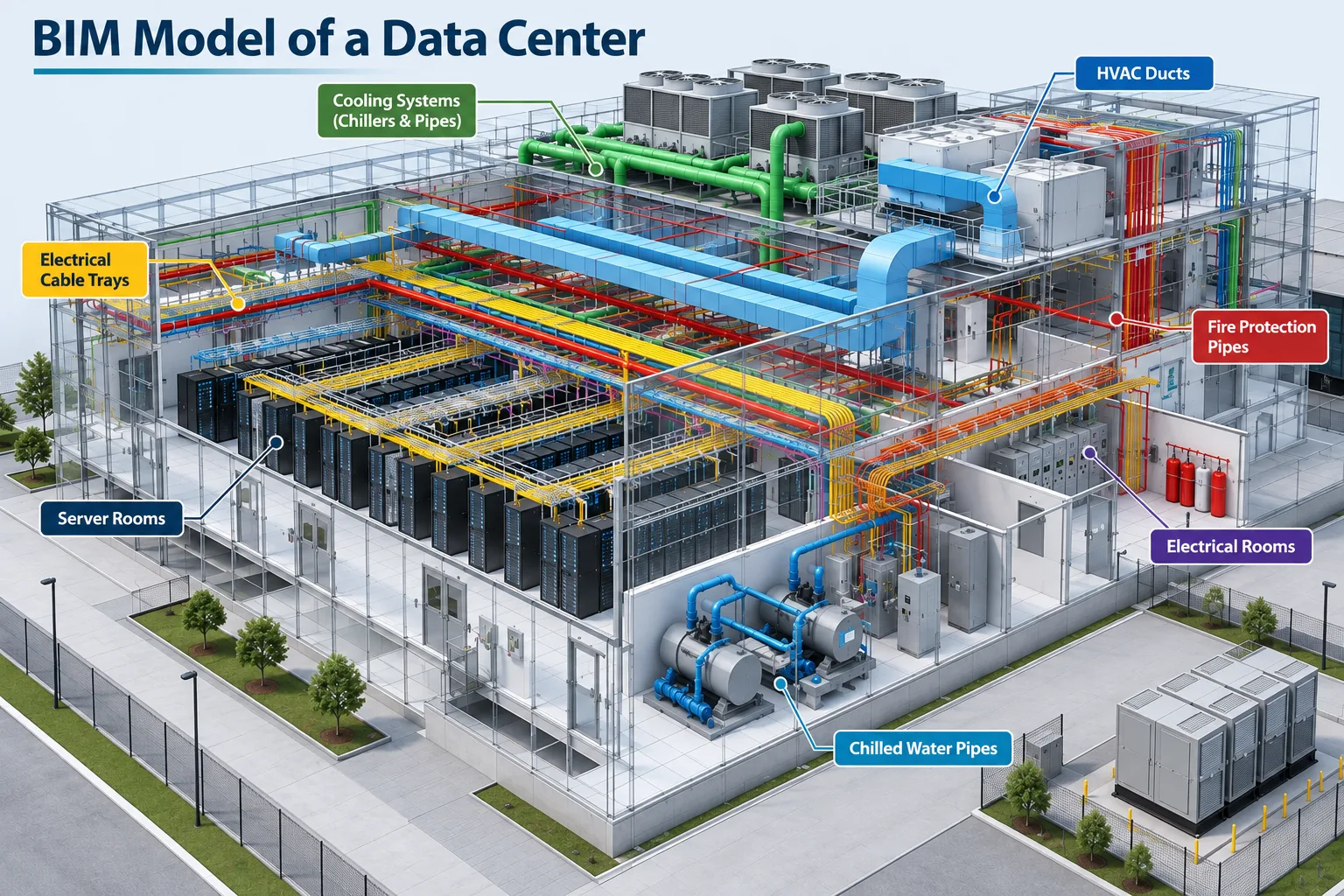
Mechanical and electrical systems occupy significant space. Large equipment also requires proper access clearances. Cable routes need careful planning across multiple areas. Cooling systems require accurate equipment and duct coordination. Fire protection systems need appropriate routing and coverage.
BIM helps teams coordinate these requirements digitally. Designers can identify conflicts before installation begins. Construction teams can understand complex installation sequences. Owners can review systems before approving major changes.
BIM also supports data center reliability goals. Accurate models help reduce construction-related uncertainties. Better coordination can reduce rework and material waste. It can also support clearer project communication.
Data centers often involve multiple specialist contractors. Each contractor may develop different technical models. BIM brings these disciplines into one shared environment. This improves coordination between project stakeholders.
Master BIM and Elevate Your Career – Enroll Today!
Stay ahead in the construction and design industry with our comprehensive BIM Course! Learn Building Information Modeling (BIM) from experts, gain hands-on experience with top software, and boost your career prospects. Join now and become a certified BIM professional!
Know MoreHow does BIM Work in Data Center Projects?
BIM follows a structured workflow throughout projects. Each stage adds useful information to the model. Teams then use that information for decisions.
1. Project Requirements are Defined
The project team first establishes BIM requirements. These requirements define modeling standards and deliverables. They also identify required model details and formats.
Teams may define specific project information requirements. They can establish naming and documentation standards. These standards support consistency across project models.
2. Existing Project Information is Collected
Teams gather drawings, specifications, and site information. Existing facilities may require laser scanning surveys. Accurate site information supports reliable model development.
New projects usually begin with design information. This information may include architectural drawings. Engineering drawings also provide important system details.
3. Architectural and Structural Models are Developed
Architectural teams create the building’s digital representation. Structural teams model foundations and structural elements. These models establish the project’s physical framework.
The models include walls, floors, roofs, and structural members. They can also include rooms and equipment spaces. This creates a foundation for technical coordination.
4. MEP Systems are Modeled
MEP modeling is critical for data center projects. Teams model mechanical and electrical infrastructure carefully.
Mechanical models can include cooling equipment and ductwork. They may also include chilled water piping. Electrical models include panels, cables, and equipment. Other systems can include fire protection infrastructure.
5. Models are Federated and Coordinated
Separate discipline models are combined into one environment. This creates a coordinated or federated BIM model. Teams can then review multiple systems together.
Coordination teams examine equipment locations and service routes. They also check access and maintenance requirements. This stage helps identify potential installation problems.
6. Clash Detection is Performed
Software checks models for physical conflicts. These conflicts may involve different building systems. For example, ducts can conflict with cable trays.
Teams review each detected clash carefully. Some clashes may require design changes. Others may require construction sequencing adjustments.
Early resolution prevents many site-level problems. It can also reduce expensive construction rework.
7. Construction Teams Use the BIM Model
Contractors can use models during construction planning. Models can support installation and sequencing decisions. They can also support quantity and material planning.
Teams can compare construction progress against model information. This helps identify potential deviations earlier. BIM can therefore support better project control.
8. The Final Model Supports Facility Operations
The completed model can become an asset database. It can contain information about installed equipment. This information supports facility management activities.
Operators can locate equipment through the digital model. They can also access relevant maintenance information. Future modifications can use the existing model.
What are the Main BIM Components Used in Data Centers?
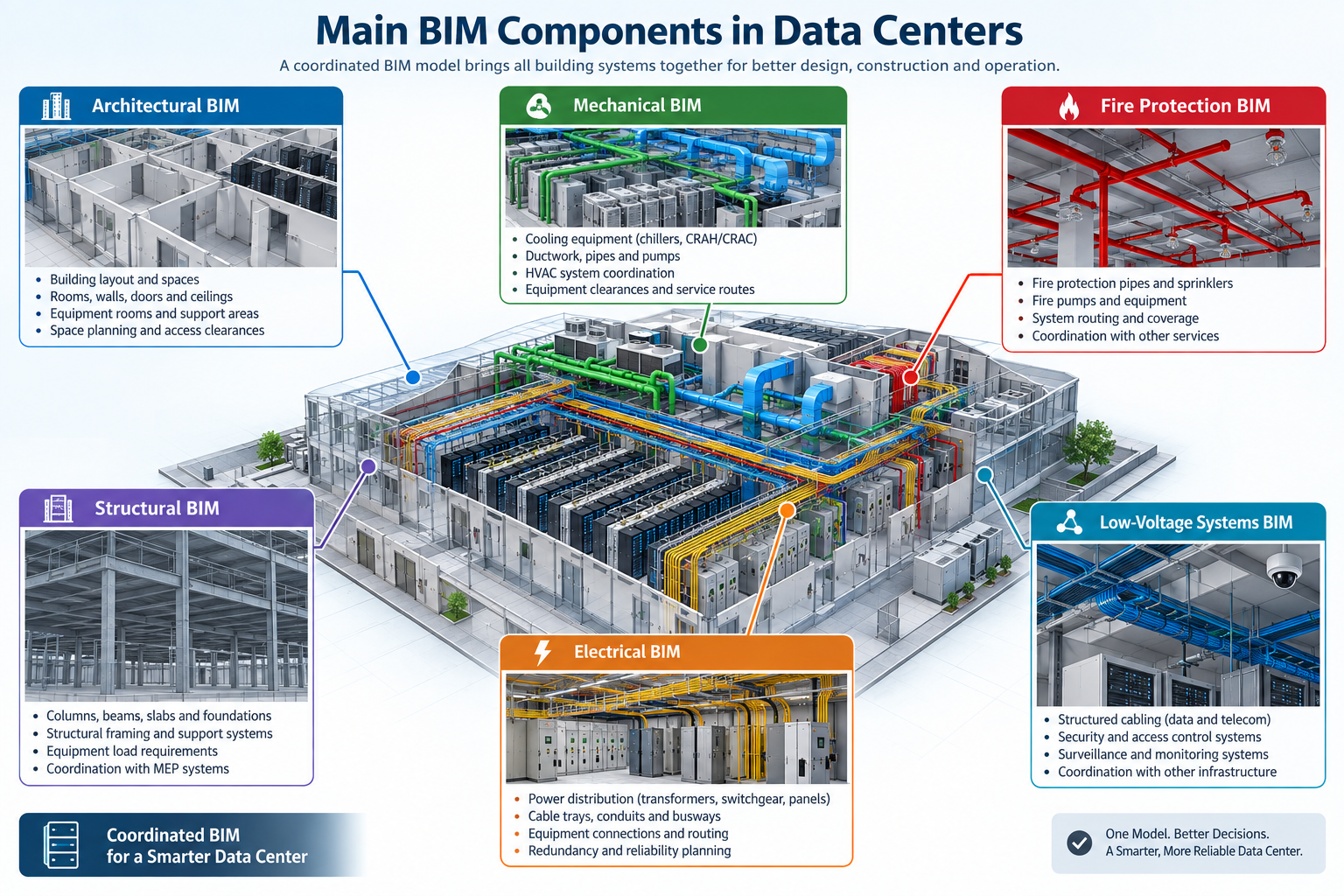
Data center BIM involves several technical disciplines. Each discipline contributes important project information.
Architectural BIM
Architectural BIM represents the building’s physical spaces. It includes rooms, walls, floors, doors, and ceilings. Teams can also model equipment rooms and support areas.
Data centers require careful space planning. Equipment needs adequate access and service clearances. Architectural models help teams verify these requirements.
Structural BIM
Structural BIM represents the building’s supporting framework. It can include columns, beams, slabs, and foundations. Structural coordination supports equipment installation planning.
Heavy equipment can create significant structural requirements. Structural models help identify suitable equipment locations. They also support coordination with MEP systems.
Mechanical BIM
Mechanical BIM focuses heavily on cooling infrastructure. Cooling is essential for reliable data center operation. Models can represent chillers, ducts, pipes, and pumps.
Teams can analyze equipment locations and service routes. They can also review clearances around mechanical equipment.
Electrical BIM
Electrical BIM represents critical power infrastructure. Data centers require reliable and redundant power systems. Models can include transformers, switchgear, panels, and cable trays.
Electrical coordination helps organize dense service routes. It also supports equipment access and maintenance planning.
Fire Protection BIM
Fire protection systems require accurate spatial coordination. Models can include pipes, sprinkler systems, and equipment. Teams can review routing alongside other services.
This reduces conflicts with ducts and cable trays. It also supports clearer construction documentation.
Low-Voltage and Security BIM
Data centers use several communication and security systems. These can include structured cabling and surveillance systems. Access control systems may also be modeled.
These systems require careful coordination with other infrastructure. BIM provides a shared environment for reviewing them.
BIM Coordination and Common Data Environments
It connects different discipline models. Coordination teams review combined project information. They identify issues and manage design changes.
A common data environment supports controlled information sharing. Teams can access current files and approved information. This reduces confusion caused by outdated documents.
BIM Dimensions Used in Data Center Projects
Different BIM dimensions represent different project information. Data centers can benefit from several dimensions.
3D BIM
3D BIM represents the physical building and systems. It provides the foundation for coordination activities. Teams can visualize complex infrastructure more clearly.
4D BIM
4D BIM connects models with construction schedules. Teams can visualize installation sequences over time. This helps coordinate complex construction activities.
For data centers, sequencing is especially important. Many systems require carefully planned installation stages.
5D BIM
5D BIM connects models with cost information. Teams can estimate quantities from model elements. They can also track potential cost changes.
This supports better budgeting and cost control. It can also improve procurement planning.
6D BIM
6D BIM adds facility performance information. It can support energy and sustainability analysis. Teams can evaluate operational considerations during design.
7D BIM
7D BIM focuses on facility management information. It can connect assets with maintenance data. Operators can use this information after handover.
This makes BIM useful beyond construction completion. It supports long-term facility management and asset planning.
Master BIM and Elevate Your Career – Enroll Today!
Stay ahead in the construction and design industry with our comprehensive BIM Course! Learn Building Information Modeling (BIM) from experts, gain hands-on experience with top software, and boost your career prospects. Join now and become a certified BIM professional!
Know MoreBIM vs Traditional Data Center Design and Construction
Traditional data center projects use separate drawings. Teams often work across multiple disconnected documents. This can create coordination problems between disciplines.
BIM creates a shared digital project environment. Teams can coordinate systems before physical installation. This makes complex design decisions easier.
| Factor | BIM Approach | Traditional Approach |
|---|---|---|
| Design | Coordinated 3D models | Separate 2D drawings |
| Clash Detection | Digital clash checking | Mostly manual checking |
| MEP Coordination | Integrated system coordination | Discipline-based coordination |
| Cost Control | Model-based quantity information | Manual quantity calculations |
| Construction | Better installation planning | Drawing-based planning |
| Changes | Easier to visualize | Changes require document updates |
| Facility Management | Digital asset information | Separate records and documents |
BIM also improves communication between stakeholders. Architects, engineers, and contractors share coordinated information. This reduces misunderstandings during project execution.
Traditional methods still have useful applications. However, complex facilities need stronger coordination methods. BIM provides greater visibility across project stages.
What are the Benefits of BIM for Data Centers?
BIM provides several benefits for data center projects. These benefits extend beyond basic 3D visualization.
Better MEP Coordination
Data centers contain extensive MEP infrastructure. Multiple systems often occupy the same spaces. BIM coordinates these systems within one model.
Teams can review ducts, pipes, and cable trays. They can also check equipment clearances. This improves overall spatial coordination.
Early Clash Detection
Clashes can create expensive construction problems. BIM identifies many clashes during design. Teams can resolve these issues before installation.
Common clashes involve electrical and mechanical systems. Structural elements can also conflict with services. Early detection reduces site-based modifications.
Improved Design Accuracy
BIM creates detailed digital representations of facilities. Teams can review systems before construction begins. This improves understanding of complex building components.
Accurate models also support better design decisions. Teams can test different arrangements digitally. This reduces unnecessary physical changes.
Better Cost Control
BIM can connect models with quantity information. Teams can extract quantities from model elements. This supports more informed cost estimates.
Design changes can also affect quantities quickly. Teams can review these impacts before approval. This improves budget monitoring throughout the project.
Reduced Rework
Construction errors often cause delays and additional costs. Better coordination can reduce these avoidable problems. BIM helps identify issues before site installation.
Contractors can also review installation requirements beforehand. This improves preparation for complex work areas.
Faster Construction Planning
4D BIM can connect models with schedules. Teams can visualize different installation sequences. This supports better construction planning.
Data center projects involve many specialist installations. Proper sequencing helps prevent workflow conflicts. It can also improve site productivity.
Better Project Communication
BIM provides a visual communication platform. Stakeholders can understand complex systems more easily. This helps technical and non-technical teams.
Teams can review models during coordination meetings. They can discuss specific locations and system conflicts. This creates clearer project discussions.
Improved Facility Management
The BIM model can support facility operations. It can contain information about installed assets. Operators can use this information after handover.
Equipment information can support maintenance activities. Location data can also improve asset identification. This can make facility management more efficient.
Easier Future Modifications
Data centers may require future upgrades. Additional equipment may also require new infrastructure. An accurate BIM model supports these modifications.
Teams can review existing conditions before changes. They can identify available spaces and service routes. This reduces uncertainty during future projects.
Better Lifecycle Planning
BIM supports information throughout the facility lifecycle. Its value can continue after construction ends. Owners can use models for operational planning.
This makes BIM more than a construction tool. It becomes a useful information management system.
What are the Challenges of Using BIM for Data Centers?
BIM provides major advantages for complex facilities. However, implementation also creates several challenges.
High Modeling Complexity
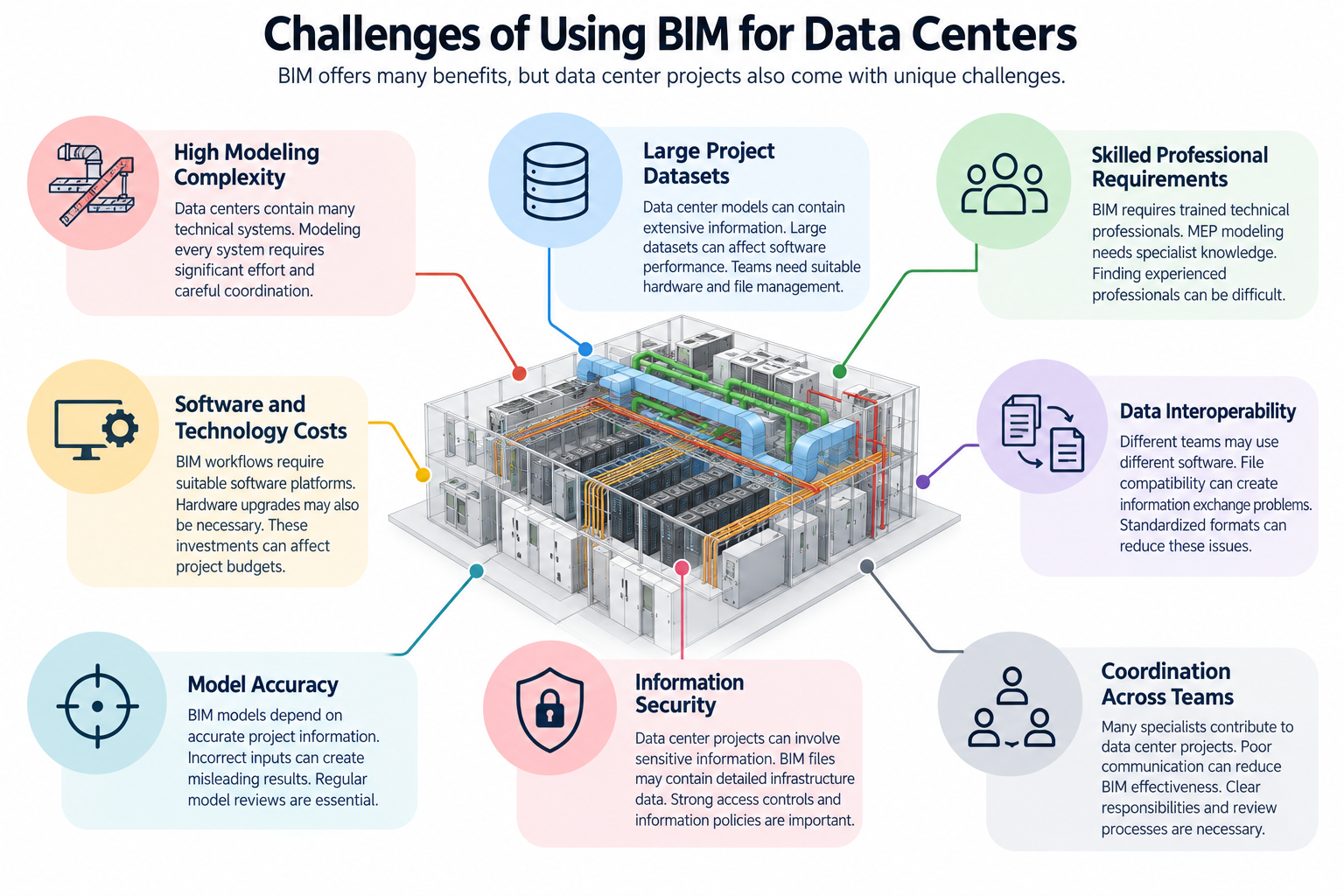
Data centers contain many technical systems. Modeling every system requires significant effort. Detailed models also require careful coordination.
Large Project Datasets
Data center models can contain extensive information. Large datasets can affect software performance. Teams need suitable hardware and file management.
Skilled Professional Requirements
BIM requires trained technical professionals. MEP modeling also needs specialist knowledge. Finding experienced professionals can sometimes be difficult.
Software and Technology Costs
BIM workflows require suitable software platforms. Hardware upgrades may also become necessary. These investments can affect project budgets.
Data Interoperability
Different teams may use different software. File compatibility can create information exchange problems. Standardized formats can reduce these issues.
Model Accuracy
BIM models depend on accurate project information. Incorrect inputs can create misleading results. Regular model reviews are therefore essential.
Information Security
Data center projects can involve sensitive information. BIM files may contain detailed infrastructure data. Strong access controls and information policies are important.
Coordination Across Teams
Many specialists contribute to data center projects. Poor communication can reduce BIM effectiveness. Clear responsibilities and review processes are necessary.
Get Career-Oriented BIM Certification Course with Expert Mentors! Get a free demo here!
Conclusion
BIM connects design, construction, and operational information. It helps teams identify problems before construction. It also supports quantities, schedules, and cost planning.
The benefits continue beyond project completion. BIM can support maintenance and asset management. It can also simplify future facility modifications.
However, successful implementation requires proper planning. Teams need skilled professionals and suitable technology. They also need consistent standards and information controls.
For complex data center projects, BIM offers significant value. It improves coordination across multiple technical disciplines. It also supports better decisions throughout the facility lifecycle.
Master BIM and Elevate Your Career – Enroll Today!
Stay ahead in the construction and design industry with our comprehensive BIM Course! Learn Building Information Modeling (BIM) from experts, gain hands-on experience with top software, and boost your career prospects. Join now and become a certified BIM professional!
Know MoreFrequently Asked Questions
What is BIM for data centers?
BIM for data centers creates digital facility models. These models contain building and system information.
Why is BIM important for data centers?
Data centers contain complex MEP infrastructure. BIM improves coordination and detects clashes early.
How is BIM used in data center design?
BIM models architectural, structural, and MEP systems. Teams coordinate these systems before construction begins.
How does BIM help with MEP coordination?
BIM combines different MEP systems digitally. Teams can identify routing conflicts and clearance issues.
What BIM dimensions are used for data centers?
Data centers can use 3D, 4D, 5D, 6D, and 7D BIM. Each dimension adds different project information.
Can BIM reduce data center construction costs?
BIM can reduce rework and material waste. It also supports better quantity and cost planning.
Can BIM support data center facility management?
Yes, BIM can support facility management after handover. Asset information can help teams manage maintenance activities.
What are the challenges of BIM for data centers?
Common challenges include complex modeling and large datasets. Skilled professionals and strong information management are also important.
What software is commonly used for data center BIM?
Different BIM software can support data center projects. The choice depends on project requirements and team workflows.
Is BIM necessary for every data center project?
BIM is especially valuable for complex data centers. Its usefulness depends on project size, complexity, and coordination requirements.