Table of Contents
Getting ready for a Deloitte DevOps interview can bring many questions to mind. What topics should you revise? Which tools should you practise? What kind of questions can the interviewer ask?
The interview may cover both basic concepts and practical DevOps work. You may be asked about Git, Jenkins, Docker, Kubernetes, cloud, Terraform, or Linux. Some questions may also be based on a real problem.
Your project experience can also come up during the discussion. You may need to explain a tool you used or a problem you faced while working on a project.
This guide covers common Deloitte DevOps interview questions in simple words. It also includes scenario-based questions to help you practise for the technical round.
Key Takeaways
- Revise the basic DevOps concepts.
- Learn common Git and Jenkins topics.
- Understand Docker and Kubernetes basics.
- Go through AWS, Azure, and Terraform.
- Practise simple Linux commands.
- Be ready for project and troubleshooting questions.
Deloitte DevOps Interview Process
The interview process can change based on the role and your experience.
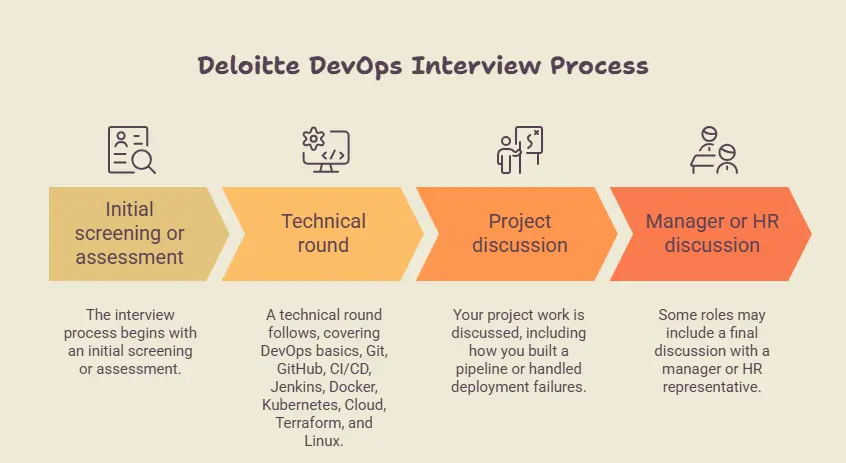
You may have an initial screening or assessment. A technical round can follow it. Some roles may also include a manager or HR discussion.
The technical round can cover:
- DevOps basics
- Git and GitHub
- CI/CD
- Jenkins
- Docker
- Kubernetes
- Cloud
- Terraform
- Linux
Your project work can also be discussed.
You may be asked how you built a pipeline or what you did when a deployment failed. So, go through your projects before the interview.
DevOps Interview Questions for Freshers
Freshers can expect questions about basic DevOps ideas and common tools.
1. Why is version control important in DevOps?
Answer:
Version control keeps a record of code changes.
It lets developers see what was changed. An older version can also be checked if a new change causes a problem.
Git is one of the common tools used for this.
2. What happens when new code enters a CI/CD pipeline?
Answer:
The pipeline can start when new code is added.
The code may be checked and built first. Tests can then run.
If the checks pass, the code can move towards deployment.
A simple flow is:
Code → Build → Test → Release
3. Why are different environments used?
Answer:
Software is usually tested before it reaches real users.
Different environments can be used for different work.
- Development for writing code
- Testing for checking the application
- Production for real users
This gives the team a place to check changes before release.
4. What is the purpose of a DevOps tool?
Answer:
Different tools handle different tasks.
Git keeps code changes. Jenkins can run pipeline jobs. Docker can run applications in containers.
Each tool has a different role in the DevOps process.
Learn & Master DevOps with Entri. Enrol now!
DevOps Interview Questions for Experienced Professionals
Experienced candidates may get questions about tools, projects, and troubleshooting.
Git & GitHub Questions
1. What is git stash used for?
Answer:
git stash temporarily keeps changes that are not committed.
For example, you may need to change branches while your current work is unfinished.
The changes can be stashed first. They can be brought back later.
2. How can you see the commit history in Git?
Answer:
Use:
git log
It shows previous commits in the repository.
You can check details such as the commit message and author.
3. What is a pull request?
Answer:
A pull request is used to get code reviewed before it is merged.
A developer can push changes to a branch and open a pull request.
Other team members can check the code and leave comments before the changes are merged.
4. How can you remove a file from Git tracking?
Answer:
The git rm command can be used.
For example:
git rm filename
The change then needs to be committed.
If the file should stay on the computer but not be tracked, another approach is needed.
CI/CD & Jenkins Questions
1. What is a Jenkins webhook?
Answer:
A webhook tells Jenkins that a change has happened in a Git repository.
For example, when new code is pushed, the Git platform can send a message to Jenkins.
Jenkins can then start the required job.
2. What is a Jenkinsfile?
Answer:
A Jenkinsfile contains the pipeline instructions for a project.
It can include steps for:
- Getting the code
- Building the application
- Running tests
- Creating an image
- Deploying the application
3. What is a Jenkins parameter?
Answer:
A parameter lets a user give a value when starting a Jenkins job.
For example, a job may ask which environment should be used.
The value can be development, testing, or production.
4. A Jenkins job is running slowly. What will you check?
Answer:
First, check where the job is spending most of its time.
Look at the build log and individual stages.
Also check the Jenkins agent and server resources.
A slow test, large download, or network problem can also cause delays.
Docker Interview Questions
1. What is the difference between a container and a virtual machine?
Answer:
A container shares the host system’s kernel and usually needs fewer resources.
A virtual machine has its own operating system.
Containers are often used to package and run applications in a consistent way.
2. What does docker exec do?
Answer:
docker exec runs a command inside a running container.
For example:
docker exec -it <container-name> sh
This can open a shell inside the container.
It is useful when checking files or settings inside a running container.
3. What is Docker Compose?
Answer:
Docker Compose is used to run multiple related containers together.
For example, an application may have a web container, application container, and database container.
Compose can define these services in one file.
4. How can you check Docker container details?
Answer:
Use:
docker inspect <container-name>
It shows detailed information about the container.
You can check settings related to the network, storage, and environment.
Kubernetes Interview Questions
1. What is a Kubernetes Service?
Answer:
A Service gives a stable way to reach Pods.
Pods can be created or removed during normal Kubernetes work.
A Service gives other applications a fixed way to reach the required Pods.
2. What is a ConfigMap?
Answer:
A ConfigMap stores configuration values needed by an application.
For example, it can hold an application setting or service address.
This keeps such settings outside the application image.
3. What is a Secret in Kubernetes?
Answer:
A Secret is used for sensitive values such as passwords and tokens.
An application can use the required Secret without putting the value directly inside its image.
Proper access control is still needed.
4. What is a Namespace in Kubernetes?
Answer:
A Namespace separates resources inside a Kubernetes cluster.
For example, testing and production resources can be kept in different Namespaces.
It also makes a large cluster easier to organise.
AWS/Azure & Cloud Questions
1. What is AWS S3?
Answer:
Amazon S3 is a cloud storage service.
It can store files such as images, documents, backups, and other data.
Files are stored as objects inside buckets.
2. What is an Azure Virtual Machine?
Answer:
An Azure Virtual Machine gives you a virtual server in Microsoft Azure.
It can run applications and other software.
The machine can be selected based on CPU, memory, storage, and application needs.
3. What is autoscaling in cloud?
Answer:
Autoscaling changes the number of running resources based on demand.
For example, more servers can be added when traffic increases.
Some resources can be reduced when traffic goes down.
4. What is a cloud region?
Answer:
A cloud region is a geographical area where a cloud provider has its infrastructure.
Cloud providers have regions in different parts of the world.
A region can be selected when creating a cloud resource.
Terraform & Infrastructure as Code Questions
1. What is a Terraform provider?
Answer:
A provider allows Terraform to work with a platform or service.
For example, Terraform can use a cloud provider to create cloud resources.
2. What is a Terraform variable?
Answer:
A variable lets you pass values into Terraform code.
For example, different server sizes can be used in different environments without changing the main resource code.
3. What is the use of terraform destroy?
Answer:
terraform destroy removes resources managed by Terraform.
Check the resources carefully before running it.
Using it in the wrong environment can remove important resources.
4. Why are Terraform files kept in version control?
Answer:
Terraform files contain infrastructure settings.
Keeping them in Git gives the team a history of changes.
It also makes code review easier.
Linux & Shell Scripting Questions
1. How do you find a process in Linux?
Answer:
The ps command can show running processes.
For example:
ps aux
You can also use grep to find a particular process.
2. How do you find which process is using a port?
Answer:
The ss command can be used.
For example:
ss -ltnp
It can show listening ports and related process information.
3. How do you search for text in a Linux file?
Answer:
Use:
grep
For example:
grep "error" app.log
This searches the file for the word error.
4. What is a shell script?
Answer:
A shell script is a file containing commands that can be run together.
It is useful for repeated tasks.
For example, a script can check disk space, create a backup, or restart a service.
DevOps Scenario-Based Questions
Scenario questions are based on problems that can happen during real work.
1. A new application works in testing but fails in production. What will you check?
Compare both environments.
Check the configuration, environment variables, application version, and external services.
Also check the application logs.
Something different between the two environments may be causing the problem.
2. A build passes, but the application does not start after deployment. What will you check?
Start with the application logs.
Then check the deployment settings and environment variables.
Also check the required ports, files, packages, and services.
3. A Git repository has become very large. What could you check?
First, find what is taking up the space.
Large files and old files in Git history can increase the repository size.
Check the history and remove files that should not be stored in Git.
4. A cloud application gets much more traffic than usual. What will you check?
Check CPU, memory, request count, response time, and error rate.
Also check whether autoscaling is working.
If the application still cannot handle the traffic, more resources may be needed.
5. A deployment works on one server but not another. How will you find the difference?
Compare both servers.
Check the operating system, application version, environment variables, installed packages, ports, and configuration.
Logs can also show where the two servers behave differently.
Monitoring, Security & DevSecOps Questions
1. What is an alert in monitoring?
An alert is raised when a set condition is met.
For example, an alert can be created when disk space becomes very low.
Alerts can also be used for high CPU use, application errors, or a service going down.
2. What is an application health check?
A health check tells whether an application or service is working.
For example, an application can have a health endpoint.
A monitoring system can check it regularly and report a problem if the check fails.
3. Why is access control important in DevOps?
Not everyone needs access to every system.
Access should match the work a person needs to do.
For example, a developer may not need permission to change production infrastructure.
4. What is security scanning in a CI/CD pipeline?
Security scanning checks code, packages, or images for known problems.
A pipeline can run these checks before deployment.
If a serious issue is found, the pipeline can stop before release.
5. What is the principle of least privilege?
It means giving only the access that is needed.
For example, a service that only needs to read files does not need permission to delete them.
This approach can be used for users, applications, and cloud accounts.

Common Interview Mistakes
1. Giving answers word by word
- Do not try to memorise every answer.
- Understand the topic and explain it in your own words.
2. Giving a long answer
- A simple question does not need a very long answer.
- Start with the main point. Add an example if needed.
3. Saying you used a tool when you did not
- Be clear about your experience.
- If you only practised a tool, say that you used it for learning.
4. Ignoring troubleshooting
- DevOps work often includes finding problems.
- Practise situations such as a failed deployment, full disk, stopped container, or broken pipeline.
5. Not checking your resume
- Questions can come from your resume.
- Go through the tools, projects, and skills you have listed.
Not understanding the question
- If a question is not clear, ask the interviewer to explain it again.
- It is better to understand the question before answering.
How to Prepare for a Deloitte DevOps Interview
1. Start with the basics
Begin with the main DevOps areas:
- Git
- Linux
- CI/CD
- Jenkins
- Docker
- Kubernetes
- Cloud
- Terraform
Take one topic at a time.
2. Practise the tools
Reading alone may not be enough.
Try small tasks such as:
- Create a Git branch.
- Run a Docker container.
- Write a simple Jenkins pipeline.
- Run Kubernetes commands.
- Create a basic Terraform resource.
- Practise Linux commands.
3. Go through your projects
If you have project experience, revise it before the interview.
Know:
- What the project does
- What your role was
- Which tools you used
- Why you used them
- What problem you faced
- How you fixed it
4. Practise troubleshooting
Try simple problems such as:
- A Docker container stops.
- A Jenkins build fails.
- A Kubernetes Pod does not start.
- A server runs out of disk space.
- An application becomes slow.
- A deployment fails.
Think about what you would check first.
5. Revise common commands
You do not need to remember every command.
Focus on common Git, Linux, Docker, Kubernetes, and Terraform commands. Also understand what each command does.
6. Keep your answers simple
Answer the question first. Then give a short example if needed.
If you do not know something, be honest. You can also explain what you would check or how you would approach the problem.
Learn & Master DevOps with Entri. Enrol now!
Conclusion
A Deloitte DevOps interview can cover basic concepts, tools, and real work problems.
Revise Git, Jenkins, Docker, Kubernetes, Linux, cloud, Terraform, and CI/CD. Give extra attention to the tools listed on your resume.
Go through your project work too. Remember your role, the tools you used, and the problems you faced.
Try a few practical tasks before the interview. This can make the tools and commands easier to understand.
You do not need to memorise every answer. Understand the topic and explain it in simple words. This can help you handle both direct questions and troubleshooting questions.
| Related Articles | |||||
| DevOps Roadmap for Beginners | DevOps Engineer Roles and Responsibilities | Continuous Integration vs Continuous Delivery | |||
| Can I Learn DevOps in 3 Months? | DevOps Engineer Career Path | ||||
Frequently Asked Questions
What topics should I study for a Deloitte DevOps interview?
Revise DevOps basics, Git, Jenkins, Docker, Kubernetes, cloud, Terraform, Linux, and CI/CD. Also go through your project work.
Are DevOps questions asked to freshers at Deloitte?
You may get questions about branches, commits, pull requests, git stash, merge, and Git history. Basic Git commands are also useful to practise.
Can Deloitte ask Docker and Kubernetes questions?
Yes. Questions can cover containers, Docker commands, Kubernetes Pods, Services, ConfigMaps, Secrets, and Namespaces.
Is Linux important for a DevOps interview?
Yes. Linux is commonly used in DevOps work. Revise basic commands for processes, files, permissions, logs, ports, and disk space.
Can the interview include scenario-based questions?
Yes. You may be given a problem such as a failed deployment, broken pipeline, stopped container, or slow application. You may need to explain what you would check.
Should I learn every DevOps tool before the interview?
No. Focus first on the tools mentioned in the job description and your resume. Understand what each tool does and practise the basic commands.
How can I prepare for a Deloitte DevOps interview?
Start with the basics and then revise the main DevOps tools. Practise common commands and troubleshooting situations. Also be ready to explain your projects clearly.
What Git questions can be asked in a DevOps interview?
Yes. Freshers may be asked basic questions about DevOps, version control, CI/CD, cloud, and common DevOps tools.