Table of Contents
Getting ready for a DevOps interview at Tech Mahindra?
You may have questions about what to study and what type of questions can come up.
The interview can cover basic DevOps topics. It can also include questions about tools and real work situations. Linux, Git, Jenkins, Docker, Kubernetes, AWS, and Terraform are some important topics to revise. You should also know the basics of CI/CD.
The interviewer may ask what a tool means. They may also ask how you used it in a project or how you would solve a problem. So, do not learn only definitions. Try to understand how each tool is used. This blog covers common Tech Mahindra DevOps interview questions in simple words.
Key Takeaways
- Revise the basic DevOps concepts.
- Practise common Git and Linux commands.
- Learn how Jenkins and CI/CD work.
- Know the basics of Docker and Kubernetes.
- Revise basic AWS and Terraform concepts.
- Be ready to explain your project work.
Tech Mahindra DevOps Interview Process
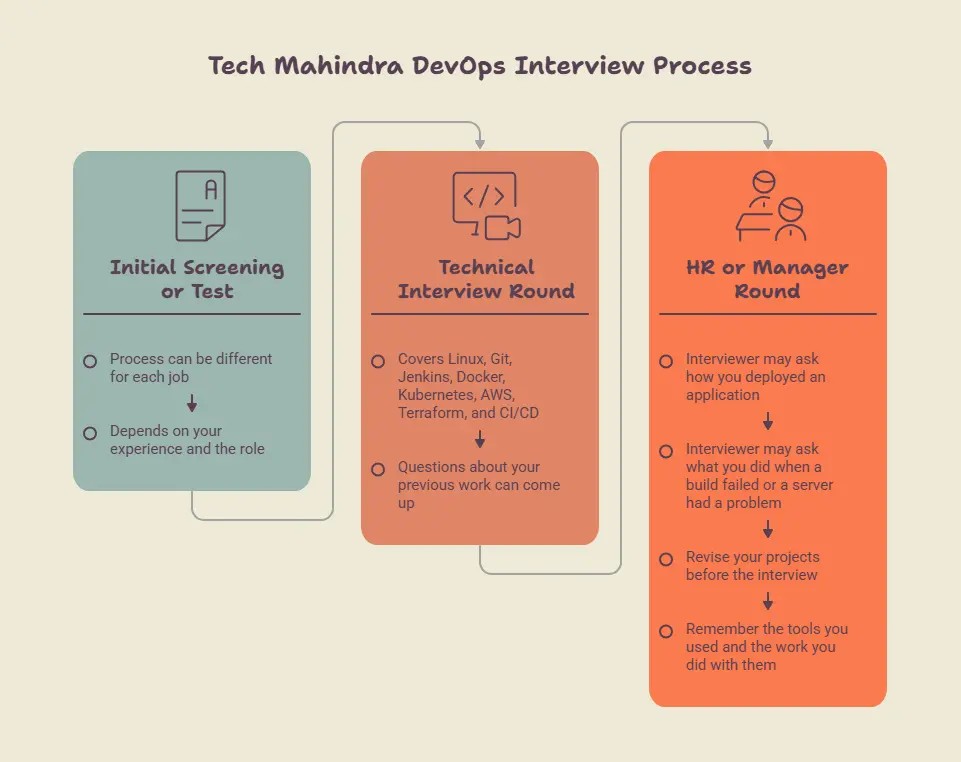
The interview process can be different for each job. It can also depend on your experience and the role. You may have an initial screening or test. A technical interview can follow it. There may also be an HR or manager round.
The technical round can cover:
- Linux
- Git
- Jenkins
- Docker
- Kubernetes
- AWS
- Terraform
- CI/CD
Questions about your previous work can also come up.
For example, the interviewer may ask how you deployed an application. They may ask what you did when a build failed or when a server had a problem. So, revise your projects before the interview. Remember the tools you used and the work you did with them.
DevOps Interview Questions for Freshers
Freshers are usually asked questions about the basic ideas of DevOps and its tools.
1. What is DevOps?
DevOps is a way of working where development and operations teams work closely together.
Developers work on the application. The operations team helps run and manage it.
Both teams work together to build, test, and release software.
DevOps also uses automation. Repeated tasks can be done with tools instead of doing them by hand every time.
2. Why do companies use DevOps?
DevOps can help teams release software faster. It can also reduce repeated manual work.
Testing and deployment can be automated.
A team can use DevOps to:
- Find errors earlier
- Test code regularly
- Automate repeated tasks
- Release updates faster
The tools used can be different in each company.
3. What is CI/CD?
CI means Continuous Integration.
Developers regularly add code changes to a shared project. The code can then be built and tested.
CD means Continuous Delivery or Continuous Deployment. It takes tested code towards release or deployment.
A simple flow is:
Code → Build → Test → Deploy
4. What is Git?
Git is a tool used to track changes in code.
If several developers work on one project, Git helps them manage their changes.
Some common commands are:
git clonegit addgit commitgit pushgit pull
Git is also used for branches and merging code.
Learn & Master DevOps with Entri. Enrol now!
DevOps Interview Questions for Experienced Professionals
For experienced candidates, the questions can go beyond basic definitions. The interviewer may ask about your project work and how you handled different problems.
Git and GitHub Questions
1. What is the difference between Git and GitHub?
Git is a version control system. It tracks changes made to code.
GitHub is an online platform used to store and share Git repositories.
In simple words:
- Git manages code changes.
- GitHub provides a place to store and work with repositories.
2. What is a Git branch?
A Git branch gives you a separate place to work on code.
For example, you can create a branch for a new feature. You can make and test the changes there without changing the main code directly.
After the work is ready, the branch can be merged into the main branch.
3. What is a merge conflict?
A merge conflict happens when Git cannot merge two changes automatically.
This can happen when two developers change the same part of a file.
Git marks the conflict. The developer checks both changes and decides what should stay.
The conflict is then fixed, saved, and committed.
4. What would you do if a Git push fails?
First, check the error message.
A common reason is that the remote branch has newer changes. Get those changes, check them, and then try the push again.
Avoid force push unless you know why it is needed. It can overwrite remote changes.
CI/CD and Jenkins Questions
1. What is Jenkins?
Jenkins is a tool that helps automate different steps in software development.
For example, a developer pushes new code to Git. Jenkins can pick up that change and start a job. The job may build the code and run tests.
It can also be connected to the deployment process.
2. What is a Jenkins pipeline?
A Jenkins pipeline is a set of steps that Jenkins follows for a project.
For example, the pipeline may first build the application. Then it can run tests and move the code to deployment if everything is fine.
A simple flow is:
Build → Test → Deploy
Different projects can have different steps.
3. A Jenkins build has failed. What will you check?
I would first open the build log in Jenkins and look for the error.
The failed step usually gives some idea about the problem. I would then check what changed recently.
Depending on the error, I may also check the build settings, credentials, environment variables, test results, or the server.
Once the problem is fixed, I would run the build again and check the result.
4. How can you stop a failed build from being deployed?
The deployment step can be kept after the build and test steps.
For example:
Build → Test → Deploy
If the build or test fails, Jenkins should stop the pipeline at that point. The deployment step will not be reached.
This way, code that has failed an earlier check does not move forward automatically.
Docker Interview Questions
1. What is Docker?
Docker is used to run applications inside containers.
A container has the application and the things it needs to run.
This makes it easier to move an application between different environments.
2. What is a Docker image?
A Docker image is used to create a container.
It contains the application files, packages, and settings needed to run the application.
A simple way to remember it is:
Image = package
Container = running version
3. What is a Dockerfile?
A Dockerfile contains instructions for building a Docker image.
It can tell Docker:
- Which base image to use
- Which files to copy
- Which packages to install
- Which command to run
It gives Docker the steps needed to prepare the application.
4. A Docker container has stopped. How will you find the problem?
First, check the container status:
docker ps -a
Then check the logs:
docker logs <container-name>
The logs may show an application error or a problem with the start command.
Also check ports, environment variables, and container settings.
Kubernetes Interview Questions
1. What is Kubernetes?
Kubernetes is used to manage container-based applications.
When there are many containers, managing them manually can be difficult.
Kubernetes can start containers, replace failed ones, and change the number of running copies.
2. What is a Pod?
A Pod is the basic unit used by Kubernetes.
A Pod can contain one or more containers.
In a simple setup, a Pod often has one main application container.
Kubernetes normally manages Pods rather than individual containers.
3. What is a Deployment?
A Deployment tells Kubernetes how an application should run.
It can define how many copies of a Pod should run.
It also helps when a new application version needs to be released.
4. A Pod is not running. What will you check?
First, check the Pod status:
kubectl get pods
Then use:
kubectl describe pod <pod-name>
You can also check the logs.
Look for problems with the image, configuration, resources, or application.
Cloud Interview Questions
1. What is Amazon EC2?
EC2 is a service in AWS that gives you a virtual server.
You can use this server to run a website, application, or other software. The server size can be changed based on the needs of the application.
For example, a small application may need a small EC2 instance. A bigger application may need more resources.
2. What is a VPC?
VPC stands for Virtual Private Cloud.
It gives you a private network in AWS for your cloud resources.
Inside a VPC, you can set up things like subnets and routes. You can also control which resources can connect to each other.
3. What is IAM?
IAM stands for Identity and Access Management.
It is used to manage access to AWS resources.
For example, one person may only need to view an EC2 server. Another person may need permission to create or change resources.
IAM helps give each user the access they need.
4. What is a load balancer?
A load balancer helps share incoming requests between servers.
Suppose an application is running on three servers. Instead of sending all the requests to one server, the load balancer can send them to the available servers.
It can also check whether a server is working. If one server has a problem, traffic can be sent to another available server.
Terraform and Infrastructure as Code Questions
1. What is Terraform?
Terraform is used to create and manage infrastructure through code.
It can create cloud servers, networks, and other resources.
Instead of setting everything up manually, you can write the setup in Terraform files.
2. What is Infrastructure as Code?
Infrastructure as Code means managing infrastructure with code.
For example, you can describe a cloud server in a Terraform file instead of creating it manually.
The same setup can then be reused.
3. What does terraform plan do?
terraform plan shows the changes Terraform wants to make.
It can show resources that will be:
- Created
- Changed
- Removed
You can review these changes before applying them.
4. What does terraform apply do?
terraform apply makes the changes described by Terraform.
For example, if the plan shows a new resource, terraform apply can create it.
It is better to check the plan before running apply.
Linux and Shell Scripting Questions
1. How do you check disk space in Linux?
You can use:
df -h
It shows used and available disk space.
If the disk is almost full, you may need to find large files or folders.
2. How do you check memory usage?
You can use:
free -h
It shows memory information.
You can also use top to check running processes and resource use.
3. How do you check Linux logs?
You can use commands such as:
taillessgrep
tail shows recent log entries.
grep can help find words such as error or failed.
4. How can shell scripts help in DevOps?
Shell scripts are useful for repeated tasks.
For example, a script can check disk space, restart a service, run commands, or take backups.
This saves time when the same task is done often.
DevOps Scenario-Based Interview Questions
Scenario questions check how you handle a problem.
1. A production deployment has failed. What will you do?
First, check the deployment and application logs.
Find where the deployment stopped. Check recent code changes, server status, and container status.
If the problem is serious, the team may roll back the release.
Then fix the cause, test the change, and deploy again.
2. A Docker container keeps stopping. What will you check?
First, check the container:
docker ps -a
Then check:
docker logs <container-name>
Look for application errors or a problem with the start command.
Also check ports and environment variables.
3. A Kubernetes Pod is not running. What will you do?
Start with:
kubectl get pods
Then use:
kubectl describe pod <pod-name>
Check the Pod logs too.
Look for image, configuration, resource, or application problems.
4. A server suddenly becomes slow. How will you check it?
First, check CPU and memory usage.
Also check disk space and running processes.
Commands such as top, free, and df can help.
Then check application logs and recent deployments.
If the server looks normal, check the application or database.
5. A CI/CD pipeline fails during deployment. What will you check?
First, find the stage where it failed.
Read the pipeline log and look for the error.
Then check:
- Credentials
- Environment variables
- Server access
- Deployment settings
- Build files
- Network problems
Fix the issue and run the required checks before trying again.
Monitoring, Security and DevSecOps Questions
1. What is monitoring in DevOps?
Monitoring is used to check how a system is working.
A DevOps team may keep track of things like:
- CPU usage
- Memory usage
- Disk space
- Application errors
- Response time
- Server health
For example, if CPU usage suddenly becomes very high, the team can check the server and find out what is causing it.
2. What is DevSecOps?
DevSecOps brings security into the DevOps work.
Security is not checked only after the application is ready. It can also be checked while the code is being built and tested.
The team may check the code, packages, Docker images, and cloud setup for security issues.
This gives the team a chance to fix problems before they affect the application.
3. How do you keep passwords safe in CI/CD?
Passwords and API keys should not be added to the code.
For CI/CD, they can be kept in a secure credentials or secrets store. The pipeline can then use them when they are needed.
Only the required users and systems should have access to these secrets.
This also helps prevent passwords from appearing in source code or build logs.
4. What will you do if you find a security issue in production?
First, inform the team handling the issue.
Then check what part of the application is affected. The team can also check whether users or data are at risk.
If needed, the affected service or access can be restricted for some time.
After that, fix the issue and test the fix before putting the updated version into use.
5. What is the difference between logs and monitoring?
Logs tell you what happened inside a system.
Monitoring shows the health and performance of the system.
For example, a log may show an application error. Monitoring may show very high CPU usage.
Both can help when finding a problem.

Common Interview Mistakes
Giving only definitions
Do not stop after saying what a tool means. Add a small example of how it is used.
Claiming experience you do not have
Do not say you used a tool in a live project if you did not. You can say that you learned it or used it for practice.
Forgetting basic commands
Revise common commands for:
- Linux
- Git
- Docker
- Kubernetes
You do not need to memorise every command. Know the common ones and understand their use.
Not explaining troubleshooting
When you get a problem, explain what you would check first. Then explain how you would find and fix the cause.
Memorising answers
Do not learn every answer word by word. Understand the topic and explain it in your own words.
Learn & Master DevOps with Entri. Enrol now!
Conclusion
Preparing for a Tech Mahindra DevOps interview is not only about learning definitions. Revise Git, Jenkins, Docker, Kubernetes, Linux, AWS, and Terraform. Also spend time on CI/CD.
A little revision before the Tech Mahindra DevOps interview can make the questions easier to handle. Go through the DevOps tools you have studied. If you have done a project, look at it again and remember what you worked on.
Questions can also come from simple problems. For example, a build may fail, a Docker container may stop, or a server may become slow. Think about what you would check in each case.
You can answer in simple words. Just explain what you know and what you would do. If you have not used a tool before, you can say that too.
| Related Articles | |||||
| DevOps Roadmap for Beginners | DevOps Engineer Roles and Responsibilities | Continuous Integration vs Continuous Delivery | |||
| Can I Learn DevOps in 3 Months? | DevOps Engineer Career Path | ||||
Frequently Asked Questions
What topics should I study for a Tech Mahindra DevOps interview?
Start with the basic DevOps topics. You should know Git, Linux, Jenkins, Docker, Kubernetes, AWS, Terraform, and CI/CD.
If you have project experience, revise your project too. The interviewer may ask about the tools you used and the work you did with them.
Are DevOps questions asked to freshers at Tech Mahindra?
Yes, freshers can get questions on basic DevOps concepts and tools. You may be asked what DevOps is, how CI/CD works, or what Git and Docker are used for.
You may also get simple questions about Linux commands and cloud services.
What type of Jenkins questions can come in a DevOps interview?
You may be asked about Jenkins, Jenkins pipelines, builds, and CI/CD.
For example, the interviewer may ask what happens when a Jenkins build fails. You should know how to check the build log and find the failed step.
Do I need to know Docker and Kubernetes for a DevOps interview?
It is useful to know the basics of both tools. You should understand Docker images, containers, and Dockerfiles.
For Kubernetes, learn basic topics such as Pods and Deployments. You should also know how to check a Pod when it is not running.
Can I get scenario-based questions in a DevOps interview?
Yes. You may be given a simple problem and asked how you would handle it.
For example, a Docker container may stop, a Kubernetes Pod may fail, or a deployment may not work. In such questions, explain what you would check first and how you would find the cause.
What Linux commands should I know for a DevOps interview?
You should know some common commands instead of trying to learn every Linux command.
Commands such as df -h can be used to check disk space. free -h helps check memory. top shows running processes and resource use.
It is also useful to know basic commands for checking logs.
Should freshers prepare project-based questions for a DevOps interview?
Yes. If you have done a DevOps project, be ready to explain it.
Know what the project was about, which tools you used, and what you did with them. You may also be asked about a problem you faced and how you solved it.
If you do not have live project experience, be honest about what you have practised.
How can I prepare for a Tech Mahindra DevOps interview?
Start with the basics and revise one topic at a time. Practise common Git and Linux commands. Go through Jenkins, Docker, Kubernetes, AWS, and Terraform.
Also practise a few troubleshooting questions. Try to explain the answers in your own words instead of memorising them.