Table of Contents
Video editing has become very important in 2026. People create videos for YouTube, Instagram, TikTok, businesses, movies, online classes, and many other platforms. Because of this, good video editing software is now needed by beginners, content creators, freelancers, and professionals.
The good news is that many free video editing software are available today. You do not always need expensive tools to create high-quality videos. Free software can help you cut clips, add music, use effects, add subtitles, improve colors, and create professional-looking videos.
Some free editing software is simple and beginner-friendly, while some offer advanced features for professional editing work. Different tools are useful for different editing styles and needs. In this guide, you will learn about the best free video editing software in 2026, their features, advantages, and which software is best for beginners and professionals.
Key Takeaways:
- Free software can create professional videos
- Different tools fit different editing needs
- Beginners should choose simple editing software
- No watermark software looks more professional
- DaVinci Resolve is best for professionals
- CapCut is best for social media
- OpenShot is best for beginners
- Practice regularly to improve editing skills
Build a Career in AI-Powered Video Editing
How We Evaluated & Our Selection Criteria
Not all free video editing software is good for everyone. Some tools are easy for beginners, while others are better for professional work. We compared different software using important points to find the best free video editing tools in 2026. These points help users choose the right software easily.
| Selection Point | Simple Explanation |
|---|---|
| No Watermark | Videos should export without logo or watermark. |
| Truly Free | Important editing tools should be free to use. |
| Regular Updates | Software should receive new updates in 2025–2026. |
| Device Support | Should work on Windows, Mac, Linux, mobile, or browser. |
| Smooth Performance | Should run properly on normal computers. |
| Export Quality | Should support good video quality and formats. |
| Beginner-Friendly | Easy tools and simple interface are important. |
| Tutorials & Community | Users should get tutorials and online help easily. |
♦️No Watermark on Export
- Good free software should allow users to export videos without watermarks.
- Watermarks make videos look unprofessional.
♦️Truly Free Features
Some software says “free” but locks important features behind payment.
We selected software that offers:
- Basic editing tools
- Export options
- Effects and transitions
Users should be able to edit properly without paying.
♦️Regular Software Updates
Software should stay updated for better performance and new features.
Updated software gives:
- Better speed
- Bug fixes
- New editing tools
- Better security
Active software is more reliable.
♦️Support for Different Devices
People use different devices for editing.
Good software should support:
- Windows
- Mac
- Linux
- Mobile phones
- Browser editing
More device support helps more users.
♦️Performance on Normal Computers
Not everyone has expensive computers.
We checked if software works well on:
- Mid-range laptops
- Basic computers
- Standard editing systems
Smooth performance is important for beginners.
♦️Good Export Quality
Export quality affects the final video result.
Good software should support:
- HD videos
- 4K export
- Different file formats
Better export quality improves videos.
♦️Easy for Beginners
Beginners need software with simple tools and easy navigation.
We checked:
- Easy interface
- Simple timeline
- Quick learning process
Beginner-friendly software helps users learn faster.
♦️Tutorials and Community Support
Learning becomes easier when tutorials are available.
Good software should have:
- YouTube tutorials
- Online guides
- Editing communities
- User support forums
Tutorials help beginners solve problems quickly.
Become an AI-powered Video Editor
Master the future of video editing with AI-powered tools and techniques. Learn how to create professional-quality videos faster, automate repetitive editing tasks, generate engaging content, and boost your creative productivity.
Start Learning!Best Free Video Editing Software at a Glance (2026)
| Software | Best For | Platform | Beginner Friendly | Watermark Free | Free Version |
|---|---|---|---|---|---|
| CapCut | Social media videos | Mobile, PC | Yes | Yes | Yes |
| DaVinci Resolve | Professional editing | Windows, Mac, Linux | Medium | Yes | Yes |
| Filmora | Beginners | Windows, Mac | Yes | Limited | Yes |
| Shotcut | Basic free editing | Windows, Mac, Linux | Medium | Yes | Yes |
| OpenShot | Simple editing | Windows, Mac, Linux | Yes | Yes | Yes |
| HitFilm | Effects and YouTube | Windows, Mac | Medium | Yes | Yes |
| iMovie | Apple users | Mac, iPhone | Yes | Yes | Yes |
| Canva Video Editor | Quick online editing | Browser | Yes | Yes | Yes |
Each software is useful for different editing needs and skill levels.
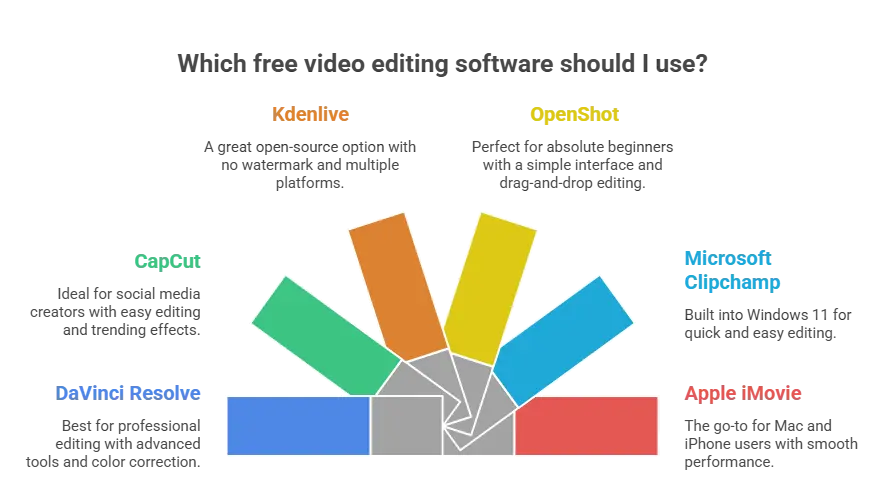
1. DaVinci Resolve 20 — Best for Professional Free Editing
DaVinci Resolve is one of the most powerful free video editing software in 2026. Many professional editors and filmmakers use it.
Best Features
- Professional editing tools
- Advanced color correction
- Audio editing tools
- High-quality video export
Good For
- YouTube videos
- Films and documentaries
- Professional projects
Things to Know
- Many advanced features
- Learning may take time
- Needs a good computer
Best for users who want professional editing for free.
2. CapCut Desktop 3.0 — Best for Social Media Creators
CapCut is very popular among social media creators. It is simple, fast, and beginner-friendly.
Best Features
- Easy editing tools
- Auto captions
- Trending effects
- Fast export options
Good For
- Instagram reels
- TikTok videos
- YouTube shorts
Things to Know
- Very easy for beginners
- Works well for short videos
- Some advanced features are limited
Best for quick and simple social media editing.
3. Kdenlive 24.x — Best Open-Source Free Video Editor
Kdenlive is a free open-source editing software with many useful tools.
Best Features
- Completely free
- No watermark
- Many editing options
- Supports multiple platforms
Good For
- Basic to advanced editing
- Linux users
- Budget creators
Things to Know
- Interface may feel confusing first
- Needs some learning
Best for users who want free open-source software.
4. OpenShot 3.x — Best for Absolute Beginners
OpenShot is simple and easy to learn. It is a good choice for people starting video editing.
Best Features
- Very simple interface
- Easy drag-and-drop editing
- Basic effects and transitions
- Free to use
Good For
- Beginners
- School projects
- Simple editing work
Things to Know
- Limited advanced features
- Better for basic editing
Best for complete beginners learning editing.
5. Microsoft Clipchamp — Best Free Editor for Windows 11
Clipchamp comes built into Windows 11 and is simple to use.
Best Features
- Easy video editing
- Templates available
- Simple export options
- Browser-based editing
Good For
- Quick editing
- Basic business videos
- Beginners
Things to Know
- Some features need payment
- Best for simple editing only
Best for Windows users who want quick editing.
6. Apple iMovie 14 — Best for Mac & iPhone Users
iMovie is Apple’s free editing software for Mac and iPhone users.
Best Features
- Simple editing tools
- Smooth Apple performance
- Easy video export
- Good templates and effects
Good For
- Mac users
- iPhone video editing
- Beginners and casual creators
Things to Know
- Only works on Apple devices
- Limited advanced tools
Best for Apple users who want simple editing software.
Best Free Video Editor by Use Case
| Use Case | Best Software |
|---|---|
| Best for Beginners | OpenShot |
| Best for Professionals | DaVinci Resolve |
| Best for Social Media | CapCut |
| Best for Mac Users | iMovie |
| Best for Windows Users | Clipchamp |
| Best Open-Source Editor | Kdenlive |
| Best for Quick Editing | CapCut |
| Best for YouTube Videos | DaVinci Resolve |
Key Features to Look for in Free Video Editing Software
Before choosing video editing software, it is important to check some useful features. Good features make editing easier and faster.
The right software helps create better videos.
1. Easy Interface
Software should be simple to understand.
- Easy buttons and tools
- Simple timeline
- Beginner-friendly design
Easy software helps beginners learn quickly.
2. No Watermark
Good free software should export videos without watermarks.
Watermarks make videos look unprofessional.
3. Basic Editing Tools
Software should support:
- Cutting videos
- Trimming clips
- Joining videos
- Adding music
Basic tools are important for editing.
4. Effects and Transitions
Good software should include:
- Simple effects
- Smooth transitions
- Text and subtitles
Effects make videos more attractive.
5. Good Export Quality
Software should support:
- HD export
- 4K videos
- Different file formats
Good export quality improves videos.
6. Fast Performance
Software should run smoothly.
- No lagging
- Faster exports
- Smooth editing experience
Fast software saves time.
7. Audio Editing Tools
Good software should help improve sound.
- Add music
- Remove noise
- Balance audio
Clear sound improves video quality.
8. Tutorials and Support
Helpful software should have:
- YouTube tutorials
- User guides
- Online communities
Tutorials help beginners solve problems easily.
Upskill with AI Video Editing Skills
Conclusion & Final Recommendation
Free video editing software has become very powerful in 2026. Beginners and professionals can now create high-quality videos without spending money.
Different software is useful for different editing needs. Some tools are simple for beginners, while others offer advanced professional features.
Simple Recommendations
- Best for Beginners: OpenShot
- Best for Professionals: DaVinci Resolve
- Best for Social Media: CapCut
- Best for Mac Users: iMovie
- Best Open-Source Tool: Kdenlive
Choose software based on your skill level and editing needs.
The best way to learn video editing is to start practicing regularly. Simple projects and daily practice help improve skills faster. Good software plus regular practice can help you become a better video editor.
| Related Articles | |
| What is Video Editing? A Complete Beginner’s Guide | The Complete Guide to Video Editing: Skills, Tools, and Career (2026)The Complete Guide to Video Editing |
Become an AI-powered Video Editor
Master the future of video editing with AI-powered tools and techniques. Learn how to create professional-quality videos faster, automate repetitive editing tasks, generate engaging content, and boost your creative productivity.
Start Learning!Frequently Asked Questions
Which is the best free video editing software in 2026?
Different software is best for different users.
- DaVinci Resolve → Professional editing
- CapCut → Social media videos
- OpenShot → Beginners
- iMovie → Apple users
👉 Choose software based on your editing needs.
Can free video editing software make professional videos?
Yes, many free tools now support professional editing features.
They offer:
- HD and 4K export
- Audio editing
- Effects and transitions
- Color correction
👉 Good free software can create high-quality videos.
Which free video editor is easiest for beginners?
OpenShot and CapCut are very easy for beginners.
They offer:
- Simple interface
- Easy editing tools
- Quick learning process
👉 Beginners should start with simple software.
Is DaVinci Resolve really free?
Yes, DaVinci Resolve has a powerful free version.
It includes:
- Professional editing tools
- Color correction
- Audio editing
- High-quality export
👉 Many professionals use the free version.
Which free video editor is best for YouTube videos?
DaVinci Resolve is one of the best choices for YouTube creators.
It supports:
- Long-form editing
- Advanced effects
- Professional video quality
👉 Great for serious YouTube content creators.
Do free video editors add watermarks?
Some free software adds watermarks, but many do not.
Watermark-free editors include:
- DaVinci Resolve
- OpenShot
- Kdenlive
- CapCut
👉 Watermark-free videos look more professional.
Can I edit videos on a low-end laptop?
Yes, some editing software works well on normal laptops.
Good options include:
- CapCut
- OpenShot
- Clipchamp
👉 Beginners do not need expensive computers to start.
Which free video editor is best for social media content?
CapCut is one of the best tools for social media editing.
It is useful for:
- Instagram reels
- TikTok videos
- YouTube shorts
👉 CapCut is fast, simple, and beginner-friendly.