Table of Contents
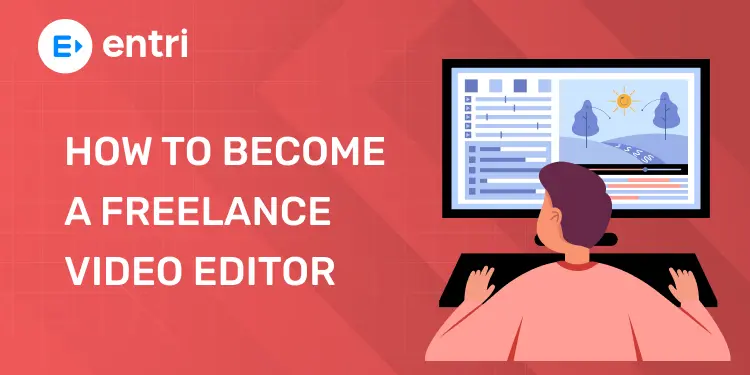
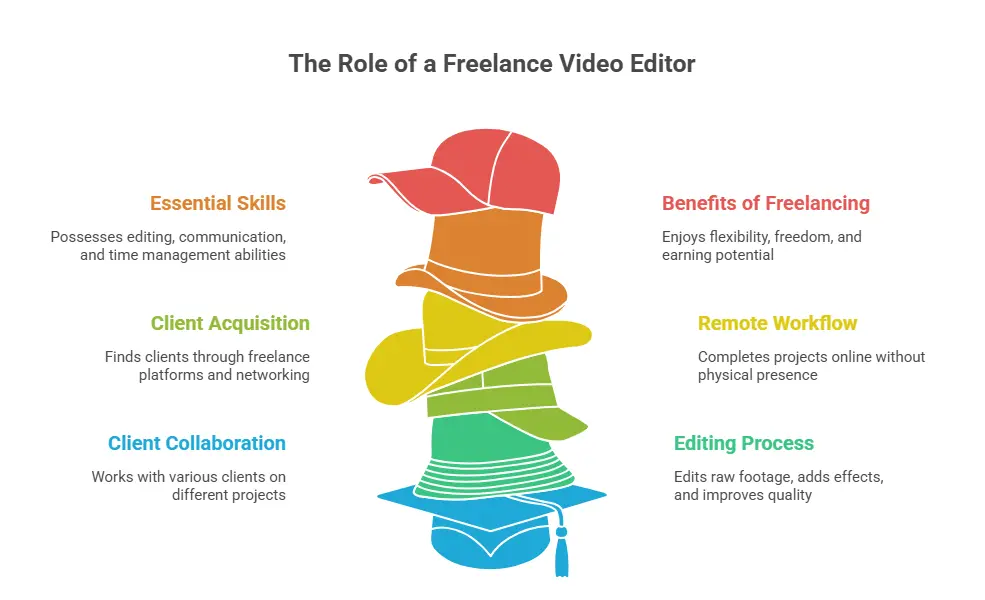
A freelance video editor works independently and edits videos for different clients. They do not work in one company. They can work from home and choose their own projects.
Many are now becoming freelance video editors because of high demand in online content. Freelancing gives freedom, flexible work, and good earning opportunities.
Key Takeaways:
What Does a Freelance Video Editor Actually Do?
A freelance video editor works for different clients instead of one company. They edit videos and deliver the final project online. They work independently and choose their own projects.
Main Work of a Freelance Video Editor
- Edit raw video clips
- Cut and trim videos
- Add music and sound
- Add text and subtitles
- Use simple effects and transitions
- Improve video quality
Their job is to make videos clean and professional.
Where they Get Work From
Freelance editors find clients on:
- Freelance websites
- Social media platforms
- YouTube creators
- Business owners
- Personal contacts
Clients send videos and instructions.
How they Work
Freelancers usually follow simple steps:
- Receive video from client
- Edit the video
- Make changes if needed
- Send final video online
Everything is done remotely.
Skills Needed
A freelance video editor needs:
- Basic editing skills
- Creativity
- Good communication
- Time management
- Software knowledge
Skills help get more clients.
Why People Choose Freelancing
People choose freelancing because:
- Work from anywhere
- Flexible timing
- Multiple clients
- Good earning chances
Freelancing gives more freedom than regular jobs.
Skills You Need to Get Started
To start video editing, you need simple equipment and good software. You don’t need very expensive tools in the beginning.
Basic tools are enough to start learning.
Computer or Laptop
You need a computer or laptop to edit videos.
- A laptop is enough for beginners
- More RAM helps faster editing
- Good storage is useful for saving files
A normal laptop is fine to start.
Good Internet Connection
Internet is needed for:
- Downloading software
- Uploading videos
- Watching tutorials
A stable internet connection is helpful.
Video Editing Software
Editing software helps you create videos.
Popular tools:
- CapCut (very easy)
- Filmora (beginner-friendly)
- DaVinci Resolve (free and powerful)
- Adobe Premiere Pro (professional use)
Start with simple software first.
Audio Tools (Optional)
Good audio makes videos better.
You can use:
- Headphones
- Simple microphone
Clear sound improves quality.
Storage Device
You need storage for videos.
- Internal storage (laptop/PC)
- External hard drive (backup)
Always keep backup files safe.
Extra Helpful Tools
Some extra tools include:
- Mouse for easy editing
- Keyboard shortcuts
- Cloud storage (Google Drive)
These tools make editing easier.
How to Build Your Portfolio from Scratch
A video editing portfolio is a collection of your best edited videos. It shows your skills to clients and companies.
A good portfolio helps you get jobs and freelance work.
1. Start with Simple Projects
Begin with very easy videos.
You can edit:
- Phone videos
- Short clips
- Family videos
- Practice videos
Simple practice is the first step.
2. Create Your Own Practice Videos
If you have no clients, create your own content.
Try making:
- Travel videos
- Vlogs
- Reels
- Short cinematic videos
Self-made videos also show your skills.
3. Use Free Stock Videos
You can use free videos from the internet.
This helps you:
- Practice editing
- Try different styles
- Build variety in your work
Stock videos are good for beginners.
4. Show Different Editing Styles
Add different types of videos.
Include:
- Fast editing
- Slow cinematic editing
- Social media videos
- Simple storytelling videos
Variety makes your portfolio stronger.
5. Keep Only Your Best Work
Do not add all videos.
Only include:
- Clean edits
- Good quality videos
- Final polished work
Quality is more important than quantity.
6. Upload Your Portfolio Online
Share your work on:
- YouTube
- Vimeo
- Personal website
Online portfolios help you reach more clients.
7. Improve and Update Regularly
Keep improving your portfolio.
- Add new projects
- Remove old weak videos
- Improve video quality
Updated portfolios look more professional.
8. Ask for Feedback
Show your work to others and ask for advice.
- Friends
- Online groups
- Editors’ communities
Feedback helps you grow faster.
Setting Your Freelance Rates
Setting your freelance rate means deciding how much money you will charge for your video editing work.
Good pricing helps you get clients and earn fairly.
🟠Start with Beginner Rates
If you are new, start with low rates.
- Charge small amounts first
- Focus on gaining experience
- Build your portfolio
Beginners should not charge too high.
🟠Check Market Prices
Look at what other editors are charging.
- See freelancer websites
- Check social media editors
- Compare similar work
This helps you set fair prices.
🟠Charge Based on Project
Different videos have different prices.
- Short reels = lower price
- YouTube videos = medium price
- Ads or business videos = higher price
Bigger work should cost more.
🟠Charge Per Hour or Per Project
You can charge in two ways:
- Per hour (based on time spent)
- Per project (fixed price for full video)
Many freelancers prefer per project pricing.
🟠Increase Rates with Experience
As you improve your skills:
- Increase your prices
- Take better projects
- Work with higher-paying clients
Better skills mean higher income.
🟠Consider Editing Time
Think about how long a video takes.
- Fast edits = lower cost
- Long edits = higher cost
Time spent should match your price.
🟠Don’t Undervalue Your Work
Avoid very low pricing.
- It reduces your value
- Makes work harder
- Attracts difficult clients
Charge fairly for your skills.
How to Find Your First Clients
Finding your first clients is the most important step in freelancing. It may feel hard at the start, but simple methods can help you get your first work.
Start small and stay consistent.
Tell People You Are an Editor
Start by sharing your skills.
- Tell friends and family
- Share on WhatsApp
- Post on social media
Many first clients come from personal networks.
Use Social Media
Social media is a powerful tool.
- Post your edited videos
- Share reels and short edits
- Use hashtags
Good content can attract clients.
Join Freelance Websites
You can find clients online.
- Fiverr
- Upwork
- Freelancer
- PeoplePerHour
These platforms connect you with global clients.
Join Editing Communities
Be active in online groups.
- Facebook groups
- Discord servers
- Reddit communities
People often share job opportunities there.
Contact YouTubers and Creators
Many creators need video editors.
- Small YouTubers
- Instagram creators
- New content makers
Send simple messages with your portfolio.
Offer Free or Low-Cost Work (Start Only)
At the beginning:
- Do small free projects
- Offer low prices for practice
- Build trust and experience
This helps you get your first reviews.
Build a Simple Portfolio
Show your work clearly.
- Best edited videos
- Short samples
- Different styles
Portfolio helps clients trust you.
Be Consistent and Patient
Getting clients takes time.
- Keep applying daily
- Improve your skills
- Don’t give up
Consistency brings results.
Managing Projects & Client Communication
Managing projects and talking to clients is very important in freelance video editing. It helps you work smoothly and build good relationships.
Good communication brings more clients.
Understand Client Requirements
Always start by understanding what the client wants.
- Ask about video style
- Know video length
- Check deadline
- Understand budget
Clear understanding avoids mistakes.
Plan Your Work
Before editing, make a simple plan.
- Organize video clips
- Decide editing style
- Set timeline for work
Planning helps you work faster.
Stay in Touch with Client
Keep updating your client.
- Share progress updates
- Ask for feedback
- Confirm changes
Regular communication builds trust.
Use Simple Communication
Talk in a clear and simple way.
- Avoid confusion
- Ask clear questions
- Reply on time
Simple communication avoids problems.
Handle Revisions Politely
Clients may ask for changes.
- Accept feedback calmly
- Make required changes
- Improve the video
Revisions are part of freelancing.
Meet Deadlines
Always finish work on time.
- Manage your time well
- Avoid last-minute rush
- Deliver before deadline if possible
On-time delivery builds reputation.
Organize Your Files
Keep everything organized.
- Save project files properly
- Name folders clearly
- Keep backup copies
Organized work saves time.
Keep Professional Behavior
Always behave professionally.
- Be respectful
- Stay patient
- Be responsible
Good behavior leads to repeat clients.
How Much Can You Earn as a Freelance Video Editor?
Freelance video editor income is not fixed. It depends on your skills, experience, and type of work.
Better skills bring higher earnings.
Beginner Earnings
If you are new, you will earn less at the start.
- Small video projects
- Simple social media edits
- Practice work
Beginners earn low but gain experience.
Intermediate Earnings
After learning skills, income increases.
- YouTube videos
- Reels and shorts
- Client projects
Intermediate editors earn more steady income.
Expert Earnings
Skilled editors earn high income.
- Brand advertisements
- Business videos
- Professional editing projects
Experts earn much more per project.
Per Project Payment
Most freelancers earn per project.
- Short videos = low payment
- Medium videos = medium payment
- Long or complex videos = high payment
Bigger work pays more money.
Per Month Income Range
Income can vary a lot.
- Beginners: low income
- Skilled editors: medium income
- Experienced editors: high income
Income grows with experience.
Factors That Affect Earnings
Your income depends on:
- Editing skills
- Experience level
- Client type
- Work quality
- Speed of delivery
Better skills = better pay.
Freelance vs Full-Time Income
- Freelancers: flexible income, no fixed salary
- Full-time editors: fixed monthly salary
Freelancing can earn more with good clients.
Common Mistakes to Avoid
Beginners in video editing and freelancing often make simple mistakes. These mistakes can slow down growth and reduce quality.
Avoiding mistakes helps you become a better editor.
🟠Not Practicing Enough
- Many beginners stop practicing
- Skills do not improve fast
- Confidence stays low
Practice every day to improve.
🟠Using Too Many Effects
- Overusing effects looks bad
- Videos become messy
- Viewers get confused
Keep editing simple and clean.
🟠Ignoring Audio Quality
- Bad sound reduces video quality
- Noise makes videos hard to watch
- Music may not match video
Always check and improve audio.
🟠Not Following Client Instructions
- Misunderstanding client needs
- Wrong video style or length
- Extra revisions needed
Always ask and confirm details.
Join Our Online Video Editing Course in Kerala. Get Ready for your Dream Job!
🟠Missing Deadlines
- Late delivery affects trust
- Clients may not return
- Professional image is lost
Always manage time properly.
🟠Poor File Organization
- Hard to find video files
- Confusion in projects
- Wasted time
Keep folders clean and organized.
🟠Not Building a Portfolio
- No proof of skills
- Hard to get clients
- Less trust from others
Always save your best work.
🟠Low Communication with Clients
- Misunderstandings happen
- Delayed feedback
- Project errors
Always communicate clearly and regularly.
Become an AI-powered Video Editor
Master the future of video editing with AI-powered tools and techniques. Learn how to create professional-quality videos faster, automate repetitive editing tasks, generate engaging content, and boost your creative productivity.
Start Learning!Conclusion
Freelance video editing is a good and creative career. You can start with simple skills and small projects. With regular practice, you can improve your editing and get better clients over time. Keep learning, keep practicing, and grow step by step.
| Related Articles | |
| What is Video Editing? A Complete Beginner’s Guide | The Complete Guide to Video Editing: Skills, Tools, and Career (2026)The Complete Guide to Video Editing |
Become an AI-powered Video Editor
Master the future of video editing with AI-powered tools and techniques. Learn how to create professional-quality videos faster, automate repetitive editing tasks, generate engaging content, and boost your creative productivity.
Start Learning!Frequently Asked Questions
What is a freelance video editor?
A freelance video editor is someone who edits videos for different clients instead of working for one company.
They work independently and take projects online.
They choose their own work and timing.
How do I start freelance video editing?
You can start by learning basic editing skills and one software.
Then:
- Practice editing videos
- Build a small portfolio
- Share your work online
- Apply for small projects
Start small and grow step by step.
Do I need a degree to become a video editor?
No, you do not need a degree.
You only need:
- Editing skills
- Practice
- A good portfolio
Skills are more important than degrees.
What software should beginners use?
Beginners can use simple software like:
- CapCut
- Filmora
- DaVinci Resolve
- Adobe Premiere Pro
Start with easy tools first.
How can I find my first clients?
You can find clients by:
- Sharing work on social media
- Using freelance websites
- Contacting small creators
- Joining online groups
First clients often come from small opportunities.
How much can a freelance video editor earn?
Earnings depend on skills and experience.
- Beginners earn low
- Intermediate editors earn moderate income
- Experts earn high income
Better skills bring higher pay.
Can I work from home as a video editor?
Yes, freelance video editing is mostly remote work.
You can:
- Work from home
- Edit videos online
- Work with global clients
It is a flexible career.
What are the main challenges in freelancing?
Freelancers may face:
- Finding clients
- Tight deadlines
- Client feedback and changes
- Competition
Practice and patience help overcome challenges.