Table of Contents
The best way to learn video editing combines structured learning with consistent practice. Watching tutorials alone rarely builds practical skills.
Real improvement comes from editing complete projects regularly. Recreating professional videos also strengthens creative understanding. Constructive feedback helps identify mistakes quickly. Learning one software thoroughly saves valuable time. A clear roadmap keeps learning organized.
This guide explains proven learning methods, software choices, practical resources, and effective habits for becoming a confident video editor.
Build a Career in AI-Powered Video Editing
Quick Overview
| Question | Quick Answer |
|---|---|
| Best learning method | Structured learning with practical projects. |
| Best beginner software | Premiere Pro, DaVinci Resolve, Filmora, or CapCut. |
| Daily practice | 1–2 hours consistently. |
| Job-ready timeline | Around 6–12 months. |
| Portfolio importance | Essential for jobs and freelancing. |
| Can you learn for free? | Yes, using quality resources. |
| Is a course necessary? | Helpful, but not compulsory. |
Become an AI-powered Video Editor
Master the future of video editing with AI-powered tools and techniques. Learn how to create professional-quality videos faster, automate repetitive editing tasks, generate engaging content, and boost your creative productivity.
Start Learning!Why is Learning Video Editing Different from Watching Tutorials?
Many beginners spend countless hours watching tutorials. Tutorials explain tools and features effectively. However, passive learning creates limited improvement. Practical editing develops stronger technical confidence. Every completed project teaches valuable lessons.
Different learning approaches produce different outcomes.
Watching Tutorials
Tutorials introduce editing concepts quickly. They explain software functions clearly. They also demonstrate useful techniques. However, knowledge fades without practical application.
Tutorials work best for:
- Learning new features.
- Solving specific problems.
- Understanding editing terminology.
- Exploring creative ideas.
- Discovering industry techniques.
Tutorials should support practical learning. They should never replace regular editing.
Following Tutorials While Editing
Following tutorials creates active learning. Beginners immediately practice new techniques. Repetition strengthens memory naturally. Mistakes become easier to identify. Learning also feels more engaging.
This method helps learners:
- Understand editing workflows.
- Build software confidence.
- Improve editing accuracy.
- Practice new tools.
- Complete guided projects.
Active participation improves long-term understanding.
Recreating Professional Videos
Recreating professional edits improves observation skills. Beginners notice details often overlooked. Timing becomes easier to understand. Storytelling also becomes more natural. Creative confidence improves steadily.
Observe editing elements like:
- Scene pacing.
- Music placement.
- Transition timing.
- Text animations.
- Visual rhythm.
- Color adjustments.
Recreate projects only for practice. Avoid publishing copied work.
Creating Original Projects
Original projects encourage independent thinking. Editors solve problems creatively. Every completed project improves confidence. Practical experience grows much faster. Personal creativity also develops naturally.
Original projects help learners:
- Apply editing techniques.
- Improve storytelling.
- Develop creative styles.
- Build stronger portfolios.
- Solve editing challenges.
Original work prepares beginners for professional opportunities.
Working on Client-Style Assignments
Client-style projects simulate professional editing environments. They introduce realistic expectations early. Deadlines encourage better time management. Revisions teach patience and flexibility. Professional habits develop naturally.
These assignments improve:
- Client communication.
- Workflow planning.
- File organization.
- Revision handling.
- Delivery standards.
Professional practice builds workplace confidence.
What is the Best Way to Learn Video Editing?
Learning becomes easier through structured steps. Every step builds practical confidence. Skipping fundamentals creates unnecessary confusion. Strong basics support advanced editing later.
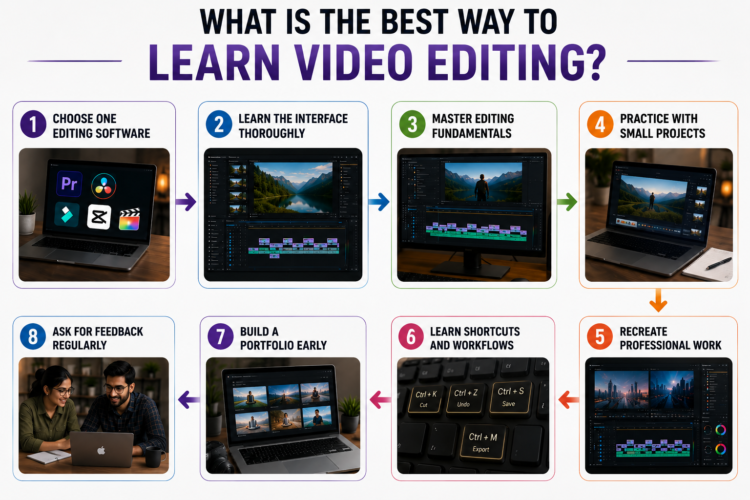
1️⃣ Choose One Editing Software
Beginners often switch software too frequently. This slows overall progress. Mastering one application builds confidence faster. Other software becomes easier afterward.
Popular beginner options include:
- Adobe Premiere Pro.
- DaVinci Resolve.
- Filmora.
- CapCut.
- Final Cut Pro.
Choose software matching long-term career goals.
2️⃣ Learn the Interface Thoroughly
Every editing program shares similar layouts. Understanding the interface reduces confusion. Familiar navigation also improves editing speed.
Spend time exploring:
- Project panel.
- Timeline.
- Preview window.
- Toolbar.
- Effects panel.
- Export settings.
Comfort with navigation improves productivity.
3️⃣ Master Editing Fundamentals
Strong fundamentals support every future project. Beginners should avoid rushing advanced effects. Simple techniques remain valuable throughout every career.
Focus on learning:
- Cutting clips accurately.
- Trimming unnecessary footage.
- Arranging sequences.
- Organizing timelines.
- Adjusting audio levels.
- Exporting videos correctly.
These skills create reliable editing workflows.
4️⃣ Practice with Small Projects
Small projects reduce learning pressure. They also strengthen practical confidence. Every finished project develops new abilities. Consistency matters more than project length.
Good beginner projects include:
- Travel highlight videos.
- Daily vlogs.
- Product showcase videos.
- Birthday videos.
- Tutorial clips.
- School presentations.
Each project introduces different editing challenges.
5️⃣ Recreate Professional Work
Professional editors demonstrate effective storytelling techniques. Recreating their work improves creative awareness. Small details become easier to recognize. Technical accuracy also improves gradually.
Pay attention to:
- Scene timing.
- Music selection.
- Editing rhythm.
- Text placement.
- Color consistency.
- Viewer engagement.
Study techniques rather than copying styles.
6️⃣ Learn Shortcuts and Workflows
Efficient workflows improve editing speed significantly. Keyboard shortcuts reduce repetitive actions. Organized projects prevent unnecessary mistakes.
Develop habits like:
- Learning common shortcuts.
- Naming folders clearly.
- Saving projects regularly.
- Backing up important files.
- Organizing media assets.
Good workflows increase long-term productivity.
7️⃣ Build a Portfolio Early
Many learners postpone portfolio building. Starting early creates better opportunities. Every completed project demonstrates practical improvement.
Include different project types such as:
- Social media edits.
- Product advertisements.
- YouTube videos.
- Tutorial videos.
- Personal creative edits.
A strong portfolio grows with experience.
8️⃣ Ask for Feedback Regularly
Feedback accelerates improvement considerably. Fresh perspectives reveal hidden mistakes. Constructive suggestions strengthen editing decisions. Continuous learning builds lasting confidence.
Ask reviewers about:
- Storytelling.
- Pacing.
- Audio quality.
- Visual consistency.
- Viewer engagement.
Every revision improves future projects.
Step-by-Step Video Editing Learning Roadmap
A structured roadmap keeps learning focused. Each stage introduces new abilities gradually. Practical experience remains equally important.
Stage 1 – Learn the Basics
Begin by understanding essential editing tools. Practice simple exercises every day. Repeat important tasks regularly until comfortable.
Focus on:
- Importing media.
- Timeline navigation.
- Cutting clips.
- Trimming footage.
- Basic audio editing.
- Export settings.
Expected Outcome
By completing this stage, learners should confidently edit simple videos, organize projects efficiently, and understand the complete beginner workflow.
Stage 2 – Build Creative Skills
Once fundamentals become comfortable, begin exploring creative tools. Experiment regularly using personal projects. Focus on improving quality instead of adding unnecessary effects.
Learn skills including:
- Color correction.
- Motion graphics.
- Animated titles.
- Smooth transitions.
- Speed ramping.
- Sound design.
Expected Outcome
Learners should create polished videos, improve editing speed, and build portfolio-ready projects with greater creative confidence.
Stage 3 – Work on Real Projects
The final stage focuses on practical experience. Real projects prepare learners for professional opportunities. They also improve creativity, confidence, and decision-making. Every completed project adds valuable experience.
Work on different project types, including:
- YouTube videos.
- Instagram Reels.
- Product advertisements.
- Podcast episodes.
- Interview videos.
- Tutorial videos.
- Client-style assignments.
Treat every project professionally by:
- Planning before editing.
- Organizing media properly.
- Meeting project deadlines.
- Reviewing edits carefully.
- Exporting suitable formats.
- Saving backup copies.
Expected Outcome
After completing this stage, learners should:
- Handle complete editing workflows.
- Build professional confidence.
- Deliver polished projects consistently.
- Create a strong beginner portfolio.
- Prepare for freelance opportunities.
Become an AI-powered Video Editor
Master the future of video editing with AI-powered tools and techniques. Learn how to create professional-quality videos faster, automate repetitive editing tasks, generate engaging content, and boost your creative productivity.
Start Learning!Which Video Editing Software Should You Learn?
Every editing software offers different advantages. The best choice depends on personal goals. Beginners should avoid switching applications frequently. Mastering one software produces faster progress.
| Software | Difficulty | Best For | Industry Demand | Cost |
|---|---|---|---|---|
| Adobe Premiere Pro | Moderate | Professional editing | Very High | Paid |
| DaVinci Resolve | Moderate | Editing and color correction | High | Free/Paid |
| Final Cut Pro | Easy | Mac users | High | Paid |
| CapCut | Very Easy | Short-form content | Growing | Free/Paid |
| Filmora | Easy | Complete beginners | Paid | Paid |
Choosing the Right Software
Adobe Premiere Pro
Suitable for learners planning professional careers.
Best for:
- Agencies.
- Media companies.
- Marketing teams.
- Film production.
DaVinci Resolve
Ideal for learners wanting powerful free software.
Recommended for:
- Professional editing.
- Color correction.
- Independent creators.
- Budget-conscious beginners.
Final Cut Pro
Designed exclusively for Mac users.
Suitable for:
- Creative professionals.
- Content creators.
- Freelancers.
CapCut
Excellent for social media creators.
Perfect for:
- Instagram creators.
- YouTube Shorts.
- TikTok videos.
- Mobile editing.
Filmora
Filmora simplifies beginner learning.
Suitable for:
- Students.
- Hobby editors.
- Personal projects.
- Complete beginners.
Choose software matching long-term goals. Consistency always delivers better results.
Best Learning Resources
Learning becomes easier through reliable resources. Combining different methods improves understanding. Practical application should always remain the priority.
Useful learning resources include:
Online Courses
Online courses provide structured lessons. They also include guided projects and assignments.
Benefits include:
- Organized curriculum.
- Practical exercises.
- Flexible learning.
- Regular assessments.
YouTube Tutorials
YouTube offers thousands of free lessons. Beginners can quickly solve editing problems. However, avoid watching tutorials endlessly.
Use YouTube for:
- Software tips.
- Workflow ideas.
- Editing shortcuts.
- Creative inspiration.
Project-Based Learning
Projects transform theory into practical knowledge.
Project-based learning helps:
- Build confidence.
- Improve storytelling.
- Solve editing challenges.
- Create portfolios.
Editing Communities
Communities provide valuable discussions. They also encourage regular feedback.
Benefits include:
- Creative inspiration.
- Career guidance.
- Portfolio reviews.
- Networking opportunities.
Mentorship
Mentors provide personalized advice. They also identify mistakes quickly.
Mentorship improves:
- Editing quality.
- Professional confidence.
- Workflow efficiency.
- Industry understanding.
Practice Challenges
Editing challenges encourage consistency. They also improve creativity under time limits.
Practice challenges develop:
- Faster editing.
- Creative thinking.
- Better storytelling.
- Problem-solving abilities.
Daily Practice Plan
Daily practice builds long-term improvement. Small sessions remain highly effective. Consistency always beats occasional long practice.
🕐 One Hour Daily
Suitable for busy learners.
Suggested routine:
- Learn one editing concept.
- Practice one technique.
- Review completed work.
🕑 Two Hours Daily
Ideal for steady progress.
Suggested routine:
- Study new lessons.
- Edit personal projects.
- Practice shortcuts.
- Review mistakes.
🕓 Four Hours Daily
Best for dedicated learners.
Suggested routine:
- Learn advanced techniques.
- Complete longer projects.
- Analyze professional edits.
- Build portfolio content.
Daily improvement creates lasting editing skills.
Practice Projects Every Beginner Should Complete
Different projects develop different abilities. Completing varied projects creates versatile editors.
Practice with:
🌍 Travel vlog.
🛍️ Product advertisement.
🎥 Talking-head YouTube video.
📱 Instagram Reel.
🎙️ Podcast edit.
🎤 Interview video.
📚 Tutorial video.
These projects strengthen:
- Storytelling.
- Audio editing.
- Timeline management.
- Platform optimization.
- Client workflows.
Common Mistakes Beginners Make
Many beginners slow their progress through poor learning decisions. These mistakes often create confusion and reduce long-term improvement. Avoiding them makes learning smoother and more enjoyable.
Common beginner mistakes include:
- Learning without a structured roadmap.
- Trying advanced techniques too early.
- Comparing progress with experienced editors.
- Depending only on presets and templates.
- Ignoring project planning before editing.
- Practicing only one type of video.
- Avoiding longer editing projects.
- Learning many concepts together.
- Never reviewing completed projects.
- Setting unrealistic learning goals.
- Ignoring storytelling fundamentals.
- Giving up after difficult projects.
Identify mistakes early and correct them gradually. Consistent learning produces stronger editing skills.
How Long Does It Take to Learn Video Editing?
Learning speed varies considerably. Practice habits influence every outcome. Previous creative experience also helps.
Typical learning milestones include:
- Basic editing: One to two months.
- Intermediate editing: Three to six months.
- Freelancing: Four to eight months.
- Job readiness: Six to twelve months.
- Professional expertise: Several years.
Learning never truly stops. Every project teaches valuable lessons.
Can You Learn Video Editing Without a Course?
Yes, many editors remain self-taught. However, structured learning often speeds progress. Different learners benefit from different approaches.
Popular learning options include:
📖 Self-learning.
💻 Online courses.
🏫 Offline classes.
🚀 Bootcamps.
👨🏫 Mentorship.
Choose the method matching personal goals, learning style, and available time.
How to Build a Strong Portfolio
A portfolio demonstrates practical ability. Employers value completed projects greatly. Quality always matters more than quantity.
Include:
- Five to ten quality projects.
- Different editing styles.
- Personal creative work.
- Client-style assignments.
- A short showreel.
Update the portfolio regularly. Replace older projects with stronger work.
Career Opportunities After Learning Video Editing
Video editing offers diverse career options. Every industry needs engaging visual content. Skilled editors enjoy flexible working opportunities.
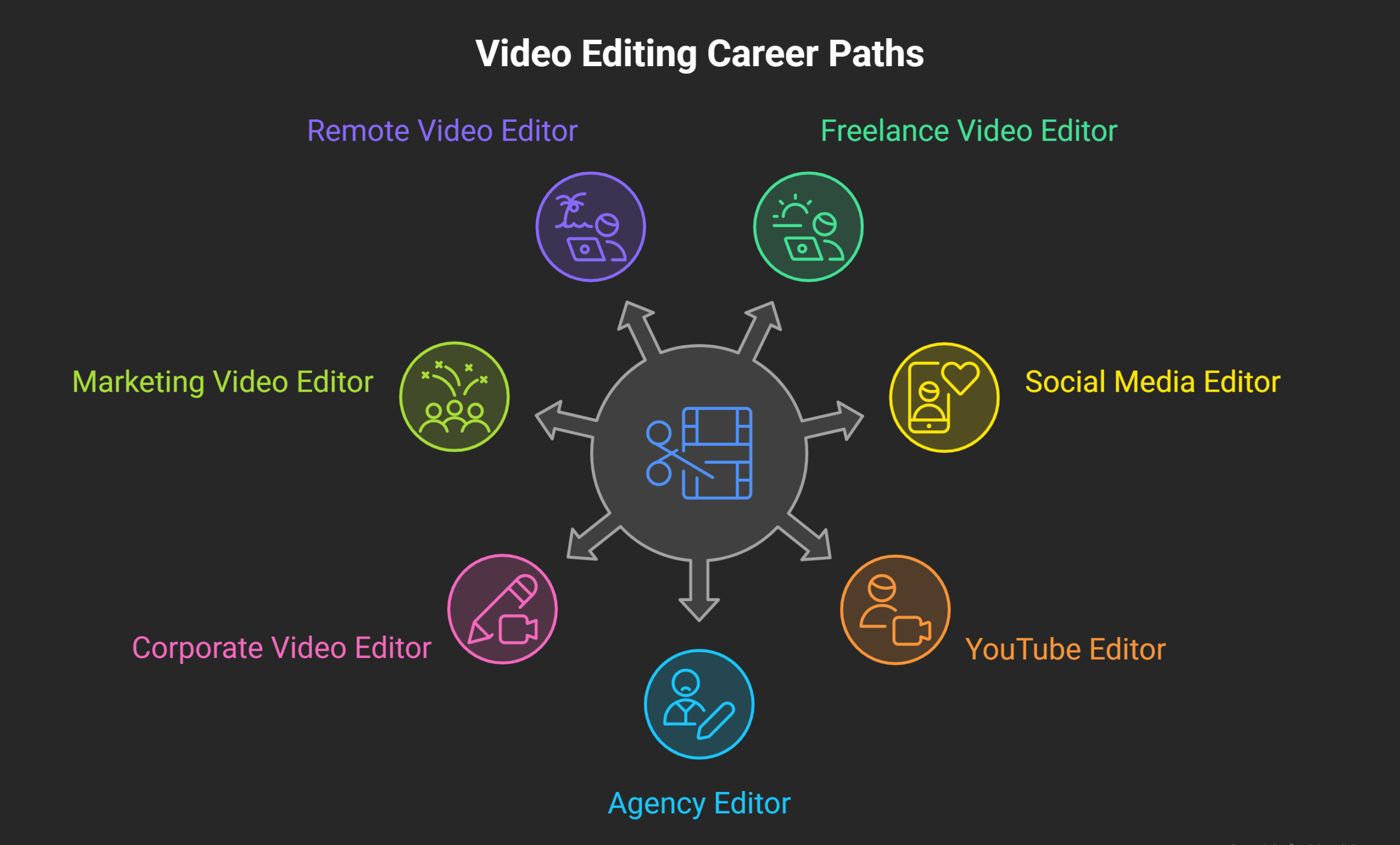
Popular career paths include:
- Freelance video editor.
- Social media editor.
- YouTube editor.
- Agency editor.
- Corporate video editor.
- Marketing video editor.
- Remote video editor.
Employers usually value:
- Strong portfolios.
- Creative storytelling.
- Software expertise.
- Time management.
- Communication skills.
Tips to Learn Video Editing Faster
Learning becomes easier with better study habits. A clear learning strategy improves confidence and saves valuable time. Focus on steady improvement instead of quick results.
Follow these practical tips:
- Create a weekly learning schedule.
- Set achievable editing goals.
- Track progress after every project.
- Keep an inspiration folder.
- Study different editing styles.
- Learn from project breakdowns.
- Revisit older projects regularly.
- Practice with different video formats.
- Build a personal editing workflow.
- Celebrate small learning milestones.
Small improvements accumulate over time. Consistency remains the key to mastering video editing.
Upskill with AI Video Editing Skills
Final Verdict
The best way to learn video editing combines structured lessons with practical experience. Projects develop stronger skills than tutorials alone. Learning one software deeply builds confidence faster. Regular feedback improves every completed project.
A strong portfolio creates better career opportunities. Stay consistent, keep practicing, and focus on continuous improvement. Over time, dedication transforms beginners into confident video editors.
Become an AI-powered Video Editor
Master the future of video editing with AI-powered tools and techniques. Learn how to create professional-quality videos faster, automate repetitive editing tasks, generate engaging content, and boost your creative productivity.
Start Learning!Frequently Asked Questions
What is the best way to learn video editing?
The best approach combines structured learning with consistent hands-on practice. Real projects help develop skills faster than watching tutorials alone.
Which video editing software should beginners learn first?
Beginners can start with Adobe Premiere Pro, DaVinci Resolve, Filmora, or CapCut. Choose one software and master it before trying others.
Can video editing be learned without joining a course?
Yes, many successful editors are self-taught using online resources. However, a structured course can provide better guidance and faster progress.
How much time should beginners practice daily?
Practicing one to two hours every day is enough for steady improvement. Consistency matters more than long, irregular study sessions.
How long does it take to become job-ready?
Most learners become job-ready within six to twelve months of regular practice. Portfolio quality and practical experience also influence career opportunities.
What projects should beginners include in a portfolio?
Include projects like YouTube videos, product advertisements, interviews, tutorials, and social media edits. Showcasing different editing styles demonstrates versatility and creativity.
Is video editing a good career choice?
Yes, video editing offers opportunities across media, marketing, education, and entertainment industries. Skilled editors can also work as freelancers or remote professionals.
Do employers value certificates or portfolios more?
Most employers prefer strong portfolios that demonstrate practical editing skills. Certifications can support learning but rarely replace real project experience.
Should beginners learn advanced effects immediately?
No, beginners should first master editing fundamentals before learning advanced techniques. Strong basics make complex editing much easier later.
How can beginners improve their editing skills faster?
Complete regular projects, seek constructive feedback, and analyze professional edits carefully. Continuous practice and steady improvement produce long-term success.