Table of Contents
There is no single official golden rule of video editing. However, most professionals agree on one simple principle. Every edit should serve the story and the viewer.
Good editing removes distractions and improves flow. It also supports emotions and keeps viewers engaged. Great editors never add effects without purpose. Every decision should make the video clearer, stronger, and more meaningful.
Build a Career in AI-Powered Video Editing
Quick Overview
| Golden Rule | Why It Matters | Where It’s Used | Biggest Beginner Mistake | Professional Tip |
|---|---|---|---|---|
| Every edit should serve the story and the viewer. | Creates engaging videos. | Films, YouTube, commercials, documentaries, and social media. | Adding effects without purpose. | Ask, “Does this improve the story?” before every edit. |
What is the Golden Rule of Video Editing?
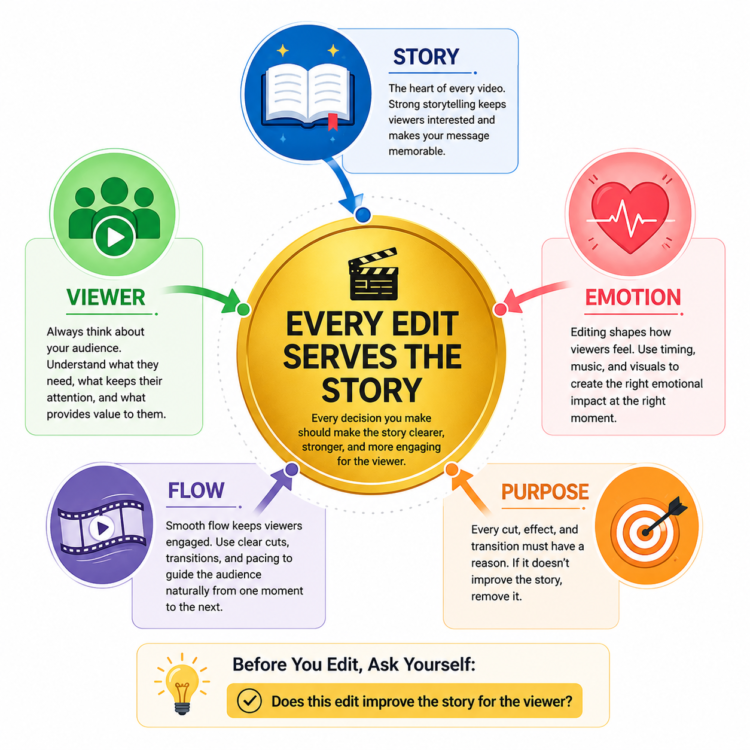
The golden rule focuses on clarity. Every editing choice should improve the story. Every scene should help viewers understand the message. Editing should never distract from the main purpose.
Professional editors constantly ask one important question:
“Does this edit improve the story?”
If the answer is no, the edit usually disappears.
Story Comes Before Effects
Many beginners love visual effects. However, effects alone never create great videos. A clear story always matters more.
Strong storytelling helps:
- Keep viewers interested.
- Create emotional moments.
- Explain ideas clearly.
- Improve viewer satisfaction.
Effects should support the story, never replace it.
Every Edit Needs Purpose
Each cut can change attention. Every transition changes flow. Small decisions influence the entire video.
Before making changes, ask:
- Does this improve clarity?
- Does this remove distractions?
- Does this improve pacing?
- Does this strengthen emotions?
Purpose creates better editing.
Keep the Viewer Engaged
Editing controls attention. Good pacing keeps audiences watching. Smooth transitions reduce distractions.
Viewer engagement improves through:
- Clear storytelling.
- Natural pacing.
- Balanced audio.
- Organized visuals.
Simple editing often feels stronger.
Build Emotional Connection
Viewers remember emotions longer. Editing shapes emotional experiences. Music and timing work together.
Editors create emotions using:
- Scene order.
- Facial expressions.
- Music timing.
- Meaningful pauses.
Emotions create memorable videos.
Communicate Clearly
Videos should explain ideas easily. Confusing edits reduce understanding.
Clear communication depends on:
- Logical scenes.
- Smooth transitions.
- Clean visuals.
- Balanced sound.
Every edit should improve understanding.
Become an AI-powered Video Editor
Master the future of video editing with AI-powered tools and techniques. Learn how to create professional-quality videos faster, automate repetitive editing tasks, generate engaging content, and boost your creative productivity.
Start Learning!Why Storytelling is the Foundation of Great Editing
Stories create lasting memories. People remember meaningful moments. They rarely remember special effects alone.
Good editing strengthens every story.
Stories Stay Longer
Viewers connect with stories naturally. They remember characters and experiences.
Strong storytelling helps:
- Build trust.
- Create curiosity.
- Increase engagement.
- Improve retention.
Stories create stronger connections.
Editing Creates Emotion
Editors control emotional timing. Small changes influence feelings.
Editing shapes emotions through:
- Music.
- Pacing.
- Scene order.
- Silence.
Emotion creates stronger impact.
Pacing Supports Storytelling
Every story needs rhythm. Fast pacing creates excitement. Slow pacing creates emotion.
Different projects require different pacing.
Examples include:
- Action scenes.
- Interviews.
- Travel videos.
- Educational content.
Good pacing supports the message.
Real-World Examples
Different videos use storytelling differently.
YouTube Videos
Editors:
- Hook viewers quickly.
- Remove slow moments.
- Keep content interesting.
Advertisements
Editors:
- Deliver messages quickly.
- Highlight products.
- Build emotional appeal.
Films
Editors:
- Develop characters.
- Build suspense.
- Create emotional endings.
Corporate Videos
Editors:
- Explain ideas clearly.
- Maintain professionalism.
- Support company branding.
Documentaries
Editors:
- Present real stories.
- Maintain authenticity.
- Build emotional connections.
Every format depends on storytelling.
Principle 1: Every Cut Must Have a Purpose
Cuts guide viewers naturally. Random cuts reduce quality. Every edit should improve the viewing experience.
Remove Unnecessary Clips
Extra footage slows videos. Strong edits remain focused.
Remove:
- Long pauses.
- Repeated shots.
- Unimportant scenes.
- Weak camera angles.
Shorter videos often feel stronger.
Guide Viewer Attention
Cuts control focus. Good timing directs attention naturally.
Purposeful cuts help:
- Highlight important moments.
- Improve storytelling.
- Maintain interest.
- Increase clarity.
Every cut needs meaning.
Avoid Random Editing
Random editing confuses viewers. Frequent cuts create distractions.
Avoid:
- Constant angle changes.
- Unnecessary zooms.
- Random effects.
- Meaningless transitions.
Purpose always comes first.
Practical Example
Imagine a cooking tutorial.
Instead of showing:
- Every ingredient twice.
- Long waiting periods.
- Repeated stirring.
Show:
- Key preparation steps.
- Important techniques.
- Final results.
The lesson becomes clearer.
Principle 2: Keep the Viewer Oriented
Viewers should always understand the scene. Confusing edits interrupt storytelling. Good continuity improves comfort.
Maintain Continuity
Scenes should connect naturally. Characters should move consistently.
Continuity helps:
- Reduce confusion.
- Improve realism.
- Support storytelling.
- Create smooth flow.
Consistency matters greatly.
Match Eye-Lines
Characters should appear connected. Eye contact improves conversations.
Good eye-lines help:
- Improve realism.
- Strengthen dialogue.
- Maintain attention.
- Support continuity.
Small details matter.
Keep Screen Direction Consistent
Movement should remain logical. Sudden changes confuse viewers.
Maintain direction by:
- Planning camera angles.
- Matching movement.
- Following action carefully.
Viewers stay comfortable.
Respect the 180-Degree Rule
This rule maintains orientation. Characters remain correctly positioned.
Following this rule:
- Improves conversations.
- Reduces confusion.
- Creates consistency.
- Strengthens continuity.
Break it only intentionally.
Practical Example
Imagine an interview.
Poor continuity shows:
- Changing directions.
- Different eye-lines.
- Mismatched hand positions.
Good continuity feels invisible.
Become an AI-powered Video Editor
Master the future of video editing with AI-powered tools and techniques. Learn how to create professional-quality videos faster, automate repetitive editing tasks, generate engaging content, and boost your creative productivity.
Start Learning!Principle 3: Rhythm and Pacing Matter
Rhythm controls energy. Pacing controls attention. Good timing improves every project.
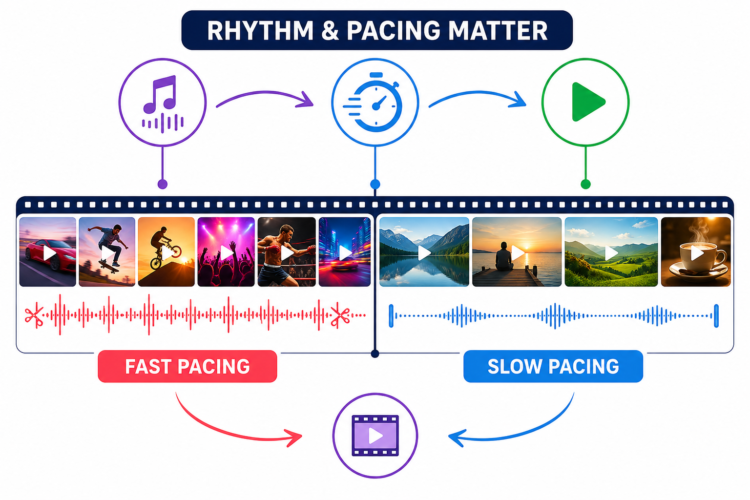
Fast Edits Build Energy
Fast editing suits exciting content. Short scenes create momentum.
Fast pacing works for:
- Sports videos.
- Product launches.
- Social media.
- Action sequences.
Energy keeps viewers engaged.
Slow Edits Build Emotion
Some stories need patience. Longer scenes allow emotions to develop.
Slow pacing suits:
- Interviews.
- Travel films.
- Documentaries.
- Emotional stories.
Not every video needs speed.
Edit Around Music
Music creates natural rhythm. Matching edits improve flow.
Editors often:
- Cut on beats.
- Match scene changes.
- Build emotional moments.
- Support storytelling.
Music guides pacing naturally.
Maintain Viewer Attention
Attention changes quickly. Strong pacing prevents boredom.
Improve pacing by:
- Removing delays.
- Shortening weak scenes.
- Keeping conversations focused.
- Ending scenes naturally.
Every second should add value.
Practical Example
Imagine a travel video.
Fast cuts show excitement. Slower scenes highlight beautiful locations. Balanced pacing creates a better viewing experience.
Principle 4: Audio Is Half the Experience
Good audio improves every video. Clear sound keeps viewers engaged. Poor audio quickly reduces quality. Even beautiful visuals cannot hide bad sound.
Keep Dialogue Clear
Speech should remain easy to understand. Clear voices improve communication.
Improve dialogue by:
- Removing background noise.
- Adjusting volume levels.
- Reducing echo.
- Using clean recordings.
Clear dialogue builds trust.
Balance Background Music
Music supports the story. It should never overpower voices.
Good music balance helps:
- Create emotion.
- Improve mood.
- Support storytelling.
- Maintain clarity.
Lower music during conversations.
Use Sound Effects Wisely
Sound effects add realism. Too many become distracting.
Use effects for:
- Footsteps.
- Door sounds.
- Nature ambience.
- Object movements.
Keep effects natural.
Add Ambient Sound
Background sounds create atmosphere. They make scenes feel realistic.
Examples include:
- Rain.
- Wind.
- Birds.
- City traffic.
Natural sound improves immersion.
Create Smooth Audio Transitions
Audio should flow naturally. Sudden changes feel uncomfortable.
Always check:
- Music fades.
- Voice transitions.
- Background sounds.
- Volume consistency.
Balanced sound improves professionalism.
Principle 5: Simplicity Wins
Professional editing often looks simple. Clean videos communicate better. Too many effects distract viewers. Simplicity keeps attention on the story.
Use Simple Cuts
Straight cuts feel natural. They suit almost every project.
Simple cuts help:
- Improve flow.
- Reduce distractions.
- Support storytelling.
- Create professional results.
Less often feels stronger.
Avoid Too Many Effects
Effects should add value. They should never become the main focus.
Avoid:
- Flashy animations.
- Constant zooms.
- Excessive transitions.
- Random visual effects.
Use effects with purpose.
Focus on the Message
Every editing choice should support the goal. Viewers should remember the message, not the effects.
Ask yourself:
- Is this necessary?
- Does it help?
- Does it improve clarity?
- Will viewers notice positively?
Purpose creates better edits.
How the Golden Rule Applies to Different Types of Videos
Every video has unique goals. The golden rule remains the same. Editors simply adapt it for different audiences.
YouTube Videos
Focus on:
- Strong introductions.
- Clear storytelling.
- Smooth pacing.
- Viewer retention.
Instagram Reels
Editors should:
- Grab attention quickly.
- Keep videos short.
- Add readable captions.
- End with impact.
TikTok Videos
Successful TikTok videos include:
- Fast pacing.
- Clear hooks.
- Trend awareness.
- Simple editing.
Films
Film editors prioritize:
- Character development.
- Emotional storytelling.
- Natural pacing.
- Visual continuity.
Commercials
Commercials require:
- Clear messaging.
- Strong branding.
- Quick engagement.
- Memorable endings.
Wedding Videos
Wedding editors focus on:
- Emotional moments.
- Beautiful pacing.
- Meaningful music.
- Natural storytelling.
Corporate Presentations
Corporate videos need:
- Clear communication.
- Professional editing.
- Consistent branding.
- Organized visuals.
Educational Content
Educational videos should:
- Explain clearly.
- Remove distractions.
- Maintain attention.
- Use helpful graphics.
Documentaries
Documentaries depend on:
- Authentic stories.
- Honest editing.
- Emotional balance.
- Clear structure.
Every format follows the same principle. The story always comes first.
Common Mistakes That Break the Golden Rule
Many beginners focus on effects. Professional editors focus on purpose.
Avoid these common mistakes:
- Overusing transitions.
- Editing for effects only.
- Poor pacing.
- Weak storytelling.
- Ignoring audio quality.
- Adding excessive text.
- Inconsistent colors.
- Keeping unnecessary clips.
- Creating long introductions.
- Ending videos abruptly.
- Ignoring viewer attention.
- Exporting without reviewing.
Fix these mistakes by:
- Simplifying edits.
- Removing distractions.
- Reviewing carefully.
- Keeping stories clear.
- Practicing consistently.
Small improvements create better videos.
Practical Editing Workflow Based on the Golden Rule
A clear workflow improves every project.
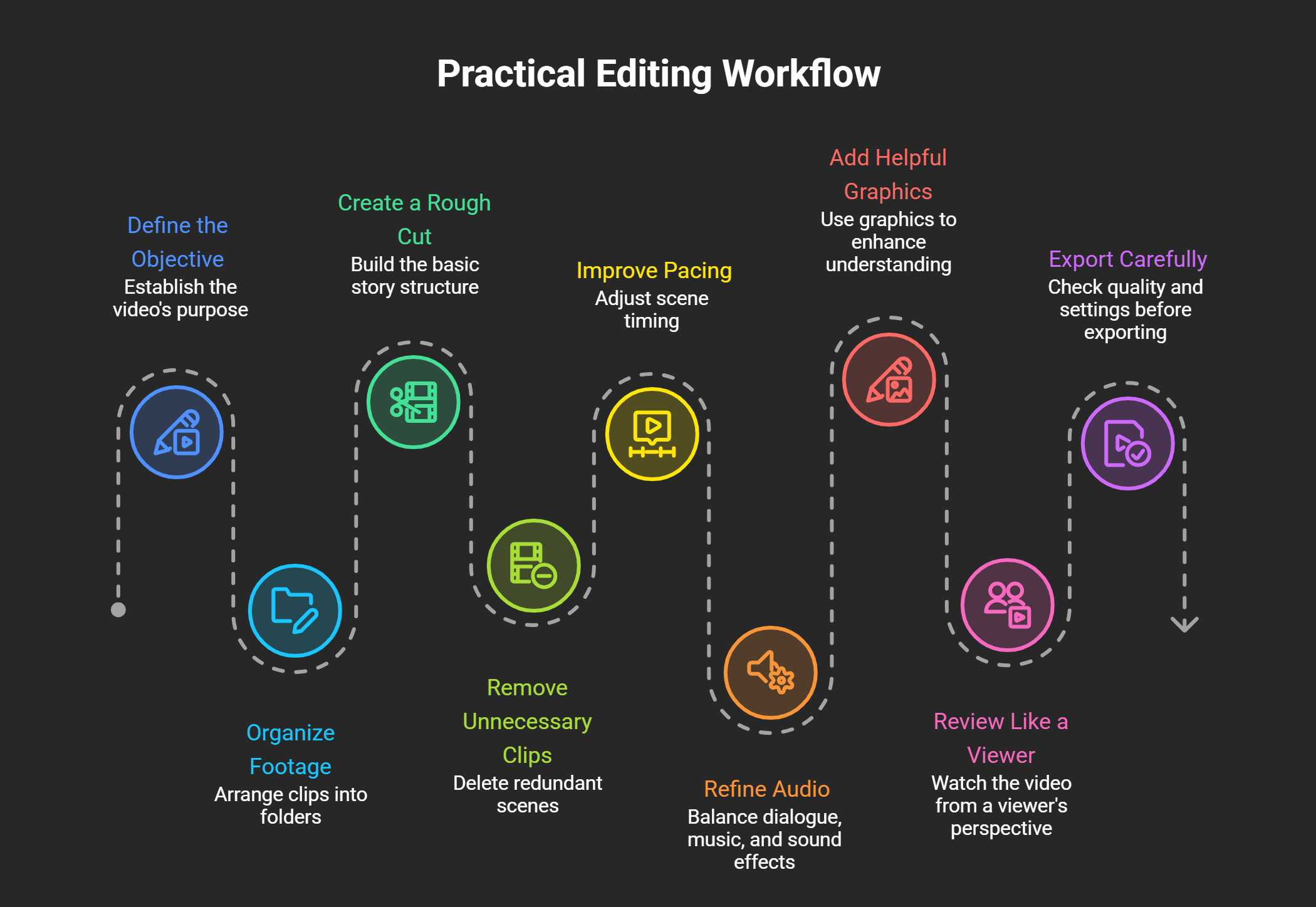
1️⃣ Define the Objective
Know the video’s purpose. Every decision should support that goal.
2️⃣ Organize Footage
Arrange clips carefully. Create folders before editing.
3️⃣ Create a Rough Cut
Build the basic story first. Ignore small details initially.
4️⃣ Remove Unnecessary Clips
Delete anything slowing the story. Keep only valuable scenes.
5️⃣ Improve Pacing
Adjust scene timing. Remove awkward pauses.
6️⃣ Refine Audio
Balance dialogue, music, and sound effects carefully.
7️⃣ Add Helpful Graphics
Use graphics only when they improve understanding.
8️⃣ Review Like a Viewer
Watch the video completely. Look for confusing moments.
9️⃣ Export Carefully
Check quality, resolution, audio, and captions before exporting.
A structured workflow saves time.
Beginner vs Professional Editing
| Area | Beginner | Professional |
|---|---|---|
| Storytelling | Focuses on effects | Focuses on clear stories |
| Cut Selection | Adds unnecessary cuts | Cuts with purpose |
| Transitions | Uses many effects | Uses simple transitions |
| Audio | Often ignored | Carefully balanced |
| Color | Inconsistent | Consistent throughout |
| Pacing | Uneven | Smooth and natural |
| Workflow | Unorganized | Well planned |
| Final Review | Sometimes skipped | Always completed |
Professionals value clarity over complexity.
Does AI Change the Golden Rule?
AI improves editing speed. It automates repetitive tasks. The golden rule still remains unchanged.
AI can help with:
- Auto cuts.
- Auto captions.
- Silence removal.
- Scene detection.
- Background noise reduction.
Editors still decide:
- Storytelling.
- Emotional impact.
- Creative timing.
- Visual style.
- Viewer experience.
AI supports creativity. It never replaces it.
Upskill with AI Video Editing Skills
Tips to Apply the Golden Rule Every Time You Edit
Follow these habits consistently:
- Remove anything without purpose.
- Watch edits without sound.
- Listen without watching visuals.
- Ask others for feedback.
- Choose clarity over complexity.
- Edit for the target audience.
- Finish storytelling before adding effects.
- Review every project carefully.
- Practice with different video styles.
- Keep improving every project.
Strong habits build stronger editors.
Final Verdict
The golden rule of video editing is simple. Every edit should serve the story and the viewer. Great editing improves clarity, emotion, and engagement. Strong storytelling always outperforms flashy effects.
Purposeful cuts create smoother videos. Clear audio strengthens every message. Simple editing keeps viewers focused. Consistent practice develops better judgment. AI can improve efficiency, but creative decisions still belong to people.
Master this golden rule first. Every future editing skill becomes easier to learn. Professional videos always begin with thoughtful storytelling, careful editing, and a clear focus on the audience.
Become an AI-powered Video Editor
Master the future of video editing with AI-powered tools and techniques. Learn how to create professional-quality videos faster, automate repetitive editing tasks, generate engaging content, and boost your creative productivity.
Start Learning!Frequently Asked Questions
What is the golden rule of video editing?
The golden rule of video editing is that every edit should serve the story and the viewer. Before adding a cut, transition, or effect, editors should ask whether it improves the message, strengthens the emotion, or helps the audience understand the content more clearly.
Why is storytelling considered more important than visual effects?
Storytelling gives a video meaning and keeps viewers emotionally connected from beginning to end. Visual effects can enhance a video, but they cannot replace a clear narrative, logical flow, and engaging presentation.
How can beginners apply the golden rule while editing?
Beginners should focus on creating a clear story before adding transitions, graphics, or special effects. Reviewing each edit and removing anything that does not improve the video is one of the easiest ways to follow the golden rule.
Does the golden rule apply to all types of videos?
Yes, the same principle works for YouTube videos, films, advertisements, documentaries, social media content, and corporate presentations. Although editing styles differ, every successful video should communicate its message clearly and keep viewers engaged.
Why are unnecessary edits considered a mistake?
Unnecessary edits distract viewers and interrupt the natural flow of a video. Purposeful editing creates smoother transitions, improves pacing, and helps the audience stay focused on the story.
How does audio support the golden rule of editing?
Clear dialogue, balanced music, and natural sound effects make videos easier to understand and more enjoyable to watch. Poor audio can distract viewers and reduce the overall impact, even when the visuals are excellent.
Can simple editing look more professional than complex editing?
Yes, professional editors often prefer simple cuts and subtle transitions because they keep the focus on the content instead of the editing itself. Clean editing usually creates a more polished and natural viewing experience.
Does AI change the golden rule of video editing?
No, AI only assists with repetitive tasks such as captions, rough cuts, and audio cleanup. Human editors still make the creative decisions that shape storytelling, emotion, pacing, and audience engagement.
How do professionals decide whether to keep or remove a clip?
Professional editors evaluate whether each clip adds value to the story or helps achieve the video’s objective. If a scene slows the pace, repeats information, or distracts viewers, it is usually removed.
What is the best way to master the golden rule of video editing?
Practice editing different types of projects while focusing on storytelling, pacing, and viewer experience instead of visual effects. Watching professional videos critically, asking for constructive feedback, and reviewing completed projects regularly will help develop stronger editing judgment over time.